
Beautifly 5903003700968
Beautifly B-Glossy PRO Needle-Free Mesotherapy Device User Manual
Model: 5903003700968
1. Product Overview
The Beautifly B-Glossy PRO is a multi-functional needle-free mesotherapy device designed for advanced facial care. It integrates various technologies to support skin rejuvenation, lifting, and improved absorption of skincare products.
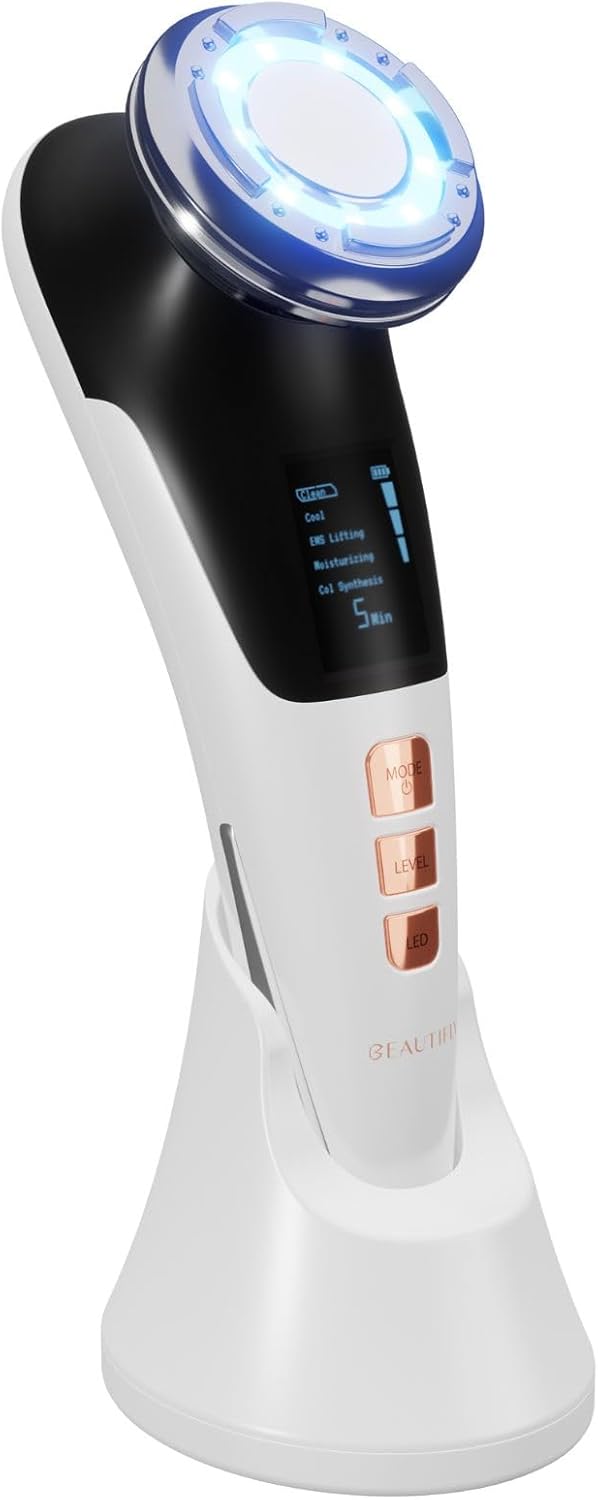
Figure 1: Beautifly B-Glossy PRO device on its charging stand.
Key Features:
- Needle-Free Mesotherapy: Facilitates deeper penetration of active ingredients without needles.
- 8 Working Modes: Includes Clean, Cool, EMS Lifting, Moisturizing, and Collagen Synthesis modes.
- Light Therapy (Photon Light): Utilizes yellow, blue, and red LED light for various skin concerns.
- EMS Microcurrents: Stimulates facial muscles for lifting and firming.
- Vibration Massage: Enhances circulation and product absorption.
- Cryotherapy (Cooling): Helps to narrow pores and soothe skin.
- Hot & Cold Compress: Provides temperature-based treatments.

Figure 2: Overview of the device's primary functions.
2. Safety Information
Please read all safety instructions carefully before using the device to ensure safe and effective operation.
- Do not use if you have sensitive skin, skin allergies, or open wounds.
- Consult a physician before use if you have a pacemaker, heart condition, epilepsy, or are pregnant.
- Keep the device dry and do not immerse it in water.
- Keep out of reach of children.
- Do not use on damaged or irritated skin.
- Discontinue use if you experience discomfort or adverse reactions.
- Use only the provided charging cable and adapter.
3. Package Contents
Verify that all items are present in the package:
- Beautifly B-Glossy PRO Device
- Charging Stand
- USB Charging Cable
- User Manual
4. Device Components

Figure 3: Device display and control buttons.
- Treatment Head: The top part of the device that comes into contact with the skin, featuring LED lights and electrodes.
- LCD Display: Shows current mode, intensity level, battery status, and remaining time.
- Mode Button: Press to cycle through different working modes.
- Level Button: Adjusts the intensity level within a selected mode.
- LED Button: Activates or changes the LED light therapy.
- Charging Contacts: Located at the bottom of the device for charging on the stand.
5. Setup
5.1 Initial Charging
Before first use, fully charge the device. This typically takes 3-4 hours.
- Connect the USB charging cable to the charging stand and a suitable power adapter (not included).
- Place the Beautifly B-Glossy PRO device onto the charging stand, ensuring the charging contacts align.
- The battery indicator on the LCD display will show charging progress.
- Once fully charged, disconnect the device from the charger.
5.2 Preparing Your Skin
For optimal results, ensure your skin is clean and free of makeup before treatment. Apply a suitable gel or serum to the treatment area.
6. Operating Instructions
The Beautifly B-Glossy PRO offers multiple modes for comprehensive skin care.

Figure 4: Interacting with the device's control buttons.
6.1 Power On/Off
- To power on, press and hold the "Mode" button for 2 seconds.
- To power off, press and hold the "Mode" button for 2 seconds. The device will also automatically shut off after the set treatment time.
6.2 Mode Selection
Press the "Mode" button repeatedly to cycle through the available working modes:
- Clean (ION+): Deep cleansing mode, helps remove impurities.
- Cool (Cryotherapy): Cooling effect, helps shrink pores and soothe skin.
- EMS Lifting: Microcurrent stimulation for facial muscle toning and lifting.
- Moisturizing (ION-): Enhances absorption of skincare products.
- Col Synthesis (Collagen Synthesis): Stimulates collagen production.
6.3 Intensity Level Adjustment
After selecting a mode, press the "Level" button to adjust the intensity. Most modes have multiple levels (e.g., 1-5) to suit individual comfort and skin sensitivity.
6.4 LED Light Therapy
Press the "LED" button to activate or change the light color. The device features:
- Red Light: Supports collagen production, reduces wrinkles.
- Blue Light: Targets acne-causing bacteria, calms inflammation.
- Yellow Light: Improves skin tone, reduces redness.


Figure 5: Examples of device use with different LED light settings.
6.5 Treatment Application
Gently move the treatment head across the desired areas of your face and neck. Follow the recommended treatment times for each mode, typically displayed on the LCD screen.
7. Maintenance
7.1 Cleaning the Device
After each use, clean the treatment head to ensure hygiene and device longevity.
- Wipe the treatment head with a soft, damp cloth.
- Do not use abrasive cleaners, alcohol, or harsh chemicals.
- Ensure the device is completely dry before storing or recharging.
7.2 Storage
Store the device in a cool, dry place, away from direct sunlight and extreme temperatures. Keep it on its charging stand when not in use to ensure it's ready for the next treatment.
8. Troubleshooting
| Problem | Possible Cause | Solution |
|---|---|---|
| Device does not turn on. | Low battery or not charged. | Charge the device fully. Ensure charging contacts are clean and aligned. |
| No sensation during EMS/Vibration mode. | Intensity level too low; insufficient contact with skin; dry skin. | Increase intensity level. Ensure full contact with skin. Apply more gel/serum to the skin. |
| LED lights not working. | LED function not activated or device malfunction. | Press the "LED" button to cycle through light options. If problem persists, contact support. |
| Device shuts off unexpectedly. | Low battery; automatic shut-off after treatment time. | Recharge the device. Note that the device has a built-in timer for each mode. |
9. Specifications
| Feature | Detail |
|---|---|
| Brand | Beautifly |
| Model Number | 5903003700968 |
| Dimensions (L x W x H) | 17.5 x 5.5 x 6.7 cm |
| Weight | 500 Grams |
| Color | White |
| Working Modes | Clean, Cool, EMS Lifting, Moisturizing, Collagen Synthesis (5 main modes, 8 total functions including light/vibration) |
| Light Therapy | Red, Blue, Yellow Photon Light |
| Vibration Frequency | 8000 / min |
10. Warranty and Support
For warranty information or technical support, please refer to the contact details provided with your purchase or visit the official Beautifly website. Keep your proof of purchase for warranty claims.
Related documents5903003700968


Ask a question about this manual
Ask about setup, troubleshooting, compatibility, parts, safety, or missing instructions. Manuals+ will review the question and use this page’s manual context to help answer it.