
1. Introduction
The AUNMAS LY-C1 is a versatile wireless anti-theft alarm designed to provide security for various items such as bicycles, motorcycles, electric bikes, electric scooters, doors, and windows. This device features a powerful 150dB alarm, adjustable sensitivity levels, and convenient remote control operation. Its IP55 waterproof rating ensures reliable performance in outdoor conditions.
2. Product Overview
2.1 Components
- Alarm Unit
- Remote Control
2.2 Key Features
- High Decibel Alarm: Emits a 150dB sound to deter potential thieves.
- Adjustable Sensitivity: 7 levels of sensitivity, from gentle touch to strong impact, can be easily adjusted via the remote control.
- Wireless Remote Control: Operates up to 20 meters (66 feet) range.
- IP55 Waterproof: Suitable for outdoor use, resistant to dust and water splashes.
- SOS Function: Can be used as an emergency alert.
- Long Standby Time: 500mA battery provides 6 to 10 months of standby time.
- Compact Design: Small and exquisite, easy to install.

Figure 2.1: Labeled components of the alarm unit and remote control.

Figure 2.2: Dimensions of the alarm unit and remote control.
3. Setup
3.1 Installation
The alarm unit can be easily installed using double-sided adhesive tape or strapping. Ensure the unit is securely attached to the desired surface (e.g., bicycle seat post, motorcycle frame, window frame).

Figure 3.1: Example installation on an electric bicycle.

Figure 3.2: Example installation on a bicycle.
3.2 Pairing Remote Controls
The alarm unit (host) can be paired with up to 5 remote controls. A single remote control can also manage multiple alarm units once paired.
To Add a New Remote Control:
- Connect the USB power cable to the main alarm unit.
- On the remote control, press and hold the doorbell button (often labeled with a bell icon).
- After approximately 8 seconds, the alarm unit will emit a 'drip drip' sound, and its blue indicator light will change from slow flashing to fast flashing. This indicates the unit is in learning mode.
- While the alarm unit is in learning mode, press either the arm or disarm button on the new remote control you wish to pair.
- The alarm unit will emit a 'drip drip' sound twice. The blue light will then change from fast flashing back to slow flashing, confirming successful pairing.
- Repeat this process for any additional remote controls, up to a maximum of 5 per alarm unit.
To Re-pair Remote Controls (Deletes All Existing Pairings):
This function is useful if a remote control is lost or if you need to clear all existing pairings and start fresh.
- Connect the USB power cable to the main alarm unit.
- On the remote control, long press the doorbell button (often labeled with a bell icon).
- After approximately 8 seconds, the alarm unit will emit a 'drip drip' sound, and its blue indicator light will change from slow flashing to fast flashing. This indicates the unit is in learning mode.
- Release the doorbell button. Then, press the disarm button (often labeled with an unlocked padlock icon).
- The alarm unit will emit two 'drip drip' sounds. The blue light will then change from fast flashing back to slow flashing, confirming successful re-pairing.
- Important: Performing this action will overwrite and delete all previously paired remote control codes. If you need multiple remote controls, you must re-add them following the steps for 'To Add a New Remote Control'.
4. Operating Instructions
4.1 Remote Control Functions
- Arm Key: Activates the alarm system.
- Disarm Key: Deactivates the alarm system.
- Doorbell Key: Activates the doorbell function on the alarm unit.
- Car-Hunting Key: Helps locate your vehicle by triggering a sound from the alarm unit.
4.2 Adjusting Sensitivity
The alarm features 7 levels of adjustable sensitivity. To adjust the sensitivity:
- Ensure the alarm is disarmed.
- Long press the disarm button on the remote control.
- The alarm unit will indicate the current sensitivity level (e.g., with beeps or light flashes). Continue pressing to cycle through the levels.
- Release the button when the desired sensitivity level is reached.
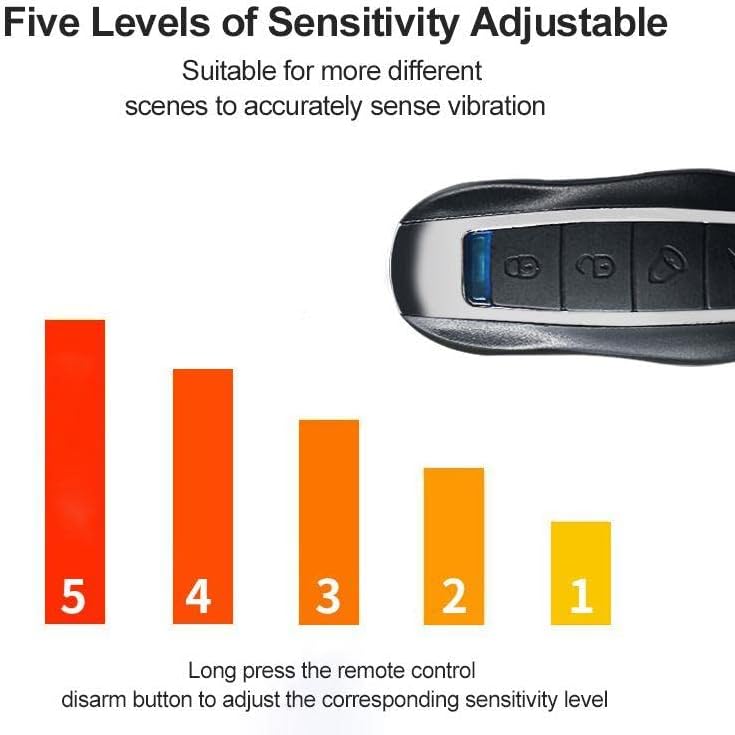
Figure 4.1: Sensitivity levels indication.
5. Maintenance
5.1 Charging the Alarm Unit
The alarm unit is powered by a 500mA battery. When the battery is low, connect the unit to a USB power source using a standard USB cable.
- Charging Indicator: During charging, the red light will be on, and the blue light will flash.
- Fully Charged Indicator: Once fully charged, only the blue light will flash.

Figure 5.1: Charging status indicators.
5.2 Battery Life
A fully charged alarm unit can last for 6 to 10 months in standby mode, depending on usage and environmental conditions.
5.3 Waterproof Rating
The alarm unit has an IP55 waterproof rating, meaning it is protected against dust ingress and low-pressure water jets from any direction. It is suitable for outdoor use but should not be submerged in water.
6. Troubleshooting
- Alarm not responding to remote control:
- Check the battery level of both the alarm unit and the remote control.
- Ensure the remote control is within the operating range (up to 20 meters).
- Re-pair the remote control with the alarm unit following the instructions in Section 3.2. - Alarm is too sensitive or not sensitive enough:
- Adjust the sensitivity level using the remote control as described in Section 4.2. There are 7 levels to choose from to suit different environments and needs. - Alarm sound is weak:
- Ensure the alarm unit's battery is fully charged. A low battery can affect the alarm's volume.
7. Specifications
| Feature | Specification |
|---|---|
| Model Number | LY-C1 |
| Brand | AUNMAS |
| Sound Level | 150 dB |
| Remote Control Range | Up to 20 meters (66 feet) |
| Waterproof Rating | IP55 |
| Battery Standby Time | 6 to 10 months (500mA battery) |
| Item Weight | 132 Grams |
| Compatible Devices | Bicycles, Motorcycles, Electric Bikes, Electric Scooters, Doors, Windows |
8. Warranty and Support
Specific warranty information for the AUNMAS LY-C1 alarm is not provided in the product details. For any support inquiries, please refer to the seller or the official AUNMAS brand channels.
- Spare Parts Availability: Information unavailable.
- Software Updates: Information unavailable.