
CS BATTERY BP-283, BP-284
CS BATTERY Replacement Battery BP-283/BP-284 User Manual
For ICOM IC-F4400 Series Two-Way Radios
1. Introduction
This manual provides essential instructions for the safe and effective use of your CS BATTERY BP-283/BP-284 replacement battery. This high-capacity Lithium-Ion battery is designed to power compatible ICOM two-way radios, offering reliable performance. Please read this manual thoroughly before use.
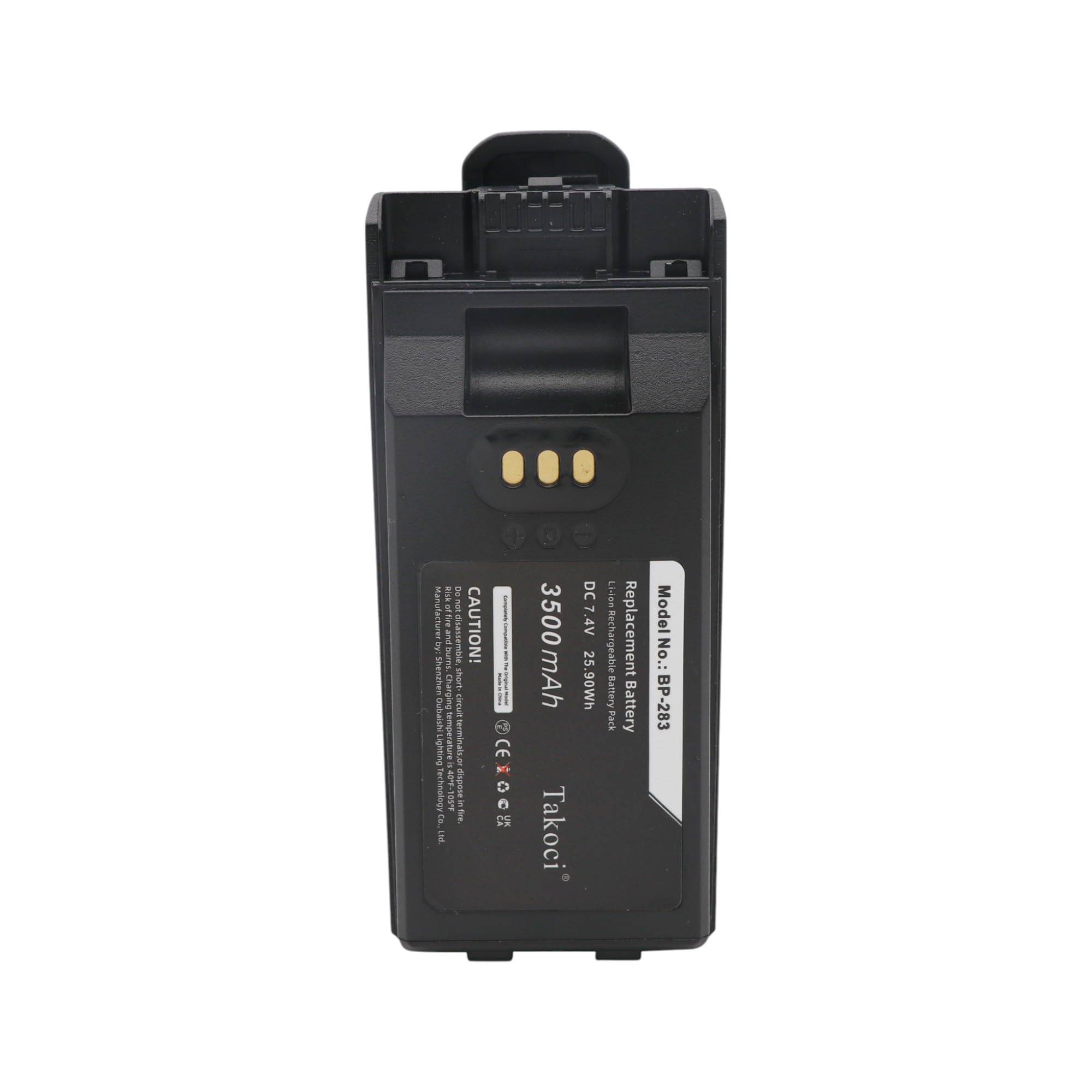
Figure 1: Front and back view of the replacement battery. The front shows the label with model number BP-283, voltage (DC 7.4V), and capacity (3500mAh / 25.90Wh). The back features a belt clip.
2. Compatibility
This replacement battery is compatible with the following ICOM two-way radio models and original battery part numbers:
Compatible Radio Models:
- IC-F3400, IC-F3400D, IC-F3400DP, IC-F3400DPS, IC-F3400DPT, IC-F3400DS, IC-F3400DT
- IC-F4400, IC-F4400D, IC-F4400DP, IC-F4400DPS, IC-F4400DPT, IC-F4400DS, IC-F4400DT
- IC-F7010, IC-F7010S, IC-F7010T
- IC-F7020, IC-F7020S, IC-F7020T
- IP730D, IP740D
Compatible Battery Part Numbers:
- BP-283
- BP-284
Important: Before purchase or installation, please verify that the part number of your original battery matches one of the compatible part numbers listed above.
3. Setup and Installation
- Initial Charge: For optimal performance, fully charge the battery before its first use. Refer to your radio's charging instructions.
- Removing the Old Battery:
- Ensure the radio is powered off.
- Locate the battery release latch on your radio (consult your radio's manual if unsure).
- Slide or press the latch to unlock the battery.
- Carefully remove the old battery from the radio.
- Installing the New Battery:
- Align the new CS BATTERY BP-283/BP-284 with the battery compartment of your radio.
- Gently slide the battery into place until it clicks securely. Ensure the battery release latch engages.
- Verify that the battery is firmly attached and does not wobble.

Figure 2: Back view of the battery, highlighting the belt clip and the four metallic connection points at the bottom, which interface with the radio.
4. Operating the Battery
Once installed, the battery operates seamlessly with your compatible ICOM radio. Follow your radio's instructions for power on/off and general usage.
Charging:
- Always use the original charger or a compatible charger specifically designed for your ICOM radio and this battery type.
- Do not use damaged chargers or attempt to charge the battery with incompatible equipment.
- The battery features over-charge protection, but it is good practice to remove the battery from the charger once fully charged.
5. Maintenance and Safety
Proper care extends battery life and ensures safe operation.
General Maintenance:
- Keep the battery contacts clean and dry. Use a clean, dry cloth to wipe them if necessary.
- Store the battery in a cool, dry place away from direct sunlight and extreme temperatures when not in use.
- Avoid fully discharging the battery frequently, as this can reduce its overall lifespan.
Safety Precautions:
- Do not disassemble, crush, puncture, or modify the battery. This can lead to internal short circuits, overheating, fire, or explosion.
- Do not expose the battery to high temperatures (above 60°C / 140°F) or direct heat sources, such as fire or heaters.
- Do not immerse the battery in water or other liquids.
- Avoid dropping the battery or subjecting it to severe impacts. If the battery appears damaged, discontinue use immediately.
- Keep the battery away from children and pets.
- Dispose of used batteries responsibly according to local regulations. Do not dispose of batteries in household waste.
- The battery is equipped with safety protection against over-charge, over-discharge, over-heat, over-current, and short-circuit. However, always handle with care.
6. Troubleshooting
If you encounter issues with your battery, consider the following common solutions:
| Problem | Possible Cause | Solution |
|---|---|---|
| Battery not charging | Incorrectly seated battery, dirty contacts, faulty charger, or incompatible charger. | Ensure battery is properly seated. Clean battery and charger contacts. Try a different compatible charger. Verify charger is working. |
| Radio not powering on with new battery | Battery not fully charged, incorrect installation, or incompatible battery. | Fully charge the battery. Re-install the battery, ensuring it clicks into place. Double-check battery compatibility with your radio model. |
| Short battery life | Battery not fully charged, extreme operating temperatures, or battery nearing end of lifespan. | Ensure battery is fully charged before use. Operate radio within recommended temperature ranges. If battery is old, consider replacement. |
If these steps do not resolve the issue, please contact customer support.
7. Specifications
| Feature | Detail |
|---|---|
| Model Numbers | BP-283, BP-284 |
| Battery Type | Lithium-Ion (Li-ion) |
| Voltage | 7.4V |
| Capacity | 3500mAh / 25.90Wh |
| Dimensions (L x W x H) | 114.32 x 51.32 x 22.08mm (approx. 4.5 x 2.02 x 0.87 inches) |
| Weight | 138.4g |
| Reusability | Rechargeable |
| Safety Features | Over-charge, over-discharge, over-heat, over-current, short-circuit protection |
8. Support
For any questions, concerns, or assistance regarding your CS BATTERY replacement battery, please do not hesitate to contact our customer support team. Your satisfaction is important to us.
We aim to respond to all inquiries within 24 hours.
Contact: Please refer to your purchase platform or product packaging for specific contact details, or send an email to the seller.
Related documentsBP-283, BP-284


Ask a question about this manual
Ask about setup, troubleshooting, compatibility, parts, safety, or missing instructions. Manuals+ will review the question and use this page’s manual context to help answer it.