
PHONSUN G781U, G781V
PHONSUN Replacement LCD Main Flex Cable User Manual
For Samsung Galaxy S20 FE 5G G781U G781V (Fan Edition)
1. Introduction
This manual provides essential information regarding the PHONSUN Replacement LCD Screen Display Connection Mainboard Flex Cable. This component is designed to replace the original flex cable that connects the LCD display screen to the main logic board motherboard in compatible Samsung Galaxy S20 FE 5G models. It is intended for repair purposes when the original part is damaged or malfunctioning.
2. Compatibility
This replacement flex cable is specifically compatible with the following models:
- Samsung Galaxy S20 FE 5G (Fan Edition)
- Samsung Galaxy S20 FE 5G 2020 Fan Edition G781U
- Samsung Galaxy S20 FE 5G UW SM-G781V
Important: This part is NOT compatible with Samsung Galaxy S20, S20 Plus, or S20 Ultra models.

3. Product Overview
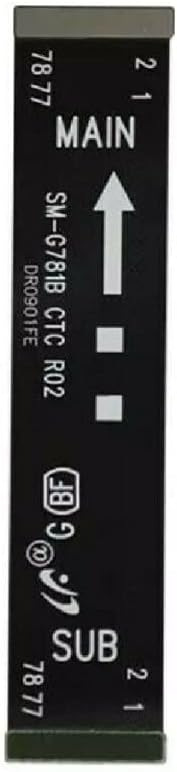
The PHONSUN Replacement LCD Main Flex Cable is a crucial internal component for your Samsung Galaxy S20 FE 5G. It serves as the primary connection pathway between the device's LCD display assembly and its main logic board, ensuring proper data and power transmission for screen functionality.


4. Installation (Setup)
The installation of this flex cable requires disassembling the smartphone. Due to the delicate nature of smartphone components and the complexity of the repair process, professional technician installation is strongly recommended. Incorrect installation can lead to further damage to your device.
This product includes the flex cable only. Detailed step-by-step installation instructions are not provided with the component itself. It is advised to consult reputable online repair guides or videos specific to the Samsung Galaxy S20 FE 5G model for guidance, or to seek assistance from a certified repair service.
General considerations for installation:
- Ensure the device is powered off and disconnected from any power source before beginning.
- Use appropriate tools to prevent damage to screws and internal components.
- Handle the flex cable by its edges and avoid touching the gold contacts to prevent static discharge or contamination.
- Carefully align connectors before applying gentle, even pressure to seat them.
- Test the display functionality before fully reassembling the device.
5. Operating Principles
The LCD Main Flex Cable serves as the critical data and power conduit between the smartphone's display assembly and its main logic board. Once correctly installed, it facilitates the transmission of video signals, touch input data, and power, enabling the display to function as intended. It does not require any user operation beyond its proper installation; its function is entirely internal and automatic once the device is powered on.
6. Maintenance and Care
As an internal component, the flex cable itself requires no routine maintenance. However, proper care of your smartphone can extend the lifespan of all its internal parts, including the flex cable:
- Avoid Physical Impact: Drops or impacts can damage internal connections, including the flex cable.
- Protect from Liquids: Moisture can cause corrosion and short circuits.
- Prevent Overheating: Extreme temperatures can degrade electronic components.
- Professional Repairs: If your phone requires internal servicing, always ensure it is performed by qualified technicians to prevent damage to delicate components.
7. Troubleshooting
If you experience issues after replacing the flex cable, consider the following troubleshooting steps:
- No Display or Intermittent Display:
- Ensure the flex cable is securely and correctly seated in both the LCD and mainboard connectors. A loose connection is a common cause of display issues.
- Verify that the LCD assembly itself is not damaged.
- Touchscreen Not Responding:
- Check the flex cable connections again.
- Confirm that the touchscreen digitizer is functioning correctly and is not damaged.
- Device Not Powering On:
- Ensure all internal components, including the battery connector, are properly reconnected.
- This issue is less likely to be directly caused by the display flex cable unless other components were dislodged during installation.
If issues persist after rechecking all connections and confirming compatibility, it is advisable to seek assistance from a professional smartphone repair technician. Attempting further repairs without proper knowledge and tools may cause irreversible damage.
8. Specifications
| Feature | Detail |
|---|---|
| Product Type | Replacement LCD Screen Display Connection Mainboard Flex Cable |
| Compatibility | Samsung Galaxy S20 FE 5G G781U, G781V (Fan Edition) |
| Manufacturer | PHONSUN |
| Item Weight | 0.634 ounces |
| Package Dimensions | 6.14 x 3.43 x 0.47 inches |
| ASIN | B094H2JH8D |
| Date First Available | August 17, 2020 |
9. Warranty and Support
Specific warranty information for this replacement part is not provided within this manual. For details regarding warranty coverage, return policies, or technical support, please contact the seller or the manufacturer, PHONSUN, directly through their official channels or the platform where the product was purchased.
It is recommended to retain your proof of purchase for any warranty or support claims.
Ask a question about this manual
Ask about setup, troubleshooting, compatibility, parts, safety, or missing instructions. Manuals+ will review the question and use this page’s manual context to help answer it.