
1. Product Overview
The Kassionel Universal Replacement Remote Control (Model RAV491) is designed to operate various Yamaha AV Receiver models. This remote control offers a direct replacement solution, requiring no programming for immediate use. It is compatible with models such as RAV331, HTR-3064, RAV434, RAV434-WW510600, HTR-5064, YHT-595, HTR-6295, RX-A800, and YHT-595BL.

Image 1.1: The Kassionel Universal Replacement Remote Control in operation, demonstrating its strong signal capability. No programming is required; it works directly out of the package.
Key Features:
- Universal Compatibility: Designed to work with a wide range of Yamaha AV Receiver models.
- No Programming Required: Functions immediately upon battery insertion.
- Durable Construction: Made from ABS material for longevity.
- Strong Signal: Ensures reliable communication with your AV receiver.
- Soft Buttons: Provides a comfortable tactile experience during use.
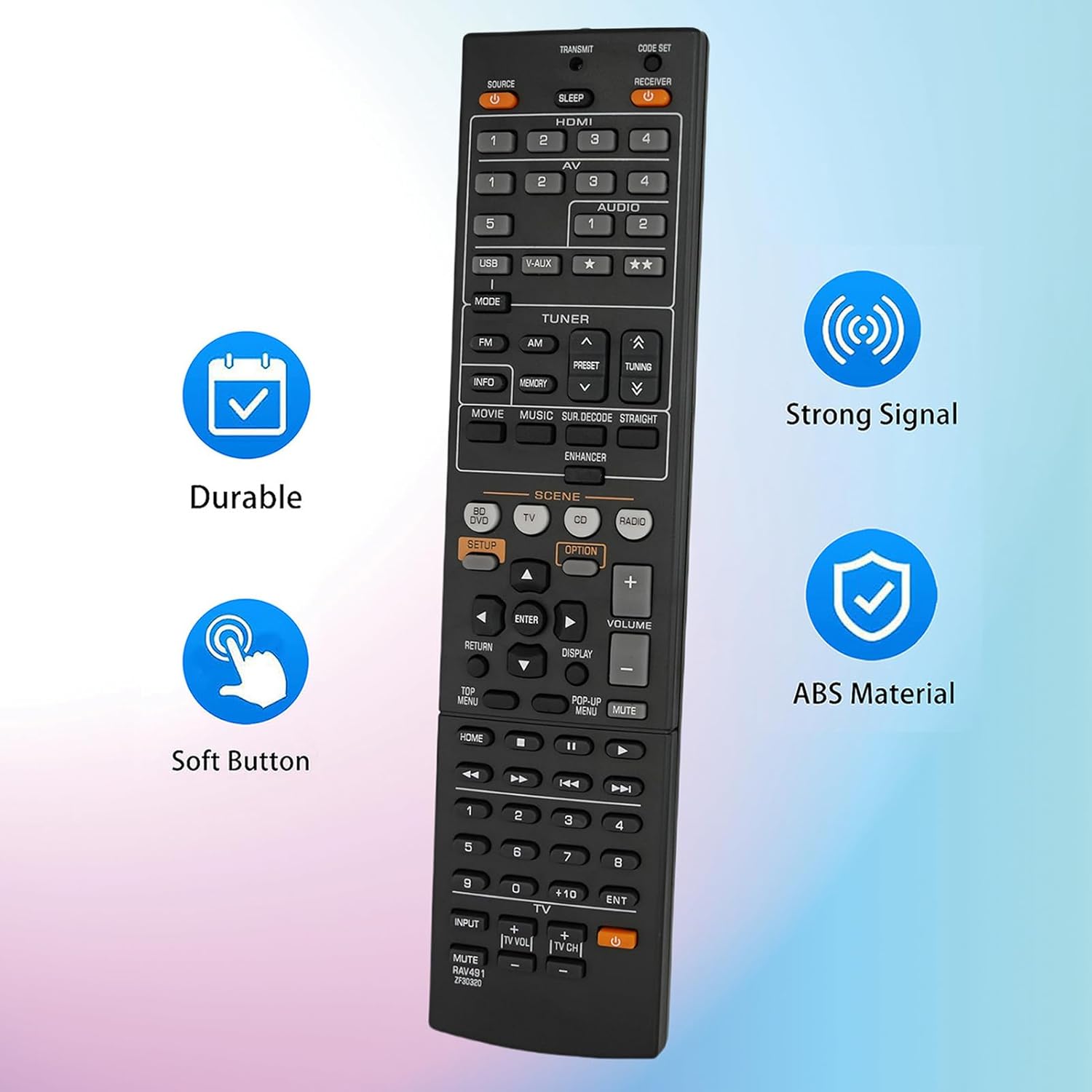
Image 1.2: Visual representation of the remote control's key features, including its durable ABS material, soft buttons, and strong signal transmission.
2. Setup and Battery Installation
The Kassionel Universal Replacement Remote Control is designed for immediate use without any complex programming. Simply install the batteries, and it will be ready to operate your compatible Yamaha AV Receiver.
Battery Installation:
- Locate the battery compartment on the back of the remote control.
- Slide the battery compartment cover downwards and lift it off.
- Insert two (2) 1.5V AAA alkaline batteries, ensuring the positive (+) and negative (-) terminals align correctly with the markings inside the compartment.
- Replace the battery compartment cover by sliding it back into place until it clicks securely.
Note: Batteries are not included with the remote control. Always use new AAA alkaline batteries for optimal performance.

Image 2.1: Rear view of the remote control with the battery cover removed, illustrating the correct placement for two AAA batteries.
3. Operating Instructions
Once batteries are installed, the remote control is ready to operate your Yamaha AV Receiver. Point the remote directly at your AV receiver for best signal transmission.

Image 3.1: A clear view of the remote control's layout, displaying all functional buttons.
Basic Functions:
- Power On/Off: Press the SOURCE or RECEIVER buttons at the top to power on or off the respective devices.
- Input Selection: Use the HDMI 1-4, AV 1-5, AUDIO 1-2, USB, or V-AUX buttons to select your desired input source.
- Volume Control: Use the VOLUME + and - buttons to adjust the audio level. Press MUTE to silence the audio.
- Navigation: The central directional pad (UP, DOWN, LEFT, RIGHT arrows) and ENTER button are used for menu navigation.
- Menu Access: Buttons like SETUP, OPTION, RETURN, DISPLAY, TOP MENU, and POP-UP MENU provide access to various receiver settings and functions.
- Scene Selection: Dedicated buttons for BD/DVD, TV, CD, and RADIO allow quick switching between common usage scenarios.
- Tuner Functions: Use FM, AM, PRESET, and TUNING buttons for radio operation.
- Playback Controls: Standard playback buttons (Play, Pause, Stop, Fast Forward, Rewind, Skip) are located at the bottom of the remote.
Video Demonstration:
Video 3.1: This video demonstrates the features and functionality of the Kassionel Universal Replacement Remote Control, highlighting its ease of use and compatibility with Yamaha AV Receivers.
4. Care and Maintenance
To ensure the longevity and optimal performance of your remote control, follow these care and maintenance guidelines:
- Cleaning: Wipe the remote control with a soft, dry cloth. For stubborn dirt, slightly dampen the cloth with water or a mild cleaning solution, then wipe dry immediately. Avoid using abrasive cleaners, solvents, or alcohol, as these can damage the surface.
- Battery Replacement: Replace batteries when the remote's response becomes sluggish or stops working. Always replace both batteries at the same time with new ones of the same type (AAA alkaline). Do not mix old and new batteries, or different types of batteries.
- Storage: If the remote control will not be used for an extended period, remove the batteries to prevent leakage, which can damage the device. Store in a cool, dry place away from direct sunlight and extreme temperatures.
- Avoid Drops: Protect the remote from drops and impacts, which can damage internal components.
5. Troubleshooting
If you experience issues with your remote control, refer to the following common troubleshooting steps:
- Remote Not Responding:
- Check if the batteries are inserted correctly with the correct polarity (+/-).
- Replace the batteries with new AAA alkaline batteries.
- Ensure there are no obstructions between the remote control and the AV receiver's infrared sensor.
- Make sure you are within the effective range (up to 10 meters) and pointing the remote directly at the receiver.
- Specific Functions Not Working:
- Verify that your AV receiver model is listed as compatible. While this remote is universal for many Yamaha models, some specific functions might vary.
- Ensure you have selected the correct input source on your AV receiver for the function you are trying to control (e.g., pressing "TV" on the remote when the receiver is set to "CD" input will not work for TV functions).
- No Programming Required: This remote is designed to work out of the box. If you are attempting to program it, please note that it is not necessary for basic operation with compatible Yamaha AV receivers.
6. Product Specifications
| Feature | Detail |
|---|---|
| Brand | Kassionel |
| Model Name | RAV491 |
| Item Model Number | RAV491 |
| Compatible Devices | Yamaha AV Receivers (e.g., RAV331, HTR-3064, RAV434, HTR-5064, YHT-595, HTR-6295, RX-A800, YHT-595BL) |
| Connectivity Technology | Infrared |
| Special Feature | No Programming Required, Universal |
| Color | Black |
| Button Quantity | 45 |
| Maximum Range | 10 Meters |
| Batteries Required | 2 x AAA batteries (not included) |
| Battery Type | Alkaline |
| Product Dimensions (L x W x H) | 21.01 x 5 x 1.52 cm |
| Item Weight | 87 Grams |
| Manufacturer | Kassionel |
| UPC | 730637798024, 730637798123 |
7. Warranty and Support
This product is manufactured by Kassionel. For any questions, concerns, or support needs regarding your Kassionel Universal Replacement Remote Control, please contact the seller directly through your purchase platform.
Specific warranty details may vary by retailer and region. Please refer to your purchase documentation or contact the seller for information regarding warranty coverage.