
Introduction
Thank you for purchasing the Andoer W64RGB Mini RGB LED Video Light. This compact and versatile light is designed for photography and videography, offering a wide range of color temperatures, RGB modes, and special lighting effects. Please read this manual carefully before use to ensure proper operation and to maximize the product's lifespan.
Safety Information
- Do not disassemble or modify the device. Unauthorized modifications may cause damage or injury.
- Keep the device away from water and high humidity environments. This product is water-resistant, but not waterproof.
- Do not expose the device to direct sunlight or high temperatures for extended periods.
- Use only the specified charging cable and power adapter.
- Keep out of reach of children.
- Avoid looking directly into the light when it is on, as it may cause eye strain.
Package Contents
Please check that all items are present in your package:
- Andoer W64RGB Mini RGB LED Video Light
- USB Type-C Charging Cable
- User Manual
Product Overview
The Andoer W64RGB features a compact design with multiple mounting options and an intuitive control interface.


The light includes 3 cold shoe mounts, allowing for multi-lamp splicing or attachment of other accessories.

Setup
1. Charging the Battery
The Andoer W64RGB has a built-in 2000mAh lithium battery. Before first use, fully charge the device.
- Connect the provided USB Type-C cable to the charging port on the side of the light.
- Connect the other end of the cable to a USB power source (e.g., wall adapter, computer USB port, power bank).
- The LCD display will indicate the charging status. The battery icon will show animation while charging and become solid when fully charged.

2. Mounting the Light
The W64RGB can be mounted in several ways:
- Cold Shoe Mount: Attach the light to a camera's hot shoe or a stand with a cold shoe adapter.
- Magnetic Back: The integrated magnet allows for quick attachment to metallic surfaces.
- Multi-lamp Splicing: Use the three cold shoe mounts on the light to connect additional W64RGB units or other accessories.
Operating Instructions
1. Power On/Off
Press and hold the power button (usually located on the side or top) for a few seconds to turn the light on or off.
2. Mode Selection
The light typically cycles through different modes (CCT, RGB, Special Effects) by short-pressing a mode button or the control wheel. Refer to the LCD display for the current mode.
3. CCT Mode (Color Temperature)
In CCT mode, you can adjust the color temperature and brightness.
- Color Temperature Adjustment: Rotate the control wheel to adjust the color temperature from 2500K (warm light) to 9000K (cool light).
- Brightness Adjustment: Press the control wheel to switch to brightness adjustment, then rotate to set the desired brightness level (0%-100%).

4. RGB Mode (Hue and Saturation)
In RGB mode, you can select from a full spectrum of colors.
- Hue Adjustment: Rotate the control wheel to cycle through 360° of colors.
- Brightness Adjustment: Press the control wheel to switch to brightness adjustment, then rotate to set the desired brightness level (0%-100%).

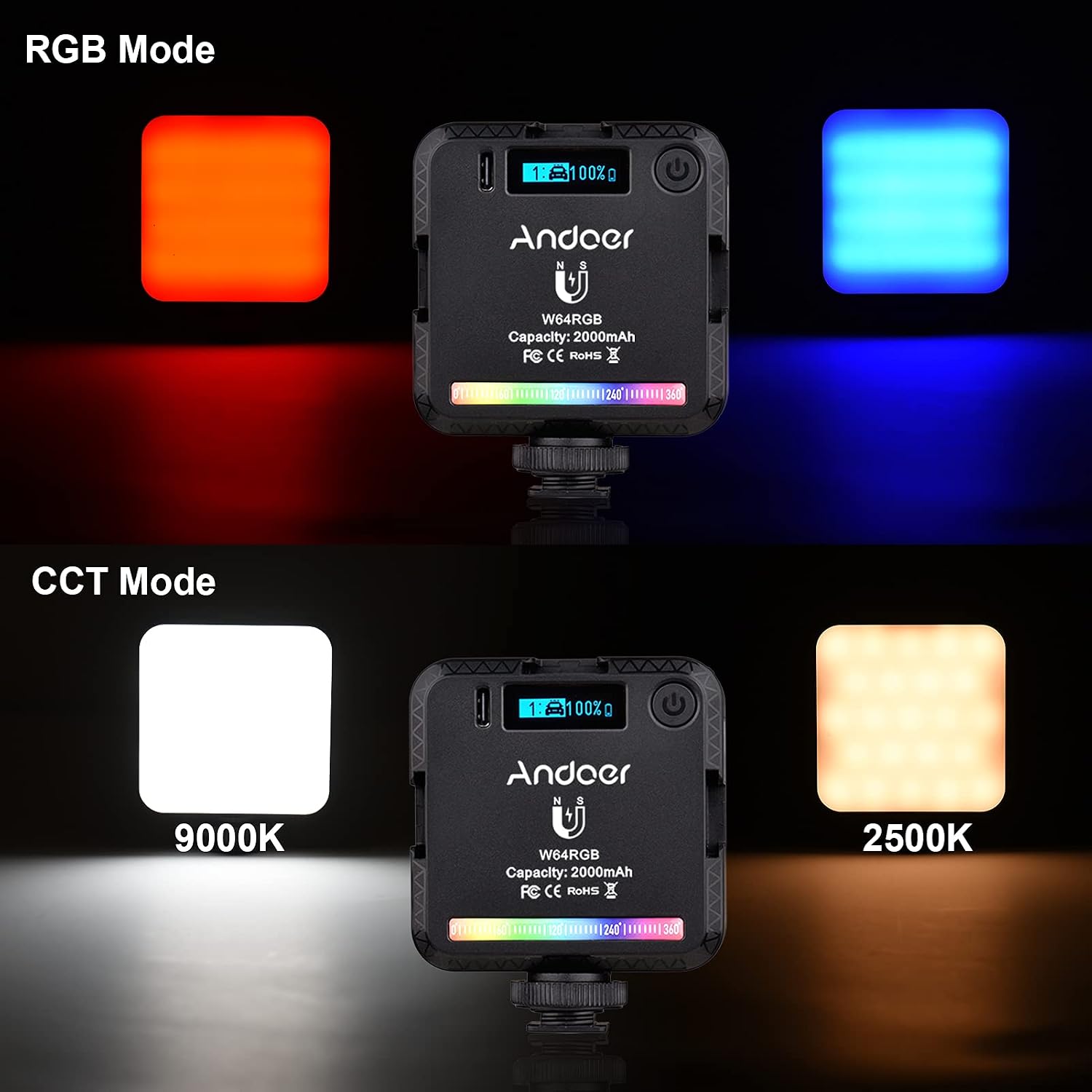
5. Special Effects Mode
The W64RGB offers 20 special lighting effects to enhance your creative projects.
- Selecting Effects: In Special Effects mode, rotate the control wheel to browse through the 20 available effects.
- Adjusting Parameters: Some effects may have adjustable parameters (e.g., speed, intensity). Press the control wheel to switch between effects and parameter adjustment.
Examples of effects include Ambulance, Fireworks, TV, Candles, Party, RGB Flash, Lightning, and more.

Maintenance
- Cleaning: Use a soft, dry cloth to clean the light. Do not use harsh chemicals or abrasive materials.
- Storage: When not in use, store the light in a cool, dry place, away from direct sunlight and extreme temperatures.
- Battery Care: For optimal battery life, charge the light regularly, even if not in frequent use. Avoid fully discharging the battery for extended periods.
Troubleshooting
| Problem | Possible Cause | Solution |
|---|---|---|
| Light does not turn on. | Battery is depleted. | Charge the light using the provided USB Type-C cable. |
| Light flickers or is unstable. | Low battery or faulty connection. | Ensure the battery is sufficiently charged. Check for any loose connections if using external power. |
| Controls are unresponsive. | Temporary software glitch. | Turn the light off and then on again to reset. |
| Light gets warm during operation. | Normal operation. | It is normal for LED lights to generate some heat. Ensure adequate ventilation. If it becomes excessively hot, discontinue use and contact support. |
Specifications
| Model | W64RGB |
| LED Beads | 73 (High Quality) |
| Output Power | 6W |
| Color Temperature | 2500K-9000K (Stepless Adjustment) |
| CRI (Color Rendering Index) | 95+ |
| RGB Hue Adjustment | 360° |
| Brightness Adjustment | 0%-100% |
| Special Light Effects | 20 Modes |
| Battery Capacity | 3.7V 2000mAh Lithium Battery |
| Charging Port | USB Type-C |
| Mounting Options | 3 Cold Shoe Mounts, Magnetic Back |
| Water Resistance Level | Water-resistant |
| Dimensions | Approx. 7cm x 8.5cm x 2.5cm |
Warranty and Support
Andoer products are designed and manufactured to the highest quality standards. This product is covered by a standard manufacturer's warranty. Please refer to your purchase documentation for specific warranty terms and conditions.
For technical support, troubleshooting assistance, or warranty claims, please contact your retailer or visit the official Andoer website for contact information.
Official Andoer Store: Andoer Store on Amazon
