
Introduction
This manual provides comprehensive instructions for the safe and efficient operation, setup, and maintenance of your Medify Air MA-22 Air Purifier. The MA-22 is designed to improve indoor air quality by effectively removing airborne particles.
The Medify MA-22 Air Purifier features an H13 True HEPA filter, a higher grade of HEPA, capable of capturing 99.9% of particles down to 0.1 microns. It is ideal for spaces up to 555 sq ft, making it suitable for various environments such as homes, offices, bedrooms, and nurseries.

Figure 1: Medify Air MA-22 Air Purifier
Product Features
- H13 True HEPA Filtration: Captures 99.9% of airborne particles as small as 0.1 microns, including allergens, dust, pollen, pet dander, smoke, and odors.
- 3-in-1 Filter System: Combines a pre-filter, H13 True HEPA filter, and activated carbon filter for comprehensive air purification.
- Wide Coverage: Cleans up to 555 sq ft in one hour (1x air change per hour) or 278 sq ft in 30 minutes (2x air changes per hour).
- Quiet Operation: Designed for low noise levels, with a maximum noise output of less than 53dB, suitable for bedrooms and quiet environments.
- Multiple Fan Speeds & Timer: Features 3 fan speeds and a programmable timer for customized operation.
- Compact Design: Lightweight and powerful, with a 360-degree True HEPA filter for efficient air intake.

Figure 2: MA-22 Coverage Area (up to 555 sq ft)

Figure 3: Clean Air Cycle within the MA-22

Figure 4: The 3-Stage Filtration System

Figure 5: True HEPA H13 Filter Effectiveness
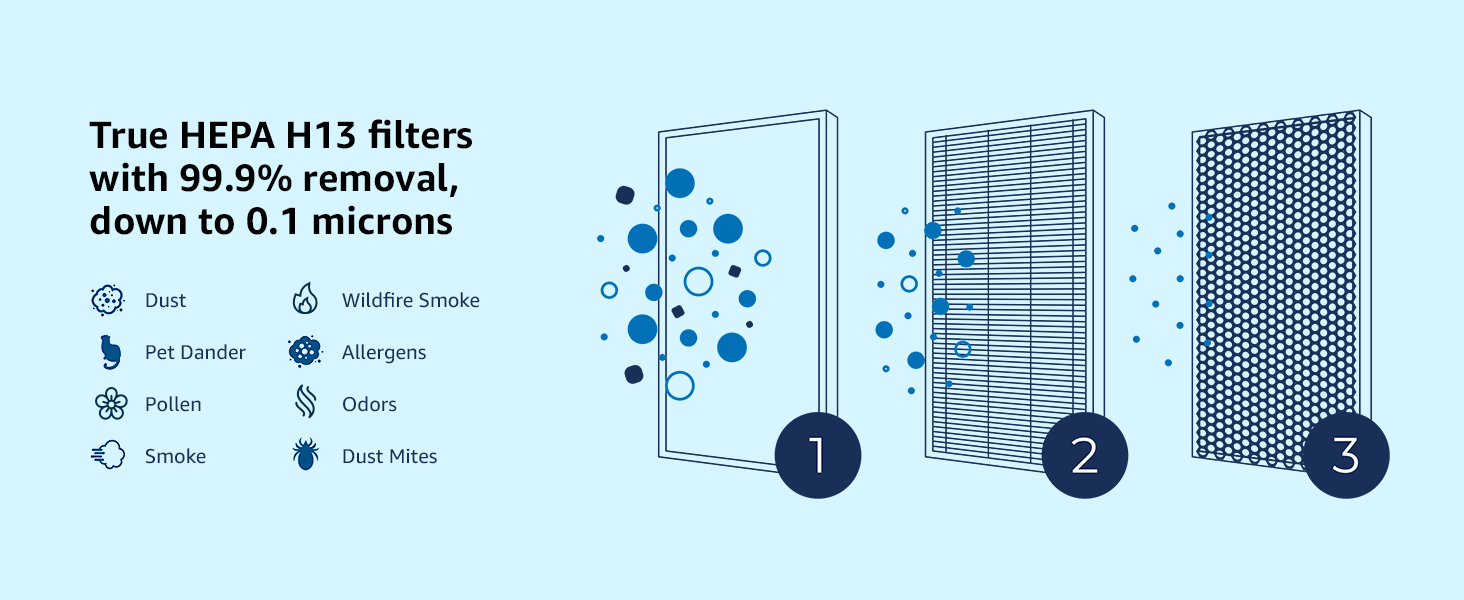
Figure 6: Lightweight and Compact Design
Setup Instructions
Follow these steps to set up your Medify Air MA-22 Air Purifier:
- Unpack the Unit: Carefully remove the air purifier from its packaging. Ensure all components, including the air purifier machine and the True HEPA H13 filter, are present.
- Remove Filter Packaging: The filter inside the unit is typically sealed in plastic for protection. Open the bottom cover of the air purifier and remove the filter. Remove all plastic packaging from the filter.
- Install Filter: Place the unwrapped filter back into the air purifier, ensuring it is seated correctly. Close the bottom cover securely.
- Position the Purifier: Place the air purifier on a flat, stable surface in the desired room. Ensure there is adequate space around the unit for optimal airflow (at least 6 inches from walls or furniture).
- Connect Power: Plug the power cord into a standard electrical outlet.
Operating Instructions
The Medify Air MA-22 is designed for simple operation.
- Power On/Off: Press the power button on the control panel to turn the unit on or off.
- Adjust Fan Speed: The unit features 3 fan speeds. Press the fan speed button repeatedly to cycle through the low, medium, and high settings.
- Sleep Mode: Activate Sleep Mode for quiet operation during rest periods. In this mode, the fan speed is reduced, and indicator lights are dimmed.
- Set Timer: Use the timer function to set the purifier to operate for a specific duration (e.g., 2, 4, 8 hours) before automatically shutting off.

Figure 7: Operating Modes for Peaceful Sleep
Maintenance
Regular maintenance ensures optimal performance and longevity of your air purifier.
- Filter Replacement: The H13 True HEPA filter should be replaced every 3-4 months, or approximately every 2,000 hours of operation, depending on air quality and usage. Refer to the filter replacement indicator on your unit. Replacement filters can be identified by model number B09G9391NP.
- Cleaning the Exterior: Wipe the exterior of the unit with a soft, dry cloth. Do not use abrasive cleaners or solvents.
- Air Intake/Outlet: Periodically check and gently clean the air intake and outlet vents to ensure they are free from dust and obstructions.
Troubleshooting
If you encounter issues with your Medify Air MA-22, refer to the following common problems and solutions:
| Problem | Possible Cause | Solution |
|---|---|---|
| Unit does not turn on. | Not plugged in; power outlet issue; filter not installed correctly. | Ensure power cord is securely plugged into a working outlet. Check if the filter is correctly seated and the bottom cover is closed. |
| Reduced airflow or poor purification. | Clogged filter; obstructed air intake/outlet. | Replace the filter if it's past its lifespan. Clear any obstructions from the air intake and outlet vents. |
| Unusual noise. | Filter not seated properly; foreign object inside; unit on uneven surface. | Check filter installation. Ensure the unit is on a flat, stable surface. If noise persists, contact customer support. |
| Indicator lights are too bright. | Normal operation. | Activate Sleep Mode to dim the lights. |
Specifications
| Feature | Detail |
|---|---|
| Product Dimensions | 15.4 x 10.1 x 10 inches (Unit) |
| Item Weight | 7.24 pounds |
| Model Number | MA-22 |
| Manufacturer | Medify Air |
| Material | Plastic |
| Filter Type | H13 True HEPA (3-in-1) |
| Coverage Area | Up to 555 sq ft (1x ACH) / 278 sq ft (2x ACH) |
| Noise Level | < 53dB |
| Certifications | CARB, ETL, Energy Star Certified |
| Filter Lifespan | 2,000 hours or 3-4 months |
| Included Components | Air purifier machine, True HEPA H13 filter |
| UPC | 850025796521 |
Warranty and Support
Your Medify Air MA-22 Air Purifier is backed by a USA registered Lifetime Warranty when genuine Medify replacement filters are used. This warranty covers defects in materials and workmanship under normal use.
For detailed warranty information, technical support, or to purchase genuine replacement filters, please refer to the official Medify Air website or contact their customer service.
An official User Manual in PDF format is available for download: Download User Manual (PDF)


