
Adexa HZB12A
Adexa HZB12A Ice Maker User Manual
Model: HZB12A
1. Important Safety Instructions
Please read all instructions carefully before operating your new ice maker. Retain this manual for future reference.
- Ensure the appliance is connected to a grounded power outlet with the correct voltage (230 Volts).
- Do not immerse the power cord, plug, or any part of the appliance in water or other liquids.
- Unplug the ice maker from the power outlet before cleaning or when not in use.
- Do not operate any appliance with a damaged cord or plug, or after the appliance malfunctions or has been damaged in any manner.
- Keep the ice maker away from heat sources and direct sunlight.
- Ensure proper ventilation around the unit. Maintain at least 10 cm of space around the sides and back.
- This appliance is for household use only. Do not use outdoors.
- Do not use chemical cleaners or abrasive materials on the ice maker.
- Always place the ice maker on a flat, stable surface.
- Do not block the ventilation openings.
2. Product Overview
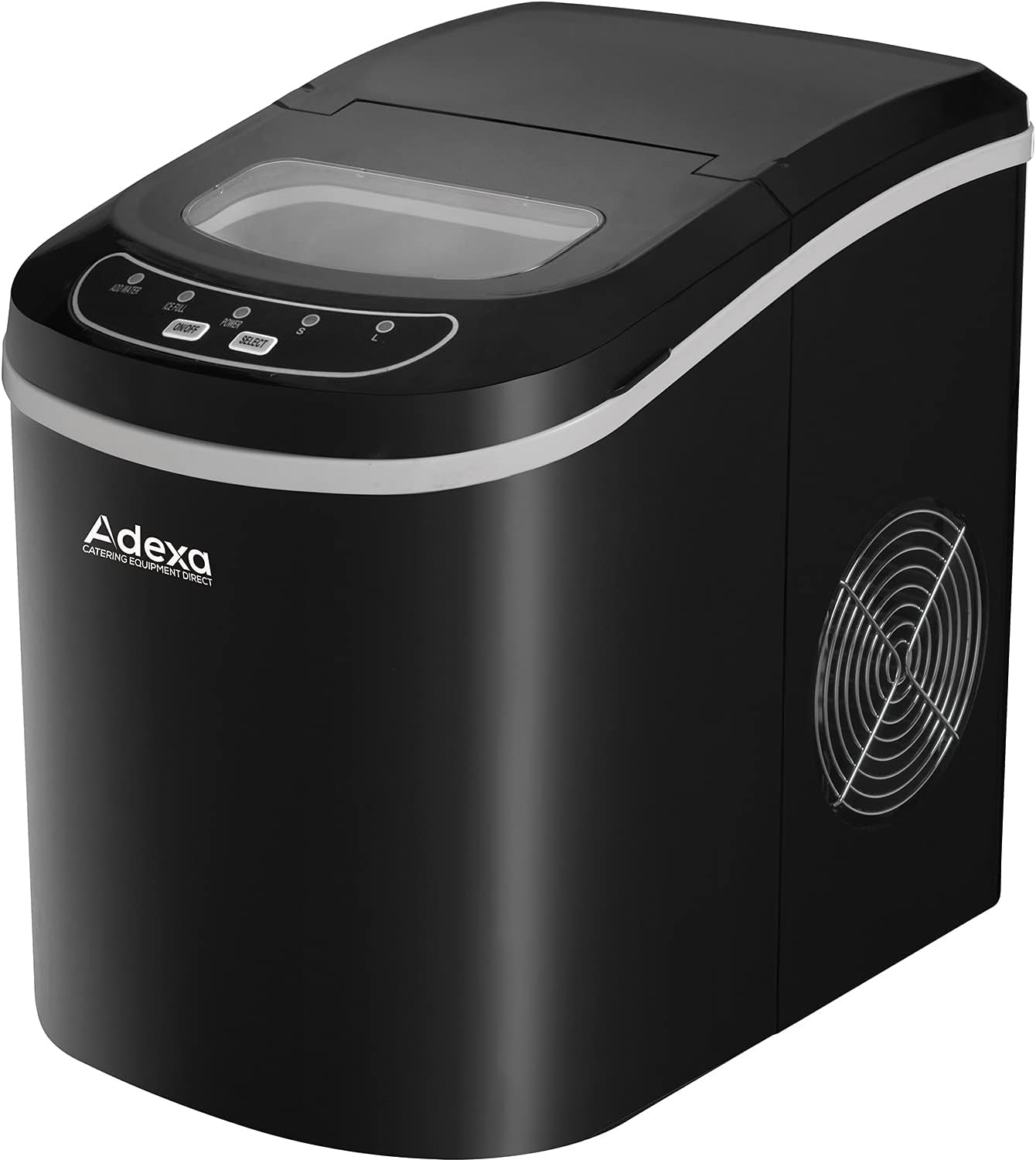
Figure 2.1: Front view of the Adexa HZB12A Ice Maker, showing the control panel and ice viewing window.

Figure 2.2: Adexa HZB12A Ice Maker with key dimensions: 24.2 cm (width), 35.8 cm (depth), and 32.8 cm (height).
Components:
- Ice Viewing Window
- Control Panel (ON/OFF, SELECT buttons, indicator lights)
- Ice Basket
- Water Reservoir (2.2 Liters capacity)
- Ice Scoop
- Drain Plug (located at the bottom)
- Air Vent (side)
3. Setup and Installation
- Unpacking: Carefully remove the ice maker from its packaging. Remove all packing materials, including any tape or protective film.
- Placement: Place the ice maker on a flat, stable, and level surface, away from direct sunlight and other heat sources (e.g., ovens, radiators). Ensure there is at least 10 cm of clear space around the sides and back for proper ventilation.
- Initial Cleaning: Before first use, clean the interior of the ice maker.
- Remove the ice basket.
- Clean the interior with a soft cloth dampened with warm water and a mild detergent. Rinse thoroughly.
- Wipe the exterior with a soft, damp cloth.
- Dry all surfaces thoroughly before use.
- Power Connection: Plug the ice maker into a grounded electrical outlet (230V).
4. Operating Instructions
- Fill Water Reservoir: Open the lid and pour potable water into the water reservoir. Do not exceed the MAX fill line. The reservoir capacity is 2.2 liters. This model requires manual water filling.
- Power On: Press the ON/OFF button on the control panel. The "POWER" indicator light will illuminate.
- Select Ice Size: Press the SELECT button to choose your desired ice cube size:
- Small (S)
- Large (L)
- Ice Making Cycle: The ice maker will begin its first ice-making cycle. This typically takes a few minutes. The "ICE" indicator light will flash during the process.
- Ice Collection: Once ice cubes are formed, they will be released into the ice basket. When the ice basket is full, the "ICE FULL" indicator light will illuminate, and the ice maker will pause operation. Remove ice to resume.
- Add Water Indicator: If the water level in the reservoir is too low, the "ADD WATER" indicator light will illuminate. Add more water to continue ice production.
- Power Off: To stop ice production, press the ON/OFF button again.
Note: The first few batches of ice may be smaller or irregular. Discard these and allow the unit to stabilize for optimal performance.
5. Maintenance and Cleaning
Regular Cleaning:
- Daily: Wipe the exterior with a soft, damp cloth. Empty the ice basket and clean it with warm, soapy water.
- Weekly (or as needed): Clean the interior water reservoir and ice-making components.
- Unplug the ice maker.
- Drain any remaining water from the reservoir by removing the drain plug at the bottom of the unit.
- Clean the interior with a solution of warm water and white vinegar (1:1 ratio) or a mild, non-abrasive cleaner.
- Use a soft brush or cloth to clean hard-to-reach areas.
- Rinse thoroughly with clean water. Drain completely.
- Dry all internal parts before reassembling and using.
- Air Vent: Periodically clean the air vent on the side of the unit with a soft brush or vacuum cleaner to ensure proper airflow.
Storage:
If the ice maker will not be used for an extended period:
- Drain all water from the reservoir.
- Clean and dry the interior thoroughly to prevent mold or mildew growth.
- Store the unit in a cool, dry place, away from direct sunlight.
6. Troubleshooting Guide
Before contacting support, please refer to the following table for common issues and their solutions.
| Problem | Possible Cause | Solution |
|---|---|---|
| Ice maker not working. | No power; unit not plugged in. | Ensure the power cord is securely plugged into a grounded outlet. Check the circuit breaker. |
| "ADD WATER" indicator is on. | Water reservoir is empty or low. | Add potable water to the reservoir up to the MAX fill line. |
| "ICE FULL" indicator is on. | Ice basket is full. | Remove ice from the basket. The unit will resume operation automatically. |
| Ice cubes are small or irregular. | First cycle; water temperature too high; ambient temperature too high. | Discard first few batches. Use colder water. Ensure unit is in a cool, well-ventilated area. |
| Ice maker is noisy. | Normal operation sounds (compressor, water pump); unit not level. | Ensure the unit is on a flat, stable surface. Some noise is normal during operation. |
| Ice melts quickly. | Ice maker is not a freezer; ambient temperature. | The ice maker is designed to produce ice, not store it. Transfer ice to a freezer for long-term storage. |
7. Specifications
| Feature | Detail |
|---|---|
| Model | HZB12A |
| Brand | Adexa |
| Ice Production Capacity | 12 kg / 24 hours |
| Water Reservoir Capacity | 2.2 Liters |
| Ice Storage Capacity | 0.7 kg (approx.) |
| Power / Wattage | 100 Watts |
| Voltage | 230 Volts |
| Refrigerant | R600a |
| Product Dimensions (D x W x H) | 35.8 cm x 24.2 cm x 32.8 cm |
| Net Weight | 6 kg |
8. Warranty and Support
Adexa products are manufactured to the highest quality standards. This product is covered by a standard manufacturer's warranty against defects in materials and workmanship from the date of purchase.
For warranty claims, technical support, or service inquiries, please contact your retailer or the Adexa customer service department. Please have your model number (HZB12A) and proof of purchase ready when contacting support.
For more information, visit the official Adexa website or contact your local distributor.
Related documentsHZB12A


Ask a question about this manual
Ask about setup, troubleshooting, compatibility, parts, safety, or missing instructions. Manuals+ will review the question and use this page’s manual context to help answer it.