
Tecnolite 50LQLEDT65MVN
Contents
Tecnolite Zibal IV Outdoor LED Floodlight User Manual
Model: 50LQLEDT65MVN
Introduction
Thank you for choosing the Tecnolite Zibal IV Outdoor LED Floodlight. This manual provides essential information for the safe and efficient installation, operation, and maintenance of your new floodlight. Please read this manual thoroughly before installation and keep it for future reference.

Image: The Tecnolite Zibal IV LED Floodlight shown next to its product packaging, highlighting its design and branding.
Safety Information
Always follow basic safety precautions when installing or using this product to reduce the risk of fire, electric shock, or injury to persons.
- Ensure the power supply is disconnected before installation or maintenance.
- Installation should be performed by a qualified electrician in accordance with local electrical codes.
- Do not operate the floodlight if the housing or cable is damaged.
- Avoid direct eye exposure to the light source when the floodlight is on.
- This product is designed for outdoor use with IP65 protection, but avoid submerging it in water.
Setup and Installation
The Tecnolite Zibal IV floodlight is designed for easy installation on walls, ceilings, or floors. It features an adjustable metal bracket for precise light direction.
Package Contents:
- Tecnolite Zibal IV LED Floodlight
- Mounting accessories (screws, anchors)
- Connection accessories

Image: The Tecnolite Zibal IV LED Floodlight displayed with its mounting hardware, including screws and wire connectors, ready for installation.
Installation Steps:
- Choose Location: Select a suitable outdoor location (garden, patio, corridor, terrace) that provides the desired illumination coverage.
- Mark Drilling Points: Use the floodlight's bracket as a template to mark the drilling points on the mounting surface.
- Drill Holes: Drill holes at the marked points and insert appropriate wall anchors if necessary.
- Mount Bracket: Secure the floodlight's bracket to the surface using the provided screws.
- Electrical Connection:
- Ensure power is OFF at the circuit breaker.
- Connect the floodlight's wires to your main power supply wires (Live, Neutral, Ground) using the connection accessories. Ensure all connections are secure and insulated.
- Adjust Angle: Once mounted, adjust the floodlight's angle using the adjustable bracket to direct the light as needed.
- Restore Power: Turn on the power supply at the circuit breaker.

Image: Close-up of the Tecnolite Zibal IV floodlight's adjustable mounting bracket, illustrating its rotational capability for customized light direction.
Operating Instructions
The Tecnolite Zibal IV LED Floodlight operates immediately upon receiving power. It does not require replacement bulbs.
- Power On/Off: Control the floodlight using an external switch connected to its power supply.
- Light Direction: The adjustable bracket allows you to manually change the direction of the light beam to illuminate specific areas or objects.
- Light Angle: The light has an opening angle of 120°, providing wide coverage.

Image: Visual representation of different light color temperatures (3000K Warm, 4000K Neutral White, 6500K Daylight) demonstrating the potential light output variations, though this specific model is daylight.
Maintenance
The Tecnolite Zibal IV LED Floodlight is designed for durability and minimal maintenance. Its aluminum material with IP65 and IK07 protection ensures resistance against dust, water, and impacts.
- Cleaning: Periodically clean the floodlight's surface with a soft, damp cloth. Do not use abrasive cleaners or solvents.
- Inspection: Regularly inspect the power cable and housing for any signs of damage. If damage is found, disconnect power and contact a qualified technician for repair or replacement.
- No Bulb Replacement: This LED floodlight does not require bulb replacement.

Image: Rear view of the Tecnolite Zibal IV LED Floodlight, showcasing its robust aluminum casing and heat sink fins designed for efficient heat dissipation and durability.
Troubleshooting
If you encounter issues with your Tecnolite Zibal IV floodlight, refer to the following common problems and solutions:
| Problem | Possible Cause | Solution |
|---|---|---|
| Light does not turn on. | No power supply; Loose wiring; Faulty switch. | Check circuit breaker; Verify all wire connections are secure; Test the switch. |
| Light flickers. | Unstable power supply; Loose connection. | Ensure stable power; Check and tighten all electrical connections. |
| Reduced brightness. | Dirt or debris on the lens; End of product lifespan. | Clean the lens with a soft cloth; If product is old, consider replacement. |
| Water inside the housing. | Improper sealing; Damage to housing. | Disconnect power immediately. Contact support for inspection or replacement. |
Specifications
Key technical specifications for the Tecnolite Zibal IV LED Floodlight:
| Feature | Detail |
|---|---|
| Model Number | 50LQLEDT65MVN |
| Power Consumption | 50 W |
| Luminous Flux | 4500 Lumens |
| Light Color Temperature | Daylight (6500K) |
| Voltage | 120V (AC) |
| Material | Aluminum |
| Protection Rating | IP65 (Dust and Water Resistant) |
| Impact Resistance | IK07 (Resistance to 500 grs object impact) |
| Beam Angle | 120° |
| Lifespan | 25,000 hours |
| Dimensions (LxWxH) | 14.99 x 3.48 x 21.49 cm |
| Weight | 750 g |
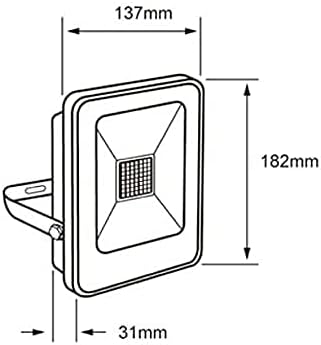
Image: Technical diagram illustrating the dimensions of the Tecnolite Zibal IV LED Floodlight, including length, width, and height measurements in millimeters.
Warranty Information
Tecnolite offers a warranty for its LED products, including the Zibal IV floodlight. The product is covered by a warranty of up to 5 years on LED components.
This warranty covers defects in materials and workmanship under normal use. It does not cover damage resulting from improper installation, misuse, abuse, accidents, or unauthorized repairs.
For warranty claims, please retain your proof of purchase and contact Tecnolite customer support.

Image: A graphic highlighting the "Up to 5 Years Warranty" on Tecnolite LED products, emphasizing product reliability.
Support
For further assistance, technical support, or warranty inquiries, please contact Tecnolite customer service:
- Website: Visit the official Tecnolite website for FAQs and support resources.
- Contact Information: Refer to the contact details provided on the product packaging or the official Tecnolite website.
- Online Store: You can also visit the Tecnolite store on Amazon for product information and support: Tecnolite Amazon Store
Documents and downloads
Ask a question about this manual
Ask about setup, troubleshooting, compatibility, parts, safety, or missing instructions. Manuals+ will review the question and use this page’s manual context to help answer it.