
1. Introduction
Thank you for choosing the GOLDEN HOUR Digital Sport Watch GH-1316. This watch is designed for active children, featuring a durable, waterproof construction and multiple functions including an alarm, stopwatch, and EL backlight. Please read this manual carefully to understand how to operate and maintain your watch.
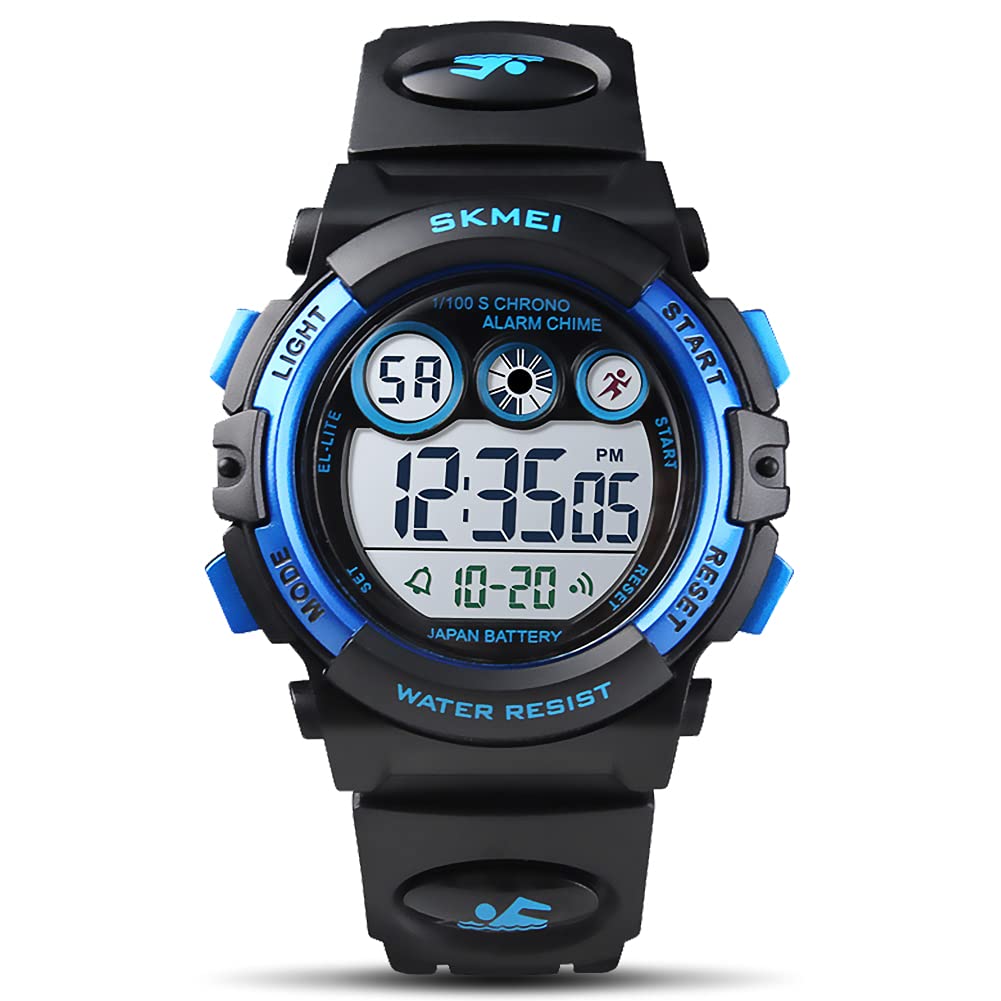
Image 1: The GOLDEN HOUR Digital Sport Watch GH-1316. This image displays the watch face and strap.
2. Product Features
- Digital Display: Clear digital time display with 12H/24H format options.
- EL Backlight: Electroluminescent backlight for clear visibility in low-light conditions.
- Multifunctional: Includes Alarm Clock, Stopwatch, and Calendar.
- Water Resistance: 50M (164Ft) water-resistant, suitable for hand washing, rain, and brief immersion.
- Durable Design: Shockproof construction with a highly clear resin material glass and soft adjustable PU band.

Image 2: Illustration of the watch's multi-functional capabilities, including stopwatch, alarm, and calendar.
3. Watch Components and Button Functions
Familiarize yourself with the watch's buttons and their functions:

Image 3: A diagram indicating the 'LIGHT', 'MODE', 'SET', 'START/STOP', and 'RESET' buttons on the watch.
- LIGHT Button: Activates the EL backlight.
- MODE Button: Cycles through different modes (Time, Stopwatch, Alarm).
- SET Button: Used to enter setting mode for time and alarm.
- START/STOP Button: Used to start/stop the stopwatch or adjust values during setting.
- RESET Button: Used to reset the stopwatch or confirm settings.
4. Operating Instructions
4.1. Time Setting
- In normal time display mode, press the MODE button three times to enter time setting mode. The seconds will flash.
- Press the RESET button to cycle through the setting items: Seconds → Hour → Minute → Month → Date → Day of Week.
- Use the START/STOP button to adjust the flashing value.
- To switch between 12-hour and 24-hour format, press the START/STOP button when the hour is flashing.
- Once all settings are complete, press the MODE button to exit setting mode.
4.2. Alarm Setting
- In normal time display mode, press the MODE button twice to enter alarm setting mode. The hour will flash.
- Press the START/STOP button to adjust the alarm hour.
- Press the RESET button to select the minute setting. The minutes will flash.
- Press the START/STOP button to adjust the alarm minute.
- Press the MODE button to exit alarm setting mode.
- To turn the alarm ON/OFF, press the START/STOP and RESET buttons simultaneously in alarm mode.
4.3. Stopwatch Function
- In normal time display mode, press the MODE button once to enter stopwatch mode.
- Press the START/STOP button to start the stopwatch.
- Press the START/STOP button again to pause the stopwatch.
- Press the RESET button to reset the stopwatch to zero.
- Press the MODE button to return to normal time display.
4.4. EL Backlight
Press the LIGHT button at any time to illuminate the watch face for a few seconds, allowing you to read the time in the dark.

Image 4: The watch display showing the time with the EL backlight activated, providing clear visibility in low light.
5. Water Resistance Guidelines
This watch is rated 50M (164Ft) water-resistant. This means it is suitable for:
- Hand washing
- Rainy days
- Sweating
- Brief immersion in water (e.g., shallow swimming)
IMPORTANT NOTE:
- DO NOT press any buttons while the watch is in water.
- Avoid wearing this watch for prolonged underwater activities such as diving or snorkeling.
- Exposure to excessive water contact or extreme hot/cold temperatures can shorten the watch's lifespan.

Image 5: An illustration showing the watch's 5ATM water resistance, suitable for activities like hand washing and swimming.
6. Maintenance
- Clean the watch regularly with a soft, dry cloth.
- Avoid exposing the watch to strong magnetic fields.
- Do not attempt to open the watch case or replace the battery yourself, as this may void the warranty and compromise water resistance. Contact professional service if needed.
- Store the watch in a cool, dry place when not in use.
7. Troubleshooting
| Problem | Possible Cause | Solution |
|---|---|---|
| Display is blank or dim | Low battery or battery needs replacement. | Replace the battery (CR2025 type). Seek professional assistance if unsure. |
| Buttons are unresponsive | Watch may be in a locked mode or internal issue. | Try pressing all buttons to see if it unlocks. If issue persists, contact support. |
| Time is incorrect | Time was not set correctly or reset. | Follow the "Time Setting" instructions in Section 4.1. |
8. Specifications
- Model Name: GH-1316
- Brand: GOLDEN HOUR
- Display Type: Digital
- Watch Movement Type: Quartz
- Water Resistance Depth: 50 Meters (164 Feet)
- Case Material Type: Plastic
- Band Material Type: Polyurethane
- Clasp Type: Buckle
- Case Diameter: 38 Millimeters
- Case Thickness: 14 Millimeters
- Band Width: 20 Millimeters
- Band Length: 220 Millimeters
- Power Source: Battery Powered
9. Warranty and Support
This GOLDEN HOUR watch comes with a manufacturer and seller combination warranty. For specific warranty details, please refer to the product packaging or contact your point of purchase. For technical support or further assistance, please reach out to GOLDEN HOUR customer service through the retailer where the product was purchased.