
Yueyinpu K-24-01
Yueyinpu K-24-01 Wireless Foot Pedal Page Turner Instruction Manual
Model: K-24-01 | Brand: Yueyinpu
1. Introduction
The Yueyinpu K-24-01 Wireless Foot Pedal Page Turner is designed to provide hands-free control for various digital content, including sheet music, e-books, and presentations. This device enhances convenience for musicians, presenters, and readers by allowing seamless page navigation using foot pedals.

Image: Yueyinpu K-24-01 Wireless Foot Pedal Page Turner with a tablet displaying sheet music.
2. What's in the Box
- Yueyinpu K-24-01 Wireless Foot Pedal Page Turner
- USB Cable (for charging)
3. Product Overview
The K-24-01 features a compact design with two foot pedals for navigation. It includes a mode selection button, power switch, and repeat function switch. The device is equipped with anti-skid pads for stability during use.

Image: Side view of the Yueyinpu K-24-01 Wireless Foot Pedal Page Turner, showing its ergonomic sloped shape.
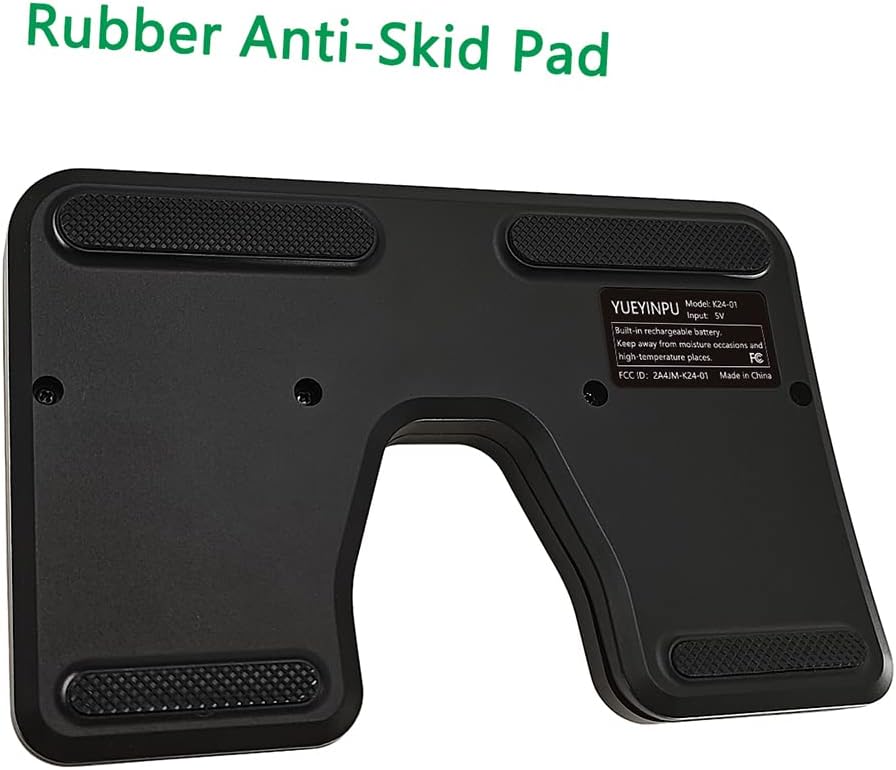
Image: Bottom view of the Yueyinpu K-24-01 Wireless Foot Pedal Page Turner, highlighting the rubber anti-skid pads.

Image: Close-up of the control panel on the Yueyinpu K-24-01, showing the Power, Mode, and Repeat switches.
4. Setup
4.1. Charging the Device
The K-24-01 has a built-in rechargeable lithium battery. Connect the provided USB cable to the device's Type-C charging port and to a compatible USB power source. A full charge provides approximately 60 hours of use.

Image: Yueyinpu K-24-01 pedal showing the Type-C charging port and indicating 60+ hours of battery life.
4.2. Bluetooth Pairing
- Ensure the page turner is powered off.
- Press and hold the 'MODE' button for 3 seconds until the LED indicator starts flashing, indicating it's in pairing mode.
- On your device (tablet, smartphone, PC), enable Bluetooth and search for available devices.
- Select 'K24-01 Pedal' from the list to connect. The LED indicator will stop flashing once successfully paired.

Image: Diagram showing the Yueyinpu K-24-01 pedal connecting via Bluetooth to an iPad, smartphone, monitor, and laptop.

Image: Screenshot of an iPad's Bluetooth settings, showing the 'Bluetooth' toggle and a list of devices.

Image: Screenshot of an iPad's Bluetooth settings, showing 'K24-01 Pedal' as connected.
5. Operating Instructions
5.1. Power On/Off
To power on the device, slide the 'POWER' switch to 'ON'. To power off, slide the 'POWER' switch to 'OFF'.
5.2. Mode Selection
The K-24-01 offers five page turning modes. Press the 'MODE' button to cycle through the modes. The active mode is indicated by the illuminated icons on the device.

Image: Table illustrating the 5 page turning modes of the Yueyinpu K-24-01 pedal, showing corresponding pedal actions (Left/Right) for each mode.
- Mode 1 (Up & Down Arrows): Left pedal acts as 'Page Up', Right pedal acts as 'Page Down'.
- Mode 2 (Left & Right Arrows): Left pedal acts as 'Left Arrow', Right pedal acts as 'Right Arrow'.
- Mode 3 (Up & Down Arrows): Left pedal acts as 'Up Arrow', Right pedal acts as 'Down Arrow'.
- Mode 4 (Left & Right Mouse Clicks): Left pedal acts as 'Left Mouse Click', Right pedal acts as 'Right Mouse Click'.
- Mode 5 (Space & Enter): Left pedal acts as 'Space', Right pedal acts as 'Enter'.
5.3. Repeat Function
The 'REPEAT' switch controls continuous page turning. When 'REPEAT' is 'ON', holding down a pedal will continuously turn pages. When 'REPEAT' is 'OFF', each pedal press will turn a single page.
5.4. Device and Software Compatibility
The K-24-01 is compatible with iOS (version 11 and above), Android, and Windows operating systems. It supports various applications such as iBooks, Kindle, WPS, Foxit PDF, Adobe PDF, Piascore, and Forscore. Functionality may vary depending on the application and its settings.

Image: Yueyinpu K-24-01 pedal in use with a tablet displaying sheet music.

Image: Image showing a cellist using the page turner pedal with a tablet on a music stand, emphasizing hands-free performance.
6. Maintenance
Keep the device clean by wiping it with a soft, dry cloth. Avoid using harsh chemicals or abrasive materials. Store in a cool, dry place away from direct sunlight and extreme temperatures.
7. Troubleshooting
- Device not connecting: Ensure the device is charged and powered on. Verify that Bluetooth is enabled on your host device and that the pedal is in pairing mode (flashing LED). If issues persist, try restarting both the pedal and your host device.
- Incorrect page turning: Check the selected mode on the pedal. Different applications may respond to different modes (e.g., some use Page Up/Down, others use Left/Right Arrow keys). Experiment with different modes to find the optimal setting for your application.
- Interference: Bluetooth connectivity can sometimes be affected by other wireless devices. Try moving away from other Bluetooth-enabled devices or turning them off temporarily to diagnose the issue.
8. Specifications
- Model Name: K-24-01
- Product Dimensions: 6.69 x 4.33 x 0.91 inches (17 x 11 x 2.3 cm)
- Item Weight: 7.1 ounces (201 grams)
- Connectivity Technology: Bluetooth
- Battery: 1 Lithium Polymer battery (included)
- Battery Life: Approximately 60 hours on a full charge
- Wireless Range: Up to 33 feet (10 meters)
- Color: Black

Image: Dimensions of the Yueyinpu K-24-01 Wireless Foot Pedal Page Turner.
Ask a question about this manual
Ask about setup, troubleshooting, compatibility, parts, safety, or missing instructions. Manuals+ will review the question and use this page’s manual context to help answer it.