
1. Introduction and Overview
The SNARK SIL-RED Silver Snark Chromatic Tuner is an advanced clip-on instrument tuner designed for precision and durability. It features Hyper-Snark Tuning Software for fast and accurate tuning, a high-resolution display, and vulcanized rubber collars for enhanced resilience. This tuner is rechargeable via a USB port, eliminating the need for disposable batteries.
Key Features:
- Hyper-Snark Tuning Software: Provides rapid and precise tuning detection.
- Rechargeable via USB: Convenient charging without battery replacement.
- Vulcanized Rubber Collars: Enhances durability and grip.
- High-Resolution Display: Offers clear and easy-to-read tuning information.
- 360-Degree Rotating Display: Allows for optimal viewing angles on any instrument.
2. Setup
2.1 Unboxing and Initial Charge
Carefully remove the tuner from its packaging. Before first use, it is recommended to fully charge the device. Connect the included USB charging cable to the tuner's USB port and to a standard USB power source (e.g., computer, USB wall adapter). The charging indicator will show the charging status.
2.2 Attaching the Tuner
The Silver Snark tuner features a clip-on design. Attach the clip securely to the headstock of your stringed instrument (guitar, bass, ukulele, violin, etc.). Ensure the clip makes firm contact with the instrument to accurately detect vibrations. The flexible neck allows you to position the display for optimal viewing.

3. Operating Instructions
3.1 Powering On/Off
Press and hold the power button located on the tuner's body to turn the device on or off. The high-resolution display will illuminate upon activation.
3.2 Tuning Your Instrument
- Ensure the tuner is securely clipped to your instrument.
- Pluck a single string on your instrument. The tuner will detect the vibration and display the note name and pitch accuracy on its screen.
- Adjust the string's tension (tighten or loosen) until the display indicates the correct note and the pitch indicator is centered. The Hyper-Snark Tuning Software provides real-time feedback for precise adjustments.
- Repeat for all strings until your instrument is in tune.
3.3 Pitch Calibration
The tuner allows for pitch calibration. Use the 'PITCH CAL' button and the '+' and '-' buttons (visible on the back of the tuner) to adjust the reference pitch (A4) if needed. The standard reference pitch is 440Hz.
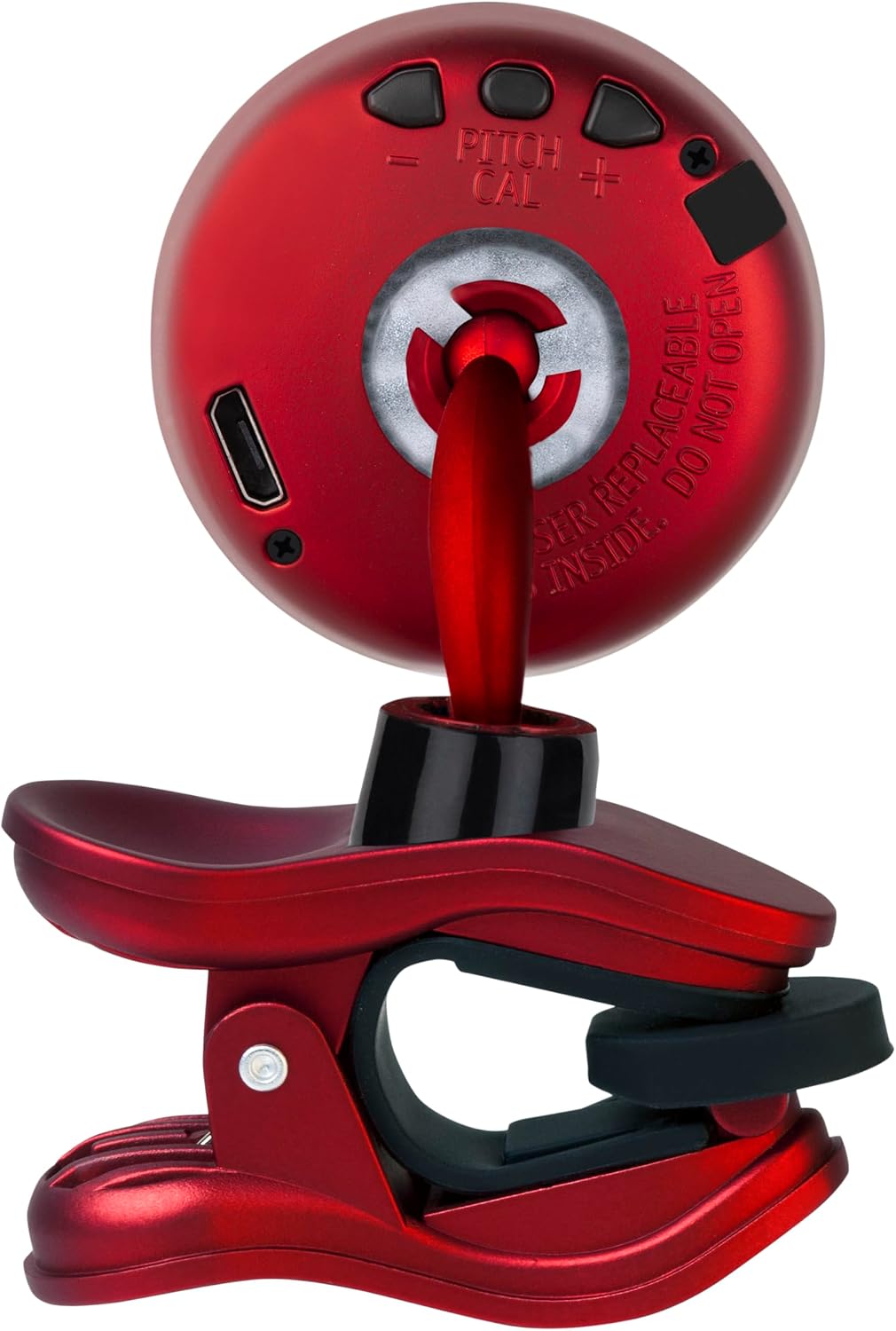
3.4 Display Rotation
The tuner's display can rotate 360 degrees. This feature allows you to orient the screen for optimal visibility regardless of how the tuner is clipped to your instrument or your viewing angle.
4. Maintenance
4.1 Cleaning
To clean the tuner, gently wipe it with a soft, dry cloth. Avoid using abrasive cleaners, solvents, or harsh chemicals, as these can damage the finish or internal components.
4.2 Charging Best Practices
- Use only the provided USB cable or a certified equivalent for charging.
- Avoid overcharging the device; disconnect it once fully charged.
- Do not expose the tuner to extreme temperatures during charging.
4.3 Storage
When not in use, store the tuner in a cool, dry place away from direct sunlight and extreme temperatures. The vulcanized rubber collars provide enhanced durability, but proper storage helps maintain the device's longevity.
5. Troubleshooting
5.1 Tuner Not Powering On
- Ensure the tuner is fully charged. Connect it to a USB power source and allow it to charge for at least 30 minutes.
- Verify that the power button is being pressed and held for a sufficient duration (typically 1-2 seconds).
5.2 Inaccurate Tuning or No Signal Detection
- Check that the tuner is securely clipped to the instrument's headstock, making good contact.
- Ensure there is minimal ambient noise that could interfere with vibration detection.
- Pluck the string firmly and clearly.
- If tuning an acoustic instrument, ensure the vibrations are strong enough for the clip to detect.
5.3 Display Issues
- If the display is dim, recharge the tuner.
- If the display is frozen or unresponsive, try turning the tuner off and then on again.
6. Specifications
| Feature | Detail |
|---|---|
| Model Number | SIL-RED |
| Tuning Software | Hyper-Snark |
| Display | High-Resolution, 360-degree rotation |
| Power Source | Rechargeable via USB |
| Durability Features | Vulcanized rubber collars |
| Item Weight | 2.08 ounces |
| Product Dimensions | 1.8 x 1.8 x 3.5 inches |
| Batteries | 1 CR2 batteries required (included, likely internal rechargeable) |
| Color | Red |
7. Warranty and Support
7.1 Product Warranty
This SNARK product is covered by a manufacturer's warranty against defects in materials and workmanship. Specific warranty terms and duration may vary by region and retailer. Please retain your proof of purchase for warranty claims.
7.2 Customer Support
For technical assistance, troubleshooting beyond this manual, or warranty inquiries, please contact SNARK customer support through their official website or the retailer from whom the product was purchased. Refer to the product packaging or SNARK's official website for the most current contact information.

