
Introduction
Thank you for choosing the Mahli Smart Robotic 3-in-1 Vacuum Cleaner. This manual provides important information on the safe use, operation, and maintenance of your device. Please read it thoroughly before first use and keep it for future reference.

Figure 1: Mahli Smart Robotic 3-in-1 Vacuum Cleaner and Remote Control
This image displays the Mahli Smart Robotic 3-in-1 Vacuum Cleaner in white, accompanied by its remote control. The vacuum cleaner is round with a power button on top, and the remote control is rectangular with navigation and function buttons.
Safety Instructions
- Read all instructions before using the appliance.
- Do not operate the vacuum cleaner in wet environments or near water.
- Keep hair, loose clothing, fingers, and all parts of the body away from openings and moving parts.
- Use only as described in this manual. Use only manufacturer's recommended attachments.
- Do not use with a damaged cord or plug. If appliance is not working as it should, has been dropped, damaged, left outdoors, or dropped into water, return it to a service center.
- Do not pull or carry by cord, use cord as a handle, close a door on cord, or pull cord around sharp edges or corners. Do not run appliance over cord. Keep cord away from heated surfaces.
- Do not unplug by pulling on cord. To unplug, grasp the plug, not the cord.
- Do not handle plug or appliance with wet hands.
- Do not put any object into openings. Do not use with any opening blocked; keep free of dust, lint, hair, and anything that may reduce air flow.
- Turn off all controls before unplugging.
- Use extra care when cleaning on stairs.
- Do not use to pick up flammable or combustible liquids, such as gasoline, or use in areas where they may be present.
- Do not pick up anything that is burning or smoking, such as cigarettes, matches, or hot ashes.
- Do not use without dust bag and/or filters in place.
- Prevent unintentional starting. Ensure the switch is in the off-position before connecting to battery pack, picking up or carrying the appliance.
- Recharge only with the charger specified by the manufacturer.
- Do not modify or attempt to repair the appliance or the battery pack.
Product Components
The Mahli Smart Robotic 3-in-1 Vacuum Cleaner comes with the following components:
- Main Robotic Vacuum Unit
- Remote Control
- USB Charging Cable
- Side Brushes (2x)
- Mop Cloth (1x)
- Cleaning Brush (1x)
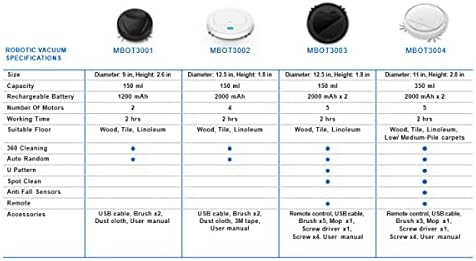
Figure 2: Included Components
This image shows the Mahli Smart Robotic 3-in-1 Vacuum Cleaner along with its accessories: two side brushes, a mop cloth, a USB charging cable, and a small cleaning brush.
Setup
1. Charging the Vacuum Cleaner
- Connect the USB charging cable to the charging port on the vacuum cleaner.
- Plug the other end of the USB cable into a compatible USB power adapter (not included) or a computer USB port.
- The charging indicator light will illuminate. A full charge takes approximately 3 hours.
- Once fully charged, the indicator light may change or turn off. Disconnect the vacuum cleaner from the power source.
2. Attaching Side Brushes
Gently press the side brushes onto the designated posts on the underside of the vacuum cleaner until they click into place.
3. Attaching the Mop Cloth (Optional)
If using the mopping function, attach the mop cloth to the designated area on the bottom of the vacuum cleaner. Ensure it is securely fastened.
Operating Instructions
1. Powering On/Off
- To power on, press the power switch on the side or bottom of the vacuum cleaner. Alternatively, for some models, simply touch the power button on the top surface after ensuring the main power switch is on.
- To power off, press the power switch again or hold the power button on the top surface.
2. Cleaning Modes
The vacuum cleaner features intelligent omni-directional and auto-route technology for efficient cleaning.
- Automatic Cleaning: Once powered on, the vacuum cleaner will automatically begin cleaning, navigating around obstacles and covering the floor area.
- Remote Control Operation: Use the provided remote control for manual direction changes or to start/stop cleaning.
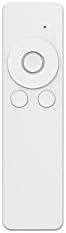
Figure 3: Remote Control
This image shows the white remote control for the Mahli Smart Robotic 3-in-1 Vacuum Cleaner. It features a circular directional pad at the top, with two smaller circular buttons below it.
3. Mopping Function
If the mop cloth is attached, the vacuum cleaner will perform mopping simultaneously with sweeping and vacuuming. Ensure the mop cloth is clean and slightly damp for best results.
Maintenance
1. Emptying the Dustbin
Regularly empty the dustbin to maintain optimal cleaning performance. Locate the dustbin compartment, open it, and dispose of collected debris. Clean the dustbin with the provided cleaning brush or a soft cloth.
2. Cleaning Side Brushes
Check the side brushes for tangled hair or debris. Remove any obstructions carefully. If brushes are worn, they may need replacement.
3. Cleaning the Mop Cloth
After each use, remove the mop cloth and wash it thoroughly. Allow it to air dry completely before reattaching.
4. Cleaning Sensors
Wipe the anti-fall sensors and other optical sensors on the bottom and front of the vacuum cleaner with a clean, dry cloth to ensure proper navigation.
Troubleshooting
| Problem | Possible Cause | Solution |
|---|---|---|
| Vacuum cleaner does not turn on. | Battery is low or depleted. Main power switch is off. | Charge the vacuum cleaner. Ensure the main power switch is in the ON position. |
| Vacuum cleaner stops unexpectedly. | Dustbin is full. Obstruction detected. Battery is low. | Empty the dustbin. Remove any obstructions. Recharge the vacuum cleaner. |
| Poor cleaning performance. | Dustbin is full. Side brushes are tangled or worn. Sensors are dirty. | Empty the dustbin. Clean or replace side brushes. Clean all sensors. |
| Vacuum cleaner gets stuck frequently. | Too many obstacles in the cleaning area. Sensors are dirty. | Clear the cleaning area of excessive clutter. Clean all sensors. |
Specifications
| Feature | Detail |
|---|---|
| Model | MBOT3002 |
| Function | Sweeping, Vacuuming, Mopping (3-in-1) |
| Battery Capacity | 2000mAh |
| Charging Time | Approx. 3 hours |
| Working Time | Approx. 2 hours |
| Rated Voltage | 3.7V |
| Working Noise | 55dB |
| Dimensions | Diameter: 12.5 inches, Height: 1.8 inches |
| Suitable Floor Types | Wood, Tile, Linoleum |
| Special Features | Intelligent Omni-Directional, Auto Route Technology, Smart Navigation, 360 Motion, Advanced Sensors, Anti-Fall Sensors |
| Included Components | Sweeper, 2x Brush, 1x Mop, 1x USB Charging Cable, 1x Cleaning Brush, Remote Control |
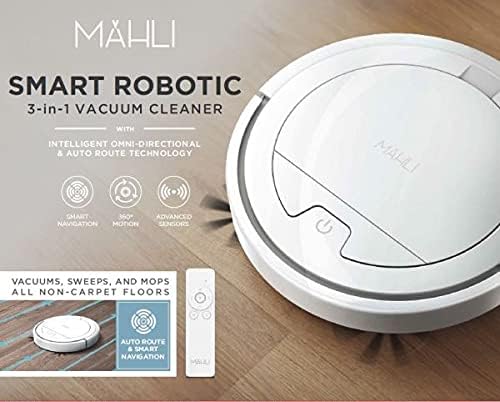
Figure 4: Robotic Vacuum Specifications Overview
This image displays a table comparing specifications for various Mahli robotic vacuum models (MBOT3001, MBOT3002, MBOT3003, MBOT3004). Key specifications include size, capacity, battery, motors, working time, suitable floor, cleaning patterns, sensors, remote, and accessories.
Warranty and Support
For warranty information and customer support, please refer to the contact details provided on the product packaging or the official Mahli website. Keep your purchase receipt as proof of purchase.
For technical assistance or troubleshooting beyond this manual, please contact Mahli customer service.
