
INNOREL RT85CM+N44
INNOREL RT85CM Carbon Fiber Tripod Instruction Manual
Model: RT85CM+N44
Introduction
Thank you for choosing the INNOREL RT85CM Carbon Fiber Tripod with N44 Low Gravity Center Ballhead. This professional-grade tripod is engineered for stability, portability, and versatility, making it an ideal companion for digital DSLR cameras and various photography needs. This manual provides essential information on the product's features, setup, operation, maintenance, and specifications to ensure optimal performance and longevity.

Figure 1: The INNOREL RT85CM Carbon Fiber Tripod with N44 Ballhead, showcasing its compact, extended, and monopod configurations.
Product Overview and Features
The INNOREL RT85CM tripod is designed with advanced features to enhance your photography experience.
- Lightweight and Robust Construction: Crafted from high-quality metal and carbon fiber using CNC technology and anodic oxidation, ensuring durability while maintaining a lightweight profile for extended use.
- Low Gravity Center Ballhead (N44): The N44 ballhead features a low gravity center design and a double U-notch, providing a more compact and reliable structure. Its 44mm (1.73in) large ball diameter and CNC machining contribute to exceptional stability.
- Hollow and Anti-Lost Design: The N44 ballhead incorporates a hollow ball design for weight reduction and an anti-lost mechanism for its knobs, preventing accidental loss of small components.
- Exclusive Mid-Column: The tripod's mid-column can be removed or inverted, allowing for extremely low-angle shooting, macro photography, and other specialized photographic techniques.
- Adjustable Multifunctions: Equipped with an advanced twist lock system for quick and secure positioning. The legs can be adjusted to three distinct angles (70°, 42°, 12°). One of the tripod legs is detachable and can be converted into a monopod or an alpenstock for hiking.

Figure 2: Detailed specifications and tube construction of the RT85CM Travel Tripod, highlighting the 10-layer carbon fiber tubes and anti-falling gasket.

Figure 3: Illustration of the N44 Low Profile Ballhead, emphasizing its lower gravity center, double U-notch, anti-lost knobs, and lightweight design compared to a standard ballhead.
Setup Instructions
Follow these steps to set up your INNOREL RT85CM tripod.
1. Unboxing and Component Identification
Upon receiving your tripod, carefully unpack all components and verify against the package list.
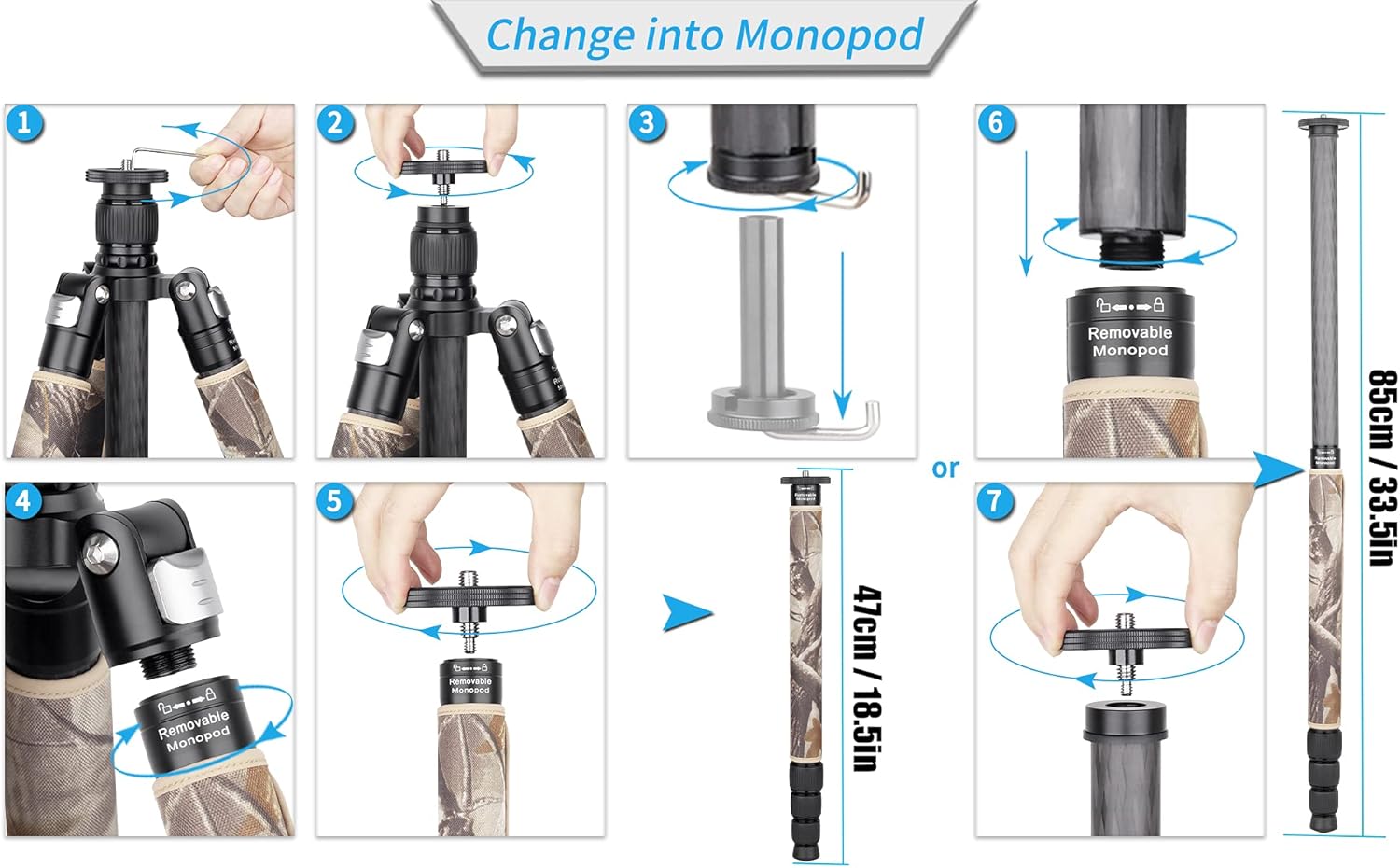
Figure 4: The complete package contents, including the tripod bag, tripod carton, tripod & ballhead, stainless steel spikes, Allen keys, extra quick release plate, and ball head bag.
- Tripod Bag x 1
- Tripod Carton x 1
- Tripod & Ballhead x 1
- Stainless Steel Spike x 3
- Allen Key x 3
- Extra Quick Release Plate x 1
- Ball Head Bag x 1
2. Adjusting Leg Angles and Extension
To adjust the leg angles, press the spring buckle at the top of each leg and set it to your desired position (12°, 42°, or 70°). Extend the leg sections by twisting the lock collars counter-clockwise to loosen, pull out the sections, and then twist clockwise to secure.

Figure 5: Different working heights and leg angle settings (12°, 42°, 70°) for the tripod, along with the spring buckle mechanism for angle adjustment.
3. Removing the Center Column
For low-angle shooting or to use the tripod without the center column, follow these steps:
- Loosen the screw on the top plate using an Allen key.
- Unscrew the top plate.
- Remove the hook from the bottom of the center column.
- Take out the center column.
- Couple the hook and top plate back together.
- Hold the mounting pan stable.

Figure 6: Visual instructions for detaching the center column to achieve lower shooting angles.
4. Converting to Monopod
One of the tripod legs can be detached and converted into a monopod.
- Loosen the screw on the top plate using an Allen key.
- Unscrew the top plate.
- Remove the hook.
- Unscrew the designated leg (usually marked as removable).
- Attach the top plate to the detached leg.
- The monopod can be used as a shorter unit (47cm/18.5in) or combined with the center column for a longer monopod (85cm/33.5in).

Figure 7: Instructions for transforming one of the tripod legs into a standalone monopod, with options for different lengths.
5. Inverting the Center Column
To achieve extreme low-angle or macro shots, the center column can be inverted.
- Remove the hook from the bottom of the center column.
- Loosen the lock sleeve.
- Remove the center column.
- Reverse the center column and insert it back into the tripod.
- Tighten the lock sleeve.
- Install the hook back onto the inverted column.

Figure 8: Visual guide for inverting the center column, enabling unique low-angle and macro photography perspectives.
Operating Instructions
Proper operation ensures the best performance from your tripod.
Using the Ballhead (N44)
The N44 ballhead allows for smooth and precise camera positioning.
- Main Locking Knob: Loosen this knob to adjust the ball's position freely. Tighten it to lock the camera securely in place.
- Panoramic Base Knob: Loosen this knob to rotate the ballhead horizontally for panoramic shots. The base has degree markings for precise alignment.
- Friction Control Knob: Some ballheads may have a separate friction control knob to adjust the tension of the ball movement, preventing sudden drops when the main knob is loosened.
- Quick Release Plate: Attach your camera to the quick release plate, then slide the plate into the ballhead's clamp. Ensure the safety lock is engaged to prevent accidental detachment.
Using the Spikes
The tripod comes with interchangeable rubber feet and stainless steel spikes for different terrains.

Figure 9: Illustration of the two types of spikes provided, which can be screwed into the tripod legs for enhanced grip on soft or uneven surfaces.
To switch to spikes, unscrew the rubber feet from the bottom of the tripod legs and screw in the stainless steel spikes. This provides better grip on soft ground, ice, or uneven surfaces.
Maintenance
Regular maintenance will prolong the life and performance of your tripod.
- Cleaning: After each use, especially in dusty, sandy, or wet environments, wipe down the tripod with a soft, damp cloth. For carbon fiber tubes, use a dry cloth. Avoid harsh chemicals.
- Lubrication: Periodically apply a small amount of silicone-based lubricant to the leg twist locks and ballhead mechanisms to ensure smooth operation. Do not over-lubricate.
- Inspecting Screws and Joints: Regularly check all screws, bolts, and joints for tightness. Use the provided Allen keys to tighten any loose components.
- Storage: Store the tripod in its bag in a dry, cool place away from direct sunlight and extreme temperatures.
Troubleshooting
If you encounter issues with your tripod, refer to the following common problems and solutions.
| Problem | Possible Cause | Solution |
|---|---|---|
| Tripod legs do not extend or retract smoothly. | Dirt, sand, or debris inside the leg sections or twist locks. | Fully extend legs, clean thoroughly with a damp cloth, and allow to dry. Apply a small amount of silicone lubricant if necessary. Ensure twist locks are fully loosened before extending/retracting. |
| Ballhead movement is stiff or not smooth. | Lack of lubrication or internal debris. | Ensure all locking knobs are fully loosened. Clean the ballhead exterior. If the issue persists, a small amount of silicone lubricant can be applied to the ball mechanism (consult professional if unsure). |
| Central column wobbles or is not stable. | Locking collar not tightened sufficiently or internal component issue. | Ensure the central column locking collar is tightened firmly. Check if the hook at the bottom of the column is securely attached. If a component is broken (e.g., a shim or ring), contact customer support for replacement parts. |
| Quick release plate does not secure camera. | Plate not fully inserted or safety lock not engaged. | Ensure the quick release plate is fully seated in the clamp and the locking lever/knob is tightened. Verify the safety pin/lock is engaged. |
Specifications
Detailed technical specifications for the INNOREL RT85CM+N44 Tripod.
| Feature | Detail |
|---|---|
| Brand | INNOREL |
| Model Number | RT85CM+N44 |
| Material | Aluminum, Carbon Fiber, Metal |
| Product Dimensions | 22.05 x 5.91 x 6.3 inches |
| Item Weight | 5.18 pounds (2350 Grams) |
| Weight Limit | 25 Kilograms |
| Maximum Height | 184 Centimeters (72.4 inches) |
| Minimum Height | 24.4 Inches |
| Tripod Head Type | Ball Heads (N44) |
| Compatible Devices | Camera |
| Special Features | Adjustable, Compact, Lightweight, Portable, Monopod Conversion |
Warranty and Support
INNOREL Technologies Co., Ltd. is committed to providing high-quality products and services.
For warranty information, technical support, or to inquire about replacement parts, please visit the official INNOREL store on Amazon or contact their customer service directly.
INNOREL Official Store: Visit Store
Established in 2014, INNOREL Technologies Co., Ltd. specializes in photography equipment, focusing on innovative and reliable products.
Related documentsRT85CM+N44


Ask a question about this manual
Ask about setup, troubleshooting, compatibility, parts, safety, or missing instructions. Manuals+ will review the question and use this page’s manual context to help answer it.