1. Introduction
The Blaupunkt BP 4.0 FHD Dash Cam is a compact and robust in-car video recorder designed to capture your journeys in Full HD. Featuring a 140-degree wide-angle lens, an integrated microphone, and an interior camera, it provides comprehensive coverage for your vehicle. This manual provides essential information for the proper installation, operation, and maintenance of your device.
2. Package Contents
Please check the package contents to ensure all items are present:
- Blaupunkt BP 4.0 FHD Dash Cam (Video Recorder)
- Interior Lens
- Mount (Suction Cup Type)
- Power Cable (Car Charger)
- User Manual

Image 2.1: Contents of the Blaupunkt BP 4.0 FHD Dash Cam package.

Image 2.2: The retail packaging for the Blaupunkt BP 4.0 FHD Dash Cam.
3. Product Overview
The BP 4.0 FHD Dash Cam features a main unit with a 2-inch display and a separate interior camera. It is designed for easy installation and discreet operation within your vehicle.
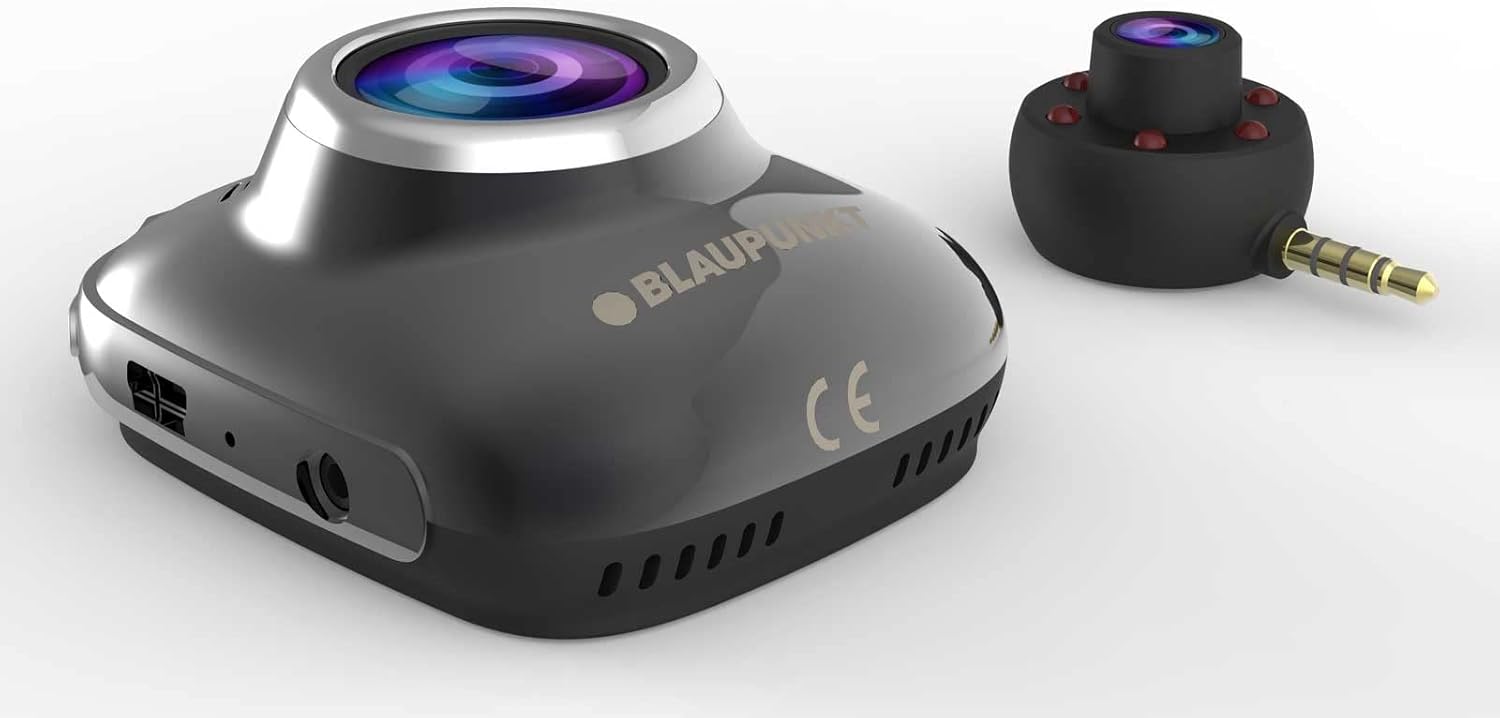
Image 3.1: Main unit and interior camera of the Blaupunkt BP 4.0 FHD Dash Cam.
Key Features:
- Dual Lens: Records both front and interior views simultaneously.
- Wide-Angle View: 140-degree horizontal field of view for comprehensive road coverage.
- Integrated Microphone: Captures in-cabin audio.
- 2-inch Display: For live view, playback, and menu navigation.
- G-Sensor: Automatically locks video files upon impact.
- Loop Recording: Continuously records, overwriting the oldest files when the memory card is full.
- Durable Design: Constructed with zinc alloy for robustness.

Image 3.2: Dimensions of the Blaupunkt BP 4.0 FHD Dash Cam.
4. Installation
Follow these steps for proper installation of your dash cam:
- Prepare the Mounting Location: Choose a location on your windshield that does not obstruct your view of the road. Clean the area thoroughly to ensure good adhesion for the suction cup mount.
- Attach the Mount: Secure the suction cup mount to the chosen spot on the windshield. Ensure it is firmly attached.
- Mount the Dash Cam: Slide the main dash cam unit onto the mount until it clicks into place. Adjust the angle of the camera to ensure the front lens captures the road ahead clearly.
- Insert MicroSD Card: Insert a high-speed MicroSD card (not included) into the designated slot on the dash cam. Ensure it is inserted correctly until it locks.
- Connect Interior Camera: Plug the interior camera's 3.5mm jack into the auxiliary port on the main dash cam unit. Position the interior camera to capture the vehicle's cabin as desired.
- Connect Power: Plug the car charger cable into the dash cam's power input port and then into your vehicle's 12V power outlet (cigarette lighter socket). Route the cable neatly along the windshield and dashboard to avoid interference with driving.
- Power On and Test: Start your vehicle. The dash cam should power on automatically and begin recording. Check the display to confirm both front and interior camera views are visible and recording correctly.
5. Basic Operation
Understanding the basic functions of your dash cam will ensure optimal performance.
Power On/Off:
- Automatic: The dash cam will automatically power on and begin recording when your vehicle's ignition is turned on (and power is supplied to the 12V outlet).
- Manual: Press and hold the power button (usually marked with a power symbol) to manually turn the device on or off.
Recording Modes:
- Loop Recording: The camera records video in continuous loops (e.g., 1, 3, or 5-minute segments). When the memory card is full, the oldest unlocked files are automatically overwritten.
- G-Sensor (Emergency Recording): In the event of a sudden impact or collision, the built-in G-Sensor will detect the event and automatically lock the current video file, preventing it from being overwritten by loop recording.
Menu Navigation:
Use the buttons located around the 2-inch display to navigate through the menu options. Common settings include video resolution, loop recording duration, G-Sensor sensitivity, date/time stamp, and format MicroSD card.
6. Maintenance
Regular maintenance ensures the longevity and optimal performance of your dash cam.
- Cleaning Lenses and Screen: Use a soft, lint-free cloth to gently wipe the camera lenses and the display screen. Avoid abrasive materials or chemical cleaners that could scratch or damage the surfaces.
- MicroSD Card Management: Periodically format your MicroSD card (at least once a month) to prevent data corruption and ensure smooth recording. Back up any important video files before formatting.
- Temperature Control: Avoid exposing the dash cam to extreme temperatures for extended periods. If your car is parked in direct sunlight on a hot day, consider removing the dash cam to prevent overheating.
- Firmware Updates: Check the official Blaupunkt website for any available firmware updates. Keeping your dash cam's firmware up-to-date can improve performance and add new features.
7. Troubleshooting
If you encounter issues with your Blaupunkt BP 4.0 FHD Dash Cam, refer to the following common problems and solutions:
| Problem | Possible Cause | Solution |
|---|---|---|
| Dash cam does not power on. | No power supply; faulty cable; dead battery. | Check car charger connection and vehicle's 12V outlet. Try a different power source or cable. Ensure the internal battery is charged. |
| Recording stops or freezes. | Slow MicroSD card; full MicroSD card; card error. | Use a high-speed (Class 10 or U1/U3) MicroSD card. Format the MicroSD card. Replace the MicroSD card if errors persist. |
| Poor video quality (especially at night). | Dirty lens; low light conditions; windshield glare. | Clean the camera lenses and windshield. Ensure no obstructions. Adjust exposure settings if available. Note that night vision performance can be limited. |
| Interior camera not working. | Loose connection; faulty interior camera. | Ensure the interior camera is securely plugged into the main unit's auxiliary port. If the issue persists, contact support. |
| Buttons are unresponsive. | Device frozen; software glitch. | Perform a soft reset by pressing the reset button (if available) or by holding the power button for 10-15 seconds. |
8. Specifications
Detailed technical specifications for the Blaupunkt BP 4.0 FHD Dash Cam:
- Brand: BLAUPUNKT
- Model Name: BP 4.0 FHD
- Item Model Number: BP 4.0 FHD
- Color: Zinc Alloy / Black
- Screen Size: 2 inches
- Field of View: 140 Degrees
- Video Recording Resolution: 1080p, 720p
- Connectivity Technology: Auxiliary
- Mounting Type: Suction Cup Mount
- Compatible Devices: Car, Truck
- Included Components: Cable, Video Recorder, User Manual, Interior Lens, Mount
- Manufacturer: BLAUPUNKT
- Date First Available on Amazon.com.be: June 6, 2022
- Spare Parts Availability: Information not available
- Software Updates Guaranteed Until: Information not available
9. Warranty and Support
For warranty information and customer support, please refer to the warranty card included in your product package or visit the official Blaupunkt website. Specific warranty terms and conditions may vary by region and retailer.


