
Introduction
This manual provides essential information for the safe operation, maintenance, and troubleshooting of your HFT Professional iImpact Long Barrel Air Hammer, model CH401LB. Please read and understand all instructions before using the tool to ensure proper function and to prevent injury or damage.
Safety Information
General Safety Warnings
- Read All Instructions: Familiarize yourself with the tool's operation and safety procedures.
- Wear Eye Protection: Always wear ANSI-approved safety goggles or a face shield during operation.
- Wear Hearing Protection: Prolonged exposure to noise can cause hearing damage.
- Wear Hand Protection: Use appropriate gloves to protect hands from vibration and debris.
- Maintain a Clean Work Area: Cluttered areas invite accidents.
- Proper Air Supply: Ensure the air compressor and hose are rated for the tool's requirements and are in good condition. Do not exceed the maximum operating pressure of 90 PSI.
- Secure Workpiece: Always secure the material being worked on to prevent movement.
- Disconnect Air Supply: Always disconnect the air supply before changing accessories, performing maintenance, or when the tool is not in use.
- Avoid Accidental Starting: Ensure the trigger is not engaged when connecting to the air supply.
- Inspect Tool Before Use: Check for damaged parts, loose connections, or any condition that may affect safe operation.
Product Overview
Components
The HFT Professional iImpact Long Barrel Air Hammer is a robust pneumatic tool designed for various demolition and chiseling tasks. Key components include the main body, trigger, air inlet, and quick-change chuck.

Image: The HFT Professional iImpact Long Barrel Air Hammer, showcasing its ergonomic design and quick-change chuck.
Features
- Lightweight, Rugged Die Cast Aluminum Body: Provides durability without excessive weight.
- Anti-Vibration Technology: Designed to reduce operator fatigue and enhance comfort during extended use.
- Extra Long 4" Barrel: Delivers increased force per impact for demanding applications.
- Variable Speed Trigger: Allows for precise control over impact force and speed.
- Comfortable Rubber Grip: Enhances handling and reduces slippage.
- Quick Connect Chuck: Facilitates fast and easy accessory changes.
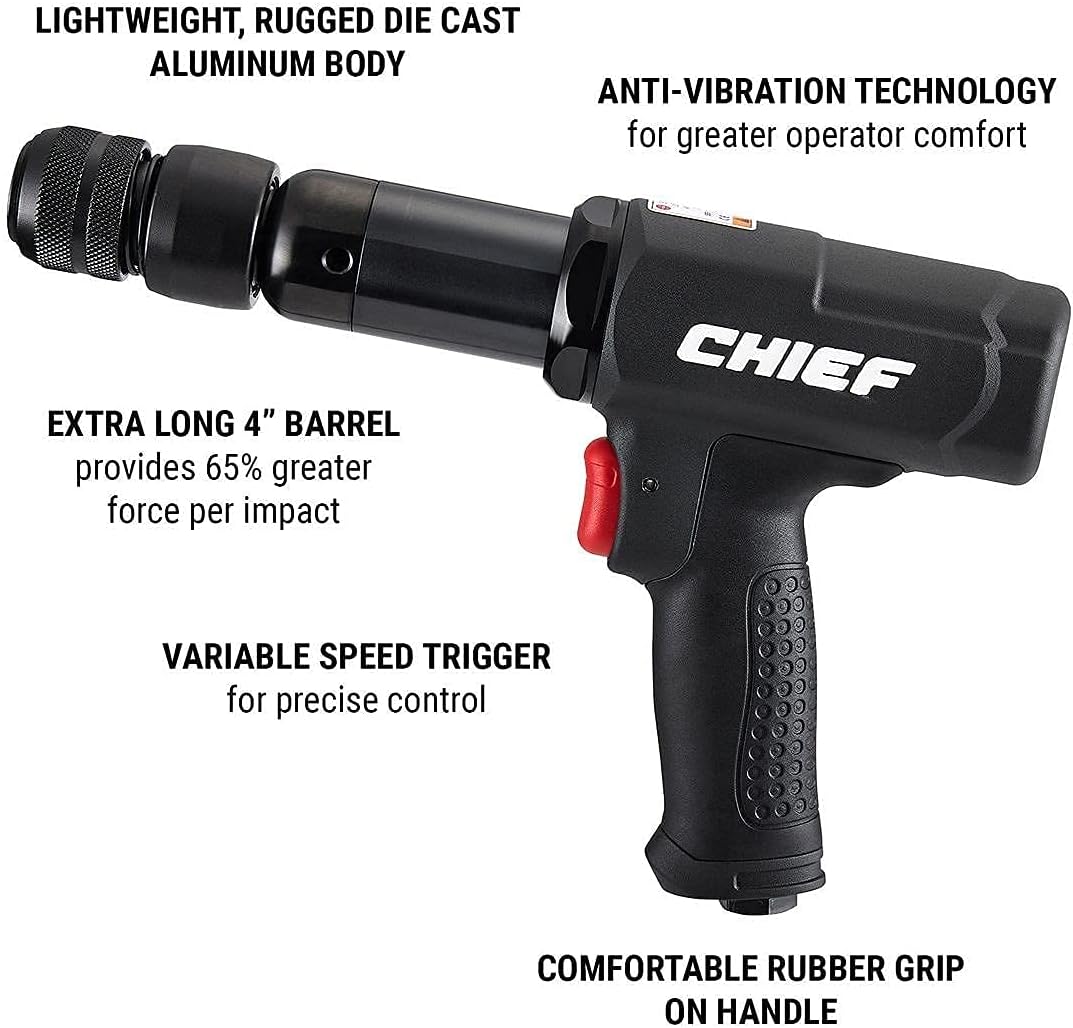
Image: The air hammer highlighting its key features such as the lightweight aluminum body, anti-vibration technology, extra long barrel, variable speed trigger, and comfortable rubber grip.
Setup
Unpacking
Carefully remove the air hammer from its packaging. Inspect the tool for any signs of damage that may have occurred during shipping. Ensure all components are present. This product is supplied as a bare tool, meaning accessories like chisels are not included.
Air Supply Requirements
The performance and longevity of your air hammer depend on a clean, dry, and adequately supplied air source.
- Compressor: Refer to the specifications section for recommended compressor tank sizes based on usage (continuous, intermittent).
- Working Pressure: Maintain a working pressure of 90 PSI for optimal performance.
- Air Inlet: The tool features a 1/4" NPT air inlet.
- Recommended Hose Size: Use a 3/8" ID air hose for efficient air flow.
- Air Filtration: Install an in-line air filter to prevent moisture and debris from entering the tool.
Tool Connection
- Ensure the air compressor is turned off and the air line is depressurized.
- Apply thread sealant tape to the 1/4" NPT air inlet fitting on the tool.
- Connect a quick-connect coupler (not included) to the air inlet.
- Connect the air hose from your compressor to the quick-connect coupler on the tool.
Installing Chisels/Attachments
The air hammer features a quick-connect chuck for easy installation and removal of chisels and other attachments.
- Ensure the air supply is disconnected from the tool.
- Pull back the quick-connect chuck collar.
- Insert the shank of the desired chisel or attachment into the chuck.
- Release the collar, ensuring the attachment is securely locked in place. Gently pull on the attachment to confirm it is seated correctly.
Operating Instructions
Before Operation
- Verify that all safety warnings have been reviewed and understood.
- Ensure appropriate personal protective equipment (PPE) is worn.
- Check that the air hose and connections are secure and free from leaks.
- Confirm the chisel or attachment is correctly installed and secured in the chuck.
Starting the Tool
- Connect the air hammer to the air supply.
- Turn on the air compressor and adjust the regulator to the recommended working pressure of 90 PSI.
- Hold the tool firmly with both hands, maintaining a stable stance.
Using the Air Hammer
Position the chisel tip against the workpiece. Gradually depress the variable speed trigger to begin operation. The variable speed trigger allows you to control the impact force and speed. Apply steady pressure to the tool and allow the hammer to do the work. Avoid excessive force, which can damage the tool or workpiece.

Image: An operator using the HFT Professional iImpact Long Barrel Air Hammer to remove a rusted component, demonstrating proper grip and application.
Stopping the Tool
Release the trigger to stop the tool. Disconnect the air supply when finished or when moving the tool to another location.
Maintenance
Daily Maintenance
- Lubrication: Apply a few drops of pneumatic tool oil into the air inlet before and after each use. This lubricates internal components and prevents rust.
- Cleaning: Wipe down the tool with a clean, dry cloth to remove dirt and debris. Do not use harsh solvents.
- Inspection: Regularly inspect the air hose for wear, cuts, or leaks. Check the quick-connect chuck for proper function and wear.
Storage
Store the air hammer in a clean, dry environment away from direct sunlight and extreme temperatures. Disconnect the air supply and ensure the tool is clean and lubricated before storage.
Troubleshooting
Common Issues and Solutions
| Problem | Possible Cause | Solution |
|---|---|---|
| Tool does not operate or operates weakly | Low air pressure; Clogged air inlet; Lack of lubrication; Damaged internal components | Check air compressor pressure and regulator setting; Clean air inlet filter; Lubricate tool; Contact service for repair |
| Air leaks from connections | Loose connections; Worn O-rings or seals; Damaged air hose | Tighten connections; Replace O-rings/seals; Replace damaged air hose |
| Excessive vibration | Worn chisel/attachment; Internal wear | Replace worn chisel; Contact service for inspection |
| Chisel not held securely | Worn quick-connect chuck; Incorrect chisel shank size | Inspect and replace chuck if worn; Ensure correct chisel size is used |
Specifications
Technical Data
| Parameter | Value |
|---|---|
| Model | CH401LB |
| Brand | HFT |
| Power Source | Compressed Air Powered |
| Maximum Speed | 2800 BPM (Blows Per Minute) |
| Stroke Length | 4 inches |
| Working Pressure | 90 PSI |
| Air Inlet | 1/4" NPT |
| Recommended Hose Size | 3/8" ID |
| Average Air Consumption | 2.9 CFM |
| Amperage | 18 Amps (Note: This value is from product data, typically air tools do not have amperage ratings. Please verify with manufacturer if concerned.) |
| Color | Black |
Compressor Requirements
- 30+ Gallon Tank: Recommended for continuous operation.
- 7-29 Gallon Tank: Suitable for intermittent operation.
- 1-6 Gallon Tank: Not recommended for this tool due to insufficient air supply.

Image: Detailed specifications and compressor requirements for the HFT Professional iImpact Long Barrel Air Hammer, including stroke, BPM, CFM, and recommended tank sizes.
Warranty and Support
Specific warranty information for the HFT Professional iImpact Long Barrel Air Hammer is not provided in the available product data. For details regarding warranty coverage, technical support, or replacement parts, please refer to the documentation included with your purchase or contact HFT customer service directly. Always retain your proof of purchase for warranty claims.