
C S MTP700
C S Replacement Battery User Manual
For Midland MTP700, MTP750 Radios
1. Introduction
This user manual provides essential information for the safe and effective use of your C S Replacement Battery, designed for Midland MTP700 and MTP750 two-way radios. Please read this manual thoroughly before using the battery to ensure optimal performance and longevity.
2. Product Overview
The C S Replacement Battery is a high-capacity power source engineered to provide reliable and extended operation for compatible Midland two-way radios. It features advanced protection mechanisms to ensure safety and durability.
Key Features:
- Compatible with Midland MTP700 and MTP750 models.
- High capacity circulation function for extended use.
- ROSH, CE, and UL triple certification for quality assurance.
- Built-in protection against over-charge, over-discharge, over-heat, over-current, and short-circuit.
- No memory effect, allowing for flexible charging without capacity degradation.
Product Images:


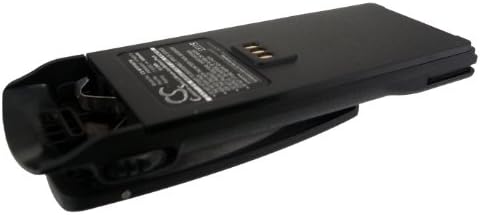
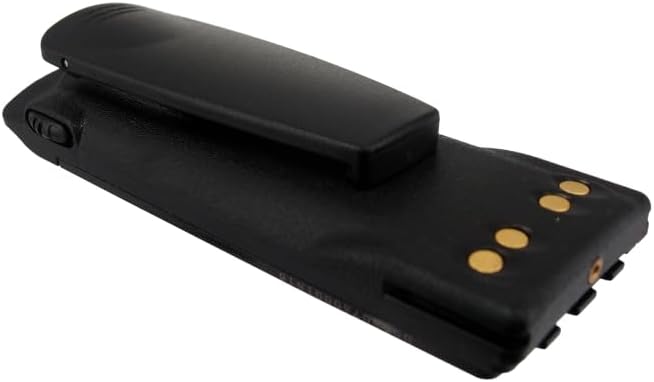

3. Specifications
| Attribute | Value |
|---|---|
| Compatible Models | Midland MTP700, MTP750 |
| Voltage | 7.5V |
| Capacity | 1800mAh / 13.50Wh |
| Dimensions (L x W x H) | 140.00 x 50.30 x 23.50mm (5.51 x 1.98 x 0.93 inches) |
| Weight | 215g |
| Battery Cell Composition | Lithium Ion |
| Certifications | ROSH, CE, UL |
4. Setup
4.1 Initial Charging
It is recommended to fully charge the battery before its first use. Use a compatible charger designed for Midland MTP700/MTP750 series batteries. The charging time may vary depending on the charger and the battery's initial charge level.
4.2 Battery Installation
- Ensure the Midland radio is powered off before installation.
- Align the battery with the battery compartment on the back of your Midland MTP700 or MTP750 radio.
- Gently slide the battery into place until it clicks securely. Ensure all latches or locking mechanisms are engaged.
- Verify that the battery is firmly attached and does not wobble.
5. Operating the Battery
Once installed, the battery powers your Midland radio. The radio's display or indicators will show the current battery level. For optimal performance, avoid completely draining the battery frequently, although the battery's design includes over-discharge protection.
5.1 Recharging
When the radio indicates a low battery, recharge the battery using the appropriate Midland charger. The battery's "no memory effect" feature allows for charging at any charge level without negatively impacting its overall capacity or lifespan.
6. Maintenance
6.1 Cleaning
Periodically clean the battery contacts and the radio's battery terminals with a clean, dry cloth to ensure good electrical connection. Do not use abrasive cleaners or solvents.
6.2 Storage
If storing the battery for an extended period (more than one month), store it in a cool, dry place, ideally at approximately 50% charge. Avoid extreme temperatures and direct sunlight. Fully discharge and recharge the battery every 3-6 months during long-term storage to maintain its health.
6.3 Battery Disposal
Do not dispose of the battery in household waste. Lithium-ion batteries should be recycled or disposed of according to local regulations. Contact your local waste management authority for information on battery recycling programs.
7. Troubleshooting
| Problem | Possible Cause | Solution |
|---|---|---|
| Battery not charging |
|
|
| Short battery life |
|
|
| Battery not recognized by radio |
|
|
8. Warranty and Support
C S provides great after-sales service. Your satisfaction is important. If you encounter any problems with the product or have questions, please feel free to contact us via email. We aim to reply within 24 hours.
For support inquiries, please refer to the contact information provided at the point of purchase or on the product packaging.
Related documentsMTP700


Ask a question about this manual
Ask about setup, troubleshooting, compatibility, parts, safety, or missing instructions. Manuals+ will review the question and use this page’s manual context to help answer it.