
Introduction
Thank you for choosing the MERTTURM 160LED Motion Sensor Cabinet Light. This product is designed to provide convenient and efficient lighting for various indoor spaces. Featuring a motion sensor, adjustable brightness, and multiple color modes, it enhances visibility and comfort in areas such as closets, kitchens, hallways, and garages. Please read this manual carefully before use to ensure proper installation and operation.
Product Features
- Enhanced Illumination: Equipped with 160 LEDs, providing strong, adjustable, and comfortable brightness for dark areas.
- Smart Motion Sensing: Automatically turns on when motion is detected within 3 meters (10 feet) and turns off after 20 seconds of no movement. Operates intelligently day or night.
- Long-Lasting Battery: Features a large 1800mAh rechargeable battery, offering up to one month of use on a single charge in night motion sensor mode.
- Versatile Sensor Modes: Choose from 3 operating modes: Always On, All-Day Motion Sensor, and Light & Motion Sensor.
- Adjustable Lighting: Offers 3 color temperatures (white, warm white, warm) and stepless brightness dimming to suit various preferences and environments.
- Easy Installation: Provides two simple installation methods: adhesive magnetic strip attachment or direct adsorption onto iron surfaces.

Image: The MERTTURM 160LED Motion Sensor Cabinet Light demonstrating its versatility in different applications such as closets, kitchens, desks, garages, bedsides, and as a portable flashlight.
Package Contents
Please check the package for the following items:
- 1 x MERTTURM 160LED Motion Sensor Cabinet Light
- 1 x USB Charging Cable
- 1 x Adhesive Strip
- 1 x Metal Strip
- 1 x User Manual
Specifications
| Model Number | UCL001-160-1 |
| LED Quantity | 160 LEDs |
| Battery Capacity | 1800mAh |
| Power Source | Battery Powered (1 A - included) |
| Wattage | 3 Watts |
| Luminous Flux | 900 Lumens |
| Color Temperature | 3000K (Warm), 4200K (Warm White), 6500K (White) |
| Control Method | Touch |
| Motion Sensor Range | 3-8 meters (10-26 feet) |
| Auto-off Time | 20 seconds (after no motion) |
| Material | Aluminum, Metal |
| Dimensions (L x W x H) | 390 x 35 x 12 mm |
| Weight | 139 Grams |
| Waterproof Level | Not waterproof (Indoor use only) |
Setup and Installation
The MERTTURM cabinet light offers two convenient installation methods:
- Adhesive & Metal Strip Installation:
- Clean the desired surface thoroughly to ensure it is dry and free of dust or grease.
- Peel off the protective film from the adhesive strip and attach it to the chosen surface.
- Attach the metal strip to the adhesive strip.
- The light unit can then be magnetically attached to the metal strip. This allows for easy removal for charging or repositioning.
- Direct Magnetic Adsorption:
- If your desired surface is made of iron or a magnetic material, the light can be directly adsorbed onto it without the need for the adhesive or metal strips.

Image: Visual guide illustrating the two installation methods: using an adhesive metal strip for magnetic attachment and direct magnetic attachment to an iron surface.
Operating Instructions
The MERTTURM cabinet light features two control buttons, S1 and S2, for managing light color, brightness, and sensor modes.
Sensor Modes (Controlled by S2 Button)
Short press the S2 button to cycle through the following sensor modes:
- Mode 1: Always On (No Sensor) - The light remains continuously on.
- Mode 2: All-Day Motion Sensor - The light activates upon motion detection regardless of ambient light conditions. (Indicated by a red light flash)
- Mode 3: Light & Motion Sensor - The light activates upon motion detection only in low-light conditions. (Indicated by a green light flash)
Long press the S2 button to turn the light ON or OFF.

Image: Illustration of the control panel with S1 and S2 buttons, detailing the three motion sensor modes and their corresponding indicator light flashes.
Color Temperature and Brightness (Controlled by S1 Button)
Short press the S1 button to change the light color temperature:
- White Light (6500K)
- Warm White Light (4200K)
- Warm Light (3000K)
Long press the S1 button to adjust the brightness continuously (stepless dimming) from 0% to 100%.
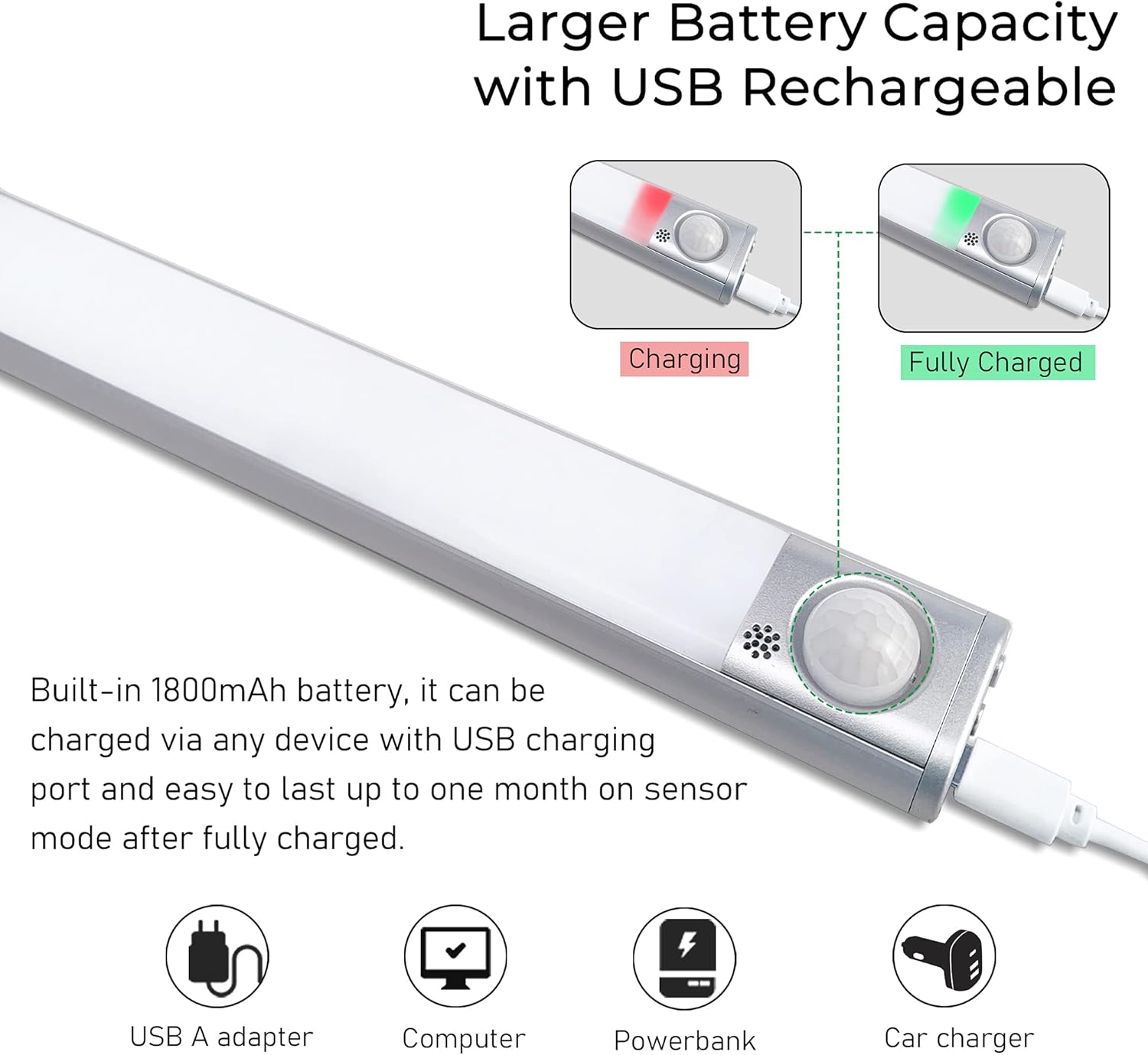
Image: Visual representation of the light's ability to switch between three color temperatures and adjust brightness levels smoothly.

Image: Demonstration of the motion sensor's activation range (3 meters) and automatic deactivation after 20 seconds of inactivity.
Charging the Device
The MERTTURM cabinet light is equipped with a built-in 1800mAh rechargeable battery. When the battery is low, the indicator light will show red. When fully charged, the indicator light will turn green.
- Connect the provided USB charging cable to the light's charging port.
- Plug the other end of the USB cable into any standard USB-A power source, such as a computer, power bank, USB wall adapter, or car charger.
- A full charge typically provides up to one month of use in night motion sensor mode.
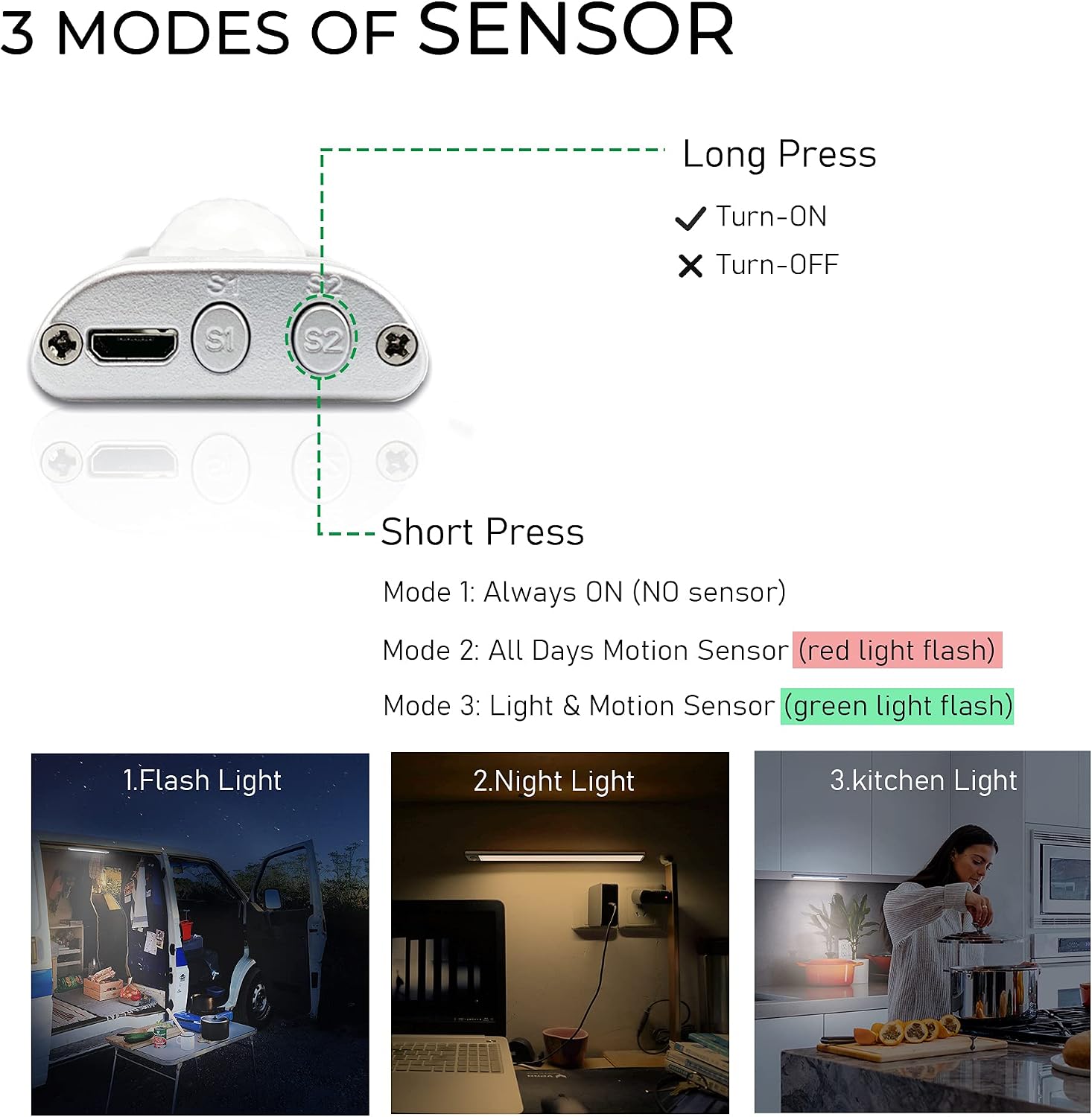
Image: The light's charging port and indicator lights, showing red for charging and green for fully charged, with various USB charging options.
Maintenance
To ensure the longevity and optimal performance of your MERTTURM cabinet light, follow these maintenance guidelines:
- Cleaning: Wipe the light gently with a soft, dry cloth. Do not use abrasive cleaners, solvents, or harsh chemicals, as these can damage the surface or electronic components.
- Avoid Water: This product is not waterproof. Do not expose it to water, high humidity, or rain. Clean only with a dry cloth.
- Battery Care: For best battery life, avoid completely draining the battery frequently. Recharge the light when the indicator shows red. If storing for an extended period, charge the battery every 3-6 months.
- Sensor Maintenance: Ensure the motion sensor area is kept clean and unobstructed for accurate detection.
Troubleshooting
If you encounter any issues with your MERTTURM cabinet light, please refer to the following common problems and solutions:
- Light does not turn on:
- Check if the battery is charged. Recharge the light if the indicator is red or off.
- Ensure the light is not in 'Always Off' mode (long press S2 to toggle power).
- Verify that the sensor is not obstructed.
- Motion sensor not working:
- Confirm the light is in 'All-Day Motion Sensor' or 'Light & Motion Sensor' mode (short press S2 to cycle modes).
- Ensure there are no strong light sources directly hitting the sensor in 'Light & Motion Sensor' mode.
- Check for any obstructions blocking the sensor's field of view.
- Light flickers or is dim:
- The battery may be low. Recharge the light fully.
- Adjust the brightness setting by long pressing the S1 button.
- Battery life is shorter than expected:
- Frequent activation in high-traffic areas will consume more battery.
- Ensure the light is in 'Light & Motion Sensor' mode for optimal battery life in dark environments.
- Verify the charging cable and power source are functioning correctly.
Safety Information
Please observe the following safety precautions:
- This product is intended for indoor use only. Do not use it in wet or damp environments.
- Do not disassemble, modify, or repair the device yourself. This may cause damage, electric shock, or fire, and will void the warranty.
- Keep the device away from heat sources, direct sunlight, and flammable materials.
- Do not look directly into the LED light for extended periods, as it may cause eye strain.
- Keep out of reach of children.
- Use only the provided or a certified USB charging cable.
Warranty and Support
MERTTURM is committed to providing high-quality, affordable, and smart home lighting solutions. We stand by the quality of our products.
- Product Warranty: This product comes with a 120-day product warranty from the date of purchase.
- Customer Service: We offer 24-hour fast customer service to assist you with any questions or concerns.
For support, please contact MERTTURM customer service through the platform where you purchased the product.

Image: MERTTURM's commitment to customer satisfaction, including 24-hour customer service and a 120-day product warranty.