
1. Overview
The Olideauto Automatic Swing Door Opener, Model Olide-120B, is a smart WiFi-enabled system designed to automate the opening and closing of swing doors. This system offers convenient control through a smartphone application, voice commands via Amazon Alexa, Google Assistant, and Siri, as well as wireless push panels and remote controls. It is engineered for ease of use and includes safety features to prevent accidents.

Image: The Olideauto Automatic Swing Door Opener installed on a door, highlighting its smart home integration capabilities.
Key Features:
- Smart Home Integration: Compatible with Siri, Amazon Alexa, Google Assistant, and smartphone applications for remote control.
- Safety Mechanism: Automatically re-opens the door if an obstruction is detected in its closing path.
- Wireless Control: Includes wireless push panels and fob keys for easy, wire-free activation.
- Adjustable Parameters: Customizable settings such as opening/closing speeds, hold-open time, and lock modes via a handheld programmer.
- Wide Voltage Compatibility: Operates within 110-220 VAC +/-10% for broad regional use.
2. Safety Information
- Ensure all electrical connections are made by a qualified professional to prevent electric shock or fire hazards.
- Do not attempt to modify the door opener or its components. Unauthorized modifications can void the warranty and pose safety risks.
- Keep hands and objects clear of the door's path during operation. The system includes an automatic re-open safety feature, but caution is always advised.
- Regularly inspect the door opener for any signs of wear, damage, or loose connections.
- This device is designed for swing doors. Do not use it for other door types.
- In case of malfunction, disconnect power immediately and contact technical support.
3. Product Components
The Olideauto Automatic Swing Door Opener system typically includes the following main components:
- Automatic Door Opener Unit (Olide-120B)
- Wireless Receiver Controller (Olide-510FW) with built-in WiFi
- Wireless Push Panels (2 pcs)
- Handheld Programmer
- Power Adapter and Cables
- Mounting Hardware and Brackets
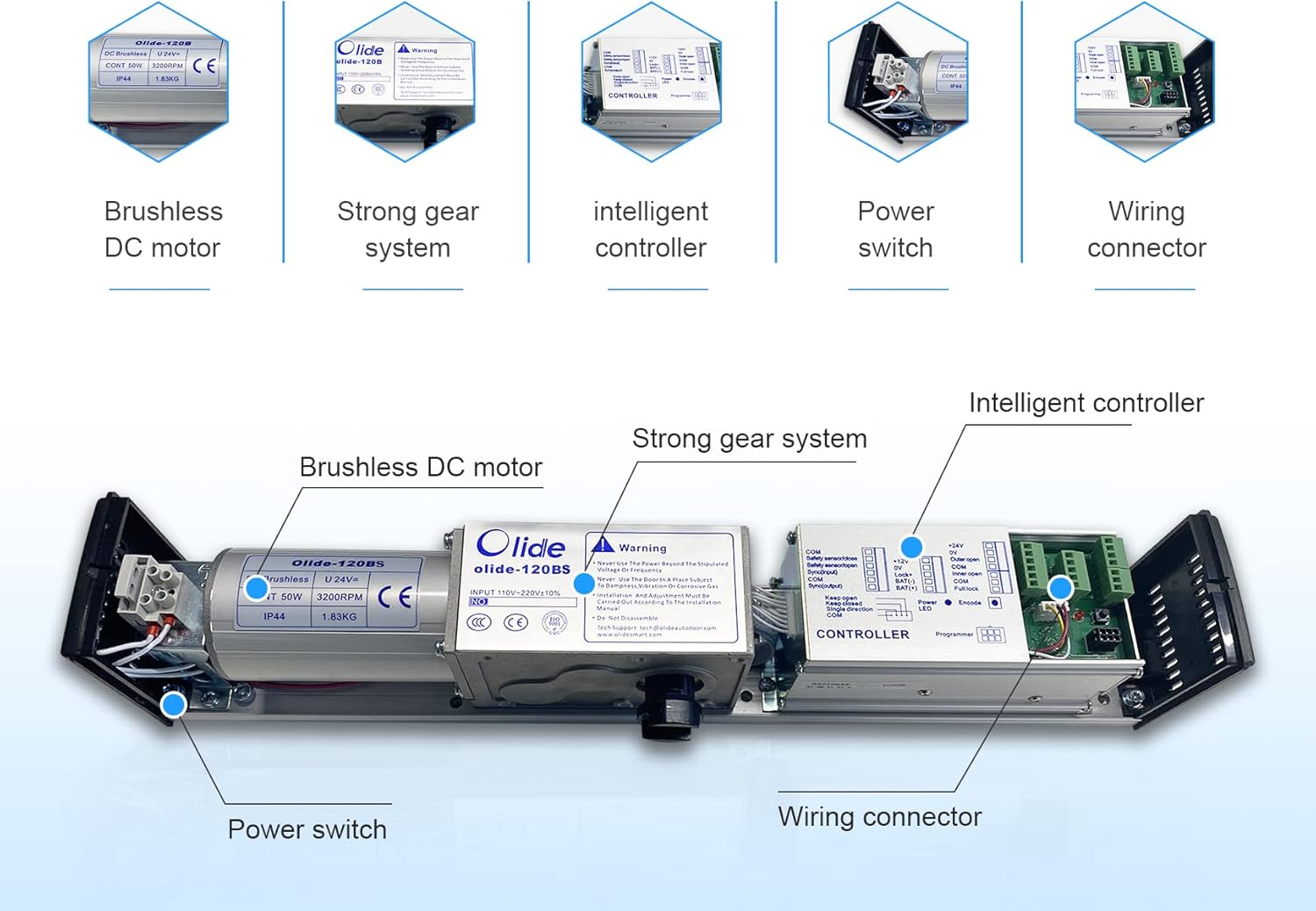
Image: Detailed view of the internal components of the Olide-120B opener.

Image: Dimensions of the wireless push panel and the OlideSmart wireless receiver controller (Model Olide-510FW).

Image: Features of the OlideSmart wireless receiver controller, including WiFi and learning buttons.
4. Installation
Proper installation is crucial for the safe and efficient operation of your automatic door opener. It is recommended to consult the detailed installation guide provided with your product or seek professional assistance.
General Installation Steps:
- Determine Door Type: Identify if your door is inswing (opens inward) or outswing (opens outward) to select the correct mounting configuration.
- Mount the Opener: Securely attach the main opener unit to the door frame or wall above the door, ensuring it is level and aligned.
- Install the Arm: Connect the appropriate arm (push or pull) to the opener and the door, adjusting for proper leverage and movement.
- Electrical Connection: Connect the power supply to the opener. Ensure all wiring is done according to local electrical codes.
- Install Wireless Components: Mount the wireless push panels in desired locations using the adhesive backing.
- Initial Testing: Perform initial tests to ensure the door opens and closes smoothly without obstruction.

Image: Examples of outswing (pull open) and inswing (push open) door configurations.
Installation Videos:
Video: Demonstrates the upside-down installation of the Olideauto swing door opener 120B.
Video: Shows the automatic door opener in an inswing push open configuration for an exterior home door.
5. Setup
After physical installation, configure the smart features of your Olideauto door opener.
5.1. Wireless Push Panel Pairing
- Ensure the wireless receiver controller (Olide-510FW) is powered on.
- Press the "LEARN" button on the receiver. The indicator light will turn green.
- Press the wireless push panel. The receiver's indicator will flash, confirming successful pairing.
- Repeat for additional push panels or fob keys.
5.2. Smart WiFi and App Setup
- Download the designated smartphone application (e.g., Smart Life App) from your device's app store.
- Register or log in to your account.
- Ensure your smartphone is connected to a 2.4GHz Wi-Fi network.
- In the app, select "Add Device" and follow the on-screen instructions to connect the Olide-510FW wireless receiver. This typically involves putting the receiver into pairing mode (often by pressing and holding the WiFi learn button).
- Once connected, you can control the door opener via the app.
5.3. Voice Assistant Integration (Alexa, Google Assistant, Siri)
- Ensure your Olide-120B is successfully connected to the smartphone app.
- Open the Amazon Alexa, Google Home, or Apple Home app on your smartphone.
- Enable the skill or service for the smart home app you used (e.g., "Smart Life").
- Discover devices. Your door opener should appear as a controllable device.
- Assign a name to your door (e.g., "Front Door") for easy voice commands.
Video: Demonstrates remote control of the smart WiFi auto door opener using a phone application.
Video: Illustrates the automatic smart WiFi door opener's compatibility with Alexa voice commands.
Video: Shows the automatic door opener's WiFi receiver and its compatibility with Alexa.
6. Operation
The Olideauto Automatic Swing Door Opener offers multiple ways to operate your door:
6.1. Using Wireless Push Panels/Fob Keys
- Simply press the wireless push panel or the button on the fob key to activate the door opener. The door will open, remain open for the set hold-open time, and then close automatically.
6.2. Using the Smartphone App
- Open the connected smartphone app.
- Tap the designated button for your door opener to open or close the door remotely.
6.3. Using Voice Commands
- Activate your voice assistant (e.g., "Alexa," "Hey Google," "Hey Siri").
- Issue a command such as "Open [Door Name]" or "Close [Door Name]."
6.4. Manual Operation (Push-Go Function)
- In manual mode, the door can be opened with minimal pressure. The opener will then assist in opening the door fully and close it slowly, providing easy operation for pedestrians or those with disabilities.
6.5. Hold Open Function
- The hold-open time can be adjusted using the handheld programmer. This allows the door to remain open for a specified duration before automatically closing.
Video: Demonstrates the wireless remote operation of the electric automatic swing door opener.
Video: Shows how to set the Olide-120B automatic door opener to hold the door open for an extended period.
Video: Illustrates the manual push-open functionality of the Olide-120B auto door opener.
Video: Demonstrates the automatic electric swinging door operation, suitable for handicap access.
7. Programming Parameters
The Olide-120B door opener's operational parameters can be customized using the provided handheld programmer. This allows fine-tuning of the door's behavior to suit specific needs.

Image: Handheld programmer for adjusting door opener settings.
Adjustable Parameters Include:
- Opening and Closing Speeds: Control how quickly the door opens and closes.
- Manual Open Force (Push-Go Function): Adjust the sensitivity for manual initiation of door opening.
- Opening Direction: Configure for inswing or outswing operation.
- Hold-On Open Time: Set the duration the door remains open before closing.
- Lock Modes: Options for power-on lock and power-off lock functionality.
Refer to the detailed programmer manual for specific instructions on navigating menus and adjusting each parameter.
8. Maintenance
Regular maintenance ensures the longevity and optimal performance of your Olideauto Automatic Swing Door Opener.
- Cleaning: Periodically wipe down the exterior of the opener and door surfaces with a soft, damp cloth. Avoid abrasive cleaners or solvents.
- Inspection: Annually check all mounting screws and connections for tightness. Ensure the door arm moves freely and is not obstructed.
- Sensor Check: Test the automatic re-open safety feature regularly by placing an object in the door's closing path. The door should reverse direction.
- Power Supply: Ensure the power cable is free from damage and securely connected.
- Battery Replacement (if applicable): If your remote controls or wireless push panels use batteries, replace them as needed to ensure reliable operation.
9. Troubleshooting
If you encounter issues with your door opener, refer to the following common troubleshooting steps:
Common Issues and Solutions:
- Door Not Responding to Commands:
- Check if the opener has power.
- Ensure wireless push panels/remotes are paired and have working batteries.
- Verify Wi-Fi connectivity for app/voice control.
- Check if the door is physically obstructed.
- Door Opens/Closes Partially:
- Inspect for physical obstructions in the door's path or hinges.
- Check programming parameters for opening/closing limits and speeds.
- Door Reverses Unexpectedly:
- Ensure there are no objects triggering the safety reversal mechanism.
- Clean any sensors if present (though this model primarily uses obstruction detection).
- No Wi-Fi Connection:
- Confirm your router is broadcasting a 2.4GHz network.
- Ensure the Wi-Fi receiver is within range of your router.
- Attempt to re-pair the Wi-Fi receiver with the app.
If these steps do not resolve the issue, please contact Olideauto technical support.
10. Specifications
| Parameter | Value |
|---|---|
| Model | Olide-120B |
| Swing Application | One-way inswing or outswing open, single leaf and double leaf standard doors |
| Voltage | 110-220 VAC +/-10% |
| Motor | DC 24V brushless motor |
| Power Consumption | 50W |
| Opening Time | 3-7 sec. @ 90 degrees |
| Hold Open Time | 1-30 sec. (Adjustable) |
| Max. Door Frame Depth | 200mm / 7.87" (with push arm) |
| Door Width | Max. 1200mm / 47.2" Min. 660mm / 26" |
| Max. Opening Angle | 120 degrees |
| Environment Temperature | -20°C to 50°C (-4°F to 122°F) |
| Operation Noise | Less than 55db |
| Opener Dimensions (L x W x H) | 21.45" x 3.35" x 3.74" (545mm x 85mm x 95mm) |
| Opener Weight | 11kg / 24 LBS |
| Material | KIT 2 (as per product data) |
| Exterior Finish | Silver |
| Smart Home Compatibility | Siri, Alexa, Google Assistant, Phone App |

Image: Dimensional drawing of the Olideauto Automatic Swing Door Opener.
11. Warranty and Support
Warranty Information:
The Olideauto Automatic Swing Door Opener (Model Olide-120B) comes with a 60-month product warranty. Please retain your proof of purchase for warranty claims.
Technical Support:
USA Technical phone support is available for assistance with installation, setup, and troubleshooting. For support, please refer to the contact information provided in your product packaging or on the official Olideauto website.
For further information or to explore other products, visit the Olideauto Store.

