
POCREATION WVC 1200
POCREATION WVC-1200 Micro Inverter User Manual
Model: WVC-1200
1. Product Overview
The POCREATION WVC-1200 Micro Inverter is a high-efficiency device designed for photovoltaic power generation systems. It converts direct current (DC) from solar panels into alternating current (AC) for household and outdoor use, integrating seamlessly with the power grid. This micro inverter features high-accuracy voltage induction microgrid mode and supports multiple units stacked in parallel for adaptive global voltage frequency.

Figure 1: Top view of the WVC-1200 Micro Inverter.

Figure 2: Angled view of the WVC-1200 Micro Inverter with specifications.
2. What's in the Box
The package for your POCREATION WVC-1200 Micro Inverter includes the following components:
- 1 x Micro Inverter (WVC-1200)
- 1 x AC Cable
- 1 x English Manual (this document)
- 2 x Accessory Kit (containing 4 x Screws, 4 x Nuts, and 8 x additional accessories for mounting)

Figure 3: Package contents of the WVC-1200 Micro Inverter.

Figure 4: Included AC Cable.

Figure 5: Accessory Kit components (screws and nuts).
3. Installation Guide
Proper installation is crucial for the safe and efficient operation of your WVC-1200 Micro Inverter. Please follow these steps carefully. It is recommended that installation be performed by a qualified professional.
3.1. System Diagram
The following diagram illustrates a typical setup for the WVC-1200 Micro Inverter within a photovoltaic power generation system.

Figure 6: Appearance description and accessories of the micro inverter.

Figure 7: Example of WVC-1200 Micro Inverter installation on a roof.
Video 1: An overview of the Micro Inverter Sine Wave Solar system, demonstrating its functionality and potential applications.
3.2. Installation Steps
- Step 1: Mount the Inverter. Install the inverter on the bracket of the photovoltaic panel using the screws provided in the accessory kit. Ensure it is securely fastened.
- Step 2: Connect DC Input. Connect the positive and negative poles of the DC connection MC4 plug from the photovoltaic panel to the DC input terminal of the inverter. Ensure correct polarity.
- Step 3: Connect AC Output. Open the waterproof cover of the AC output connector of the inverter and connect the AC cable to the AC waterproof plug. The connection method is shown in the plug connection diagram (refer to Figure 6 for visual guidance).
- Step 4: System Integration. Connect the AC output of the micro inverter to your household grid or power distribution system. Ensure all connections are secure and meet local electrical codes.
For detailed visual instructions on connections, refer to the "Appearance description of micro inverter" diagram (Figure 6).
4. Operating Instructions
Once installed, the WVC-1200 Micro Inverter operates largely automatically. It is designed to convert DC power from your solar panels into AC power for your home or the grid.
- Automatic Operation: The inverter will automatically begin converting power when sufficient DC input from the solar panels is detected and the grid connection is stable.
- Status Indicator: The inverter features a status indicator light (refer to Figure 6) that provides visual feedback on its operational status. Consult the full English manual for specific light patterns and their meanings.
- Monitoring: For advanced monitoring, the system can be integrated with an APP and KDM Cloud Server via a WiFi Modem and Router, as shown in the system diagram (refer to Figure 6). This allows for real-time performance tracking.
5. Maintenance
The POCREATION WVC-1200 Micro Inverter is designed for minimal maintenance. However, regular checks can ensure optimal performance and longevity.
- Cleaning: Periodically clean the exterior of the inverter to remove dust, dirt, or debris that may accumulate. Use a soft, dry cloth. Do not use abrasive cleaners or solvents.
- Connection Checks: Annually inspect all electrical connections (DC input, AC output, grounding) to ensure they are secure and free from corrosion.
- Ventilation: Ensure that the inverter's ventilation fins are not obstructed to allow for proper heat dissipation.
- Professional Inspection: It is recommended to have a qualified electrician inspect the entire solar power system, including the inverter, every few years.
Warning: Do not attempt to open the inverter casing. There are no user-serviceable parts inside. Opening the casing will void the warranty and may expose you to dangerous electrical components.
6. Troubleshooting
This section provides basic troubleshooting steps for common issues. For more complex problems, contact customer support.
| Problem | Possible Cause | Solution |
|---|---|---|
| No Power Output |
|
|
| Status Indicator Light Off |
|
|
| Reduced Power Output |
|
|
7. Specifications
Detailed technical specifications for the POCREATION WVC-1200 Micro Inverter:
| Parameter | Value |
|---|---|
| Model | WVC-1200 |
| Item Type | Micro Inverter |
| Material | Aluminum Alloy + Electronic Components |
| Maximum Input Power | 1200W |
| Product Use | Generation Equipment |
| Applicable Scenarios | System (Roof, Outdoor) |
| Weight | Approx. 3675g / 129.6oz (7.98 pounds) |
| Product Size (L x W x H) | Approx. 370x300x41.6mm / 14.6x11.8x1.6in |
| Power Source | Solar Powered |
| Recommended Uses | Outdoor, Household appliances |
| Manufacturer | POCREATION |
| Country of Origin | China |
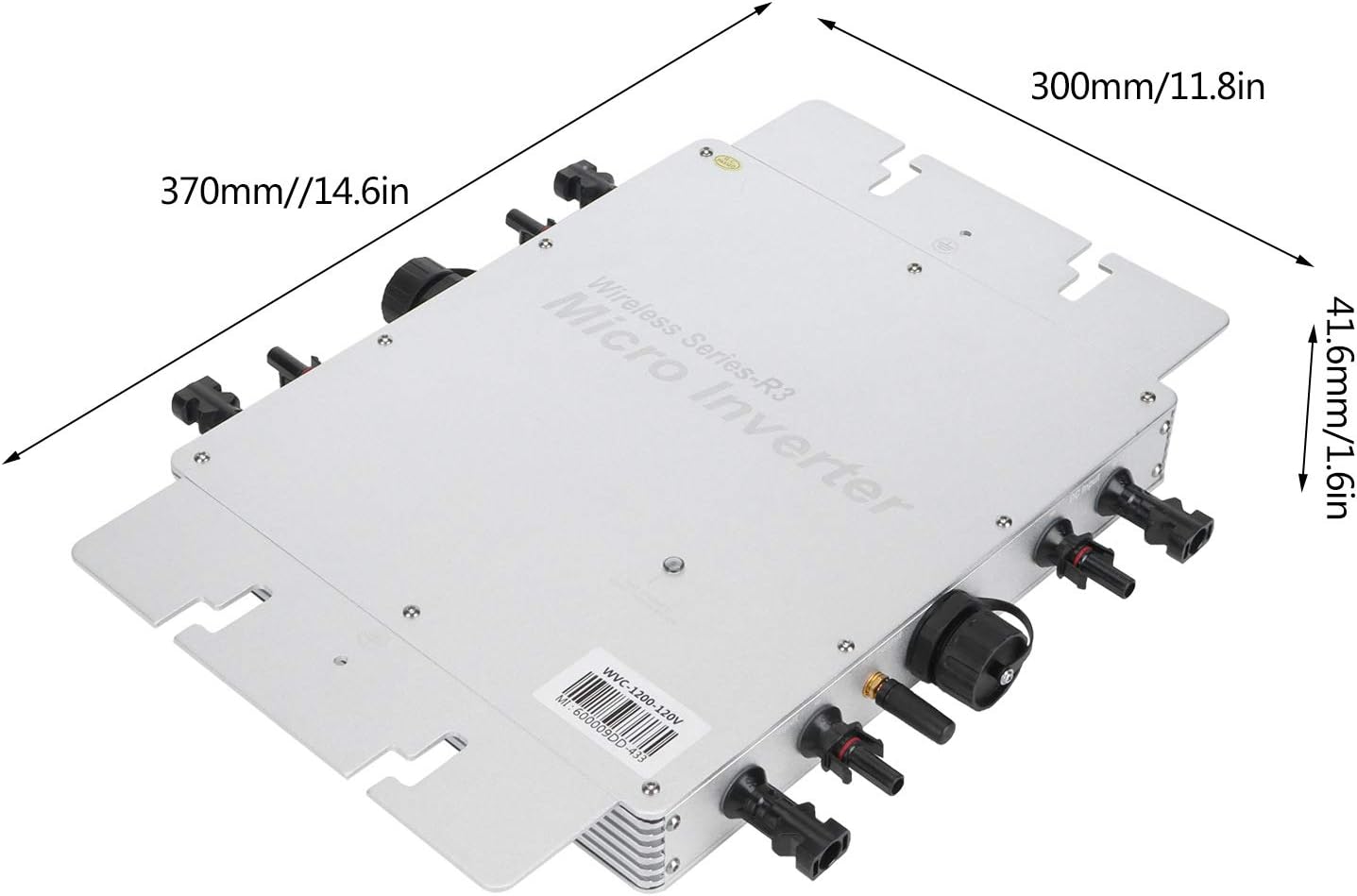
Figure 8: Dimensions of the WVC-1200 Micro Inverter.
8. Warranty and Support
For warranty information and technical support, please refer to the official POCREATION website or contact your point of purchase. Keep your purchase receipt as proof of purchase for warranty claims.
Customer Service: For any questions, troubleshooting assistance beyond this manual, or warranty claims, please contact POCREATION customer support through their official channels. Contact details are typically found on the product packaging or the manufacturer's website.
Ask a question about this manual
Ask about setup, troubleshooting, compatibility, parts, safety, or missing instructions. Manuals+ will review the question and use this page’s manual context to help answer it.