Introduction
This manual provides detailed instructions for the operation and maintenance of your Casio W736H Series Digital Watch, model W-736H-5AV. Please read this manual thoroughly to ensure proper use and to fully utilize all features of your watch. Keep this manual for future reference.
Product Overview
The Casio W736H Series Digital Watch is designed for durability and functionality, featuring a 1/100 second stopwatch, countdown timer, daily alarm with vibration, dual time, and a Super Illuminator LED light. It also boasts 100-meter water resistance and a 10-year battery life.
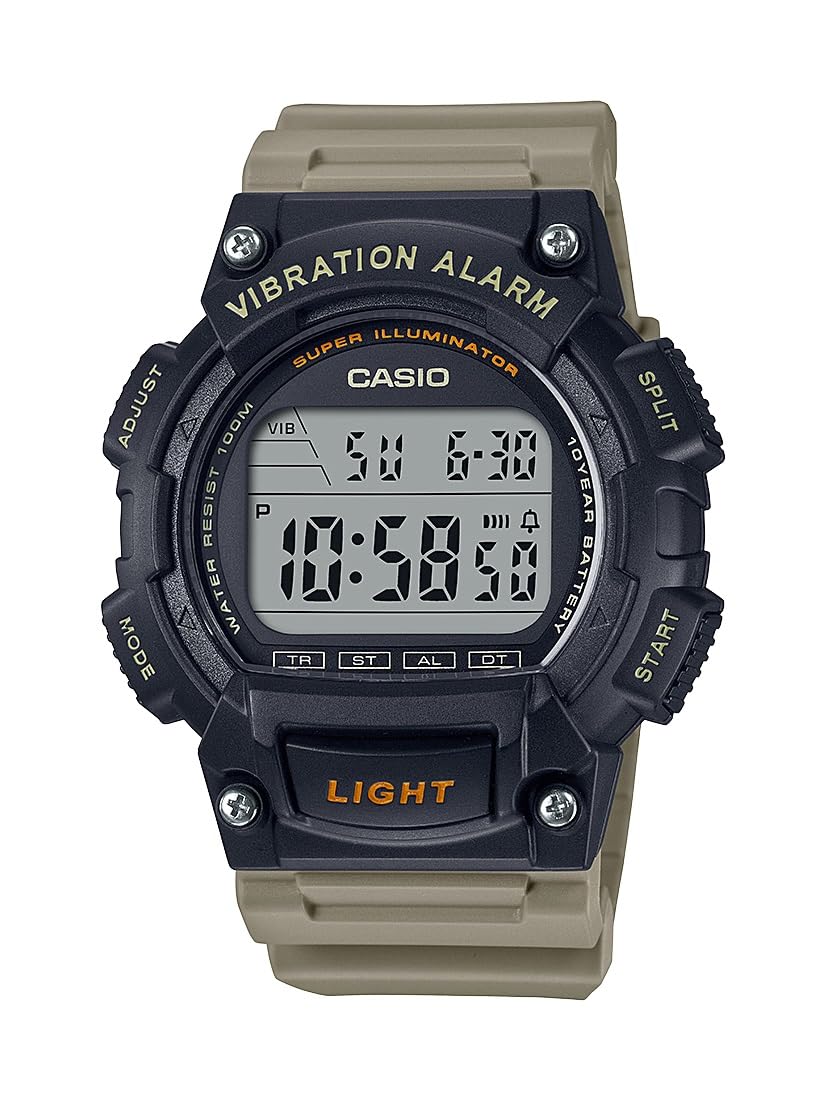
Image: Casio W736H Series Digital Watch, model W-736H-5AV. The watch features a digital display, four side buttons labeled 'ADJUST', 'MODE', 'SPLIT', 'START', and a front button labeled 'LIGHT'.
Button Functions
- ADJUST (Top Left): Used to enter and exit setting modes, and to confirm settings.
- MODE (Bottom Left): Cycles through different watch modes (Timekeeping, Stopwatch, Countdown Timer, Alarm, Dual Time).
- SPLIT / START (Top Right): In Stopwatch mode, used for split/lap timing. In other modes, may function as a start button or for value adjustment.
- START / RESET (Bottom Right): Used to start/stop functions or to reset values. Also used for value adjustment in setting modes.
- LIGHT (Front Bottom): Activates the Super Illuminator LED backlight.
Setup
Setting the Time and Date
- In Timekeeping Mode, press and hold the ADJUST button until the seconds begin to flash, indicating the setting screen.
- Press the MODE button to cycle through the settings in the following order: Seconds → DST (Daylight Saving Time) → Hour → Minute → Year → Month → Day.
- Use the START / RESET (Bottom Right) and SPLIT / START (Top Right) buttons to adjust the flashing value.
- START / RESET: Increases the value.
- SPLIT / START: Decreases the value (or cycles through options).
- Once all settings are configured, press the ADJUST button to exit the setting screen and return to Timekeeping Mode.
12/24-Hour Format
In Timekeeping Mode, press the START / RESET button to toggle between 12-hour and 24-hour time formats.
Operating Modes
Press the MODE button to cycle through the watch's various modes:
- Timekeeping Mode
- Stopwatch Mode (ST)
- Countdown Timer Mode (TR)
- Alarm Mode (AL)
- Dual Time Mode (DT)
Stopwatch Mode
The stopwatch measures elapsed time, split times, and two finishes.
- From Timekeeping Mode, press MODE until 'ST' appears on the display.
- Press START / RESET (Bottom Right) to start the stopwatch.
- Press START / RESET again to stop the stopwatch.
- To reset the stopwatch to zero, press SPLIT / START (Top Right) while it is stopped.
- For split times, press SPLIT / START while the stopwatch is running. The display will show the split time. Press SPLIT / START again to return to elapsed time measurement.
Countdown Timer Mode
The countdown timer can be set for a period from 1 minute to 24 hours.
- From Timekeeping Mode, press MODE until 'TR' appears on the display.
- Press and hold ADJUST until the hour setting flashes.
- Use START / RESET (Bottom Right) and SPLIT / START (Top Right) to set the desired countdown start time (hours and minutes).
- Press ADJUST to exit the setting screen.
- Press START / RESET to start the countdown.
- Press START / RESET again to pause the countdown. Press it once more to resume.
- To stop and reset the timer, press SPLIT / START while the timer is paused.
- When the countdown reaches zero, the watch will emit a vibration alarm.
Alarm Mode
The watch features a daily alarm with a vibration alert.
- From Timekeeping Mode, press MODE until 'AL' appears on the display.
- Press and hold ADJUST until the hour setting flashes.
- Use START / RESET (Bottom Right) and SPLIT / START (Top Right) to set the alarm hour and minute.
- Press ADJUST to exit the setting screen.
- In Alarm Mode, press START / RESET to toggle the alarm ON/OFF. An alarm indicator will appear when the alarm is active.
- To stop the alarm once it sounds/vibrates, press any button.
Dual Time Mode
This mode allows you to keep track of a second time zone.
- From Timekeeping Mode, press MODE until 'DT' appears on the display.
- Press and hold ADJUST until the hour setting flashes.
- Use START / RESET (Bottom Right) and SPLIT / START (Top Right) to set the desired hour and minute for the second time zone.
- Press ADJUST to exit the setting screen.
Super Illuminator LED Light
The Super Illuminator LED light provides illumination for the display in low-light conditions.
- Press the LIGHT button (front bottom) to illuminate the display.
- The illumination duration is preset and cannot be adjusted.
Maintenance
Battery Information

Image: A gold and black emblem indicating '10 Year Battery Life'.
This watch is equipped with a long-life battery, designed to last approximately 10 years under normal use. When the display becomes dim or the light function weakens, it indicates that the battery power is low. Battery replacement should be performed by a qualified watch technician to ensure water resistance is maintained.
Water Resistance
The watch is rated for 100-meter water resistance. This means it is suitable for swimming, showering, and snorkeling. However, it is not suitable for scuba diving. Do not operate buttons while the watch is wet or submerged in water, as this can compromise the water resistance.
Cleaning
Wipe the watch case and band with a soft, dry cloth to remove dirt and moisture. For resin bands, a mild soap solution and water can be used, followed by thorough rinsing and drying. Avoid using harsh chemicals or abrasive cleaners.
Troubleshooting
- Display is blank or dim: The battery may be low. Consider professional battery replacement.
- Time is incorrect: Re-adjust the time and date settings as described in the 'Setup' section. Ensure DST (Daylight Saving Time) is correctly set if applicable.
- Alarm not working: Check if the alarm is activated in Alarm Mode. Ensure the volume/vibration setting is enabled.
- Buttons are unresponsive: Ensure the watch is not wet. If the issue persists, a reset may be required (consult a service center), or there might be an internal malfunction.
If problems persist after attempting these solutions, please contact a Casio service center for assistance.
Specifications
- Model Number: W-736H-5AV
- Module: (Not specified in provided data, typically a 4-digit number)
- Water Resistance: 100 meters (10 BAR)
- Battery Life: Approximately 10 years (CR2032 Lithium Metal battery)
- Accuracy: ±30 seconds per month (average)
- Timekeeping: Hour, minute, second, p.m., month, date, day
- Calendar System: Full auto-calendar (to year 2099)
- Stopwatch: 1/100-second; measuring capacity: 23:59'59.99''; measuring modes: elapsed time, split time, 1st-2nd place times
- Countdown Timer: Measuring unit: 1 second; countdown range: 24 hours; countdown start time setting range: 1 minute to 24 hours (1-minute increments and 1-hour increments)
- Alarm: Daily alarm with vibration alert
- Dual Time: Yes
- Illumination: Super Illuminator LED backlight
- Dimensions: 6 x 6 x 4 inches (Product Dimensions as packaged)
- Weight: 3.84 ounces (Product Weight as packaged)
Warranty and Support
For warranty information, service, or additional support, please refer to the official Casio website or contact your local authorized Casio dealer. Keep your proof of purchase for warranty claims.
Official Casio Website: www.casio.com


