
1. Introduction
Thank you for purchasing the SYLVANIA SP962-B Rechargeable Bluetooth Party Speaker. This manual provides essential information for the safe and efficient operation of your device. Please read it thoroughly before use and retain it for future reference.
2. Safety Information
- Do not expose the speaker to water or excessive moisture. This product is not waterproof.
- Avoid placing the speaker near heat sources such as radiators, heat registers, stoves, or other apparatus (including amplifiers) that produce heat.
- Use only attachments/accessories specified by the manufacturer.
- Unplug this apparatus during lightning storms or when unused for long periods of time.
- Do not attempt to service this product yourself. Refer all servicing to qualified service personnel.
- Keep out of reach of children.
3. Package Contents
Please check that all items are present:
- SYLVANIA SP962-B Speaker
- USB Charging Cable
- User Manual (this document)
4. Product Overview
Familiarize yourself with the speaker's controls and ports.
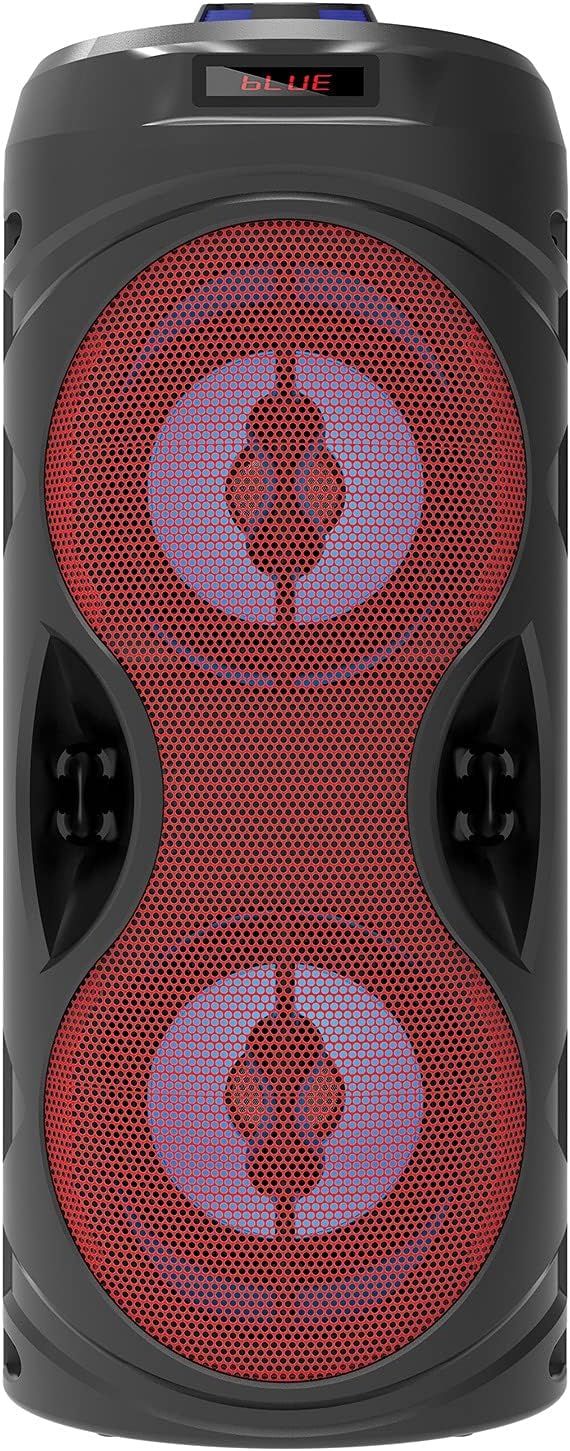
Figure 4.1: Front view of the SYLVANIA SP962-B speaker, showcasing the dual 4-inch woofers with red grilles and the top display indicating 'BLUE' for Bluetooth mode.

Figure 4.2: Top control panel of the speaker, featuring the microphone input, power switch, media control buttons, USB port, TF card slot, DC 5V/AUX input, and a volume/mode knob with integrated light.
Control Panel Functions:
- MIC Input: Connect an external microphone (not included).
- ON/OFF Switch: Powers the speaker on or off.
- Previous Track/Rewind: Short press for previous track, long press to rewind.
- Play/Pause: Play or pause audio. In FM mode, short press to auto-scan.
- Next Track/Fast Forward: Short press for next track, long press to fast forward.
- MODE Button: Switches between Bluetooth, FM Radio, USB, TF Card, and AUX input modes.
- USB Port: For USB flash drive playback.
- TF Card Slot: For TF (MicroSD) card playback.
- DC 5V/AUX Input: Connect the USB charging cable or an external audio device via AUX cable.
- Volume Knob: Rotate to adjust volume. Press to change light modes.
5. Setup
5.1 Charging the Speaker
- Locate the USB charging cable included in the package.
- Connect the small end of the USB cable to the DC 5V/AUX Input port on the speaker.
- Connect the larger end of the USB cable to a standard USB power adapter (e.g., smartphone charger, computer USB port) or a power bank.
- The charging indicator light (if present) will illuminate, typically red, during charging and turn off or change color when fully charged.
- A full charge typically takes 3-4 hours.
Note: Ensure the speaker is fully charged before first use for optimal battery life.
5.2 Powering On/Off
- To power on, slide the ON/OFF Switch to the 'ON' position. The display will light up.
- To power off, slide the ON/OFF Switch to the 'OFF' position.
6. Operating Instructions
6.1 Bluetooth Pairing
- Power on the speaker. It will automatically enter Bluetooth pairing mode, indicated by a flashing 'BLUE' on the display and an audible prompt.
- On your Bluetooth-enabled device (smartphone, tablet, laptop), go to the Bluetooth settings and enable Bluetooth.
- Search for available devices. You should see "SYLVANIA SP962-B" or a similar name in the list.
- Select "SYLVANIA SP962-B" to connect. Once paired, the speaker will emit an audible confirmation, and 'BLUE' on the display will stop flashing.
- You can now play audio from your device through the speaker.
Note: The effective Bluetooth range is approximately 30 feet (9 meters). Obstacles may reduce this range.
6.2 FM Radio Mode
- Power on the speaker. Press the MODE Button repeatedly until "FM" appears on the display.
- To auto-scan and save available FM stations, short press the Play/Pause Button. The speaker will scan and store stations automatically.
- Use the Previous Track and Next Track buttons to navigate between saved stations.
6.3 USB/TF Card Playback
- Insert a USB flash drive into the USB Port or a TF (MicroSD) card into the TF Card Slot.
- The speaker will automatically switch to USB or TF card mode and begin playing audio files. If it doesn't, press the MODE Button until "USB" or "TF" appears.
- Use the Previous Track, Play/Pause, and Next Track buttons to control playback.
Note: Ensure audio files are in a compatible format (e.g., MP3).
6.4 AUX Input Mode
- Connect one end of a 3.5mm audio cable (not included) to the DC 5V/AUX Input port on the speaker.
- Connect the other end of the audio cable to the headphone jack or audio output of your external device (e.g., MP3 player, computer).
- Press the MODE Button repeatedly until "LINE" or "AUX" appears on the display.
- Control playback from your external device. The speaker's volume knob will still adjust the output volume.
6.5 Light Modes
The speaker features dynamic light-up effects. To cycle through different light modes or turn them off, short press the Volume Knob.
7. Maintenance
- Clean the speaker with a soft, dry cloth. Do not use liquid cleaners or aerosols.
- Store the speaker in a cool, dry place when not in use for extended periods.
- Avoid dropping the speaker or subjecting it to strong impacts.
8. Troubleshooting
| Problem | Possible Solution |
|---|---|
| No power | Ensure the speaker is charged. Connect the USB charging cable and allow it to charge for a few hours. Check the power switch is in the 'ON' position. |
| No sound | Increase the volume on both the speaker and your connected device. Ensure the correct mode (Bluetooth, FM, USB, AUX) is selected. Check audio cables for secure connection in AUX mode. |
| Bluetooth not connecting | Ensure the speaker is in Bluetooth mode. Turn off and on Bluetooth on your device. Move your device closer to the speaker. Forget the device from your Bluetooth list and try pairing again. |
| FM radio static | Relocate the speaker to an area with better reception. Perform an auto-scan again to find stronger signals. |
9. Specifications
| Feature | Detail |
|---|---|
| Model | SP962-B |
| Brand | SYLVANIA |
| Output Power | 10 Watts (5W x 2 RMS) |
| Frequency Response | 100 Hz to 20 kHz |
| Woofer Size | Dual 4-inch |
| Connectivity | Bluetooth, USB, TF Card, AUX |
| Bluetooth Range | Up to 30 ft (9 meters) |
| Power Source | Battery Powered (Lithium Ion) |
| Included Components | USB charging cable |
| Product Dimensions | 16.26 x 16.26 x 39.37 cm |
| Weight | 1.39 kg |
10. Warranty and Support
This product comes with a Limited Warranty. For specific warranty terms and conditions, please refer to the warranty card included with your purchase or contact SYLVANIA customer support.
For technical support or service inquiries, please visit the official SYLVANIA website or contact their customer service department. Keep your purchase receipt as proof of purchase for warranty claims.

