
1. Introduction
Thank you for purchasing the REMAX RP-W16 Wireless Fast Charger. This device is designed to provide convenient and efficient wireless charging for compatible mobile phones. Please read this manual carefully before use to ensure proper operation and to maximize the lifespan of your product.
2. Important Safety Information
- Do not expose the charger to water, moisture, or extreme temperatures.
- Avoid dropping or subjecting the charger to strong impacts.
- Do not disassemble, modify, or attempt to repair the device yourself. This will void the warranty and may cause damage or injury.
- Keep the charger away from medical implants (e.g., pacemakers) to prevent potential interference.
- Use only certified power adapters (not included) that meet the input voltage requirements (e.g., 9V) to ensure safe and efficient charging.
- Do not place metal objects, credit cards, or other foreign materials between the charging pad and your device, as this may interfere with charging or cause overheating.
- Ensure the charging pad is placed on a stable, flat surface.
3. Package Contents
Please check the package for the following items:
- REMAX RP-W16 Wireless Fast Charger
- USB Charging Cable (Type-C or Micro-USB, depending on model variant)
- User Manual (this document)
Note: A power adapter is not included and must be purchased separately. For fast charging, a Quick Charge (QC) 2.0/3.0 or Power Delivery (PD) compatible adapter is recommended.
4. Product Overview
The REMAX RP-W16 is a compact and stylish wireless charging pad designed for convenience and fast charging. Its features include:
- 10W High Power Output: Provides efficient and fast wireless charging.
- Upgraded Pure Copper Coil: Enhances charging speed by up to 50% for quicker power delivery.
- Optimal Charging Distance: Supports wireless charging through cases with a sensing distance of 3-8mm.
- Durable and Stylish Design: Features an aluminum base with a fabric surface, offering a simple yet elegant aesthetic.
- Compact and Portable: Palm-sized design makes it easy to carry.
- Anti-Skid Foot Pads: Four non-slip pads on the base prevent the charger from sliding, even during phone vibrations.
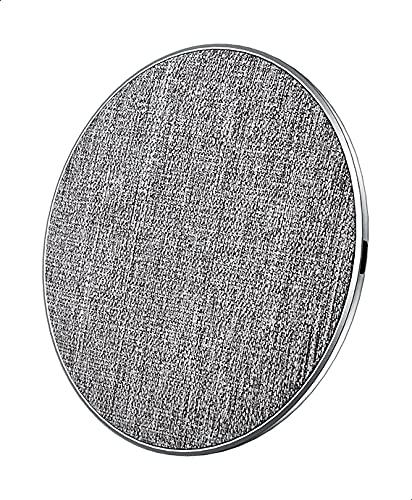
Figure 1: REMAX RP-W16 Wireless Fast Charger in use. The image displays the circular charging pad with a fabric top, an aluminum base, and a smartphone placed on it, indicating active charging. The charger's compact size and anti-skid pads are visible.
5. Setup Instructions
- Connect the Power Cable: Insert one end of the provided USB charging cable into the charging port on the REMAX RP-W16 wireless charger.
- Connect to Power Adapter: Insert the other end of the USB cable into a compatible USB power adapter (e.g., a Quick Charge 2.0/3.0 or Power Delivery adapter for fast charging).
- Plug into Power Outlet: Plug the power adapter into a wall outlet. The charger's indicator light (if present) may illuminate briefly to confirm it is powered on.
- Placement: Place the wireless charger on a flat, stable surface, ensuring there are no metal objects or foreign materials nearby.
6. Operating Instructions
- Verify Compatibility: Ensure your mobile phone supports Qi wireless charging.
- Place Device on Charger: Carefully place your Qi-compatible mobile phone directly onto the center of the REMAX RP-W16 wireless charging pad.
- Confirm Charging: Your phone should display a charging indicator (e.g., a battery icon with a lightning bolt or a charging animation). The charger's indicator light (if present) may also change color or blink to indicate active charging.
- Optimal Placement: If charging does not begin immediately, slightly adjust the position of your phone on the pad until the charging indicator appears.
- Charging with Case: The charger supports charging through most non-metallic phone cases up to 8mm thick. Remove cases containing metal or magnetic attachments, as these can interfere with wireless charging.
- Charging Complete: Once your device is fully charged, it will stop drawing power from the wireless charger. You can remove your phone at any time.
7. Maintenance and Care
- Cleaning: Disconnect the charger from the power source before cleaning. Use a soft, dry cloth to wipe the surface. Do not use harsh chemicals, cleaning solvents, or strong detergents.
- Storage: When not in use, store the charger in a cool, dry place away from direct sunlight and extreme temperatures.
- Handling: Handle the charger with care. Avoid dropping it or placing heavy objects on it.
8. Troubleshooting
| Problem | Possible Cause | Solution |
|---|---|---|
| Device not charging wirelessly. |
|
|
| Slow charging. |
|
|
| Charger indicator light blinking or off. |
|
|
9. Specifications
| Model | RP-W16 |
| Brand | REMAX |
| Input Voltage | 9V (Requires compatible power adapter) |
| Output Power | 10W |
| Charging Ports | 1 (Wireless) |
| Transmission Distance | 3-8 mm |
| Compatible Devices | Cellular Phones (Qi-compatible) |
| Special Features | Fast Charging |
| Compliant Standards | CE |
| Mounting Type | Desktop / Surface Placement |
| Material | Aluminum base, Fabric surface |
| Origin | Made in China |
10. Warranty and Customer Support
REMAX products are designed and manufactured to the highest quality standards. For information regarding warranty coverage, please refer to the warranty card included with your purchase or visit the official REMAX website.
If you encounter any issues or have questions about your REMAX RP-W16 Wireless Fast Charger, please contact REMAX customer support through their official channels. Please have your product model number (RP-W16) and proof of purchase ready when contacting support.


