
Introduction
Thank you for choosing the Technivorm Moccamaster KBGV Select 10-Cup Coffee Maker. This manual provides essential information for the safe and efficient operation, maintenance, and care of your new coffee maker. Please read all instructions carefully before first use and retain this manual for future reference.

Image: Technivorm Moccamaster KBGV Select 10-Cup Coffee Maker in Polished Silver, ready for use on a kitchen counter.
Important Safety Instructions
- Read all instructions before operating the appliance.
- Do not touch hot surfaces. Use handles or knobs.
- To protect against fire, electric shock, and injury to persons, do not immerse cord, plugs, or appliance in water or other liquid.
- Close supervision is necessary when any appliance is used by or near children.
- Unplug from outlet when not in use and before cleaning. Allow to cool before putting on or taking off parts, and before cleaning the appliance.
- Do not operate any appliance with a damaged cord or plug or after the appliance malfunctions or has been damaged in any manner.
- The use of accessory attachments not recommended by the appliance manufacturer may result in fire, electric shock, or injury to persons.
- Do not use outdoors.
- Do not let cord hang over edge of table or counter, or touch hot surfaces.
- Do not place on or near a hot gas or electric burner, or in a heated oven.
- Always attach plug to appliance first, then plug cord into the wall outlet. To disconnect, turn any control to “off,” then remove plug from wall outlet.
- Do not use appliance for other than intended use.
- The carafe is designed for use with this appliance. It must never be used on a range top.
- Do not place a hot carafe on a cold or wet surface.
- Do not use a cracked carafe or a carafe having a loose or weakened handle.
- Do not clean carafe with cleansers, steel wool pads, or other abrasive material.
Product Overview
The Technivorm Moccamaster KBGV Select is designed to brew coffee to the golden cup standard, ensuring optimal flavor and aroma. Key features include a selector switch for half or full carafe brewing, an automatic drip-stop brew basket, and a hotplate that maintains ideal coffee temperature.

Image: Diagram illustrating the components of the KBGV Select Coffee Brewer, including the water reservoir, brew basket, glass carafe, hotplate, and control switches.
Key Components:
- Water Reservoir: Clearly marked for easy filling up to 10 cups (40 oz / 1.25 L).
- Brew Basket: Cone-shaped design for optimal coffee extraction, featuring an automatic drip-stop.
- Glass Carafe: Holds up to 10 cups of brewed coffee.
- Hotplate: Independent heating element to keep coffee warm at an ideal temperature.
- Selector Switch: Allows selection between brewing a half or full carafe, adjusting brewing speed and hotplate temperature.
- Power Switch: On/Off control for the coffee maker.
- Copper Boiling Element: Rapidly heats water to 196°F - 205°F and automatically shuts off when the reservoir is empty.
Setup
- Unpacking: Carefully remove all packaging materials and inspect the coffee maker for any damage.
- Initial Cleaning: Before first use, wash the glass carafe, brew basket, and lids with warm, soapy water. Rinse thoroughly. Wipe the exterior of the coffee maker with a damp cloth.
- Placement: Place the coffee maker on a flat, stable, heat-resistant surface, away from water sources and heat. Ensure adequate ventilation.
- First Brew Cycle (Water Only):
- Fill the water reservoir to the maximum level with fresh, cold water.
- Place an empty paper filter (#4 cone filter) in the brew basket.
- Ensure the brew basket is correctly seated and the glass carafe is in place on the hotplate.
- Turn on the coffee maker using the power switch. Allow the full cycle to complete.
- Discard the water. This process cleans the internal components and prepares the machine for brewing. Repeat this step 2-3 times.

Image: A close-up view of the water distribution arm, showing the multiple outlets for even water dispersion over coffee grounds.
Operating Instructions
- Add Water: Fill the water reservoir with fresh, cold water to your desired level. The reservoir has markings for 1-10 cups (40 oz / 1.25 L).
- Insert Filter and Coffee Grounds: Place a #4 cone paper filter into the brew basket. Add your preferred amount of ground coffee. For optimal results, use approximately 55-60 grams of medium-coarse ground coffee per liter (10 cups).
- Position Brew Basket and Carafe: Ensure the brew basket is securely placed on its support and the glass carafe is centered on the hotplate beneath the brew basket.
- Select Brew Size: Use the selector switch to choose between a half carafe (for 2-6 cups) or a full carafe (for 7-10 cups). This adjusts the brewing speed and hotplate temperature for optimal extraction.
- Start Brewing: Press the power switch to turn on the coffee maker. The brewing process will begin automatically.
- Drip-Stop Feature: The brew basket features an automatic drip-stop that prevents coffee from dripping when the carafe is removed from the hotplate. This allows you to pour a cup mid-brew. Ensure the carafe is returned to the hotplate promptly to avoid overflow.
- Hotplate Function: After brewing, the hotplate will keep your coffee warm. The hotplate automatically shuts off after 100 minutes for safety and energy conservation.

Image: A detailed view of the power switch (left) and the half/full carafe selector switch (right) on the front of the coffee maker.
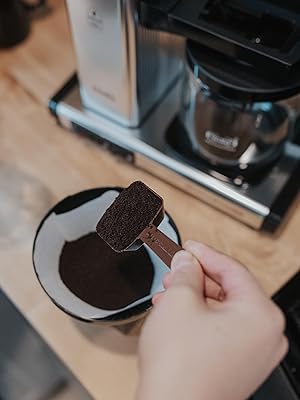
Image: A hand using a scoop to add ground coffee into a paper filter placed within the brew basket of the coffee maker.

Image: A hand carefully lifting the glass carafe from the hotplate, demonstrating the automatic drip-stop feature.
Maintenance
Daily Cleaning:
- After each use, discard the used coffee grounds and paper filter.
- Wash the brew basket, carafe, and lids with warm, soapy water. These parts are dishwasher safe.
- Wipe down the exterior of the coffee maker with a damp cloth. Do not use abrasive cleaners or immerse the main unit in water.
Descaling:
Regular descaling is crucial to maintain optimal performance and extend the lifespan of your coffee maker. Descale your Moccamaster every 3 months, or more frequently if you have hard water.
- Use a descaling solution specifically designed for coffee makers. Do not use vinegar, as it can damage the internal components and leave a residual odor.
- Follow the instructions provided with your descaling solution.
- Typically, this involves filling the water reservoir with the descaling solution and running a brew cycle without coffee grounds.
- After the descaling cycle, run 2-3 cycles with fresh, clean water to rinse the system thoroughly.
Troubleshooting
| Problem | Possible Cause | Solution |
|---|---|---|
| Coffee not brewing. | No power; water reservoir empty; brew basket not correctly placed. | Check power connection; fill water reservoir; ensure brew basket is properly seated. |
| Coffee tastes weak. | Insufficient coffee grounds; coffee too coarsely ground; descaling needed. | Increase coffee amount; use finer grind; descale the machine. |
| Coffee overflows brew basket. | Too much coffee grounds; filter clogged; carafe not on hotplate. | Reduce coffee amount; replace filter; ensure carafe is correctly positioned. |
| Brewing is slow. | Mineral buildup (scale). | Perform a descaling cycle. |
Specifications

Image: Technical drawing displaying the height (14"), width (12.75"), and depth (6.5") of the KBGV Select coffee maker.
| Feature | Detail |
|---|---|
| Brand | Technivorm Moccamaster |
| Model Name | KBGV Select |
| Model Number | 53941 |
| Capacity | 40 Fluid Ounces (1.25 Liters / 10 Cups) |
| Color | Polished Silver |
| Product Dimensions (D x W x H) | 6.5" x 12.75" x 14" |
| Item Weight | 6.3 Pounds |
| Wattage | 1475 watts |
| Voltage | 120.0 V |
| Operation Mode | Fully Automatic |
| Coffee Input Type | Ground Coffee |
| Filter Type | Paper (#4 Cone Filter) |
| Material | Copper, Glass, Metal |
| Special Features | Automatic-Off, Manual Selector Switch |
| Dishwasher Safe Parts | Yes (Carafe, Brew Basket, Lids) |
Warranty
This Technivorm Moccamaster KBGV Select coffee maker comes with a 5-Year Manufacturer Warranty. Please refer to the warranty documentation included with your product for full terms and conditions. Retain your proof of purchase for warranty claims.
Support
For further assistance, troubleshooting, or to inquire about replacement parts, please visit the official Technivorm Moccamaster website or contact their customer support directly. Contact information can typically be found on the manufacturer's website or in the packaging materials.

Image: Logos indicating certification by the Specialty Coffee Association (SCA) and the European Coffee Brewing Centre (ECBC).


