
1. Introduction
This manual provides essential instructions for the safe and efficient operation, installation, and maintenance of your SHARP AH-XP12WMT INV Inverter Split Air Conditioner. Please read this manual thoroughly before using the appliance and retain it for future reference.
The SHARP AH-XP12WMT INV is a 1 Ton Inverter Split AC designed to provide a comfortable indoor environment. It features a copper condenser and a dust filter for enhanced performance and air quality.

Image: SHARP AH-XP12WMT INV Indoor Unit. This image shows the overall appearance of the air conditioner's indoor unit.
2. Setup and Installation
Proper installation is crucial for the optimal performance and longevity of your air conditioner. It is highly recommended that installation be performed by a qualified and certified technician.
2.1 Unpacking
Carefully unpack all components. Ensure all parts are present and undamaged. The package includes the indoor unit, outdoor unit, remote control, and a hose.
2.2 Placement Considerations
The indoor unit (IDU) dimensions are 87.70 cm (Width) x 22.20 cm (Depth) x 29.20 cm (Height). Ensure adequate space for air circulation and maintenance.

Image: Indoor Unit Dimensions. This diagram illustrates the physical measurements of the indoor unit, crucial for planning installation space.
2.3 Electrical Connection
The unit operates on 230 Volts. Ensure the electrical supply meets the requirements and a dedicated circuit is used. All electrical work must comply with local codes and regulations.
3. Operating Instructions
Your SHARP AC AH-XP12WMT INV is controlled via a remote control. Familiarize yourself with the remote's functions for optimal use.
3.1 Basic Operation
- Power On/Off: Press the power button on the remote control to turn the unit on or off.
- Temperature Adjustment: Use the temperature up/down buttons to set your desired room temperature.
- Mode Selection: Select operating modes such as Cool, Fan, Dry, or Auto using the mode button.
- Fan Speed: Adjust the fan speed to your preference (Low, Medium, High, Auto).
3.2 Special Features
- Follow Me Sensor Mode: This feature allows the remote control to act as a thermostat, sensing the temperature at its location and adjusting the AC operation to maintain the desired temperature around you.
- Dust Filter: The integrated dust filter helps improve indoor air quality by trapping airborne particles.
4. Maintenance
Regular maintenance ensures efficient operation and extends the lifespan of your air conditioner.
4.1 Filter Cleaning
The dust filter should be cleaned regularly, typically every two weeks or more often depending on usage and air quality. To clean:
- Turn off the air conditioner and disconnect power.
- Open the front panel of the indoor unit.
- Remove the air filters.
- Clean the filters with a vacuum cleaner or wash them with lukewarm water and mild detergent.
- Allow filters to dry completely before reinstalling.
- Close the front panel.
4.2 General Cleaning
Wipe the exterior of the indoor and outdoor units with a soft, damp cloth. Do not use harsh chemicals or abrasive cleaners. Ensure the outdoor unit's coils are free from debris.
5. Troubleshooting
Before contacting service, review these common issues and solutions.
- Unit does not turn on: Check power supply, circuit breaker, and remote control batteries.
- Insufficient cooling: Ensure doors and windows are closed. Clean air filters. Check for obstructions to airflow. Adjust temperature setting.
- Unusual noise: Minor operational noises are normal. If noise is excessive or unusual, turn off the unit and contact service.
- Water leakage: Check if the drain hose is blocked or improperly installed.
For persistent problems or issues not listed here, contact a qualified service technician.
6. Specifications
Key technical specifications for the SHARP AH-XP12WMT INV Air Conditioner:
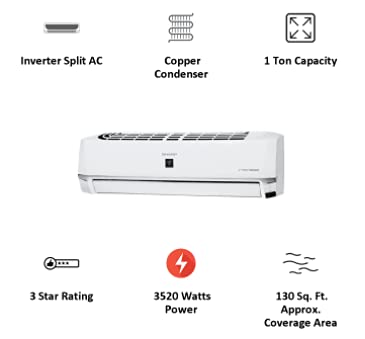
Image: Product Features Summary. This infographic highlights the main characteristics and benefits of the air conditioner.
| Feature | Specification |
|---|---|
| Brand | SHARP |
| Model | AH-XP12WMT INV |
| Part Number | 91001829 |
| Capacity | 1 Tons |
| Annual Energy Consumption | 719 Kilowatts |
| Noise Level | 52 Decibels |
| Installation Type | Split System |
| Special Features | Dust Filter, Follow Me Sensor Mode |
| Colour | White |
| Control Console | Remote Control |
| Voltage | 230 Volts |
| Wattage | 3520 KW |
| Certification | Energy Star |
| Material | Copper |
| Included Components | Hose |
| Product Dimensions (IDU) | 22.2D x 87.7W x 29.2H Centimeters |
| BEE Star Rating | 3 Star |
| Approximate Coverage Area | 130 Sq. Ft (12.07 Sq. M) |
7. Warranty and Support
For warranty information and technical support, please refer to the warranty card included with your product or contact SHARP customer service directly. Keep your purchase receipt as proof of purchase for warranty claims.
Manufacturer: SHARP
Date First Available: 23 April 2021


