
1. Introduction
Thank you for choosing the Redragon K608 Valheim Rainbow Gaming Keyboard. This mechanical keyboard is designed for an enhanced gaming and typing experience, featuring durable blue switches, vibrant rainbow backlighting, and full N-key rollover. This manual provides detailed instructions on setting up, operating, maintaining, and troubleshooting your new keyboard to ensure optimal performance.
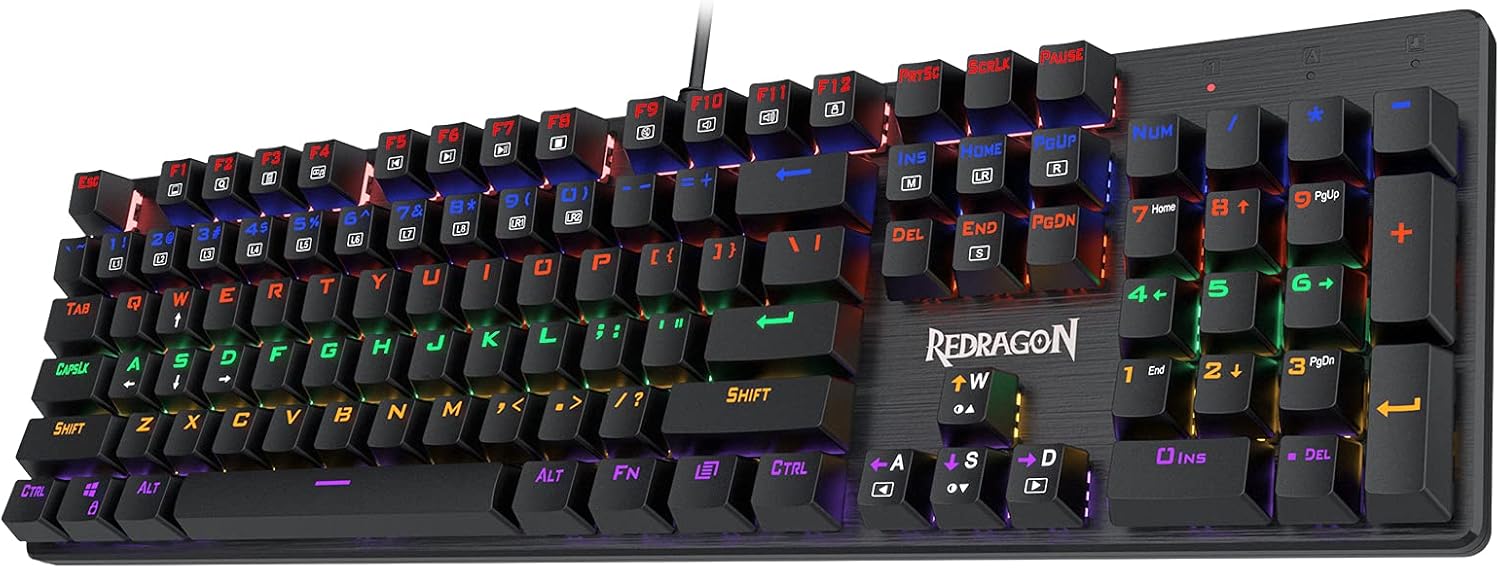
Image: The Redragon K608 Valheim Rainbow Gaming Keyboard, showcasing its full 104-key layout and vibrant rainbow backlighting.
2. Product Features
- Redragon Blue Switches: Equipped with classic mechanical blue switches, providing tactile feedback and an audible click sound, ideal for typing and gaming.
- Vibrant Rainbow Backlight: Features 9 dynamic rainbow backlight modes and 8 preset gaming lighting ways, with 2 customizable modes for personalized aesthetics.
- 100% Anti-Ghosting (NKRO): Ensures accurate simultaneous key actuation for all 104 keys, preventing missed inputs during intense gameplay.
- Durable Brushed Plate: All 104 keys are securely fixed on a solid brushed surface board, offering durability and a modern minimalist design.
- Neat Floated Design: The floated key layout provides a natural and ample feel, making cleaning easier by preventing dust buildup.
- Double-shot Frosted Keycaps: Keycaps are designed with double-shot injection molding for clear, never-fading legends.

Image: Close-up view of the Redragon Dustproof Blue Switches, highlighting their tactile and clicky mechanism.

Image: Illustration of the 9 preset backlight modes available on the keyboard, controlled via FN + INS.

Image: A pair of double-shot frosted keycaps, demonstrating their durable construction and clear legends.

Image: Side view of the keyboard showcasing its neat floated key design, which aids in cleaning and provides a distinct aesthetic.
3. Package Contents
Please check the package contents upon unboxing:
- 1 x Redragon K608 Valheim Gaming Keyboard
- 1 x User Manual
4. Setup
Follow these simple steps to set up your Redragon K608 keyboard:
- Unpack the keyboard from its packaging.
- Locate an available USB port on your computer.
- Plug the USB connector of the keyboard into the USB port.
- Your operating system will automatically detect and install the necessary drivers. No additional software installation is required for basic functionality.
5. Operating Instructions
5.1. Backlight Modes
The Redragon K608 keyboard features multiple rainbow backlight modes. To cycle through the 9 preset backlight modes, press the FN + INS keys simultaneously.
The keyboard also includes 8 preset gaming lighting modes and 2 customizable modes. These can be accessed and configured for specific gaming scenarios.

Image: Visual representation of the 8 dedicated gaming modes, showing key illumination patterns for different game types.
5.2. Multimedia Keys and Function Shortcuts
The keyboard features function keys (F1-F12) that can be combined with the FN key to access various multimedia and system shortcuts. Refer to the keycap legends for specific functions.
- FN + F1: My Computer
- FN + F2: Search
- FN + F3: Calculator
- FN + F4: Media Player
- FN + F5: Previous Track
- FN + F6: Next Track
- FN + F7: Play/Pause
- FN + F8: Stop
- FN + F9: Mute
- FN + F10: Volume Down
- FN + F11: Volume Up
- FN + F12: Lock Keyboard
5.3. N-Key Rollover (NKRO)
The K608 supports 100% N-Key Rollover, meaning every key press is registered independently, regardless of how many keys are pressed simultaneously. This feature is crucial for fast-paced gaming and accurate typing.

Image: Diagram illustrating the NKRO technology, showing multiple simultaneous key presses being registered accurately.
6. Maintenance
To ensure the longevity and optimal performance of your Redragon K608 keyboard, follow these maintenance guidelines:
- Regular Cleaning: Use a soft brush or compressed air to remove dust and debris from between the keycaps. The floated design makes this process easier.
- Keycap Cleaning: For deeper cleaning, keycaps can be carefully removed using a keycap puller (not included) and wiped with a damp cloth. Ensure they are completely dry before reattaching.
- Avoid Liquids: Do not spill liquids on the keyboard. In case of accidental spills, immediately unplug the keyboard and allow it to dry completely before reconnecting.
- Storage: Store the keyboard in a cool, dry place away from direct sunlight and extreme temperatures.
7. Troubleshooting
If you encounter any issues with your Redragon K608 keyboard, refer to the following table for common problems and solutions:
| Problem | Possible Solution |
|---|---|
| Keyboard not responding |
|
| Backlight not working or flickering |
|
| Keys are sticky or unresponsive |
|
| Specific keys not registering |
|
8. Specifications
Detailed technical specifications for the Redragon K608 Valheim Gaming Keyboard:
- Model: K608
- Switch Type: Redragon Blue Mechanical Switches
- Number of Keys: 104
- Connectivity: Wired USB
- Anti-Ghosting: N-Key Rollover (NKRO)
- Backlight: Rainbow LED with multiple modes
- Keycap Material: Double-shot ABS
- Dimensions: 17.32 x 5.91 x 1.65 inches (440 x 150 x 42 mm)
- Weight: 2.2 pounds (1 kg)
- Compatible Devices: PC, Gaming Console (via USB)
- Operating System Compatibility: Windows, macOS (basic functionality)
9. Warranty and Support
Redragon products come with a standard manufacturer's warranty. For specific warranty terms and conditions, please refer to the warranty card included with your product or visit the official Redragon website. For technical support, troubleshooting assistance beyond this manual, or warranty claims, please contact Redragon customer service through their official channels.
You can also find additional resources and the official user manual PDF at: Redragon K608 User Manual (PDF)


