
Tek Styz TS-1937
Portable Bluetooth Speaker User Manual
Model: TS-1937 | Brand: Tek Styz
Introduction
Thank you for choosing the Tek Styz TS-1937 Portable Bluetooth Speaker. This compact and versatile speaker is designed to provide high-quality audio and hands-free communication wherever you go. With its durable, water-resistant design and multiple mounting options, it is ideal for both indoor and outdoor use. This manual provides essential information on setting up, operating, and maintaining your speaker.
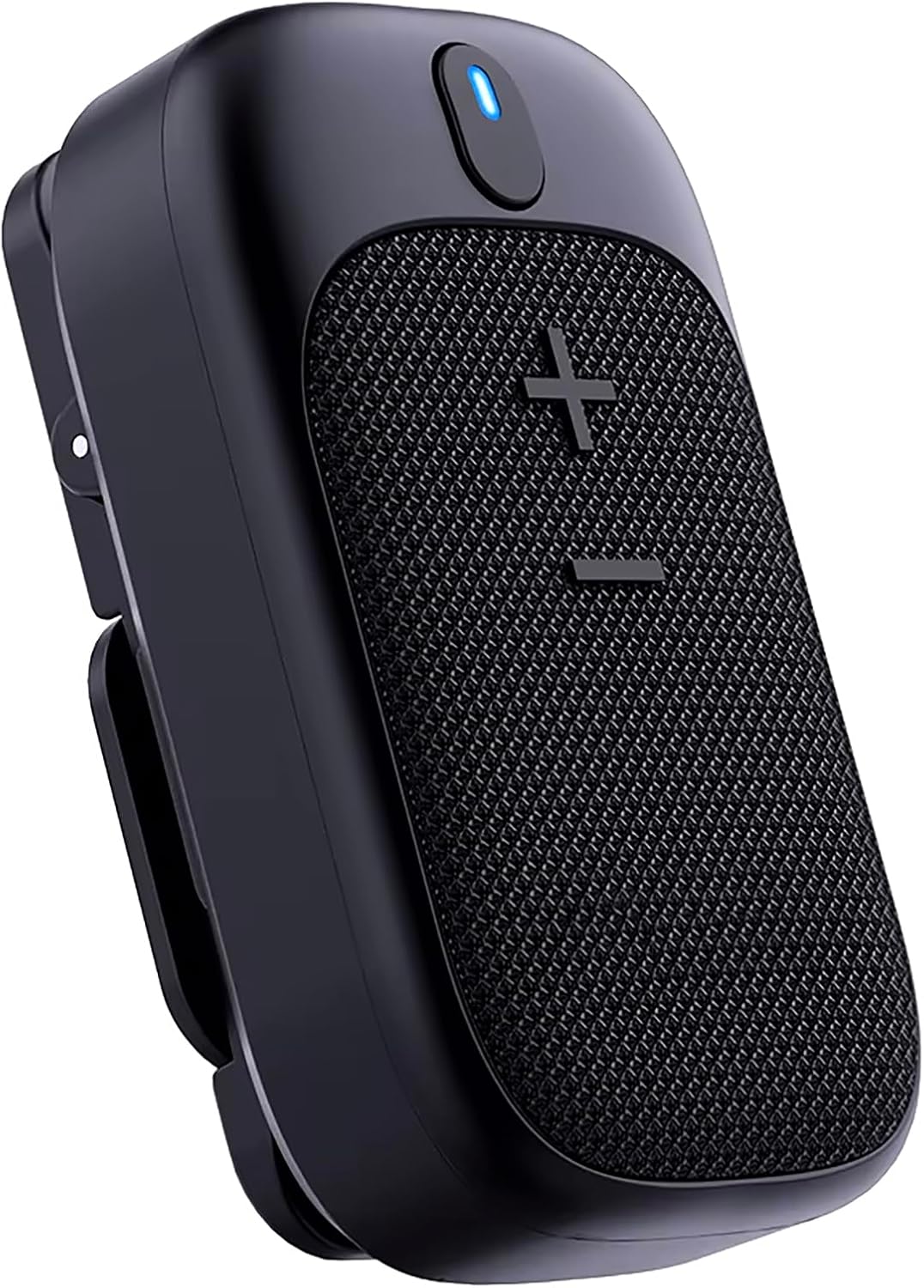
Image: The Tek Styz TS-1937 Portable Bluetooth Speaker, a compact black device with a speaker grille and control buttons on top, shown from a slightly angled perspective.
Safety Information
- Do not expose the speaker to extreme temperatures or direct sunlight for prolonged periods.
- Avoid dropping or subjecting the speaker to strong impacts.
- Keep the speaker away from water and liquids, despite its IPX5 rating, to prevent damage to internal components.
- Do not attempt to disassemble, repair, or modify the speaker yourself. Contact qualified service personnel for assistance.
- Use only the provided charging cable. Do not use damaged cables or chargers.
- Keep out of reach of children.
Package Contents
Please check the package contents to ensure all items are present:
- Tek Styz TS-1937 Portable Bluetooth Speaker
- USB Type-C Charging Cable
- User Manual (this document)
Note: A charger block/adapter is not included. Please use your existing cell/mobile phone's charger or a standard USB power adapter.
Product Overview
Speaker Components
- Power Button: On/Off, Play/Pause, Answer/End Call, Voice Assistant activation.
- Volume Up (+): Increase volume, Previous track.
- Volume Down (-): Decrease volume, Next track.
- LED Indicator: Shows power, charging, and Bluetooth status.
- USB-C Charging Port: For charging the speaker.
- Integrated Clip: For attaching to clothing, bags, etc.
- Magnetic Mount: For secure attachment to magnetic surfaces or using the double-sided magnet feature.
- Microphone: For hands-free calls and voice assistant commands.

Image: A diagram illustrating the functions of the speaker's buttons: Power button (long press for on/off, short press for talk/hang up), Plus button (short press for volume up, long press for previous song), and Minus button (short press for volume down, long press for next song).
Mounting Options
The TS-1937 speaker offers versatile mounting options for various activities:
- Spring Clip: Securely attach the speaker to clothing, backpack straps, or other thin edges.
- Built-in Magnet: The speaker contains a magnet for attaching to metallic surfaces.
- Double-sided Magnet: Use the speaker's magnet in conjunction with an external magnetic plate (not included, but implied by "magnetic to clothing") to secure it through fabric, such as on a shirt collar.

Image: The portable speaker magnetically attached to a person's shirt collar, demonstrating the double-sided magnet wearing style.

Image: The portable speaker magnetically attached to a metal pole outdoors, showcasing its built-in magnet feature for secure placement.
Setup
1. Charging the Speaker
Before first use, fully charge the speaker.
- Connect the provided USB Type-C charging cable to the speaker's charging port.
- Connect the other end of the cable to a USB power source (e.g., computer USB port, USB wall adapter).
- The LED indicator will show charging status. A full charge takes approximately 1 hour.
- Once fully charged, the LED indicator will change (refer to LED status section for details) or turn off. Disconnect the charging cable.
2. Powering On/Off
- Power On: Long press the Power button for 3 seconds. The LED indicator will flash, indicating it's ready for pairing.
- Power Off: Long press the Power button for 3 seconds. The LED indicator will turn off.
3. Bluetooth Pairing
To connect the speaker to your device:
- Ensure the speaker is powered on and in pairing mode (LED indicator flashing).
- On your Bluetooth-enabled device (smartphone, tablet, laptop), go to the Bluetooth settings.
- Search for available devices. You should see "TS-1937" or a similar name in the list.
- Select "TS-1937" to initiate pairing.
- Once successfully paired, the LED indicator will stop flashing and remain solid blue. You will hear an audible confirmation.
The speaker will automatically attempt to reconnect to the last paired device when powered on.

Image: A close-up internal view of the speaker highlighting the Bluetooth 5.4 chip, indicating advanced and stable wireless connectivity.
Operating Instructions
Music Playback
- Play/Pause: Short press the Power button.
- Volume Up: Short press the "+" button.
- Volume Down: Short press the "-" button.
- Next Track: Long press the "-" button.
- Previous Track: Long press the "+" button.
Hands-Free Calling
The built-in microphone allows for clear hands-free calls.
- Answer Call: Short press the Power button when an incoming call rings.
- End Call: Short press the Power button during a call.
- Reject Call: Long press the Power button when an incoming call rings.

Image: A woman cooking in a kitchen, wearing the speaker on her shirt, demonstrating hands-free calling while multitasking. A phone screen showing a call interface is visible in the foreground.

Image: A woman running outdoors, wearing the speaker on her sports bra, illustrating the use of the speaker for hands-free calls during physical activity.
Voice Assistant
The speaker supports voice assistants like Alexa, Siri, Google Voice, and ChatGPT.
- Activate Voice Assistant: Double-press the Power button.
Dual Stereo Pairing (TWS)
You can pair two TS-1937 speakers together for a true wireless stereo (TWS) experience.
- Ensure both speakers are powered off.
- Power on both speakers. They will enter pairing mode.
- On one of the speakers (this will be the primary speaker), double-press the Power button. The speakers will attempt to connect to each other.
- Once connected, the LED indicator on the primary speaker will flash slowly, and the secondary speaker's LED will be solid.
- Now, connect your device to the primary speaker via Bluetooth as described in the "Bluetooth Pairing" section.
- Audio will now play in stereo through both speakers.
Maintenance
- Cleaning: Wipe the speaker with a soft, dry cloth. Do not use abrasive cleaners or solvents.
- Storage: Store the speaker in a cool, dry place away from direct sunlight and extreme temperatures.
- Battery Care: To prolong battery life, avoid fully discharging the battery frequently. Charge the speaker regularly, even if not in use for extended periods.
Troubleshooting
| Problem | Possible Cause | Solution |
|---|---|---|
| Speaker does not power on. | Battery is low or depleted. | Charge the speaker fully. |
| Cannot pair with device. | Speaker is not in pairing mode; Bluetooth is off on device; Device is too far. | Ensure speaker is in pairing mode (flashing LED). Turn on Bluetooth on your device. Move device closer to speaker (within 33 feet). Forget previous pairings on your device and try again. |
| No sound or low volume. | Volume on speaker or device is too low; Speaker is not connected. | Increase volume on both speaker and device. Ensure speaker is properly paired. |
| Sound distortion. | Device volume too high; Speaker too far from device; Interference. | Reduce volume on your device. Move speaker closer to device. Avoid obstacles between speaker and device. |
| Cannot activate voice assistant. | Incorrect button press; Device not configured for voice assistant. | Double-press the Power button. Ensure your connected device's voice assistant is enabled and configured. |
Specifications
| Feature | Detail |
|---|---|
| Model Name | TS-1937 |
| Bluetooth Version | 5.4 |
| Wireless Range | Up to 800 feet (243 meters) |
| Speaker Output Power | 3 Watts |
| Audio Output Mode | Stereo |
| Battery Capacity | 600 mAh |
| Battery Life | Up to 18 Hours (at medium volume) |
| Charging Time | Approximately 1 Hour |
| Water Resistance | IPX5 (Water Resistant) |
| Dimensions (LxWxH) | 2.87"D x 1.11"W x 1.68"H (7.29cm x 2.82cm x 4.27cm) |
| Item Weight | 4 Ounces (113 grams) |
| Material | Aluminum, Hi Strength Plastic |
| Microphones | 2 (Omnidirectional noise-canceling) |
| Compatible Devices | Samsung Galaxy M13 5G, Windows, iOS, Mac, Android |

Image: A visual representation of the speaker's key specifications and dimensions, including sound, connectivity, battery, durability, and smart features.
Warranty and Support
For warranty information and customer support, please refer to the warranty card included in your package or visit the official Tek Styz website.
If you encounter any issues not covered in this manual, please contact Tek Styz customer service for assistance.
Manufacturer: Tek Styz
Ask a question about this manual
Ask about setup, troubleshooting, compatibility, parts, safety, or missing instructions. Manuals+ will review the question and use this page’s manual context to help answer it.