
1. Introduction
Thank you for purchasing the Tek Styz TS-1937 Portable Bluetooth Speaker. This manual provides essential information for the safe and efficient use of your device. Please read it thoroughly before operating the speaker and retain it for future reference.
2. Product Overview
2.1 Package Contents
- Tek Styz TS-1937 Portable Bluetooth Speaker
- USB Type-C Charging Cable
- User Manual
2.2 Key Features
- Bluetooth 5.3/5.4: For stable and efficient wireless connectivity.
- IPX5 Water-Resistant: Protection against splashes and light rain.
- Long Battery Life: Up to 18 hours of playtime on a single charge.
- Built-in Microphone: Supports hands-free calling and voice assistant functions.
- Compact and Portable: Lightweight design with clip-on and magnetic mounting options.
- Dual Stereo Mode: Connect two speakers for an enhanced stereo sound experience.
2.3 Speaker Components
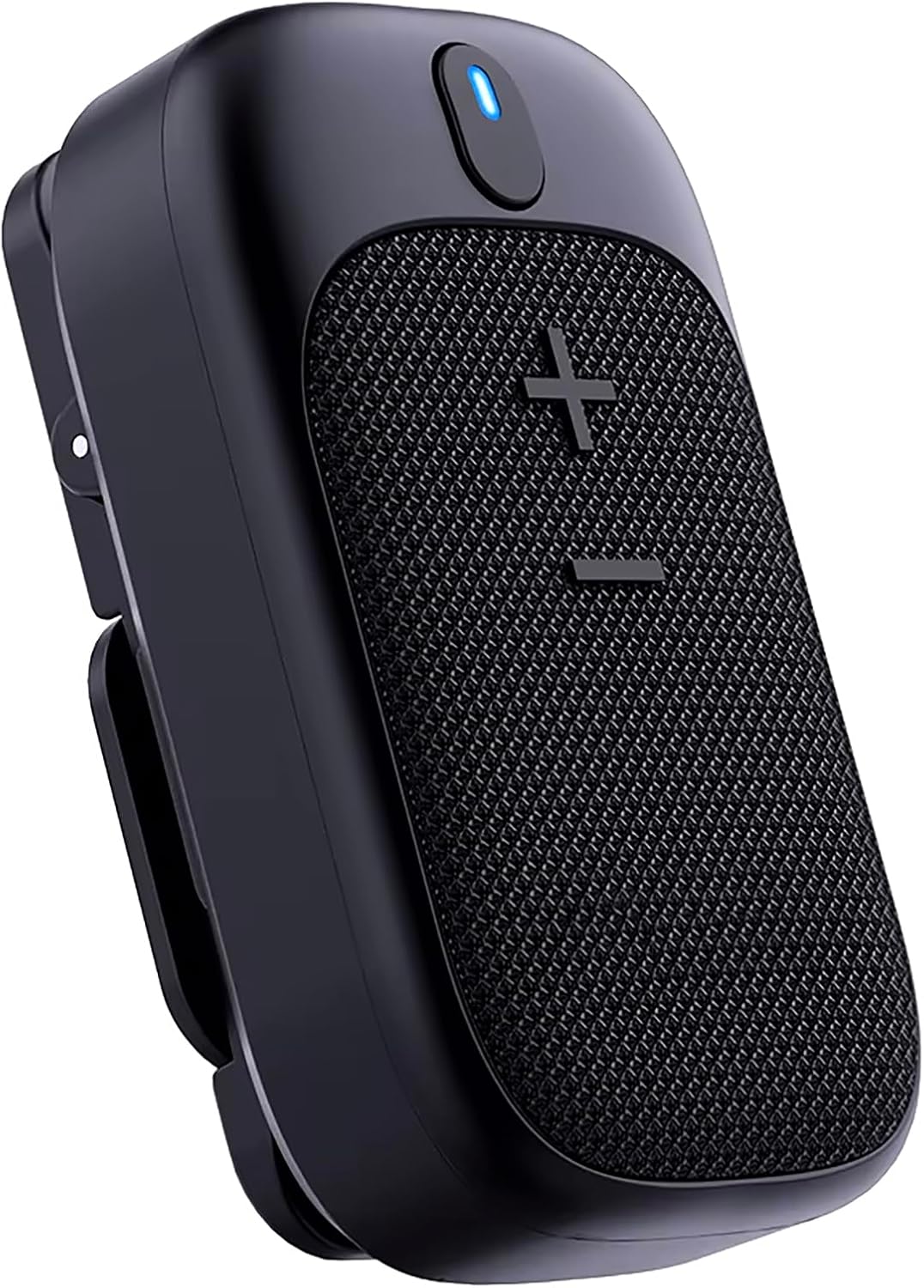
Image: Front view of the Tek Styz TS-1937 Portable Bluetooth Speaker, showing the speaker grille and control button.

Image: Close-up view of the speaker's control buttons, indicating Power/Multi-function, Volume Up/Previous Track, and Volume Down/Next Track.
- Power/Multi-function Button: Located at the top, used for power on/off, play/pause, answer/end calls, and voice assistant activation.
- Volume Up (+) / Previous Track Button: Located on the speaker grille, short press for volume up, long press for previous track.
- Volume Down (-) / Next Track Button: Located on the speaker grille, short press for volume down, long press for next track.
- LED Indicator: Shows power status, charging status, and Bluetooth pairing status.
- USB Type-C Charging Port: For charging the speaker.
- Microphone: For hands-free calls.
- Clip: Integrated clip for attaching to clothing or bags.
- Magnetic Base: For secure magnetic attachment.
3. Safety Information
Please observe the following safety guidelines to prevent damage to the device or injury to yourself:
- Do not expose the speaker to extreme temperatures, direct sunlight, or open flames.
- Avoid dropping or subjecting the speaker to strong impacts.
- Do not disassemble, repair, or modify the speaker yourself. Contact authorized service personnel.
- Keep the speaker away from water and liquids, despite its IPX5 rating. Do not submerge it.
- Use only the provided USB Type-C charging cable.
- Clean the speaker with a soft, dry cloth. Do not use abrasive cleaners.
- Dispose of the speaker and its battery responsibly according to local regulations.
4. Setup
4.1 Charging the Speaker
Before first use, fully charge the speaker.
- Connect the USB Type-C charging cable to the speaker's charging port.
- Connect the other end of the cable to a USB power adapter (not included) or a computer's USB port.
- The LED indicator will illuminate during charging and turn off or change color when fully charged. A full charge typically takes about 1 hour.
4.2 Bluetooth Pairing
To connect the speaker to your device:
- Ensure the speaker is charged and powered off.
- Press and hold the Power/Multi-function Button for 3 seconds to power on the speaker. The LED indicator will flash, indicating it is in pairing mode.
- On your mobile device (smartphone, tablet, computer), enable Bluetooth.
- Search for available Bluetooth devices and select "TS-1937" from the list.
- Once connected, the LED indicator will stop flashing and remain solid. You will hear an audible confirmation.
- If prompted for a password, enter "0000".
4.3 Wearing and Mounting Options
The TS-1937 speaker offers versatile mounting options:

Image: Demonstrates three ways to wear the speaker: double-sided magnet, built-in magnet, and spring clip.
- Spring Clip: Use the integrated clip to attach the speaker to clothing, backpack straps, or other suitable surfaces.
- Built-in Magnet: The speaker has a built-in magnet allowing it to attach to metallic surfaces.
- Double-sided Magnet: For attaching to non-metallic clothing, use the speaker's magnet in conjunction with a separate magnetic plate (if included or purchased separately) on the opposite side of the fabric.
5. Operating Instructions
5.1 Power On/Off
- Power On: Press and hold the Power/Multi-function Button for 3 seconds. The LED indicator will light up.
- Power Off: Press and hold the Power/Multi-function Button for 3 seconds. The LED indicator will turn off.
5.2 Music Playback
- Play/Pause: Short press the Power/Multi-function Button.
- Volume Up: Short press the + Button.
- Volume Down: Short press the - Button.
- Next Track: Long press the - Button.
- Previous Track: Long press the + Button.
5.3 Call Management
- Answer Call: Short press the Power/Multi-function Button when an incoming call rings.
- End Call: Short press the Power/Multi-function Button during a call.
- Reject Call: Long press the Power/Multi-function Button when an incoming call rings.
5.4 Voice Assistant
- To activate your device's voice assistant (Siri, Google Assistant, Alexa, ChatGPT), double-press the Power/Multi-function Button.
5.5 Dual Stereo Pairing (TWS Function)
To achieve a true wireless stereo sound experience, you can pair two TS-1937 speakers together:
- Ensure both speakers are powered off and not connected to any Bluetooth device.
- Power on both speakers simultaneously. They will enter pairing mode.
- On one of the speakers, double-press the Power/Multi-function Button. The speakers will attempt to connect to each other.
- Once successfully paired, you will hear an audible confirmation, and the LED indicator on one speaker will flash (master), while the other will remain solid (slave).
- Now, connect your mobile device to the master speaker (the one with the flashing LED) via Bluetooth as described in section 4.2.
- Audio will now play through both speakers in stereo.
6. Maintenance
- Cleaning: Wipe the speaker with a soft, dry, lint-free cloth. Do not use harsh chemicals or abrasive materials.
- Storage: Store the speaker in a cool, dry place away from direct sunlight and extreme temperatures when not in use for extended periods.
- Battery Care: To prolong battery life, avoid fully discharging the battery frequently. Charge the speaker regularly, even if not in use.
7. Troubleshooting
If you encounter issues with your speaker, refer to the following common problems and solutions:
| Problem | Possible Solution |
|---|---|
| Speaker does not power on. | Ensure the speaker is fully charged. Press and hold the Power/Multi-function Button for 3 seconds. |
| Cannot pair with Bluetooth device. | Ensure the speaker is in pairing mode (flashing LED). Turn off and on Bluetooth on your device. Move the speaker closer to your device. Forget "TS-1937" from your device's Bluetooth list and try pairing again. |
| No sound or low volume. | Increase the volume on both the speaker and your connected device. Ensure the speaker is properly paired. Check if the audio source is playing. |
| Sound quality is poor or intermittent. | Move the speaker closer to your device. Avoid obstacles between the speaker and your device. Ensure there is no interference from other wireless devices. |
| Speaker not charging. | Check the charging cable and USB power source. Ensure the cable is securely connected to both the speaker and the power source. Try a different USB port or adapter. |
| Dual Stereo Pairing fails. | Ensure both speakers are powered off and not connected to any device before attempting TWS pairing. Follow the TWS pairing steps carefully. |
8. Specifications

Image: Diagram showing the dimensions and key specifications of the Tek Styz TS-1937 speaker.
| Feature | Detail |
|---|---|
| Model Name | TS-1937 |
| Bluetooth Version | 5.3 / 5.4 |
| Wireless Communication Technology | Bluetooth |
| Bluetooth Range | Up to 33 feet (10 meters) |
| Maximum Range (Wireless) | Up to 800 feet (Note: This refers to the maximum theoretical range under ideal conditions, Bluetooth range is typically 33ft) |
| Speaker Maximum Output Power | 3 Watts |
| Audio Driver Type | Dynamic Driver |
| Audio Driver Size | 72 Millimeters |
| Frequency Response | 17 KHz |
| Audio Latency | 6 Milliseconds |
| Audio Output Mode | Stereo |
| Impedance | 25.94 Ohm |
| Power Source | Battery Powered (600mAh Nonstandard Battery) |
| Battery Life | Up to 18 Hours (at medium volume) |
| Charging Time | Approximately 1 hour (Fast USB-C charging) |
| Water Resistance Level | IPX5 (Water Resistant) |
| Product Dimensions | 2.87"D x 1.11"W x 1.68"H (73mm x 28mm x 42mm) |
| Item Weight | 4 Ounces |
| Material | Aluminum, High Strength Plastic, Metal |
| Control Method | Touch Buttons |
| Special Features | Digital IC Chip, Built-in Microphone, AI Voice Assistant Compatible (Alexa, Siri, Google Voice, ChatGPT), Clip-On, Magnetic Mount, TWS Function |
| Compatible Devices | Android, iOS, Mac, Windows, Motorola Moto E7 Plus, etc. |
| Indoor/Outdoor Usage | Indoor, Outdoor |
| UPC | 647010016876 |
9. Warranty and Support
Tek Styz products are designed for reliability and performance. For warranty information or technical support, please refer to the warranty card included with your purchase or contact Tek Styz customer service through their official website or the retailer where the product was purchased.
Please have your model number (TS-1937) and proof of purchase ready when contacting support.