
1. Introduction
Thank you for choosing the Technical Pro 20W Portable Megaphone Bullhorn. This device is designed for clear and powerful voice amplification over long distances, making it suitable for various applications such as crowd control, outdoor events, coaching, and emergency signaling. This manual provides essential information for the proper setup, operation, and maintenance of your megaphone.

Figure 1: The Technical Pro 20W Portable Megaphone Bullhorn, featuring a white body with red accents, shown alongside other available color variations.
2. Product Overview
2.1. Key Features
- 20 Watts Peak Power: Delivers clear and powerful sound.
- 300 Meter Range: Projects your voice effectively over long distances.
- Built-in Siren: For emergency alerts or attracting attention.
- Adjustable Volume Control: Allows for precise sound level management.
- Lightweight and Portable: Easy to carry and handle.
- Collapsible Handle: For compact storage and transport.
- Durable Construction: Made from plastic for longevity.

Figure 2: An illustration detailing the primary features of the megaphone, including its siren, collapsible handle, lightweight construction, water-resistant design, 20-watt peak power, and battery requirements.
2.2. Components
- Megaphone Cone: The main sound projection component.
- Handle: Ergonomically designed for comfortable grip, with a folding mechanism.
- Control Panel: Located at the rear, housing volume control and siren switch.
- Battery Compartment: Located within the handle or rear section.
- Carrying Strap: For convenient portability.

Figure 3: This image focuses on the practical aspects of the megaphone's design, featuring its detachable shoulder strap and collapsible handle for easy transport.

Figure 4: This image illustrates the megaphone's foldable handle, designed for compact storage and portability.
3. Setup
3.1. Battery Installation
- Locate the battery compartment, typically at the rear or base of the handle.
- Open the battery compartment cover.
- Insert 4 'C' size batteries, ensuring correct polarity (+/-) as indicated inside the compartment.
- Close the battery compartment cover securely.
Note: Batteries are not included with the megaphone. Always use fresh batteries for optimal performance.
3.2. Attaching the Carrying Strap
- Locate the attachment points for the strap on the megaphone.
- Thread each end of the strap through its respective attachment point and secure it.

Figure 5: A detailed view of the megaphone's rear, highlighting the control panel which includes the volume dial and the switch for activating the siren, and where the battery compartment is typically located.
4. Operation
4.1. Power On/Off
- To power on the megaphone, slide the power switch to the 'ON' position. A power indicator light may illuminate.
- To power off, slide the switch to the 'OFF' position.
4.2. Voice Amplification
- Ensure the megaphone is powered on.
- Speak clearly into the microphone located at the rear of the megaphone.
- Adjust the volume control to your desired level.
4.3. Volume Control
- Rotate the 'VOLUME' dial clockwise to increase the sound level.
- Rotate the 'VOLUME' dial counter-clockwise to decrease the sound level.
4.4. Siren Function (Alert Mode)
- To activate the siren, slide the siren switch to the 'SIREN' position.
- To deactivate the siren, slide the switch back to the 'OFF' or 'SPEAK' position.
- The siren volume is typically controlled by the main volume dial.

Figure 6: An annotated diagram pointing out the key operational parts of the megaphone, including the speaker, power indicator light, volume control, and the siren alert mode switch.
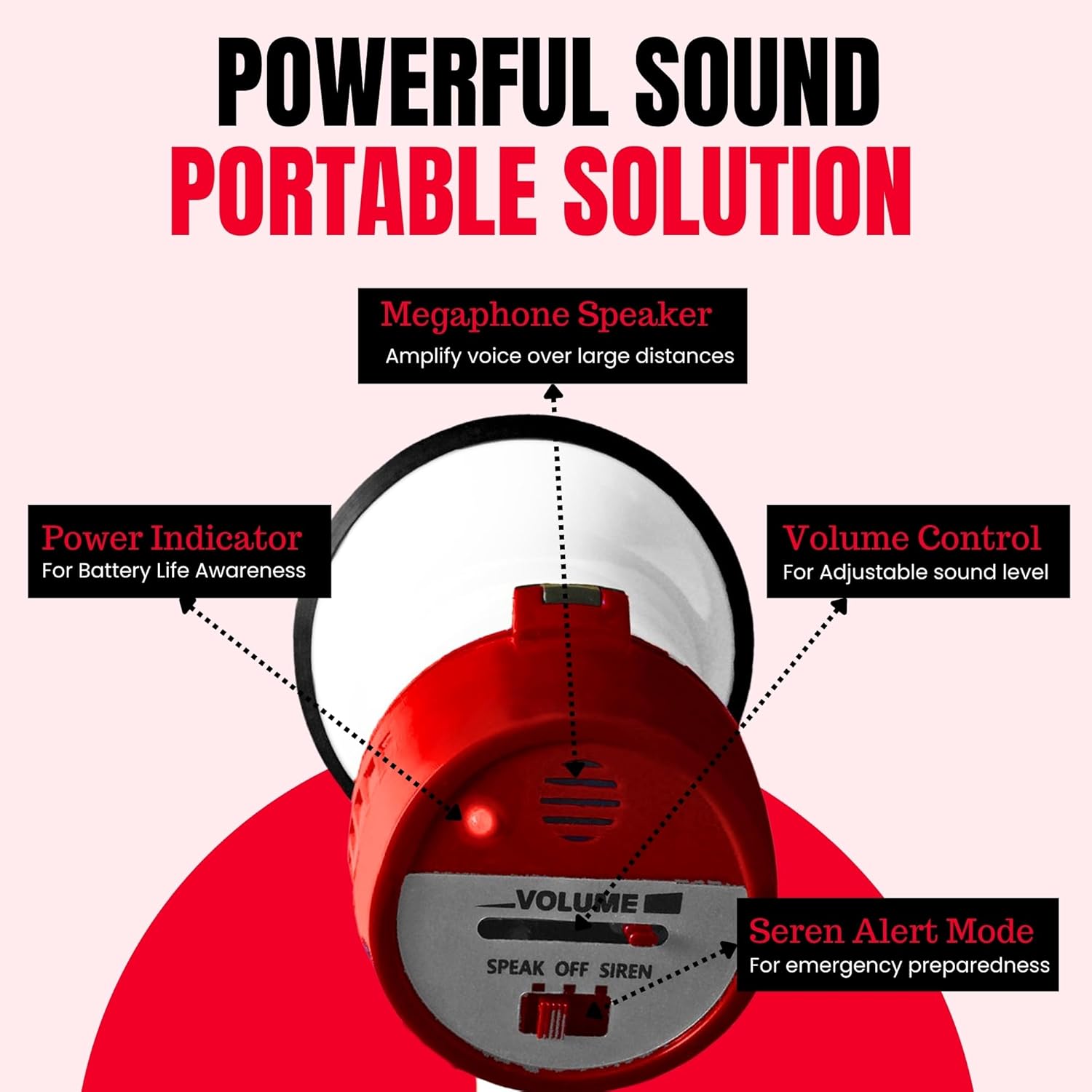
Figure 7: A user actively operating the megaphone, showcasing its function for projecting voice clearly over distances.
5. Applications
The Technical Pro megaphone is a versatile tool suitable for a wide range of indoor and outdoor activities requiring clear voice projection and attention-grabbing alerts.
- Sports Coaching: Directing players on fields or courts.
- Event Management: Guiding crowds at festivals, rallies, or public gatherings.
- Emergency Situations: Issuing warnings or instructions during evacuations.
- School Activities: Announcements during assemblies or outdoor events.
- Cheerleading: Leading cheers and chants.

Figure 8: This image illustrates the diverse applications of the megaphone, including use by emergency services, educational institutions, and sports teams.
6. Maintenance
6.1. Cleaning
- Wipe the exterior of the megaphone with a soft, damp cloth.
- Do not use abrasive cleaners or solvents, as these may damage the finish.
- Ensure no moisture enters the microphone or battery compartment.
6.2. Battery Care
- Remove batteries if the megaphone will not be used for an extended period to prevent leakage.
- Dispose of used batteries responsibly according to local regulations.
7. Troubleshooting
If you encounter issues with your megaphone, please refer to the following common problems and solutions:
| Problem | Possible Cause | Solution |
|---|---|---|
| No sound or low volume | Dead or incorrectly inserted batteries; Volume too low; Power switch off. | Check and replace batteries; Ensure correct polarity; Increase volume; Turn power switch to 'ON'. |
| Siren not working | Siren switch not activated; Low batteries. | Slide siren switch to 'SIREN'; Check and replace batteries. |
| Distorted sound | Volume too high; Microphone too close to mouth; Low batteries. | Decrease volume; Maintain a slight distance from microphone; Check and replace batteries. |
8. Specifications
- Model: TPMPH15R
- Brand: Technical Pro
- Power Output: 20 Watts
- Effective Range: Up to 300 meters (1200 feet)
- Power Source: 4 x 'C' size batteries (not included)
- Material: Plastic
- Dimensions: Approximately 13.97 x 13.46 x 22.86 cm (5.5 x 5.3 x 9 inches)
- Weight: Approximately 499 g (1.1 lbs)
- Features: Voice amplification, Siren function, Volume control, Collapsible handle, Carrying strap.
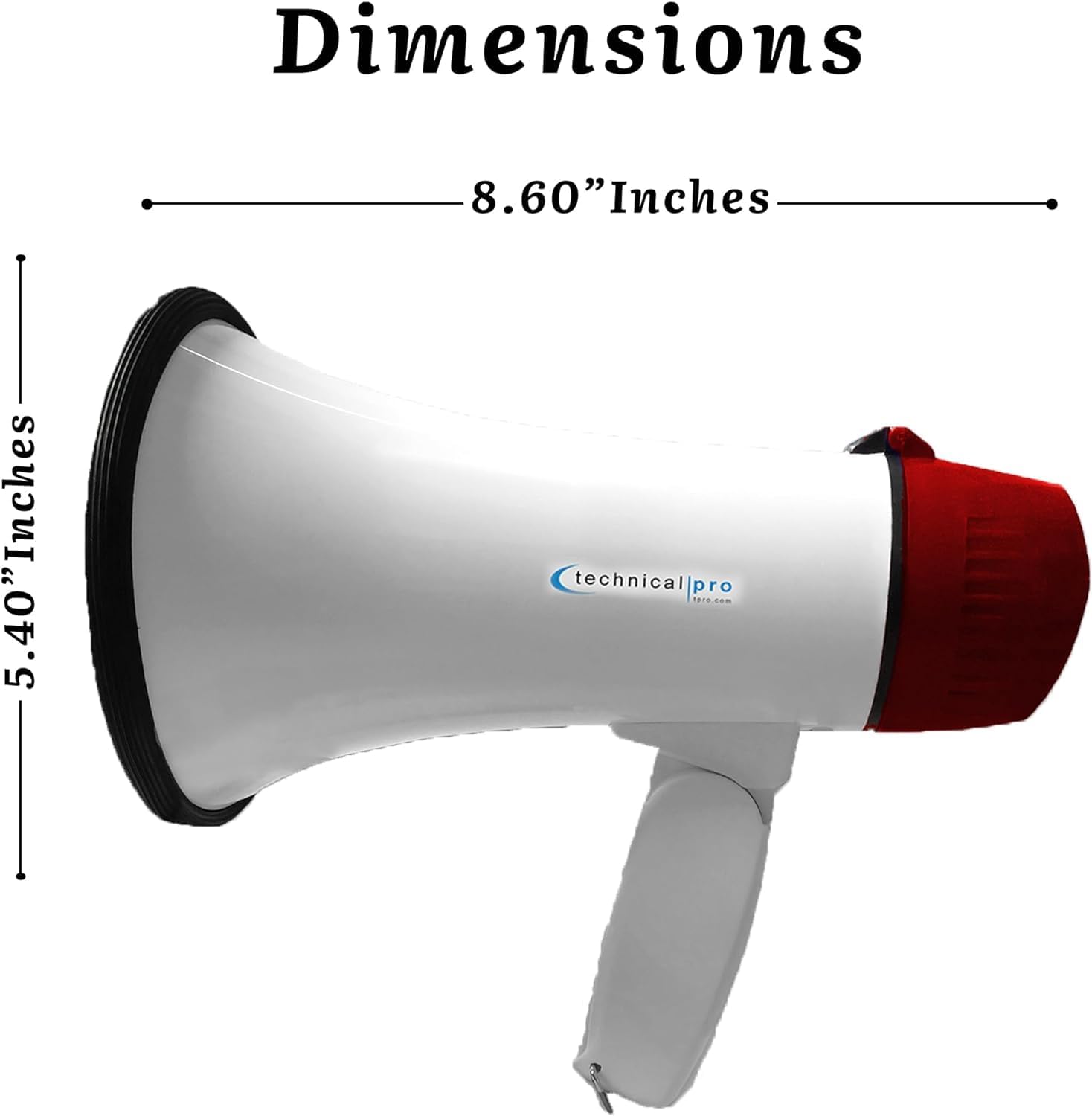
Figure 9: A visual representation of the megaphone's dimensions, indicating a length of 8.60 inches and a height of 5.40 inches.
9. Warranty and Support
Technical Pro products are manufactured to high-quality standards. For specific warranty information, please refer to the documentation included with your purchase or visit the official Technical Pro website. If you require technical assistance or have questions not covered in this manual, please contact Technical Pro customer support.
Contact Information: Please refer to the manufacturer's official website or product packaging for the most current support contact details.