
MACHSWON H845103A
MACHSWON Dual Core Parking Radar (Model H845103A) User Manual
6 Sensor Rear & Front View LCD Display Backup Radar
Brand: MACHSWON | Model: H845103A
1. Introduction
This manual provides essential information for the proper installation, operation, and maintenance of your MACHSWON Dual Core Parking Radar system. This system is designed to assist drivers in parking by detecting obstacles in front of and behind the vehicle, providing visual and audible alerts to prevent collisions.
2. Package Contents
Please verify that all items listed below are included in your package:
- 1 x Controller Host
- 1 x LCD Display Screen
- 6 x Ultrasonic Probes (White Sensors)
- 1 x Power Cable
- 1 x Hole Opener (22mm)

The image above displays the complete set of components you should find in your package. Ensure all parts are present and undamaged before proceeding with installation.
Video 2.1: Unboxing and overview of the parking sensor kit components.
3. Specifications
| Feature | Specification |
|---|---|
| Rated Voltage | 12V DC |
| Working Current | 20 ~ 180mA |
| Detection Distance | 30cm ~ 250cm |
| Alarm Volume | ≥80dB |
| Working Temperature | -40 ~ +80 °C |
| Frequency | 40kHz ± 1kH |
| Display Type | LCD |
| Model Number | H845103A |
4. Setup and Installation
4.1 Sensor Placement and Drilling
The ultrasonic probes are designed for embedded installation. Use the provided 22mm hole opener to drill precise holes in your vehicle's bumper for a flush fit. Ensure sensors are placed symmetrically and at an appropriate height for optimal detection.
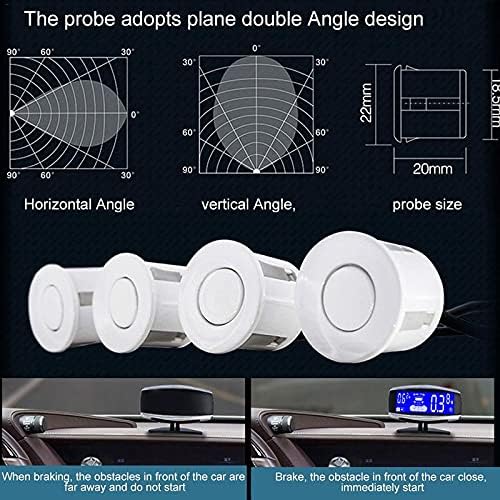
The probes feature a plane double-angle design to optimize detection. Refer to the diagram for recommended horizontal and vertical angles. The probe size is 22mm in diameter and 18.5mm in height.

4.2 Wiring Method
Connect the power cable to your vehicle's electrical system as follows:
- Yellow wire: Connect to the reverse light positive.
- White wire: Connect to the brake light positive.
- Red wire: Connect to ACC positive (Accessory power).
- Black wire: Connect to negative (ground).
Ensure all connections are secure and properly insulated. Incorrect wiring may damage the system or vehicle electronics.
Video 4.1: Demonstration of embedded parking sensor installation.
5. Operating Instructions
The parking radar system automatically activates when the reverse gear is engaged. It provides real-time distance readings and audible alerts to guide you during parking maneuvers.
5.1 LCD Display Functionality
The color LCD display provides clear visual feedback:
- Digital Readout: Shows the precise distance to the nearest obstacle in centimeters.
- Orientation: Indicates the direction of the obstacle (left, center, right) relative to the vehicle.
- Dynamic Picture: A graphical representation of your vehicle and surrounding obstacles.
- Sound/Buzzer: Provides step-by-step audible alerts that increase in frequency as you approach an obstacle.

The system's dual CPU ensures fast response times and accurate digital display. A probe self-test function alerts you to any abnormal sensor status, preventing false readings due to damage.
Video 5.1: Demonstration of front parking sensor operation and display feedback.
Video 5.2: General operation of a parking sensor system, showing distance alerts.
6. Maintenance
To ensure optimal performance and longevity of your parking radar system, follow these maintenance guidelines:
- Clean Sensors Regularly: Keep the ultrasonic probes clean from dirt, mud, snow, or ice. Obstructions can interfere with detection accuracy. Use a soft cloth and mild cleaning solution.
- Inspect Wiring: Periodically check all wiring connections for any signs of wear, fraying, or corrosion. Ensure they remain secure.
- Avoid High-Pressure Washing: When washing your vehicle, avoid directing high-pressure water jets directly at the sensors, as this may cause damage.
- Environmental Protection: The system is designed to withstand various temperatures (-40 to +80 °C), but extreme conditions can still impact performance.
7. Troubleshooting
If you encounter issues with your parking radar system, refer to the following common problems and solutions:
| Problem | Possible Cause | Solution |
|---|---|---|
| No display or power | Loose power connection, blown fuse, incorrect wiring. | Check power cable connections. Inspect vehicle fuse box. Verify wiring against Section 4.2. |
| Inaccurate distance readings | Dirty/obstructed sensors, damaged sensor, extreme weather. | Clean sensors. Check for physical damage to sensors. Allow system to normalize in stable temperatures. |
| Constant beeping/false alarms | Sensor obstruction, faulty sensor, electromagnetic interference. | Ensure sensors are clear. Check for loose sensor connections. The system has super anti-electromagnetic interference, but extreme sources can still cause issues. |
| Display shows "Error" | Sensor malfunction detected by self-test function. | Identify the faulty sensor (if indicated) and replace it. Check sensor wiring. |
8. Warranty and Support
This MACHSWON product is manufactured with quality assurance. For specific warranty details, please refer to the documentation provided with your purchase or contact MACHSWON customer support.
For technical assistance, troubleshooting beyond this manual, or replacement parts, please visit the official MACHSWON website or contact their customer service department. Keep your purchase receipt and model number (H845103A) handy when seeking support.
Ask a question about this manual
Ask about setup, troubleshooting, compatibility, parts, safety, or missing instructions. Manuals+ will review the question and use this page’s manual context to help answer it.