
Tek Styz G2 Pro
Tek Styz G2 Pro Portable Bluetooth Speaker User Manual
Model: G2 Pro | UPC: 600983104377
Introduction
Thank you for purchasing the Tek Styz G2 Pro Portable Bluetooth Speaker. This manual provides essential information for setting up, operating, and maintaining your speaker to ensure optimal performance and longevity. Please read this manual thoroughly before using the product.

Figure 1: Tek Styz G2 Pro Portable Bluetooth Speaker. This image shows the speaker from a top-down angle, highlighting the control buttons on the top surface and the fabric grille.
Key Features
- Portable Design: Compact and lightweight with a stylish fabric finish, ideal for travel and outdoor use.
- Bluetooth 4.2 Connectivity: Ensures fast and stable wireless pairing with compatible devices.
- Built-in Microphone: Allows for hands-free calling.
- Dual Speaker Pairing (TWS): Connect two G2 Pro speakers for stereo surround sound.
- Multiple Playback Modes: Supports Bluetooth, USB, TF card, FM radio, and line input.
- Long Battery Life: 800mAh battery provides up to 6+ hours of playtime.
- Easy Controls: Top-mounted buttons for volume, play/pause, and mode switching.
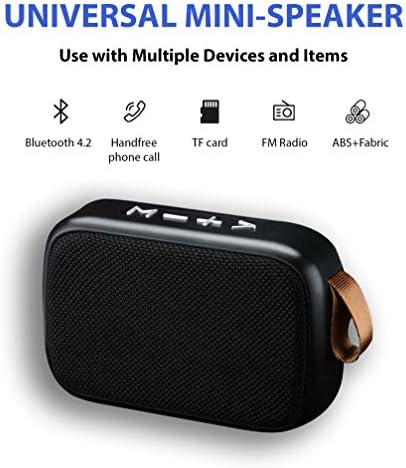
Figure 2: Universal Mini-Speaker Features. This diagram illustrates the various functionalities of the speaker, such as Bluetooth 4.2, hands-free calling, TF card support, FM radio, and its durable ABS+Fabric construction.
Setup Guide
1. Charging the Speaker
Before first use, fully charge the speaker. Connect the supplied MicroUSB charging cable to the speaker's MicroUSB port and the other end to a USB power adapter (not included) or a computer's USB port.
- A red indicator light will illuminate during charging.
- The light will turn off or change color when charging is complete.
- Charging time is approximately 2-3 hours for a full charge.
2. Powering On/Off
Locate the On/Off switch on the back of the speaker. Slide the switch to the "ON" position to power on the speaker. You will hear an audible prompt indicating it's ready for pairing. Slide to "OFF" to power down.
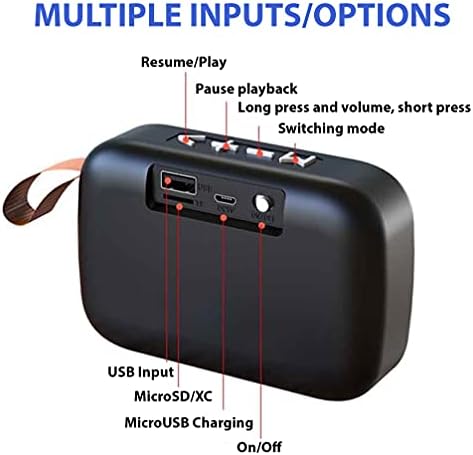
Figure 3: Speaker Rear Panel with Inputs. This image provides a detailed view of the speaker's rear panel, labeling the USB input, MicroSD/XC card slot, MicroUSB charging port, and the power On/Off switch.
Operating Instructions
1. Bluetooth Pairing
- Ensure the speaker is powered on and in Bluetooth pairing mode (indicated by a flashing blue LED or audible prompt).
- On your device (e.g., smartphone, tablet), enable Bluetooth and search for available devices.
- Select "G2 Pro" from the list of found devices.
- Once paired, the speaker will provide an audible confirmation, and the LED indicator will stop flashing.
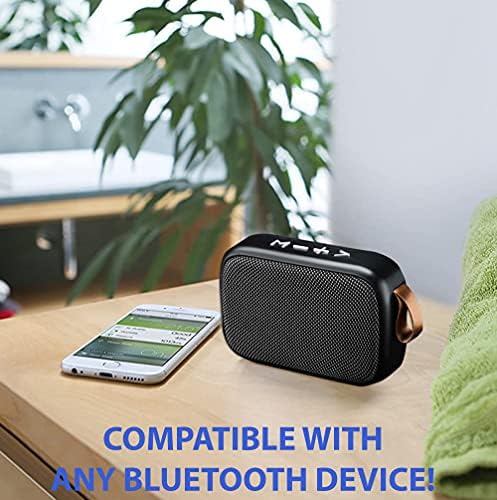
Figure 4: Speaker Compatibility. This image shows the speaker placed next to a smartphone, illustrating its compatibility with various Bluetooth-enabled devices.
2. Controlling Playback
The top panel of the speaker features control buttons:
- Play/Pause Button: Press once to play or pause audio.
- Volume Up (+): Short press to increase volume. Long press for next track.
- Volume Down (-): Short press to decrease volume. Long press for previous track.
- Mode (M) Button: Press to switch between Bluetooth, USB, TF card, FM radio, and Line-in modes.
3. Hands-Free Calling
When connected via Bluetooth to your smartphone, the built-in microphone allows for hands-free calls:
- Answer Call: Press the Play/Pause button once.
- End Call: Press the Play/Pause button once during a call.
- Reject Call: Long press the Play/Pause button.
4. True Wireless Stereo (TWS) Pairing
To achieve stereo sound, you can pair two G2 Pro speakers together:
- Ensure both G2 Pro speakers are powered on and not connected to any other Bluetooth device.
- On one speaker, double-press the Mode (M) button. It will enter TWS pairing mode.
- The two speakers will automatically connect to each other. You will hear an audible confirmation.
- Once paired, connect your device to one of the speakers via Bluetooth as described in "Bluetooth Pairing" (Step 1). The audio will now play in stereo through both speakers.
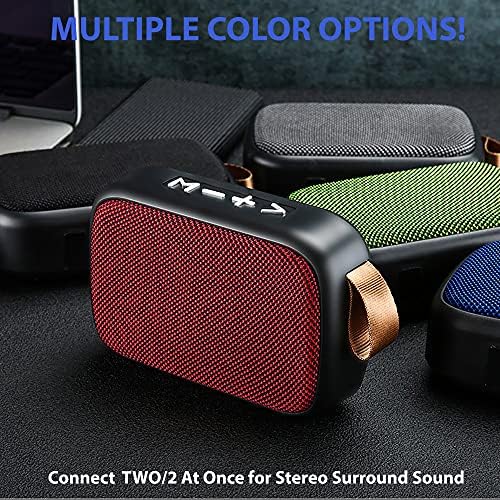
Figure 5: Multiple Speakers for Stereo Sound. This image displays several speakers in various colors, emphasizing the ability to connect two speakers for an enhanced stereo audio experience.
Maintenance
- Cleaning: Use a soft, dry cloth to clean the speaker's exterior. Do not use abrasive cleaners or solvents.
- Storage: Store the speaker in a cool, dry place away from direct sunlight and extreme temperatures.
- Battery Care: To prolong battery life, avoid fully discharging the speaker frequently. Charge it regularly, even if not in use for extended periods.
- Water Resistance: While the product description mentions "Is Waterproof: TRUE", it's generally best practice to avoid submerging the speaker or exposing it to heavy rain to ensure longevity. Refer to the manufacturer's specific IP rating if available for detailed water resistance capabilities.
Troubleshooting
| Problem | Possible Cause | Solution |
|---|---|---|
| Speaker does not power on. | Low battery. | Charge the speaker fully. |
| Cannot pair with Bluetooth device. | Speaker not in pairing mode; Device Bluetooth off; Too far from speaker. | Ensure speaker is in pairing mode. Turn on Bluetooth on your device. Move device closer to speaker (within 10 meters). |
| No sound or low volume. | Volume too low on speaker or device; Incorrect mode selected. | Increase volume on both speaker and device. Press 'M' button to select correct input mode. |
| TWS pairing fails. | Speakers already connected to another device; Incorrect TWS pairing procedure. | Disconnect speakers from any other Bluetooth devices. Ensure both speakers are G2 Pro models. Follow TWS pairing steps precisely. |
Specifications
- Model Name: G2 Pro
- Brand: Tek Styz
- Connectivity Technology: Bluetooth 4.2, USB, TF Card, Line-in
- Speaker Type: Portable Bluetooth Speaker
- Speaker Maximum Output Power: 3 Watts
- Audio Output Mode: Stereo, Surround (with TWS)
- Battery Capacity: 800 mAh
- Playtime: Up to 6+ hours
- Charging Port: MicroUSB
- Built-in Microphone: Yes
- Dimensions: 4.5 x 1.6 x 3 inches (approx.)
- Weight: 4 ounces (approx.)
- Material: ABS Plastic with Fabric cover
- Color: Gray (as per product details, other colors may be available)
- UPC: 600983104377
Warranty Information
Tek Styz products are designed for reliability and performance. For specific warranty terms and conditions, please refer to the documentation included with your purchase or visit the official Tek Styz website. Keep your purchase receipt as proof of purchase for any warranty claims.
Customer Support
If you encounter any issues or have questions regarding your Tek Styz G2 Pro Portable Bluetooth Speaker, please contact our customer support team. For the most up-to-date contact information, please visit the Tek Styz Store on Amazon or refer to the contact details provided with your product packaging.
Ask a question about this manual
Ask about setup, troubleshooting, compatibility, parts, safety, or missing instructions. Manuals+ will review the question and use this page’s manual context to help answer it.