
1. Introduction
Thank you for choosing the Tek Styz Portable Bluetooth Speaker G2 Pro TWS. This speaker is designed for portable audio playback, offering Bluetooth connectivity, a built-in microphone for calls, and the ability to pair two speakers for stereo sound. Please read this manual carefully before use to ensure proper operation and to maximize your experience with the device.
2. Package Contents
- Tek Styz Portable Bluetooth Speaker G2 Pro TWS
- MicroUSB Charging Cable
- User Manual (this document)
Note: A charger block/adapter is not included. Please use a standard USB power adapter for charging.
3. Product Overview
The Tek Styz G2 Pro TWS speaker features a durable ABS plastic body with a stylish fabric cover. It includes easy-access buttons for control and multiple input options.

Image 3.1: Front view of the Tek Styz Portable Bluetooth Speaker G2 Pro TWS, showing the speaker grille.
3.1. Controls and Ports
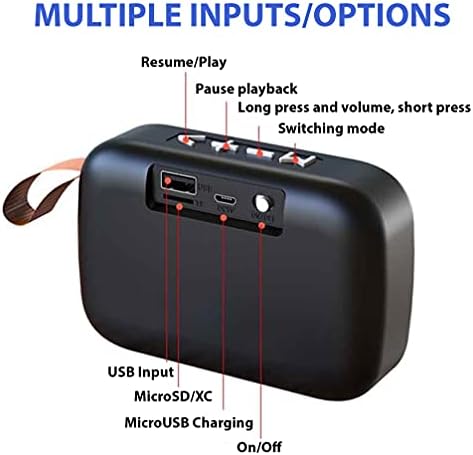
Image 3.2: Rear view of the speaker highlighting the control buttons and input ports.
- Power Button: On/Off switch.
- MicroUSB Charging Port: For charging the speaker.
- MicroSD/TF Card Slot: For playing music directly from a memory card.
- USB Input: For playing music directly from a USB drive.
- Mode Button: Switches between Bluetooth, USB, TF card, FM radio, and Line input modes.
- Volume Down / Previous Track Button: Short press for previous track, long press to decrease volume.
- Play/Pause / Call Button: Play/pause music, answer/end calls.
- Volume Up / Next Track Button: Short press for next track, long press to increase volume.
4. Setup and Pairing
4.1. Charging the Speaker
- Connect the supplied MicroUSB charging cable to the MicroUSB port on the speaker.
- Connect the other end of the cable to a standard USB power adapter (not included) or a computer's USB port.
- The charging indicator light will illuminate during charging and turn off when fully charged.
- A full charge provides up to 6+ hours of playtime.
4.2. Powering On/Off
- To power on, slide the Power button to the "ON" position. You will hear an audible prompt.
- To power off, slide the Power button to the "OFF" position.
4.3. Bluetooth Pairing
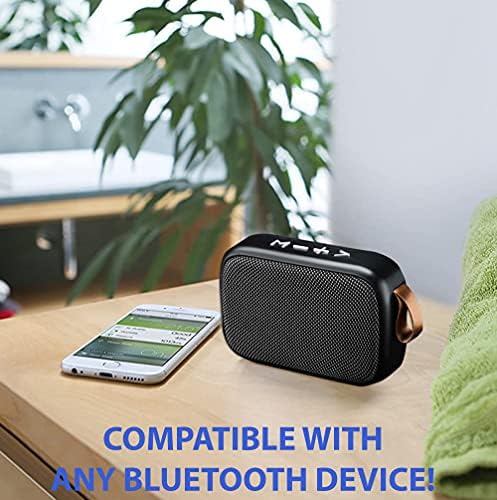
Image 4.1: The speaker is compatible with any Bluetooth-enabled device.
- Ensure the speaker is powered on and in Bluetooth mode. If not, press the Mode button until you hear the Bluetooth pairing prompt. The indicator light will flash.
- On your Bluetooth-enabled device (smartphone, tablet, computer), go to the Bluetooth settings.
- Search for available devices and select "Tek Styz Speaker" (or similar name) from the list.
- Once paired, the speaker will emit a confirmation sound, and the indicator light will stop flashing.
- You can now play audio from your device through the speaker.
4.4. True Wireless Stereo (TWS) Pairing (Optional)
To achieve a stereo surround sound experience, you can pair two Tek Styz G2 Pro TWS speakers together.
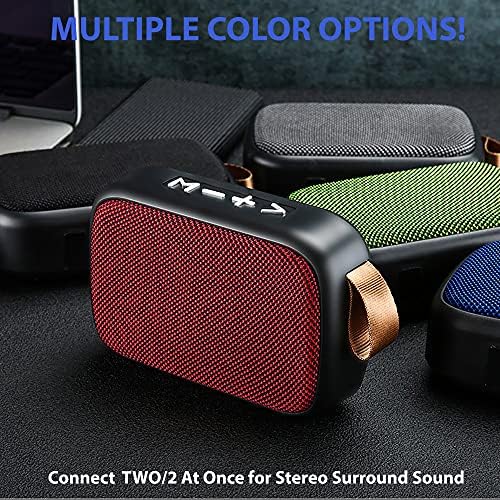
Image 4.2: Two speakers can be connected for stereo sound.
- Ensure both speakers are powered on and in Bluetooth mode, but not yet connected to any device.
- On one of the speakers, double-press the Play/Pause button. It will search for the second speaker.
- Once successfully paired, you will hear a confirmation sound, and the indicator lights on both speakers will change.
- Now, connect your device to one of the speakers via Bluetooth as described in section 4.3. Both speakers will play audio in stereo.
5. Operating Instructions
5.1. Music Playback
- Play/Pause: Press the Play/Pause button once.
- Next Track: Short press the Volume Up / Next Track button.
- Previous Track: Short press the Volume Down / Previous Track button.
- Volume Up: Long press the Volume Up / Next Track button.
- Volume Down: Long press the Volume Down / Previous Track button.
5.2. Hands-Free Calling
- When a call comes in, the speaker will ring.
- Answer Call: Press the Play/Pause button once.
- End Call: Press the Play/Pause button once during a call.
- Reject Call: Long press the Play/Pause button.
5.3. Mode Switching
Press the Mode button to cycle through available input sources:
- Bluetooth Mode
- USB Input Mode (if a USB drive is inserted)
- TF Card Mode (if a MicroSD/TF card is inserted)
- FM Radio Mode
- Line Input Mode (if an AUX cable is connected, though not explicitly mentioned as a port, it's listed in description)
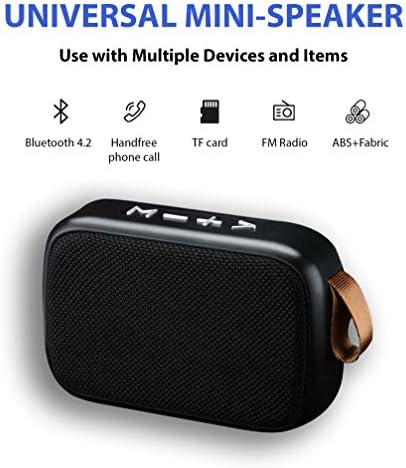
Image 5.1: The speaker supports multiple input options and features.
6. Maintenance
- Clean the speaker with a soft, dry cloth. Do not use abrasive cleaners or solvents.
- Keep the speaker away from water and excessive moisture. This product is not waterproof.
- Avoid exposing the speaker to extreme temperatures (hot or cold).
- Store the speaker in a cool, dry place when not in use for extended periods.
- Charge the speaker regularly, even if not in frequent use, to maintain battery health.
7. Troubleshooting
| Problem | Possible Cause | Solution |
|---|---|---|
| Speaker does not power on. | Battery is depleted. | Charge the speaker using the MicroUSB cable. |
| Cannot pair via Bluetooth. | Speaker is not in pairing mode or too far from device. | Ensure speaker is in Bluetooth pairing mode (flashing indicator). Move speaker closer to your device. Forget previous pairings on your device and try again. |
| No sound. | Volume too low, incorrect mode, or device not connected. | Increase speaker and device volume. Ensure correct input mode is selected. Verify Bluetooth connection. |
| Sound distortion. | Volume too high or device too far. | Reduce volume on both speaker and device. Move device closer to the speaker. |
| TWS pairing fails. | Speakers already paired to a device or not in TWS pairing mode. | Ensure both speakers are disconnected from any device. Follow TWS pairing steps carefully (Section 4.4). |
8. Specifications
- Brand: Tek Styz
- Model: G2 Pro TWS
- Connectivity Technology: Bluetooth 4.2
- Speaker Maximum Output Power: 3 Watts
- Audio Output Mode: Stereo, Surround (with TWS)
- Impedance: 4 Ohms
- Frequency Response: 48000 KHz
- Battery Capacity: 800 mAh
- Playtime: Up to 6+ hours
- Charging Port: MicroUSB
- Material: ABS Plastic, Fabric
- Item Weight: 4 Ounces
- Color: Gray
- Waterproof: No
- Compatible Devices: Android, iOS, Mac, Windows, and other Bluetooth-enabled devices.
- Additional Features: Built-in Microphone, TF Card Slot, USB Input, FM Radio.
9. Warranty and Support
For warranty information or technical support, please refer to the documentation provided with your purchase or contact Tek Styz customer service through their official website or the retailer where the product was purchased. Please have your product model number (G2 Pro TWS) and ASIN (B0932CCJNC) ready when contacting support.
You can visit the Tek Styz Store on Amazon for more information.