
1. Introduction
This manual provides detailed instructions for the proper use and maintenance of your Tek Styz Portable Bluetooth Speaker G2 Pro TWS. Please read this manual thoroughly before operating the device to ensure optimal performance and longevity.

Image: The Tek Styz Portable Bluetooth Speaker is designed for portability, allowing use in various environments such as parks or outdoor settings.
2. Package Contents
Verify that all items are present in your package:
- Tek Styz Portable Bluetooth Speaker G2 Pro TWS
- MicroUSB Charging Cable (Note: Charger block/adapter is not included)
3. Product Overview
Familiarize yourself with the speaker's controls and ports:
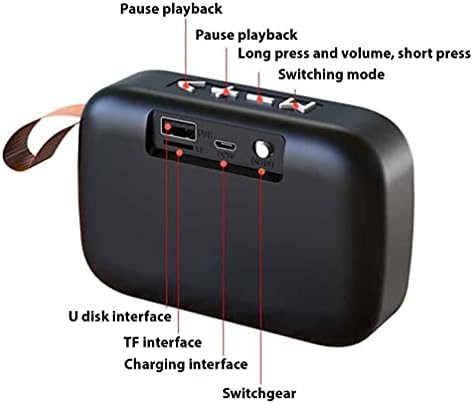
Image: Rear view of the speaker indicating the U disk interface, TF card slot, charging interface, and power switch.
- Power Switch (ON/OFF): Located on the rear panel.
- Charging Interface: MicroUSB port for charging.
- TF Card Interface: Slot for TransFlash (microSD) cards.
- U Disk Interface: USB-A port for USB flash drives.
- Control Buttons (Top Panel):
- Play/Pause: Short press to play or pause audio.
- Volume Up / Next Track: Short press for next track, long press for volume up.
- Volume Down / Previous Track: Short press for previous track, long press for volume down.
- Mode Switch: Press to cycle through Bluetooth, USB, TF card, FM radio, and Line input modes.
4. Setup
4.1 Charging the Speaker
- Connect the provided MicroUSB charging cable to the speaker's charging interface.
- Connect the other end of the cable to a USB power source (e.g., computer USB port, USB wall adapter - not included).
- The charging indicator light will illuminate. Once fully charged, the light may change color or turn off. A full charge provides up to 6+ hours of playtime.
4.2 Powering On/Off
- To power on, slide the Power Switch to the "ON" position. You will hear an audible prompt.
- To power off, slide the Power Switch to the "OFF" position.
4.3 Bluetooth Pairing
The speaker uses Bluetooth 4.2 for fast and stable connections.
- Ensure the speaker is powered on and in Bluetooth mode (indicated by an audible prompt or LED).
- On your device (e.g., smartphone, tablet), enable Bluetooth and search for available devices.
- Select "Tek Styz Speaker" (or similar name) from the list of found devices.
- Once paired, the speaker will indicate a successful connection with an audible prompt.
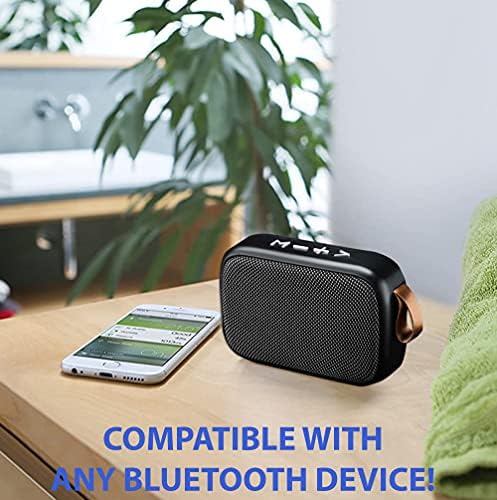
Image: The speaker is compatible with any Bluetooth-enabled device, allowing for easy wireless audio streaming.
5. Operating Instructions
5.1 Basic Audio Controls
- Play/Pause: Short press the Play/Pause button.
- Volume Adjustment: Long press the Volume Up (+) or Volume Down (-) buttons.
- Next/Previous Track: Short press the Volume Up (+) for next track or Volume Down (-) for previous track.
5.2 Mode Switching
Press the Mode Switch button to cycle through available playback modes:
- Bluetooth Mode
- USB Disk Playback (via U Disk Interface)
- TF Card Playback (via TF Card Interface)
- FM Radio Mode
- Line Input Mode (if applicable, requires an AUX cable - not included)
5.3 Hands-Free Calling
When connected to a smartphone via Bluetooth, the built-in microphone allows for hands-free calls:
- Answer Call: Short press the Play/Pause button.
- End Call: Short press the Play/Pause button.
- Reject Call: Long press the Play/Pause button.
5.4 True Wireless Stereo (TWS) Pairing
You can pair two Tek Styz G2 Pro TWS speakers together for a stereo sound experience:
- Ensure both speakers are powered on and not connected to any Bluetooth device.
- On one speaker, long press the Mode Switch button until you hear a pairing tone. This speaker will become the primary unit.
- The two speakers will automatically connect to each other. Once connected, you will hear a confirmation tone.
- Now, connect your device to the primary speaker via Bluetooth as described in section 4.3. Audio will play in stereo through both speakers.
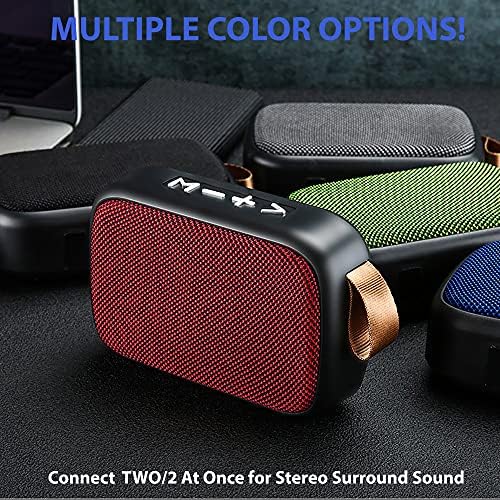
Image: The speaker is available in multiple color options and supports TWS pairing for enhanced stereo sound.
6. Maintenance
6.1 Cleaning
- Wipe the speaker with a soft, dry, or slightly damp cloth.
- Do not use harsh chemicals, cleaning solvents, or strong detergents.
- Ensure no liquid enters the speaker's ports or openings.
6.2 Battery Care
- To preserve battery life, fully charge the speaker before first use.
- Avoid completely draining the battery frequently.
- If storing the speaker for an extended period, charge it to approximately 50% every few months.
6.3 Storage
- Store the speaker in a cool, dry place away from direct sunlight and extreme temperatures.
- Keep away from dust and moisture.
7. Troubleshooting
| Problem | Possible Solution |
|---|---|
| Speaker does not power on. | Ensure the battery is charged. Connect to a power source and try again. |
| No sound from the speaker. | Check if the speaker is paired correctly. Increase the volume on both the speaker and your connected device. Ensure the correct playback mode is selected. |
| Bluetooth pairing fails. | Ensure the speaker is in Bluetooth pairing mode. Turn off and on Bluetooth on your device. Move the speaker closer to your device. Clear previous Bluetooth connections on your device. |
| Poor sound quality. | Ensure the speaker is within Bluetooth range. Check for interference from other wireless devices. Try playing a different audio source. |
| TWS pairing fails. | Ensure both speakers are disconnected from other Bluetooth devices before attempting TWS pairing. Follow TWS pairing steps carefully. |
8. Specifications
| Feature | Specification |
|---|---|
| Brand | Tek Styz |
| Model | G2 Pro TWS |
| Wireless Communication Technology | Bluetooth 4.2 |
| Speaker Maximum Output Power | 3 Watts |
| Power Source | Battery Powered (800 mAh capacity) |
| Playtime | Up to 6+ hours |
| Material | ABS Plastic with Fabric Cover |
| Product Dimensions | 4.5 x 1.6 x 3 inches |
| Item Weight | 4 Ounces |
| Special Features | Built-in Microphone, TWS Pairing, Multiple Playback Modes (Bluetooth, USB, TF Card, FM Radio) |
| Compatible Devices | Android, iOS, Mac, Windows, ZTE nubia Red Magic 5G |
9. Warranty Information
This product is covered by a standard manufacturer's warranty. Please retain your proof of purchase for any warranty claims. For specific details regarding warranty duration and terms, refer to the documentation provided at the time of purchase or contact customer support.
10. Customer Support
For technical assistance, troubleshooting, or general inquiries, please contact your retailer or refer to the official Tek Styz support channels. Contact information can typically be found on the product packaging or the brand's official website.