
Introduction
Thank you for choosing the Tek Styz G2 Pro Portable Bluetooth Speaker. This manual provides essential information for setting up, operating, and maintaining your new speaker. Designed for portability and high-quality audio, the G2 Pro offers versatile connectivity and a durable, stylish design, perfect for various indoor and outdoor environments.

Image: The Tek Styz G2 Pro Portable Bluetooth Speaker, showcasing its compact design, black fabric grille, and a convenient brown carrying strap.
Key Features
- Portable & Lightweight: Easy to carry for indoor, outdoor, travel, and party use.
- Bluetooth 4.2 Connectivity: Ensures fast and stable wireless pairing with compatible devices.
- Hands-Free Calling: Built-in microphone allows for convenient call management.
- Dual Speaker Pairing (TWS): Connect two G2 Pro speakers for true stereo surround sound.
- Multiple Playback Modes: Supports Bluetooth, USB, TF card, FM radio, and line-in audio.
- Long Battery Life: 800mAh battery provides up to 6+ hours of playtime.
- Durable Design: Constructed with ABS plastic and a stylish fabric cover.
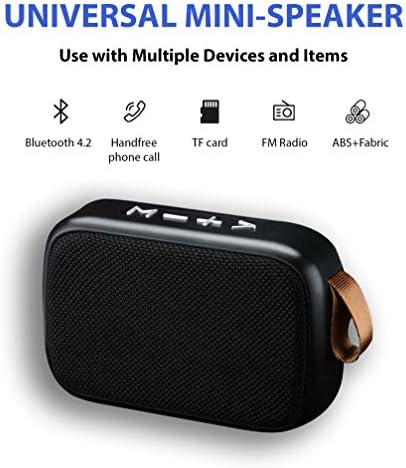
Image: Visual representation of the speaker's universal features, including Bluetooth 4.2, hands-free calling, TF card support, FM radio, and its ABS+Fabric construction.
Package Contents
Please check the box for the following items:
- 1 x Tek Styz G2 Pro Portable Bluetooth Speaker
- 1 x MicroUSB Charging Cable
- Note: A USB wall adapter is not included and must be provided by the user for charging.
Setup
Initial Charging
- Before first use, fully charge the speaker.
- Connect the MicroUSB charging cable to the speaker's MicroUSB port.
- Connect the other end of the cable to a USB power source (e.g., a computer USB port, a USB wall adapter, or a power bank).
- The charging indicator light will illuminate. It will turn off or change color once charging is complete.
Powering On/Off
- To Power On: Locate the On/Off switch or button (refer to the "Multiple Inputs/Options" image for location) and slide/press it to the 'On' position. You will hear an audible prompt indicating the speaker is on.
- To Power Off: Slide/press the On/Off switch/button to the 'Off' position.
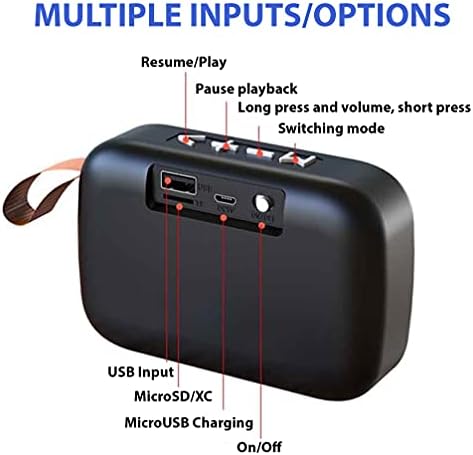
Image: Rear view of the Tek Styz G2 Pro speaker, highlighting its various ports and controls including USB, MicroSD, MicroUSB charging, and the On/Off switch.
Operating Instructions
Bluetooth Pairing
- Ensure the speaker is powered on and in Bluetooth mode (it usually defaults to Bluetooth mode upon power-on, indicated by a blinking LED or voice prompt).
- On your device (smartphone, tablet, computer), enable Bluetooth and search for available devices.
- Select "G2 Pro" (or similar name) from the list of found devices.
- Once paired, the speaker will provide an audible confirmation, and the LED indicator will become solid.
- The speaker will automatically reconnect to the last paired device when powered on, if the device's Bluetooth is active and within range.
Controlling Playback
The speaker features top-mounted buttons for easy control:
- Play/Pause: Press the Play/Pause button (often marked with a triangle or similar icon) to start or pause playback.
- Volume Up: Long press the '+' button to increase volume.
- Volume Down: Long press the '-' button to decrease volume.
- Next Track: Short press the '+' button to skip to the next track.
- Previous Track: Short press the '-' button to go to the previous track.
- Mode Key: Short press the 'M' button to switch between Bluetooth, USB, TF card, FM radio, and Line-in modes.
Hands-Free Calling
When connected via Bluetooth to your smartphone:
- Answer Call: Press the Play/Pause button once to answer an incoming call.
- End Call: Press the Play/Pause button once during a call to end it.
- Reject Call: Long press the Play/Pause button to reject an incoming call.
Dual Speaker Pairing (TWS Function)
To achieve true wireless stereo sound, you can pair two Tek Styz G2 Pro speakers together:
- Ensure both G2 Pro speakers are powered on and not connected to any Bluetooth device.
- On one of the speakers, long press the 'M' (Mode) button until you hear a pairing tone, indicating it's searching for another speaker.
- The two speakers will automatically connect to each other. You will hear a confirmation tone once they are successfully paired for TWS.
- Now, connect your device to one of the speakers via Bluetooth as described in the "Bluetooth Pairing" section. Audio will play in stereo through both speakers.
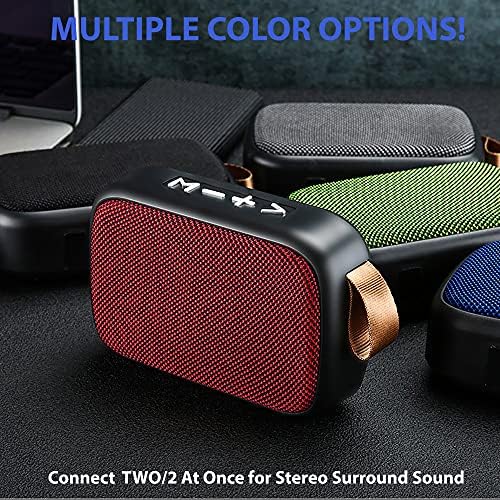
Image: A display of the Tek Styz G2 Pro speaker in various colors, illustrating the capability to connect two units for stereo surround sound.
Other Input Modes (USB, TF Card, FM Radio, Line-in)
The G2 Pro supports various audio sources:
- USB Playback: Insert a USB flash drive into the USB port. The speaker will automatically switch to USB mode and begin playing audio files.
- TF Card Playback: Insert a TF (MicroSD) card into the TF card slot. The speaker will automatically switch to TF card mode and play audio files.
- FM Radio: Press the 'M' (Mode) button to switch to FM radio mode. Use the '+' and '-' buttons to scan for stations.
- Line-in (AUX) Mode: Connect an audio device using a 3.5mm AUX cable (not included) to the speaker's line-in port. Press the 'M' (Mode) button to switch to Line-in mode.
Maintenance
- Cleaning: Use a soft, dry cloth to clean the speaker's surface. For stubborn dirt, a slightly damp cloth can be used, but ensure no moisture enters the ports.
- Storage: Store the speaker in a cool, dry place away from direct sunlight and extreme temperatures.
- Battery Care: To prolong battery life, avoid fully discharging the battery frequently. Charge the speaker regularly, even if not in use for extended periods.
- Water Resistance: While the product description mentions "Is Waterproof: TRUE", it's generally advisable to avoid submerging the speaker or exposing it to heavy rain to ensure longevity.
Troubleshooting
| Problem | Possible Cause / Solution |
|---|---|
| Speaker does not power on. | Battery is low or depleted. Charge the speaker fully. |
| Cannot pair with Bluetooth device. |
|
| No sound or low volume. |
|
| TWS pairing fails. |
|
Specifications
| Feature | Detail |
|---|---|
| Model Name | G2 Pro |
| Brand | Tek Styz |
| Connectivity Technology | Bluetooth 4.2, USB, TF Card, Line-in (AUX) |
| Speaker Type | Portable Bluetooth Speaker |
| Audio Output Mode | Stereo, Surround (with TWS) |
| Speaker Maximum Output Power | 3 Watts |
| Frequency Response | 48000 KHz |
| Impedance | 4 Ohm |
| Power Source | Battery Powered (800mAh) |
| Playtime | Up to 6+ hours |
| Material | ABS Plastic, Fabric |
| Color | Gray (other colors available) |
| Product Dimensions | 4.5 x 1.6 x 3 inches |
| Item Weight | 4 ounces |
| Waterproof | TRUE (as per product data) |
| UPC | 600983104070 |
Warranty and Support
For warranty information and customer support, please refer to the retailer where you purchased the product or visit the official Tek Styz website. Keep your purchase receipt as proof of purchase for any warranty claims.
If you encounter any issues not covered in this manual, please contact Tek Styz customer service for assistance.