
1. Introduction
This manual provides instructions for the NKF RMT-24 remote control, a direct replacement for various Westinghouse TV models. This remote is designed for immediate use without complex programming.
Compatible Westinghouse TV Models include:
- DW39F1Y1, DW46F1Y2, DW50F1Y1
- DWM32H1A1, DWM32H1G1, DWM32H1Y1
- DWM40F1A1, DWM40F1Y1, DWM40F1Y1-C, DWM40F2G1, DWM40F3G1, DWM42F2G1
- DWM48F1A1, DWM48F1G1, DWM48F1Y1, DWM48F1Y1-C
- DWM50F1Y1, DWM50F3G1, DWM55F1A1, DWM55F1G1, DWM55F1Y1, DWM55F1Y2, DWM55F2Y1
- WD40FX1450, WD50FX1120, WD55FX1180
- And many other Westinghouse TV models.

Image: The NKF RMT-24 remote control shown alongside a television displaying a list of compatible Westinghouse TV models.
2. Setup
2.1 Battery Installation
The RMT-24 remote control requires two (2) AAA alkaline batteries (not included) for operation. Follow these steps to install the batteries:
- Locate the battery compartment cover on the back of the remote control.
- Slide the cover downwards or press the latch and lift to open the compartment.
- Insert two new 1.5V AAA alkaline batteries, ensuring the positive (+) and negative (-) terminals align correctly with the markings inside the compartment.
- Replace the battery compartment cover by sliding it back into place until it clicks securely.

Image: Detailed view of the battery compartment, illustrating correct AAA battery insertion.
2.2 Initial Use (No Programming Required)
The NKF RMT-24 remote control is pre-programmed for compatible Westinghouse TV models. No additional programming or setup steps are required. Once batteries are installed, the remote is ready for use.
3. Operating Instructions
Familiarize yourself with the buttons on your RMT-24 remote control. Below is a diagram and description of common functions:

Image: Front view of the NKF RMT-24 remote control with labels for primary functions.
| Button | Function |
|---|---|
| Power (Red) | Turns the TV on or off. |
| Mute (Green) | Mutes or unmutes the TV audio. |
| Number Keys (0-9) | Directly select TV channels. |
| Source | Cycles through available input sources (e.g., HDMI 1, AV, TV). |
| CH +/- | Changes TV channels up or down. |
| VOL +/- | Adjusts the TV volume up or down. |
| INFO | Displays current channel information or program details. |
| MENU | Accesses the TV's main menu. |
| OK (Center) | Confirms selections within menus. |
| Navigation Arrows | Navigates through menus and options. |
| EXIT | Exits the current menu or on-screen display. |
4. Maintenance
4.1 Battery Replacement
Replace batteries when the remote's responsiveness decreases or it stops functioning. Always use new 1.5V AAA alkaline batteries. Do not mix old and new batteries, or different types of batteries.
4.2 Cleaning
To clean the remote control, wipe it with a soft, dry cloth. Do not use liquid cleaners, sprays, or abrasive materials, as these can damage the remote's surface or internal components.
5. Troubleshooting
- Remote not responding:
- Ensure batteries are correctly installed with the correct polarity (+/-).
- Replace old batteries with new ones.
- Ensure there is a clear line of sight between the remote control and the TV's infrared sensor. Obstructions can block the signal.
- Confirm the remote is pointed directly at the TV's sensor.
- Limited operating range:
- While the remote is designed for a range of up to 10 meters (33 feet), actual performance may vary based on TV model and environmental factors. Try operating closer to the TV.
- Ensure batteries are fresh. Weak batteries can reduce signal strength.
- Buttons are unresponsive or sticky:
- Clean the remote control as described in the Maintenance section.
- If the issue persists after cleaning and battery replacement, the remote may be damaged and require replacement.
6. Specifications
| Feature | Detail |
|---|---|
| Model Number | RMT-24 |
| Brand | NKF |
| Compatible Devices | Westinghouse Televisions |
| Power Source | 2 x AAA Batteries (not included) |
| Product Dimensions | 7.05 x 1.76 x 0.8 inches |
| Item Weight | 1.76 ounces |
| Special Feature | No Programming Required |
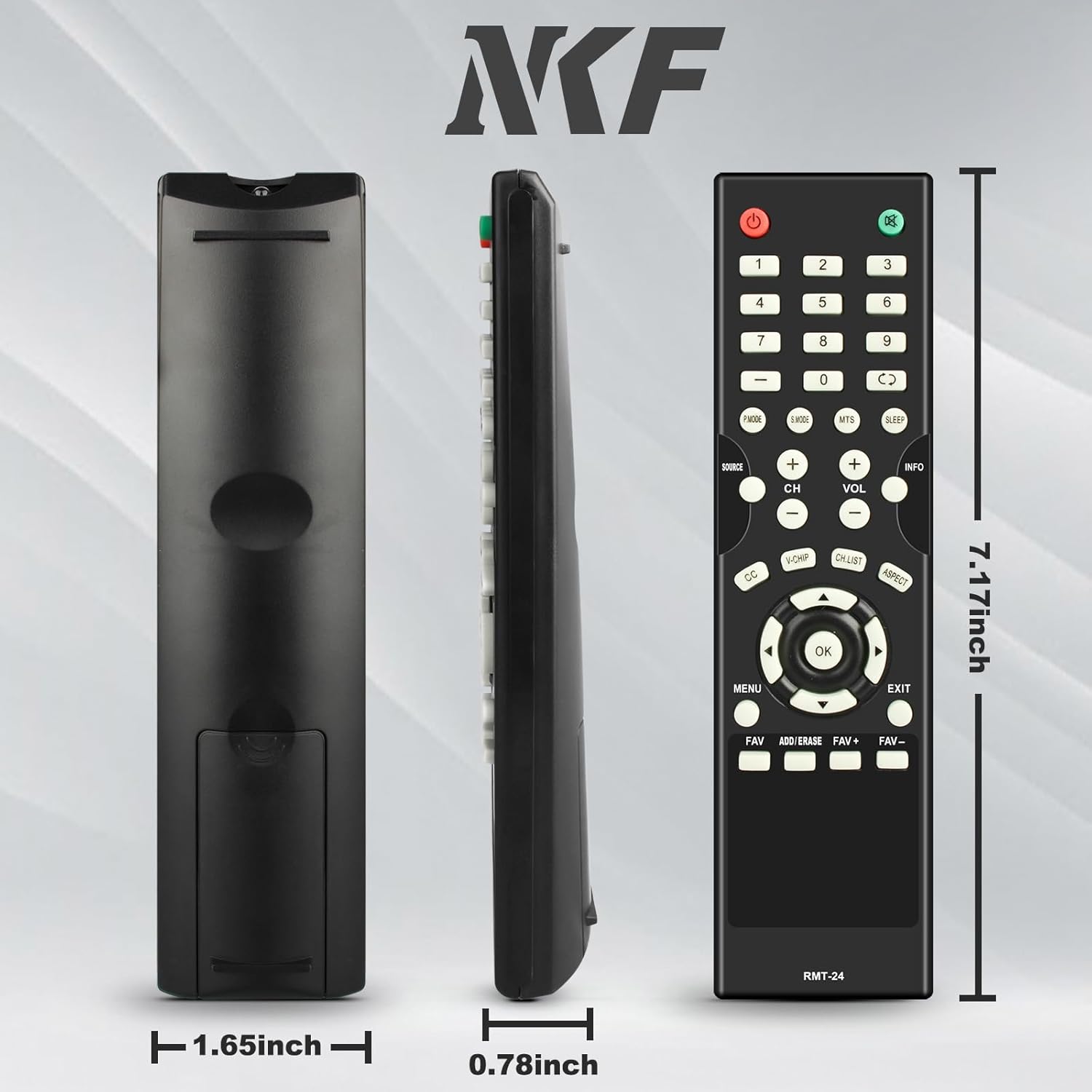
Image: Dimensional drawing of the NKF RMT-24 remote control.
7. Warranty and Support
The NKF RMT-24 remote control is manufactured with a focus on reliability and durability. For any issues or support inquiries, please refer to the retailer's return policy or contact the manufacturer, NKF, through their official channels.