
Introduction
The VEDINDUST HDMI Audio Extractor is designed to separate audio from an HDMI signal, allowing it to be outputted to various audio devices via optical, coaxial, L/R stereo, or 3.5mm auxiliary connections. This device supports 4K@60Hz video passthrough and advanced EDID management for flexible audio and video configurations.
Product Features
- HDMI Audio Extraction: Extracts audio from an HDMI source to optical, coaxial, L/R stereo, or 3.5mm auxiliary outputs.
- EDID Management: Features 8 working modes for easy configuration via a red DIP switch, allowing automatic EDID comparison or fixed EDID settings to ensure compatibility.
- 4K Ultra HD Support: Compatible with HDMI 1.4V, supporting up to 10.2G bandwidth, HDCP1.4, 4K@60Hz (YUV4:2:0), and 4K@30Hz RGB/YUV4:4:4.
- Audio Format Support: Optical and coaxial outputs support Dolby DTS 5.1. The 3.5mm and L/R outputs support PCM2.0.
- Low Power Consumption: Often operates without external power when connected to most source devices. A USB 5V power connection is available for devices requiring additional power.
- Wide Compatibility: Suitable for various HDMI source devices such as Roku, Fire TV, Blu-ray/DVD/HD players, cable/satellite boxes, PS4, PS5, Xbox, and PCs/laptops.
Note: This device does not support ARC (Audio Return Channel) or eARC. A TV is not supported as an input source. 4K HDR and 7.1 channel audio are not supported. Some devices like PS4/PS5 may only support up to 1080p through this extractor.
Setup Instructions
Package Contents
- HDMI Audio Extractor Unit
- Micro USB Power Cable
- User Manual (this document)
Connection Diagram

Step-by-Step Connection
- Connect HDMI Source: Use an HDMI cable to connect your HDMI source device (e.g., PS5, Blu-ray player, Roku) to the HDMI IN port on the extractor.
- Connect HDMI Display: Use another HDMI cable to connect your HDMI display (e.g., TV, monitor, projector) to the HDMI OUT port on the extractor.
- Connect Audio Output: Choose your desired audio output and connect it to your audio receiver, soundbar, speakers, or headphones:
- For 5.1 channel audio (Dolby DTS 5.1), connect an optical cable to the Optical port or a coaxial cable to the Coaxial port.
- For 2.0 channel stereo audio (PCM2.0), connect RCA cables to the L/R ports or a 3.5mm audio cable to the AUX port.
- Connect Power: Connect the provided Micro USB power cable to the USB 5V port on the extractor. Connect the other end to a USB power source (e.g., a USB port on your TV, a USB wall adapter, or a power bank). While many source devices provide sufficient power, external power may be required for stable operation.

Operating Instructions
EDID Management
The HDMI Audio Extractor features an EDID (Extended Display Identification Data) management switch, allowing you to configure the audio and video output behavior. Use the red DIP switch on the unit to select one of the 8 available modes.
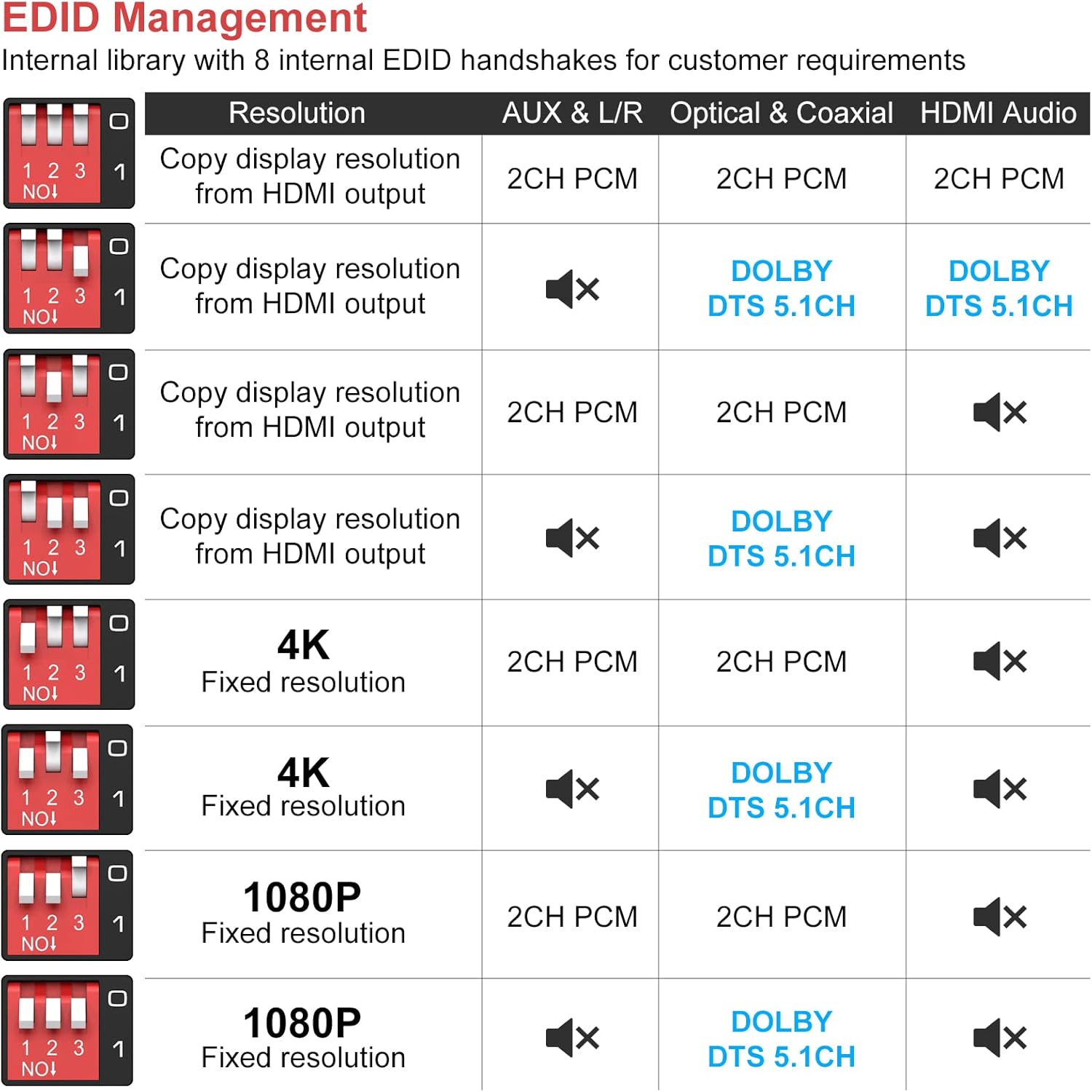
Each switch position (1, 2, 3) can be set to ON or OFF to achieve different configurations. Refer to the table above to select the appropriate mode for your setup. For example:
- To copy display resolution and output 2CH PCM audio on all outputs, set switches to a specific configuration (e.g., 1-OFF, 2-OFF, 3-OFF).
- To force 4K resolution and output Dolby DTS 5.1CH on Optical/Coaxial, set switches accordingly.
Audio Sync and TV Mute Functionality
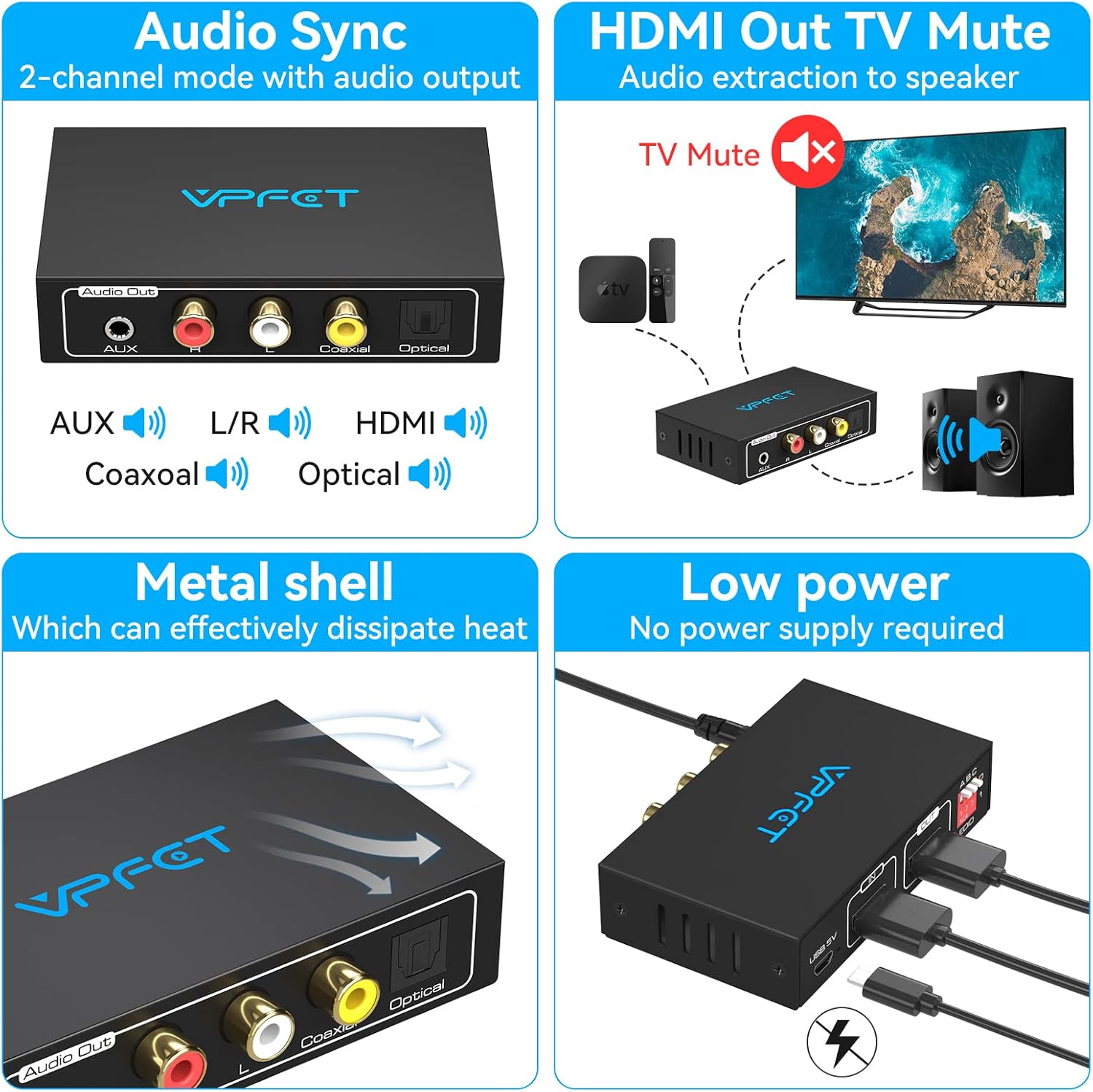
- Audio Sync: In 2-channel mode, the device ensures synchronized audio output across all enabled audio ports (AUX, L/R, Coaxial, Optical, HDMI).
- HDMI Out TV Mute: When audio is extracted to external speakers via the extractor's audio outputs, the HDMI output to the TV can be configured to mute its audio, preventing duplicate sound. This is managed through the EDID settings.
Maintenance
To ensure the longevity and optimal performance of your VEDINDUST HDMI Audio Extractor, follow these maintenance guidelines:
- Cleaning: Use a soft, dry cloth to clean the unit. Avoid using liquid cleaners or abrasive materials, which can damage the surface or internal components.
- Environment: Keep the device in a dry, well-ventilated area. Avoid exposure to extreme temperatures, direct sunlight, or high humidity.
- Heat Dissipation: The metal shell of the extractor is designed for effective heat dissipation. Ensure that the ventilation slots are not blocked to allow proper airflow.
- Cable Care: Handle HDMI and audio cables carefully. Avoid bending them sharply or placing heavy objects on them, which can cause damage.
Troubleshooting
If you encounter issues with your HDMI Audio Extractor, please refer to the following common problems and solutions:
| Problem | Possible Cause | Solution |
|---|---|---|
| No Audio Output |
|
|
| No Video Output |
|
|
| Intermittent Audio/Video |
|
|
| No 5.1 Channel Audio |
|
|
Specifications

| Feature | Detail |
|---|---|
| Model Number | SW2121314 |
| Manufacturer | VEDINDUST |
| HDMI Version | HDMI 1.4V |
| HDCP Version | HDCP 1.4 |
| Max Bandwidth | 10.2 Gbps |
| Supported Resolutions | 4K@60Hz (YUV4:2:0), 4K@30Hz (RGB/YUV4:4:4), 1080p, 720p, etc. |
| Audio Output Ports | Optical (Toslink), Coaxial, L/R RCA, 3.5mm AUX |
| Supported Audio Formats | Optical/Coaxial: Dolby Digital 5.1, DTS 5.1 L/R, 3.5mm AUX: PCM 2.0 Stereo |
| Power Supply | Micro USB 5V (Min 5 Volts DC, Max 5 Volts) |
| Operating Temperature | Up to 45 Degrees Celsius |
| Weight | 70 Grams |
| Dimensions (L x W x H) | 90mm x 54mm x 21mm (approximate, based on image) |
| Number of Pins | 21 (HDMI connector) |
| Compatible Devices | Projectors, Televisions (as display), various HDMI sources |
Warranty and Support
Warranty Information
This product is covered by a one-year replacement warranty from the date of purchase. During this period, if the product experiences any manufacturing defects or malfunctions, it will be replaced. Please note that this warranty covers replacement only and does not include repair services.
Technical Support
Should you have any questions or require technical assistance during the use of this equipment, please contact our technical support team. We are committed to providing technical support within 12 hours of your inquiry.
For support, please refer to the contact information provided with your purchase or on the VEDINDUST official website.
