
Introduction
This manual provides detailed instructions for the safe and effective use of your H2O HD 3-in-1 Steam Mop and Handheld Steam Cleaner. This versatile appliance is designed for deep cleaning and sanitizing various surfaces in your home using the power of steam, eliminating the need for harsh chemicals. Please read this manual thoroughly before initial use and retain it for future reference.

Figure 1: The H2O HD 3-in-1 Steam Mop and its included accessories, showcasing its modular design for various cleaning tasks.
Important Safety Information
Always follow basic safety precautions when using electrical appliances to reduce the risk of fire, electric shock, or injury. This appliance is for household use only.
- Do not leave the appliance unattended when plugged in. Unplug from outlet when not in use and before servicing.
- Do not allow to be used as a toy. Close attention is necessary when used by or near children, pets, or invalids.
- Use only as described in this manual. Use only manufacturer's recommended attachments.
- Do not use with damaged cord or plug. If appliance is not working as it should, has been dropped, damaged, left outdoors, or dropped into water, return it to a service center.
- Do not pull or carry by cord, use cord as a handle, close a door on cord, or pull cord around sharp edges or corners. Keep cord away from heated surfaces.
- Do not unplug by pulling on cord. To unplug, grasp the plug, not the cord.
- Do not handle plug or appliance with wet hands.
- Do not put any object into openings. Do not use with any opening blocked; keep free of dust, lint, hair, and anything that may reduce air flow.
- Keep hair, loose clothing, fingers, and all parts of body away from openings and moving parts.
- Do not use to pick up flammable or combustible liquids, such as gasoline, or use in areas where they may be present.
- Do not use without floor pad in place.
- Do not use on unsealed wooden floors for extended periods.
- Use only distilled or demineralized water in the water tank to prevent mineral buildup and prolong the life of the appliance.
Package Contents
Before assembly, ensure all items listed below are present and in good condition:
- H2O HD Steam Mop Main Unit
- Handle Assembly
- Microfiber Floor Pad (1)
- Coral Cloth Floor Pad (1)
- Carpet Glider Attachment
- Jet Nozzle
- Small Nylon Brush (1)
- Large Nylon Brush (1)
- Metal Brush (1)
- Window Cleaning Tool with Squeegee
- Garment Steamer Cloth
- Extension Hose
- Cleaning Pin
- Water Filter (pre-installed)
- User Manual (this document)
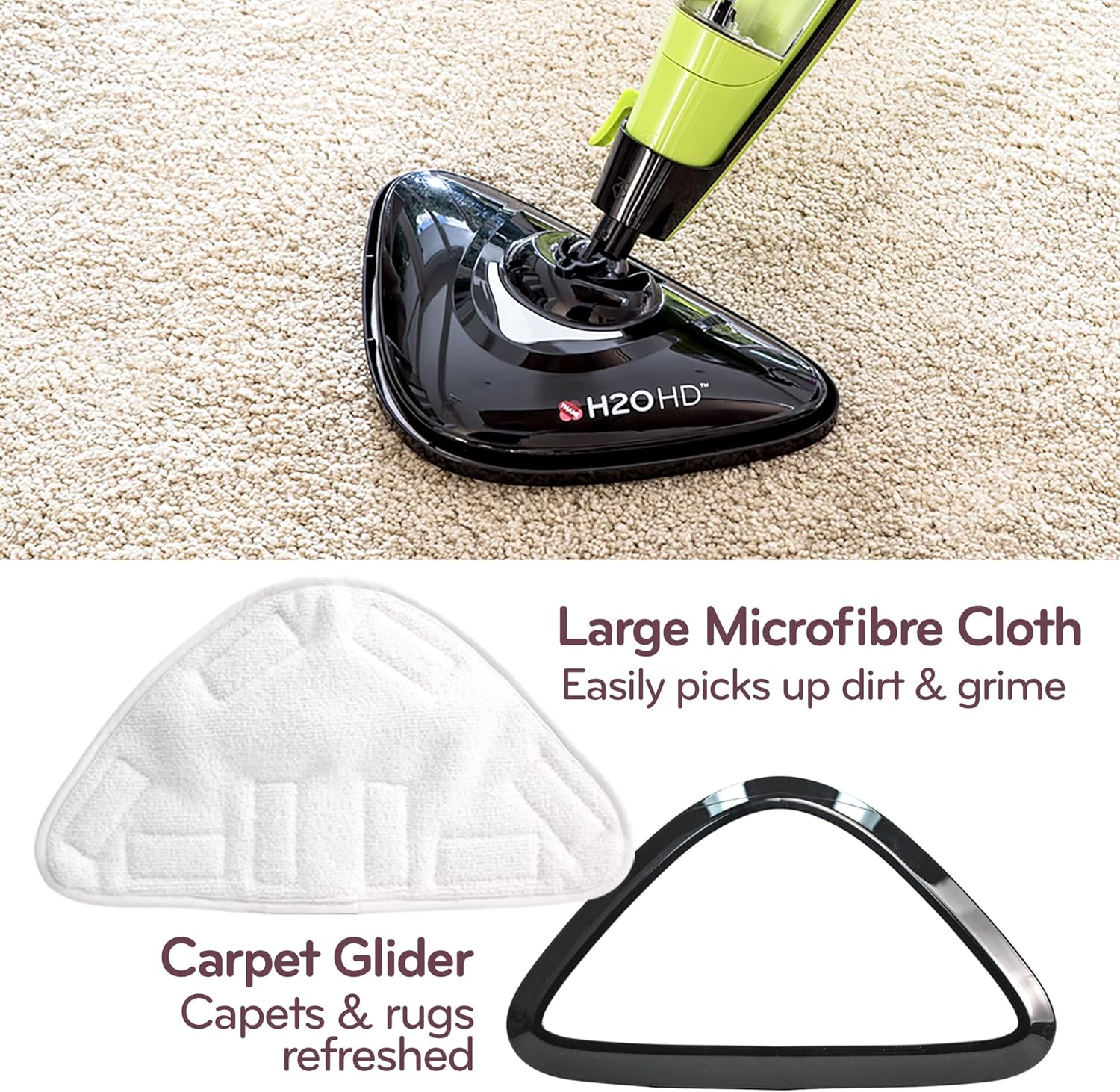
Figure 2: Close-up of the large microfiber cloth and carpet glider, essential accessories for floor and carpet cleaning.
Assembly
Follow these steps to assemble your H2O HD Steam Mop:
- Attach the Handle: Insert the handle assembly into the main body of the steam mop until it clicks securely into place. Ensure it is firmly seated.
- Attach the Mop Head: Align the mop head with the base of the main unit and push it firmly until it locks.
- Attach the Cleaning Pad: Place the desired microfiber or coral cloth floor pad onto the mop head, ensuring it covers the entire surface and is secured by the hook-and-loop fasteners.
Operating Instructions
1. Filling the Water Tank
The H2O HD Steam Mop features a removable water tank for easy filling.
- Ensure the appliance is unplugged from the power outlet.
- Remove the water tank from the main unit by pulling it upwards.
- Open the water tank cap.
- Fill the tank with clean, distilled, or demineralized water. Do not use tap water as mineral deposits can clog the steam jets. Do not add any cleaning solutions, perfumes, or other chemicals to the water tank.
- Close the water tank cap securely and reinsert the tank into the main unit until it clicks into place.

Figure 3: Demonstrates the process of filling the removable water tank with water for steam generation.
2. Powering On and Steam Settings
The H2O HD Steam Mop offers three digital steam power control levels.
- Plug the power cord into a grounded electrical outlet. The power indicator light will illuminate.
- Press the power button to turn on the unit. The appliance will begin to heat up, which typically takes less than 30 seconds.
- Select the desired steam level (Low, Medium, High) using the steam control button. The indicator lights will show the selected level.
- Wait for the steam to be ready. Once ready, steam will be emitted from the mop head.

Figure 4: Illustrates the one-touch variable steam control, allowing selection of low, medium, or high steam output.
3. Using as a Steam Mop (Floor Cleaning)
Ideal for sealed hard floors (tile, laminate, hardwood, marble, granite, vinyl, slate) and refreshing carpets.
- Ensure the appropriate floor pad is attached. For carpets, attach the carpet glider over the floor pad.
- Move the steam mop slowly and steadily across the floor surface. The steam will clean and sanitize the area.
- For stubborn stains, hold the mop over the area for a few seconds to allow the steam to penetrate.
- For carpet refreshing, move the mop back and forth over the carpet with the carpet glider attached.

Figure 5: The H2O HD steam mop in action, demonstrating its ease of operation on hard floors.

Figure 6: An overview of surfaces suitable for steam cleaning with the H2O HD, including slate, granite, carpet, laminate, sealed hardwood, vinyl, sealed tiles, and marble.
4. Using as a Handheld Steamer
The H2O HD quickly converts into a versatile handheld steamer for various cleaning tasks.
- Unplug the unit and allow it to cool slightly.
- Press the quick-release button to detach the main body from the mop head and handle.
- Attach the desired accessory (e.g., jet nozzle for grout, brush for stubborn spots, window cleaning tool for glass, garment steamer cloth for fabrics) to the handheld unit.
- Plug the unit back in and select the appropriate steam level.
- Direct the steam towards the surface to be cleaned. For best results, use short bursts of steam and wipe with a clean cloth as you go.

Figure 7: The H2O HD easily converts to a handheld steamer, ideal for tackling dirt, grime, and bacteria on various surfaces.
Maintenance
Regular maintenance ensures optimal performance and extends the life of your H2O HD Steam Mop.
1. Cleaning Microfiber Pads
- After each use, remove the microfiber pad from the mop head.
- The pads are machine washable. Wash them with mild detergent in warm water. Do not use bleach or fabric softeners, as these can damage the fibers.
- Air dry or tumble dry on low heat.
2. Descaling the Water Tank/Unit
Mineral buildup from water can affect steam output. Descale your unit regularly, especially if using non-distilled water (though distilled is highly recommended).
- Unplug the unit and ensure it is cool.
- Mix a solution of 1 part white vinegar to 2 parts distilled water.
- Pour the solution into the water tank.
- Allow the solution to sit in the tank for at least 30 minutes, or up to a few hours for heavy buildup.
- Empty the tank and rinse thoroughly with fresh distilled water.
- Run a tank full of plain distilled water through the unit to flush out any remaining vinegar residue.
3. Storage
- Ensure the unit is completely cool and dry before storing.
- Empty any remaining water from the tank.
- Store the appliance in a cool, dry place, away from direct sunlight and moisture.
- The handle can be folded for compact storage.
Troubleshooting
Refer to this section for common issues and their solutions.
| Problem | Possible Cause | Solution |
|---|---|---|
| No steam or very little steam. | Water tank empty; Unit not heated up; Steam jets clogged; Water filter clogged. | Refill water tank; Wait for unit to heat (approx. 30 seconds); Descale the unit; Replace water filter if necessary. |
| Water leaking from unit. | Water tank cap not secured; Water tank not properly seated; Overfilled water tank. | Ensure water tank cap is tightly closed; Re-seat water tank firmly; Do not overfill the tank. |
| Mop not gliding smoothly. | Floor pad dirty or worn out. | Clean or replace the microfiber floor pad. |
| Appliance not turning on. | Not plugged in; Power outlet faulty; Unit malfunction. | Check power cord connection; Test outlet with another appliance; Contact customer support if problem persists. |
Specifications
| Feature | Detail |
|---|---|
| Model Name | H2O HD STANDARD |
| Model Number | HD |
| Power Source | AC/DC |
| Wattage | 1500 watts |
| Voltage | 1.5E+3 Volts (1500V) |
| Color | Green |
| Item Weight | 8.1 pounds |
| Package Dimensions | 24.8 x 8.78 x 6.69 inches |
| Surface Recommendation | Carpet, Floor, Upholstery |
| Special Feature | Programmable (referring to steam levels) |
| Form Factor | Handheld |
| UPC | 096064000209 |
Warranty and Support
For warranty information and customer support, please refer to the warranty card included with your product or visit the official H2O website. Keep your purchase receipt as proof of purchase for any warranty claims.
Online Support: Visit the H2O Store on Amazon
Product Videos
No relevant official product videos with 'Seller' as creator type were found in the provided data to embed in this manual.


