
JUEMEL M8841-ES-1-cr
JUEMEL 20V Cordless Drill User Manual
Model: M8841-ES-1-cr
Brand: JUEMEL
1. Introduction
This manual provides detailed instructions for the safe and efficient operation, maintenance, and troubleshooting of your JUEMEL 20V Cordless Drill. Please read this manual thoroughly before using the tool to ensure proper handling and to maximize its lifespan.
Package Contents
The JUEMEL 20V Cordless Drill set includes the following components:
- JUEMEL 20V Cordless Drill
- Two (2) 1500mAh Li-Ion Batteries
- Fast Charger
- Carrying Bag
- 30-piece Drill/Driver Bits Accessories (including various drill bits for wood, metal, stone, screwdriver bits, and socket wrenches)
- Flexible Shaft Driver

Figure 1.1: JUEMEL 20V Cordless Drill with all included accessories, including two batteries, charger, carrying bag, and various drill and driver bits.

Figure 1.2: Detailed breakdown of the JUEMEL Cordless Drill and its primary components, including the drill body, battery, charger, carrying bag, and various bit types.
2. Safety Instructions
WARNING: Read all safety warnings and instructions. Failure to follow the warnings and instructions may result in electric shock, fire, and/or serious injury.
General Power Tool Safety
- Work Area Safety: Keep your work area clean and well-lit. Cluttered or dark areas invite accidents. Do not operate power tools in explosive atmospheres, such as in the presence of flammable liquids, gases, or dust.
- Electrical Safety: Power tool plugs must match the outlet. Never modify the plug in any way. Do not expose power tools to rain or wet conditions.
- Personal Safety: Always wear eye protection. Use hearing protection when operating for extended periods. Dress properly; avoid loose clothing or jewelry. Secure long hair.
- Tool Use and Care: Do not force the power tool. Use the correct power tool for your application. Disconnect the plug from the power source and/or remove the battery pack before making any adjustments, changing accessories, or storing power tools.
Battery Pack Safety
- Only recharge with the charger specified by the manufacturer.
- Do not use battery packs with power tools that are not specifically designed for them.
- When battery pack is not in use, keep it away from other metal objects that can make a connection from one terminal to another.
- Under abusive conditions, liquid may be ejected from the battery; avoid contact. If contact accidentally occurs, flush with water. If liquid contacts eyes, seek medical help.
3. Setup
Charging the Battery
The JUEMEL 20V Cordless Drill comes with two 1500mAh Li-Ion batteries. Before first use, fully charge the battery. A full charge typically takes approximately 1 hour.
- Connect the charger to a standard power outlet.
- Slide the battery pack onto the charger base. Ensure it clicks into place.
- The charger's indicator light will show red during charging. Once fully charged, the light will turn green.
- Once charging is complete, disconnect the charger from the power outlet and remove the battery.
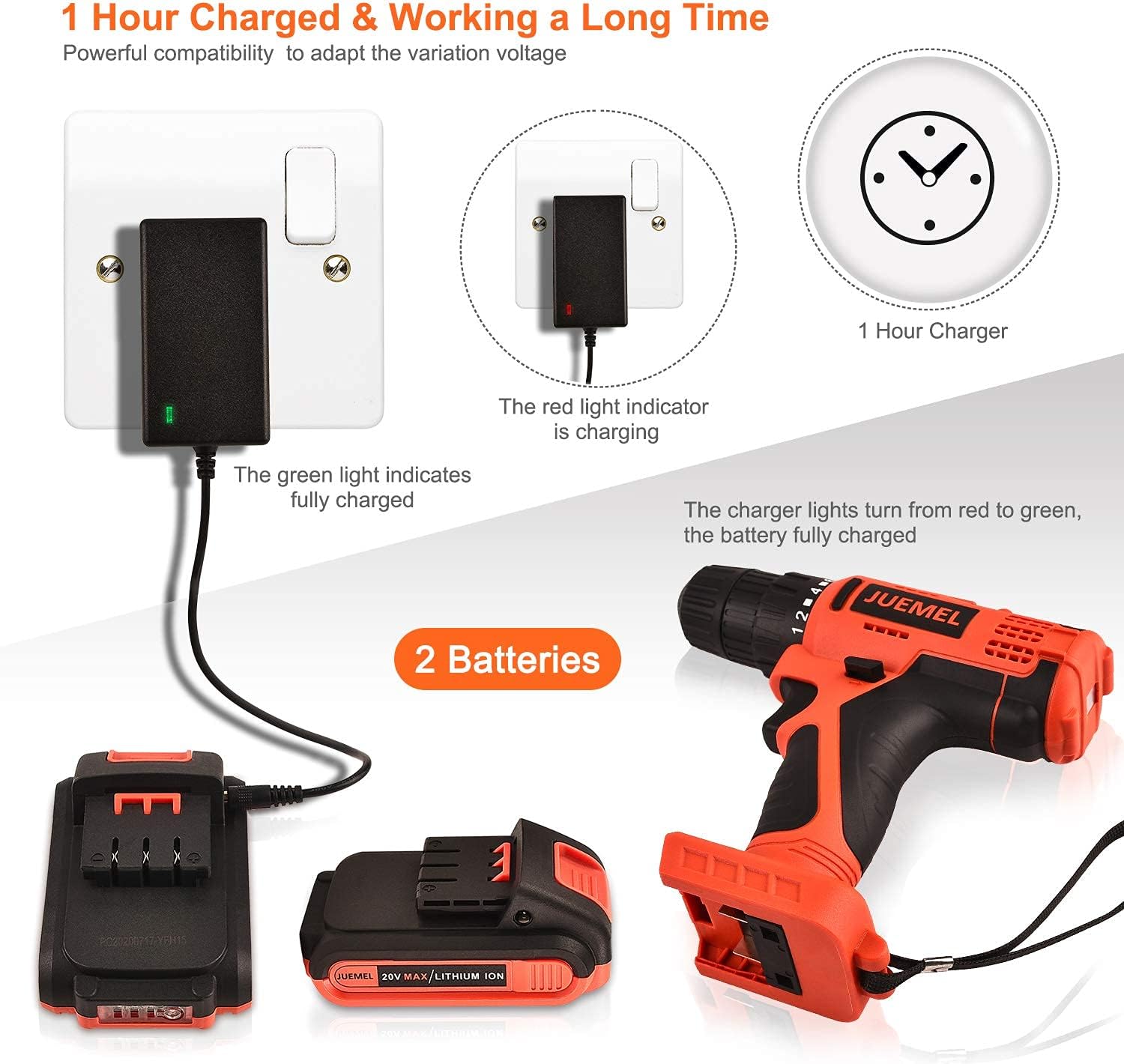
Figure 3.1: Illustration of the battery charging process. The charger light indicates red when charging and green when fully charged. Two batteries are included for continuous work.
Installing and Removing the Battery
- To Install: Align the battery pack with the base of the drill handle and slide it in until it clicks securely into place.
- To Remove: Press the battery release button (usually located on the front or sides of the battery) and slide the battery pack out of the drill handle.
Installing Drill Bits and Accessories (Keyless Chuck)
The drill features a 3/8-inch (10mm) keyless chuck for quick and easy bit changes.
- Ensure the drill is off and the forward/reverse switch is in the center (locked) position to prevent accidental starting.
- Grip the rear collar of the chuck with one hand and rotate the front collar counter-clockwise with the other hand until the chuck jaws are open wide enough to insert the bit.
- Insert the desired drill bit or accessory into the chuck jaws. Ensure the bit is inserted as far as possible without touching the chuck body.
- Rotate the front collar clockwise to tighten the chuck jaws firmly around the bit. Hand-tighten until the bit is secure.
- To Remove: Reverse the process by rotating the front collar counter-clockwise.

Figure 3.2: Detailed view of the keyless chuck mechanism, showing the 10mm (3/8") maximum capacity. Also visible are the 2-speed selector, variable speed trigger, and soft grip handle.
4. Operating the Drill
Variable Speed Trigger
The drill features a variable speed trigger, allowing you to control the drilling speed by the amount of pressure applied. Pressing the trigger lightly results in lower speed, while pressing it fully increases the speed up to the maximum setting.
2-Speed Setting
A 2-speed selector switch is located on top of the drill. This allows you to choose between two main speed ranges:
- Position 1 (Low Speed): 0-450 RPM. Ideal for driving screws, larger drilling diameters, or applications requiring higher torque and more control.
- Position 2 (High Speed): 0-1450 RPM. Suitable for faster drilling in softer materials or smaller drilling diameters.
Clutch / Torque Adjustment (18+1 Positions)
The torque adjustment collar, located behind the chuck, allows you to set the amount of torque the drill will apply before the clutch disengages. This prevents over-driving screws or damaging the workpiece. The 18+1 settings include:
- Settings 1-18: For driving screws. Lower numbers are for smaller screws or softer materials; higher numbers are for larger screws or harder materials.
- Drill Symbol (Drill Mode): For drilling applications. This setting bypasses the clutch, providing maximum torque for drilling.
Forward/Reverse Switch
The forward/reverse switch is located above the trigger. It controls the direction of rotation:
- Left Position: Forward rotation (for drilling and driving screws).
- Right Position: Reverse rotation (for removing screws or backing out bits).
- Center Position: Locks the trigger, preventing accidental starting. Always set to the center position when changing bits, performing maintenance, or storing the tool.

Figure 4.1: View of the drill's base, highlighting the magnetic bit holder for convenient storage of small accessories. The forward and reverse rotation mechanism is also illustrated.
LED Work Light
The integrated LED work light automatically illuminates when the trigger is pressed, providing visibility in dimly lit work areas. It remains on for a short period after the trigger is released.

Figure 4.2: The LED work light illuminates the drilling area, enhancing visibility and precision in dark or confined spaces.
Magnetic Bit Holder
A magnetic bit holder is conveniently located on the back of the drill, allowing you to store frequently used drill or driver bits for quick access during tasks.
Applications
The JUEMEL 20V Cordless Drill is suitable for various drilling and driving tasks, including:
- Wood drilling
- Metal drilling
- Driving and removing screws
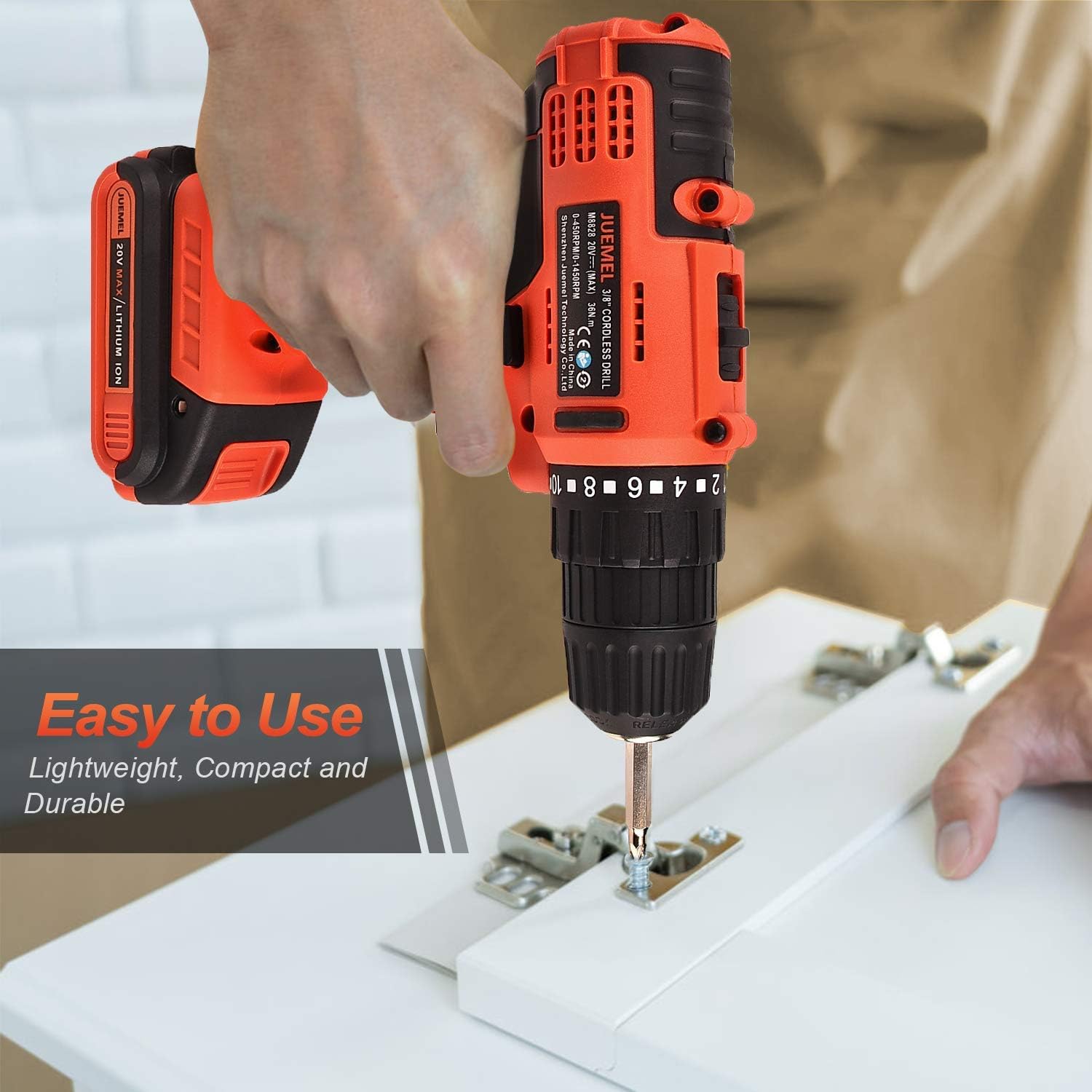
Figure 4.3: The drill in use for wood drilling, demonstrating its capability for common DIY tasks.
5. Maintenance
Regular maintenance ensures the longevity and optimal performance of your JUEMEL Cordless Drill.
Cleaning
- Always disconnect the battery pack before cleaning.
- Use a clean, damp cloth to wipe down the exterior of the drill. Do not use harsh chemicals or abrasive cleaners.
- Periodically clear dust and debris from the ventilation openings using compressed air or a soft brush to prevent overheating.
Battery Care
- Store batteries in a cool, dry place away from direct sunlight and extreme temperatures.
- Do not store batteries in a discharged state for extended periods. Recharge them periodically if not in use.
- Avoid dropping or physically damaging the battery packs.
Storage
- Store the drill and accessories in the provided carrying bag in a dry, secure location, out of reach of children.
- Remove the battery pack from the drill before storing for extended periods.
6. Troubleshooting
This section addresses common issues you might encounter with your JUEMEL 20V Cordless Drill.
| Problem | Possible Cause | Solution |
|---|---|---|
| Drill does not start. | Battery not charged or not properly installed. Forward/reverse switch in center (locked) position. | Ensure battery is fully charged and securely installed. Move forward/reverse switch to forward or reverse position. |
| Battery not charging. | Charger not plugged in. Battery not properly seated on charger. Faulty charger or battery. | Check power outlet and charger connection. Re-seat battery on charger. If issue persists, contact support. |
| Drill lacks power or stops during operation. | Battery charge is low. Overload protection activated. Incorrect speed/torque setting for task. | Recharge battery. Reduce pressure on the drill. Adjust speed to high or torque to drill mode for demanding tasks. |
| Bit wobbles or falls out. | Chuck not tightened sufficiently. Bit shank is damaged or incorrect size. | Re-tighten chuck firmly. Ensure bit shank is clean and undamaged. Use bits with appropriate shank size for the 3/8-inch chuck. |
7. Specifications
Technical specifications for the JUEMEL 20V Cordless Drill, Model M8841-ES-1-cr:
| Feature | Specification |
|---|---|
| Brand | JUEMEL |
| Model Number | M8841-ES-1-cr |
| Power Source | Battery Powered |
| Voltage | 20 Volts (DC) |
| Battery Type | Lithium Ion (1500mAh) |
| No-Load Speed (Low) | 0-450 RPM |
| No-Load Speed (High) | 0-1450 RPM |
| Maximum Torque | 320 Inch Pounds |
| Clutch Settings | 18+1 (Drill Mode) |
| Chuck Size | 3/8 inches (10mm) Keyless |
| Item Weight | 2.5 Pounds (with battery) |
| Product Dimensions | 7.1 x 2.9 x 8 inches |
| Special Features | Variable Speed, Built-in LED Work Light, Magnetic Bit Holder |
| Included Components | Bare-Tool, 2 Batteries, Charger, 30pcs Drill/Driver Bits, Carrying Bag |
8. Warranty Information
This JUEMEL 20V Cordless Drill comes with a 90-day limited warranty from the date of purchase. This warranty covers defects in materials and workmanship under normal use.
As a renewed product, it is also eligible for replacement or refund under the Amazon Renewed Guarantee if you are not satisfied with your purchase. Please refer to the Amazon Renewed program terms for full details.
Keep your purchase receipt as proof of purchase for any warranty claims.
9. Customer Support
For any questions, technical assistance, or warranty claims regarding your JUEMEL 20V Cordless Drill, please utilize the 24/7 hassle-free online service provided by JUEMEL or contact the seller directly through the platform where the product was purchased.
When contacting support, please have your model number (M8841-ES-1-cr) and purchase information readily available to expedite the process.
Ask a question about this manual
Ask about setup, troubleshooting, compatibility, parts, safety, or missing instructions. Manuals+ will review the question and use this page’s manual context to help answer it.