
1. Safety Information
Please read these safety instructions carefully before using the device. Keep this manual for future reference.
- Do not expose the device to extreme temperatures, direct sunlight, or high humidity.
- Avoid dropping or subjecting the device to strong impacts.
- Do not disassemble, repair, or modify the device yourself. Contact qualified service personnel for assistance.
- Keep the device away from water and other liquids.
- Use only the specified charging cable and adapter.
2. Package Contents
Verify that all items are present in the package:
- Remax RB-M50 Bluetooth Speaker
- USB Charging Cable
- User Manual
3. Product Overview
Familiarize yourself with the components of your Remax RB-M50 speaker.
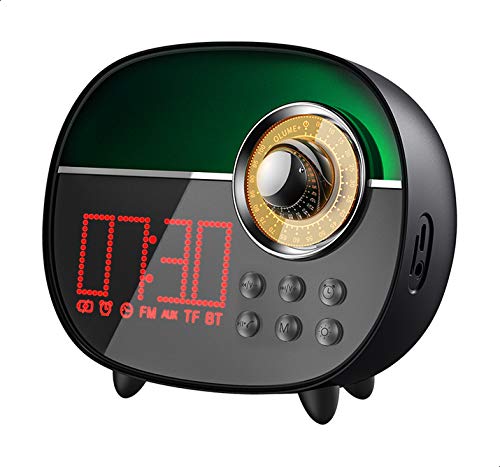
This image shows the front view of the Remax RB-M50 Bluetooth Speaker, highlighting its compact, round design and the speaker grille.
Controls and Ports:
- Power Button: Press and hold to turn on/off.
- Play/Pause Button: Press to play or pause music.
- Volume Up/Next Track: Short press for volume up, long press for next track.
- Volume Down/Previous Track: Short press for volume down, long press for previous track.
- Mode Button: Press to switch between Bluetooth, FM, or other modes.
- USB Charging Port: For charging the speaker.
4. Setup
4.1 Charging the Speaker
- Connect the USB charging cable to the speaker's charging port.
- Connect the other end of the cable to a USB power adapter (not included) or a computer's USB port.
- The charging indicator light will illuminate.
- A full charge takes approximately 2.5 hours. The indicator light will change or turn off once charging is complete.
4.2 Power On/Off
- To Power On: Press and hold the Power Button for 3 seconds. You will hear an audible prompt.
- To Power Off: Press and hold the Power Button for 3 seconds. You will hear an audible prompt.
4.3 Bluetooth Pairing
- Ensure the speaker is powered on and in Bluetooth pairing mode (indicated by a flashing LED).
- On your mobile device, enable Bluetooth.
- Search for available Bluetooth devices and select "RB-M50" from the list.
- Once paired, the speaker will emit a confirmation tone, and the LED indicator will stop flashing.
- The speaker has a reception distance of up to 10 meters (33 feet) in an open environment.
5. Operating Instructions
5.1 Music Playback (Bluetooth Mode)
- After successful Bluetooth pairing, open your music player application on your device.
- Press the Play/Pause Button on the speaker to start or pause music playback.
- Short press Volume Up/Down buttons to adjust the volume.
- Long press Volume Up/Down buttons to skip to the next or previous track.
5.2 Alarm Clock Function
The Remax RB-M50 includes an integrated alarm clock. Refer to the specific button combinations on the device for setting and managing alarms. Typically, a dedicated button or a long press on the Mode button might activate alarm settings.
- Consult the device's display or indicator lights for time and alarm status.
- Follow on-screen prompts or button sequences to set the alarm time and activate/deactivate it.
5.3 Answering/Ending Calls
- When a call comes in, the music will pause. Press the Play/Pause Button to answer the call.
- Press the Play/Pause Button again to end the call.
- Long press the Play/Pause Button to reject an incoming call.
6. Maintenance
- Clean the speaker with a soft, dry cloth. Do not use abrasive cleaners or solvents.
- Store the speaker in a cool, dry place when not in use for extended periods.
- Avoid blocking the speaker grille to ensure optimal sound quality.
7. Troubleshooting
| Problem | Possible Cause | Solution |
|---|---|---|
| Speaker does not turn on | Low battery; Device off | Charge the speaker; Press and hold the Power Button |
| Cannot pair via Bluetooth | Speaker not in pairing mode; Device Bluetooth off; Too far apart | Ensure speaker is flashing; Enable Bluetooth on device; Move devices closer (within 10m) |
| No sound | Volume too low; Device not connected | Increase volume on speaker and device; Re-pair Bluetooth |
| Alarm not working | Alarm not set or activated | Check alarm settings and ensure it is enabled. |
8. Specifications
- Brand: Remax
- Model: RB-M50
- Bluetooth Version: 5.0
- Reception Distance: 10 meters
- Rated Power: 57W
- Standby Time: 48 hours
- Playback Time: Approximately 4-6 hours
- Charging Time: Approximately 2.5 hours
- Special Features: Bluetooth, Wireless, Alarm Clock
- Power Source: Battery Powered
- Form Factor: Round
- Mounting Type: Tabletop
- Color: Black
9. Warranty and Support
This product is covered by a standard manufacturer's warranty. Please refer to the warranty card included in your package for specific terms and conditions.
For technical support or customer service, please contact your retailer or visit the official Remax website for contact information.


