
OREI UHD48-EX230-K
OREI UHD48-EX230-K 4K 4x4 HDMI Extender Matrix User Manual
Comprehensive instructions for the OREI UHD48-EX230-K 4K 4x4 HDMI Extender Matrix.
1. Product Overview
The OREI UHD48-EX230-K is a 4K 4x4 HDMI Extender Matrix designed to distribute UltraHD 4K@60Hz 4:4:4 video and audio signals from up to four HDMI sources to up to four remote displays over single CAT5e/6/7 cables. It supports distances up to 230 feet (70 meters) and includes features like HDR switching, IR control, RS-232, 1080P downscaling, and HDMI loop-out ports.
This system is ideal for professional distribution in various settings, including home theaters, commercial displays, and educational facilities.

Image 1.1: OREI 4K 4x4 HDMI Extender Matrix (main unit), four receivers, and remote control.
2. Key Features
- 4x4 Matrix Functionality: Connects 4 HDMI sources to 4 displays, with an additional 4 HDMI loop-out ports on the main unit.
- Extended Transmission: Extends 4K@60Hz signals up to 230 feet (70 meters) over a single CAT5e/6/7 LAN cable.
- High Resolution Support: Supports Ultra HD 4K@60/50Hz (12-bit) and HDMI 2.0 with HDCP 2.2/1.4.
- HDR Switcher: Integrated HDR switching capabilities.
- IR Control: Wideband IR (30-60KHz) matrix system with bi-directional IR transport for remote control of sources or displays.
- RS-232 Control: Supports RS-232 function for advanced control and automation.
- EDID Management: Advanced EDID management for optimal display compatibility.
- 1080P Downscale: Automatically downscales 4K signals to 1080P for compatible displays.
- Power over Cable (POC): 12V POC on all CAT ports, requiring only one power adapter for the main unit.
- Audio Pass-Through: Supports up to 7.1CH HD Audio (LPCM, Dolby TrueHD, and DTS-HD Master Audio).
- Durable Construction: Heavy-duty metal enclosure for heat dissipation and protection.
3. Package Contents
Please verify that all items are included in your package:
- 1x OREI UHD48-EX230-K HDMI Extender Matrix (Transmitter)
- 4x HDMI Receivers
- 1x Power Adapter (US plug, adapter/converter provided for international use)
- 4x IR Receiver Cables
- 4x IR Blaster Cables
- 1x HDMI Matrix Remote Control
- 1x RS-232 Cable
- 1x User Manual (this document)
Note: HDMI cables are not included and must be purchased separately.

Image 3.1: Visual representation of the OREI UHD48-EX230-K package contents.
4. Setup Instructions
Follow these steps to set up your OREI UHD48-EX230-K HDMI Extender Matrix:
- Prepare Cables: Ensure you have high-quality CAT5e/6/7 cables for extending the HDMI signal. For optimal performance, shielded CAT6 cable is recommended.
- Connect HDMI Sources: Connect your HDMI source devices (e.g., Blu-Ray player, game console, streaming box, laptop) to the HDMI Input ports (INPUT 1-4) on the OREI Matrix using HDMI cables.
- Connect Local Displays (Optional): If you wish to monitor any of the HDMI sources locally, connect a display to the corresponding HDMI Loop Out port (LOOP OUT 1-4) on the OREI Matrix.
- Connect Receivers: Connect each of the four HDMI Receivers to the RJ45 Output ports (OUTPUT 1-4) on the OREI Matrix using your CAT5e/6/7 cables.
- Connect Remote Displays: Connect your remote displays (TVs, projectors) to the HDMI Output port on each Receiver unit using HDMI cables.
- IR Connections:
- For controlling source devices from remote displays: Connect an IR Blaster cable to the IR OUT port on the Matrix and position the blaster head near the IR sensor of your source device. Connect an IR Receiver cable to the IR IN port on a Receiver unit and position the receiver head where it can receive signals from your remote control.
- For controlling remote displays from the Matrix location: Connect an IR Blaster cable to the IR OUT port on a Receiver unit and position the blaster head near the IR sensor of your remote display. Connect an IR Receiver cable to the IR IN port on the Matrix and position the receiver head where it can receive signals from your remote control.
- Connect Power: Connect the provided power adapter to the DC 12V port on the OREI Matrix. Only the main Matrix unit requires power, as the receivers are powered via Power over Cable (POC).
- Power On: Power on all connected devices (sources, displays, and the OREI Matrix).
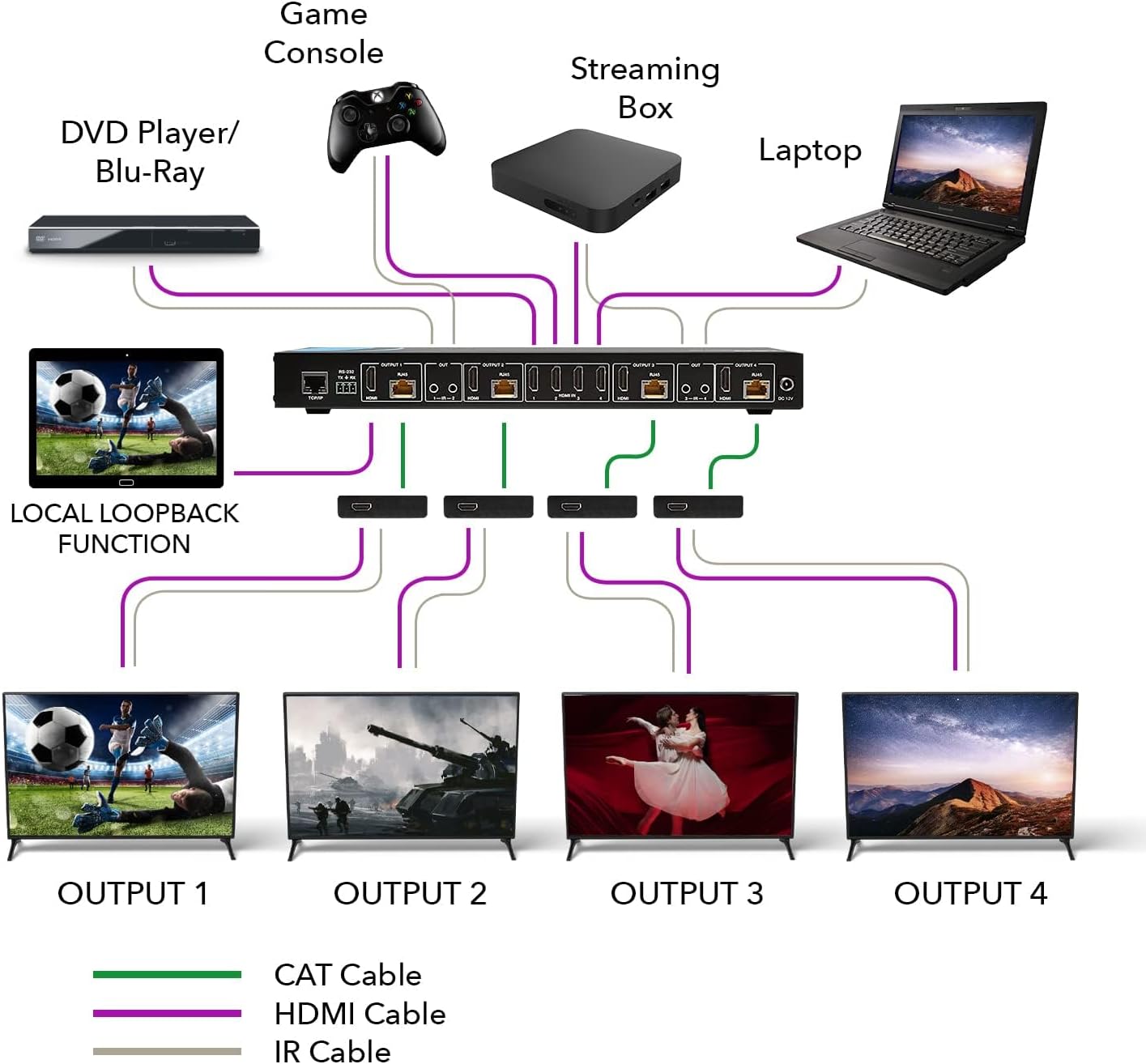
Image 4.1: Typical connection diagram for the OREI UHD48-EX230-K system.

Image 4.2: Illustration of HDMI signal extension capability up to 230 feet (70 meters) using CAT cable.
5. Operating Instructions
The OREI UHD48-EX230-K offers flexible control options to manage your HDMI sources and displays.
5.1. Front Panel Control
The front panel of the Matrix unit features buttons for selecting inputs and outputs. Use these buttons to route any of the four HDMI input sources to any of the four extended outputs or local loop-out ports.
5.2. Remote Control
Use the included IR remote control to switch between inputs and outputs. Point the remote towards the IR receiver window on the front panel of the Matrix unit.
5.3. IR Pass-Through
The bi-directional IR pass-through allows you to control source devices from the remote display locations or control remote displays from the Matrix location. Ensure IR blaster and receiver cables are correctly connected and positioned as described in the setup section.
5.4. RS-232 Control
For advanced control and integration with automation systems, connect a computer or control system to the RS-232 port on the Matrix using the provided RS-232 cable. Refer to the detailed RS-232 command set in the full product manual (if available) for specific commands.
5.5. EDID Management
The Matrix features advanced EDID management. This function helps ensure compatibility between your source devices and displays by communicating the optimal video and audio formats. Consult the full product manual for specific EDID settings and modes if you encounter display issues.
5.6. 1080P Downscaling
The unit supports automatic 4K to 1080P downscaling. If a connected display only supports 1080P, the Matrix will automatically convert the 4K signal to 1080P, ensuring compatibility without manual intervention.
6. Maintenance
To ensure the longevity and optimal performance of your OREI UHD48-EX230-K HDMI Extender Matrix, follow these maintenance guidelines:
- Cleaning: Use a soft, dry cloth to clean the unit. Avoid using liquid or aerosol cleaners, as they may damage the enclosure or internal components.
- Ventilation: Ensure the unit is placed in a well-ventilated area to prevent overheating. Do not block any ventilation openings.
- Power: Disconnect the power adapter from the wall outlet if the unit will not be used for an extended period.
- Cable Management: Keep cables organized and free from kinks or excessive bending to prevent signal degradation or damage.
- Environment: Avoid exposing the unit to extreme temperatures, humidity, or direct sunlight.
7. Troubleshooting
If you encounter issues with your OREI UHD48-EX230-K, refer to the following common troubleshooting steps:
- No Picture/Signal:
- Verify all HDMI and CAT cables are securely connected.
- Ensure the Matrix unit is powered on and its indicator lights are active.
- Check if the correct input source is selected on the Matrix and the correct HDMI input is selected on your display.
- Test with shorter, certified HDMI cables directly connected to the source and display to rule out cable issues.
- Try a different CAT cable, preferably a shielded CAT6/7 cable, as cable quality significantly impacts performance over distance.
- Power cycle all devices (source, Matrix, receivers, display).
- Flickering or Intermittent Picture:
- This often indicates a cable quality issue or signal degradation. Replace CAT cables with higher quality, shielded CAT6/7 cables.
- Ensure the total cable length does not exceed the maximum recommended distance (230 feet).
- Check for strong electromagnetic interference near the CAT cables.
- No Audio:
- Verify audio settings on your source device and display.
- Ensure HDMI cables support audio transmission.
- Check EDID settings on the Matrix if configurable.
- IR Control Not Working:
- Ensure IR blaster and receiver heads are correctly positioned and have a clear line of sight to the IR sensors of the devices they are controlling.
- Check that IR cables are securely plugged into the correct ports (IR IN/OUT).
- 4K Signal Not Displaying on 4K TV:
- Ensure your HDMI source is outputting a 4K signal.
- Verify that your display supports 4K@60Hz and that its HDMI input is configured for enhanced format (e.g., HDMI 2.0, UHD Deep Color).
- Use high-speed HDMI cables that support 4K@60Hz.
If these steps do not resolve the issue, please contact OREI customer support for further assistance.
8. Specifications
| Feature | Specification |
|---|---|
| Model Number | UHD48-EX230-K |
| Product Dimensions | 12.5 x 4 x 1.5 inches |
| Item Weight | 3 pounds |
| Brand | OREI |
| Color | Black |
| Connector Type | HDMI |
| Cable Type | HDMI, CAT5e/6/7 |
| Compatible Devices | Blu-Ray Player, Gaming Console, Media Players, Satellite Receivers, etc. |
| HDMI Version | HDMI 2.0 |
| HDCP Version | HDCP 2.2 / 1.4 |
| Max Resolution | 4K@60Hz 4:4:4 |
| Transmission Distance | Up to 230 feet (70 meters) over CAT5e/6/7 |
| IR Frequency | 30-60KHz |
| Audio Support | Up to 7.1CH HD Audio (LPCM, Dolby TrueHD, DTS-HD Master Audio) |
| Power Supply | 12V DC (single adapter for Matrix, POC for receivers) |

Image 8.1: Dimensions and weight of the OREI UHD48-EX230-K Matrix unit.
9. Warranty and Support
OREI provides the following support and warranty for the UHD48-EX230-K HDMI Extender Matrix:
- Manufacturer's Warranty: The product includes a 12-month manufacturer's warranty.
- Technical Support: Lifetime OREI Technical Support is available.
- Contact: For support inquiries, please refer to the contact information provided in the product packaging or on the official OREI website.
This product is from a small business brand. Your support is appreciated.
Related documentsUHD48-EX230-K


Ask a question about this manual
Ask about setup, troubleshooting, compatibility, parts, safety, or missing instructions. Manuals+ will review the question and use this page’s manual context to help answer it.