
1. Introduction
This manual provides essential information for the safe and efficient operation of your Bosch GLI18V-4000CN-RT 18V Cordless LED Floodlight. Please read these instructions carefully before use and keep them for future reference.
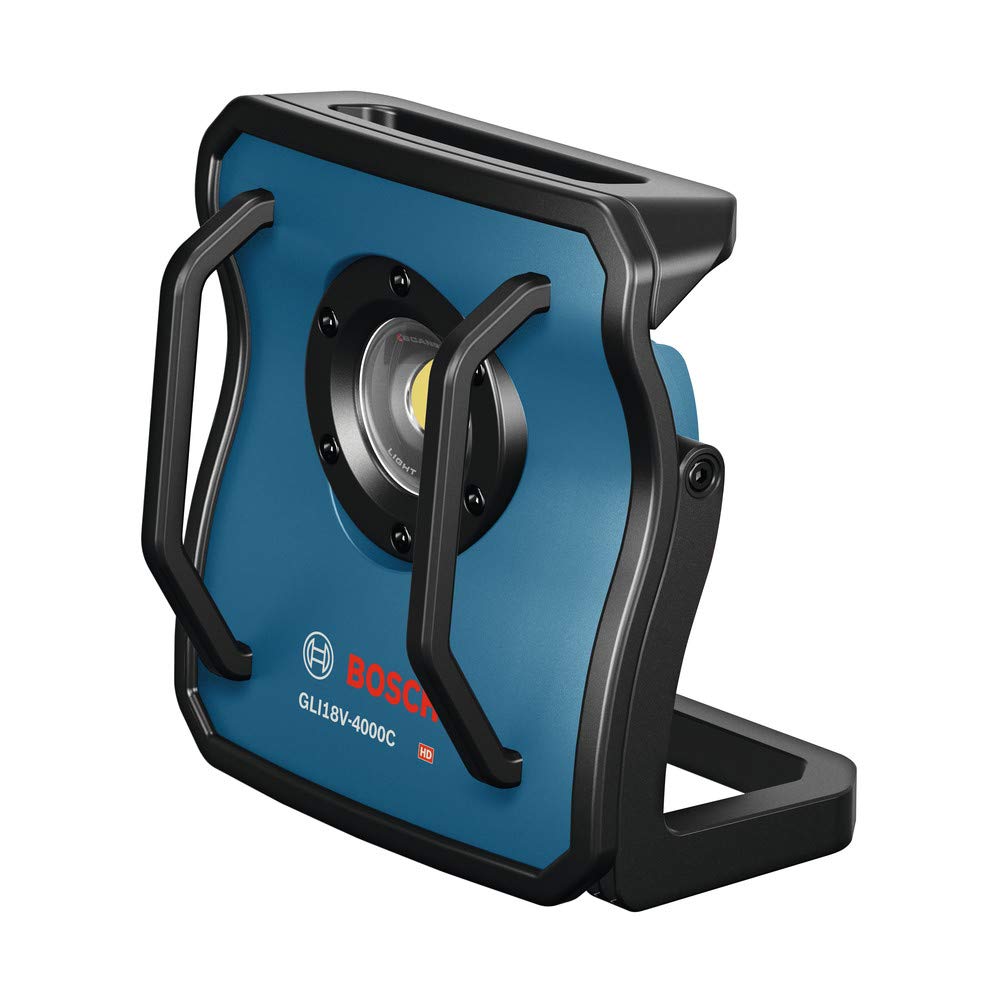
Image 1.1: Front view of the Bosch GLI18V-4000CN-RT 18V Cordless LED Floodlight, showing the main LED light and handles.
2. Safety Information
Always observe the following safety precautions to reduce the risk of electric shock, fire, and serious injury.
- Read all instructions: Familiarize yourself with the product's features and operation.
- Use appropriate batteries: This floodlight is designed for use with Bosch 18V Lithium-Ion batteries (sold separately).
- Avoid direct eye exposure: The LED light is very bright. Do not stare directly into the light source.
- Do not operate in explosive atmospheres: Do not use the floodlight in the presence of flammable liquids, gases, or dust.
- Keep children away: This product is not a toy. Keep it out of reach of children.
- Store properly: When not in use, store the floodlight in a dry, secure location.
3. Package Contents
The Bosch GLI18V-4000CN-RT package typically includes:
- Bosch GLI18V-4000CN-RT 18V Cordless LED Floodlight unit
Note: Battery and charger are sold separately and are not included with this "Tool Only" product.
4. Setup
4.1 Battery Installation
- Ensure the floodlight is turned off.
- Align the Bosch 18V Lithium-Ion battery with the battery slot on the floodlight.
- Slide the battery into the slot until it clicks securely into place.
- To remove the battery, press the release button on the battery and slide it out.
4.2 Mounting Options
The floodlight offers versatile positioning options:
- Adjustable Bracket: The integrated bracket allows for various angles and stable placement on flat surfaces.
- Tripod Mount: A 5/8 inch - 11 threaded mount is provided for compatibility with standard tripods.

Image 4.1: Side view of the floodlight showing its compact, folded position.

Image 4.2: Side view illustrating the adjustable stand for varied positioning.

Image 4.3: The floodlight mounted on a tripod, providing elevated illumination.
5. Operating Instructions
5.1 Power On/Off and Brightness Settings
The floodlight features a user interface for direct control:
- Power Button: Press to turn the floodlight on or off.
- Brightness Adjustment: Cycle through three brightness settings:
- 4000 Lumens (High)
- 2000 Lumens (Medium)
- 1000 Lumens (Low)
The user interface also displays the current battery status.
5.2 Bluetooth Connectivity and Bosch Toolbox App
The GLI18V-4000CN-RT can be controlled remotely via Bluetooth using the free Bosch Toolbox app on a compatible mobile device.
- Download and install the "Bosch Toolbox" app from your device's app store.
- Ensure Bluetooth is enabled on your mobile device.
- Open the Bosch Toolbox app and follow the instructions to connect to your GLI18V-4000CN-RT floodlight.
- Once connected, you can:
- Turn the light on or off.
- Adjust the brightness (dimming).
- Set a timer for operation.
- Check the battery status.
- Control groups of lights (if multiple compatible units are present).

Image 5.1: Controlling the floodlight remotely using the Bosch Toolbox app on a smartphone.
6. Maintenance
6.1 Cleaning
- Always disconnect the battery before cleaning.
- Use a soft, damp cloth to wipe down the exterior of the floodlight.
- Do not use harsh chemicals or abrasive cleaners.
- Ensure the floodlight is completely dry before re-inserting the battery or storing.
6.2 Storage
- Store the floodlight in a cool, dry place, away from direct sunlight and moisture.
- Remove the battery if storing for extended periods.
- Protect the LED lens from scratches and impact. The floodlight features frame-shielded metal housing and heavy-duty rods for protection.

Image 6.1: The floodlight providing illumination in a basement setting, demonstrating its robust design.

Image 6.2: The floodlight in an attic, highlighting its ability to light up large, dark spaces.
7. Troubleshooting
If you encounter issues with your floodlight, refer to the following common problems and solutions:
| Problem | Possible Cause | Solution |
|---|---|---|
| Light does not turn on. | Battery not inserted correctly or discharged. | Ensure battery is fully charged and properly seated. |
| Bluetooth connection fails. | Bluetooth off on device, app not open, or floodlight out of range. | Check device Bluetooth settings, open Bosch Toolbox app, move closer to floodlight. |
| Light output is dim. | Low brightness setting selected or battery charge is low. | Adjust brightness setting. Check battery status and recharge if necessary. |
8. Specifications
| Feature | Detail |
|---|---|
| Model | GLI18V-4000CN-RT |
| Brand | Bosch |
| Voltage | 18 Volts |
| Light Source Type | LED |
| Brightness Settings | 4000, 2000, 1000 Lumens |
| Power Source | Battery Powered (Bosch 18V Lithium-Ion) |
| Mounting Type | Table Mount, 5/8 in.-11 Threaded Mount (for tripods) |
| Special Features | Dimmable, Remote Control Compatible (via Bluetooth and Bosch Toolbox App) |
| Material | Metal |
| Color | Blue |
| Approximate Runtime (per battery Amp-hour) | 30 minutes (4000 lumens), 120 minutes (1000 lumens) |
9. Warranty and Support
For warranty information, technical support, or service inquiries, please contact Bosch customer service or visit the official Bosch website. Keep your purchase receipt as proof of purchase.
You can find more information and support resources at: www.boschtools.com