1. Introduction
Thank you for choosing the Kaku Cofi1453 TWS Wireless Earbuds. These in-ear headphones feature Bluetooth 5.0 connectivity, touch controls, and a noise-cancelling microphone for clear communication. Enjoy great bass, extremely clean mid and high tones, and overall maximum sound quality with this device.
This manual provides essential information on how to set up, operate, maintain, and troubleshoot your earbuds to ensure optimal performance and longevity.
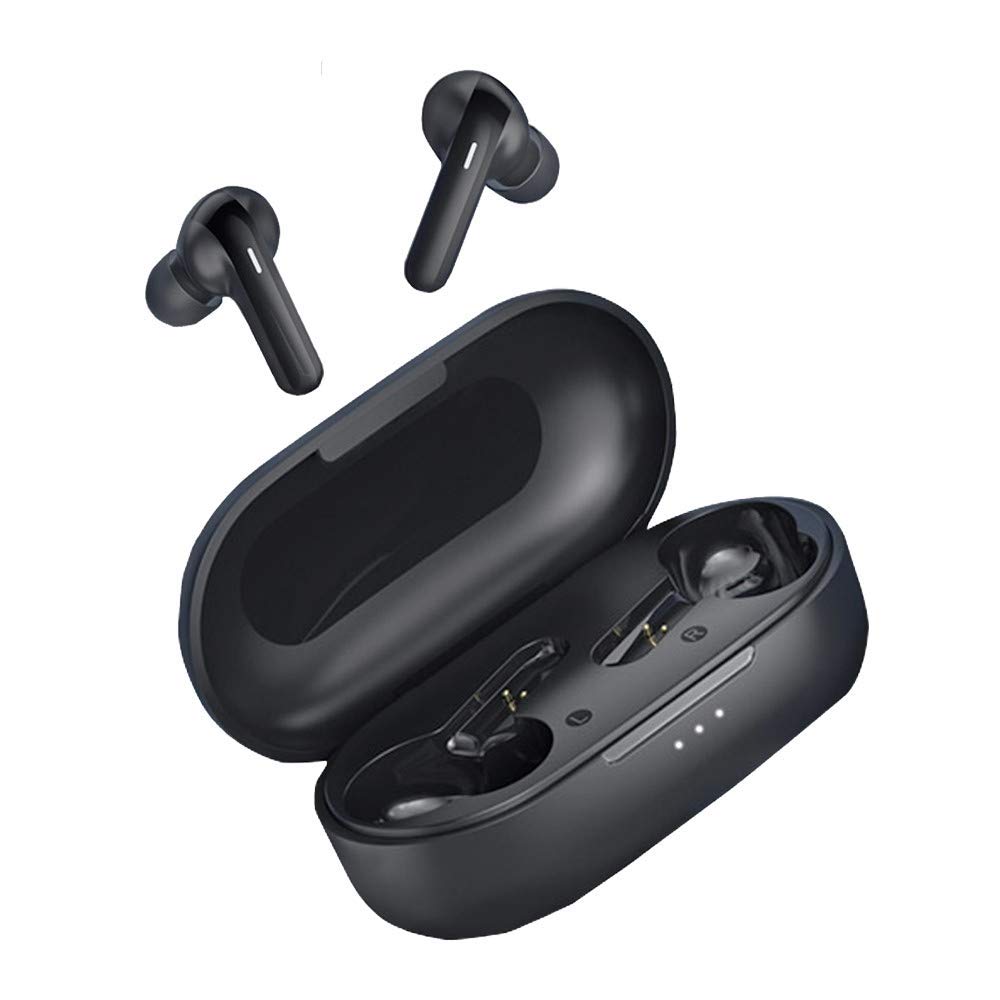
Image 1: Kaku Cofi1453 TWS Wireless Earbuds and Charging Case. The image displays the black earbuds nestled in their compact charging case, illustrating their sleek design and portable nature.
2. Setup
2.1. What's in the Box
- Kaku Cofi1453 TWS Wireless Earbuds (Left and Right)
- Charging Case
- USB Charging Cable
- User Manual
2.2. Charging the Earbuds and Case
- Initial Charge: Before first use, fully charge the earbuds and charging case.
- Charging the Case: Connect the USB charging cable to the charging port on the case and to a USB power adapter (not included) or a computer's USB port. The indicator light on the case will show charging status.
- Charging the Earbuds: Place the earbuds into their respective slots in the charging case. Ensure they are correctly seated. The earbuds will automatically begin charging. Indicator lights on the earbuds or case will confirm charging.
- Full Charge: Once fully charged, the indicator lights will change or turn off. Disconnect the charging cable.
2.3. Pairing with a Bluetooth Device
- Activate Earbuds: Open the charging case. The earbuds will automatically power on and enter pairing mode. You may hear a voice prompt indicating "Pairing".
- Enable Bluetooth: On your smartphone or other Bluetooth-enabled device, go to the Bluetooth settings and turn on Bluetooth.
- Select Device: In the list of available devices, look for "Kaku Cofi1453" or a similar name and select it.
- Confirm Connection: Once connected, you will hear a voice prompt "Connected" from the earbuds. The indicator light on the earbuds may stop flashing.
- Reconnect: After initial pairing, the earbuds will automatically connect to the last paired device when taken out of the case, provided Bluetooth is enabled on the device.
3. Operating Instructions
3.1. Wearing the Earbuds
Gently insert each earbud into your ear canal. Adjust them slightly until they fit snugly and comfortably. A proper fit ensures optimal sound quality and noise cancellation.
3.2. Touch Controls
The Kaku Cofi1453 earbuds feature intuitive touch controls on the outer surface of each earbud. The functions may vary slightly depending on the earbud (Left/Right) and the number of taps.
- Play/Pause: Single tap on either earbud.
- Next Track: Double tap on the Right earbud.
- Previous Track: Double tap on the Left earbud.
- Volume Up: Triple tap on the Right earbud.
- Volume Down: Triple tap on the Left earbud.
- Answer/End Call: Single tap on either earbud during an incoming call.
- Reject Call: Press and hold either earbud for 2 seconds during an incoming call.
- Activate Voice Assistant: Press and hold either earbud for 2 seconds (when not on a call).
- Power On/Off: Earbuds power on automatically when removed from the case and power off when placed back in the case. Manual power on/off may involve a long press (refer to specific model instructions if automatic function fails).
Note: Specific touch control functions might vary slightly. Refer to the quick start guide included in your packaging for precise details if different from above.
3.3. Making and Receiving Calls
With the built-in noise-cancelling microphone, you can make and receive calls hands-free.
- Answering a Call: Single tap on either earbud.
- Ending a Call: Single tap on either earbud.
- Rejecting a Call: Press and hold either earbud for 2 seconds.
4. Maintenance
4.1. Cleaning Your Earbuds
- Use a soft, dry, lint-free cloth to wipe the earbuds and charging case.
- For stubborn dirt, slightly dampen the cloth with water or a mild, non-abrasive cleaner.
- Do not use harsh chemicals, alcohol, or abrasive materials.
- Ensure the charging contacts on both the earbuds and the case are clean and dry.
- Avoid getting moisture into any openings.
4.2. Storage
When not in use, always store the earbuds in their charging case to protect them from dust, damage, and to keep them charged.
4.3. Battery Care
- Avoid fully discharging the battery frequently.
- Charge the earbuds regularly, even if not used for extended periods, to maintain battery health.
- Do not expose the earbuds or case to extreme temperatures (hot or cold).
5. Troubleshooting
5.1. Earbuds Not Pairing
- Ensure both earbuds are charged.
- Make sure Bluetooth is enabled on your device.
- Place the earbuds back in the case, close it, wait a few seconds, then open it again to re-enter pairing mode.
- Try forgetting "Kaku Cofi1453" from your device's Bluetooth list and re-pairing.
- Move the earbuds closer to your device.
5.2. No Sound or Low Volume
- Check the volume level on both your device and the earbuds.
- Ensure the earbuds are properly connected to your device.
- Clean any debris from the earbud speaker mesh.
- Try playing different audio sources.
5.3. Charging Issues
- Verify the charging cable is securely connected to both the case and the power source.
- Ensure the charging contacts on the earbuds and inside the case are clean and free of obstruction.
- Try a different USB cable or power adapter.
5.4. One Earbud Not Working
- Place both earbuds back into the charging case, close the lid, and then open it again.
- Ensure both earbuds are charged.
- Try resetting the earbuds (refer to specific model instructions, often involves a long press on both earbuds while in the case or a button on the case).
6. Specifications
| Brand | Kaku |
| Model Number | B-2505-W |
| Connectivity | Wireless Bluetooth |
| Bluetooth Version | 5.0 |
| Form Factor | In-Ear (Intra-Auriculaire) |
| Noise Cancellation | Active Noise Cancellation (Suppression active du bruit) |
| Color | Black (Noir) |
| Material | Plastic (Plastique) |
| Age Range (Description) | Adult |
7. Warranty and Support
Kaku products are designed for reliability and performance. For information regarding warranty coverage, please refer to the warranty card included in your product packaging or visit the official Kaku website.
If you encounter any issues not covered in this manual or require further assistance, please contact Kaku customer support through their official channels. Please have your model number (B-2505-W) and proof of purchase ready when contacting support.


