
1. Introduction
This manual provides essential information for the safe and efficient operation, installation, and maintenance of your XtremepowerUS 13" Sand Filter 0.75 HP Pool Pump. This system is designed for above-ground pools up to 10,000 gallons, offering reliable filtration to maintain clear and clean pool water. Please read this manual thoroughly before installation and use.
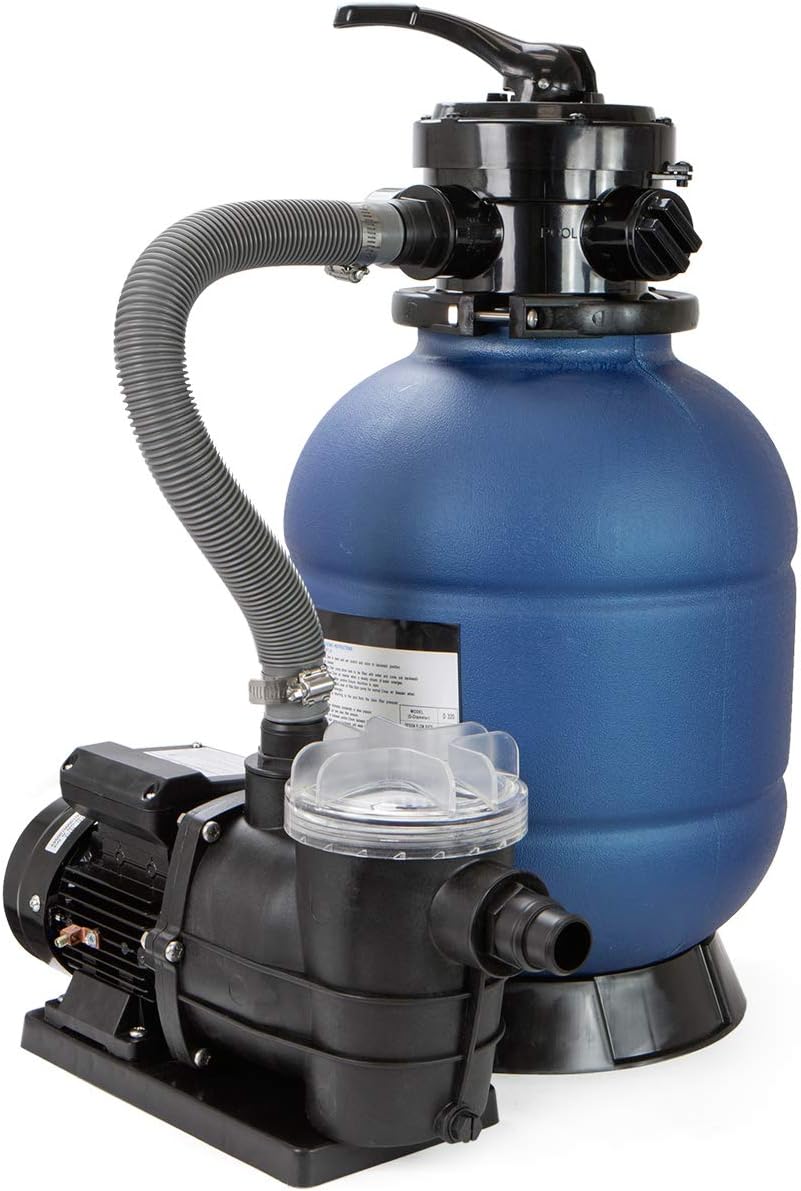
Figure 1: XtremepowerUS 13" Sand Filter 0.75 HP Pool Pump with 4-Way Valve.
2. Safety Information
WARNING: Failure to follow these instructions can result in serious injury or death.
- Always disconnect power to the pump before performing any service or maintenance.
- Ensure the pump is installed on a level, solid surface to prevent tipping.
- Do not operate the pump if the power cord or plug is damaged.
- This pump is designed for above-ground pool use only. Do not use for other purposes.
- Keep children away from the pump and filter system during operation.
- Ensure all connections are secure and leak-free before starting the pump.
- Do not run the pump dry. Ensure the pump is primed with water before operation.
- This product is not for use/sale in California due to capacitor start design.
3. Product Components
The XtremepowerUS Sand Filter Pool Pump system includes the following main components:
- Sand Filter Tank (13-inch, blue)
- 0.75 HP Pool Pump (black)
- 4-Way Multi-Port Valve
- Pressure Gauge
- Connecting Hoses and Clamps
- Base Stand
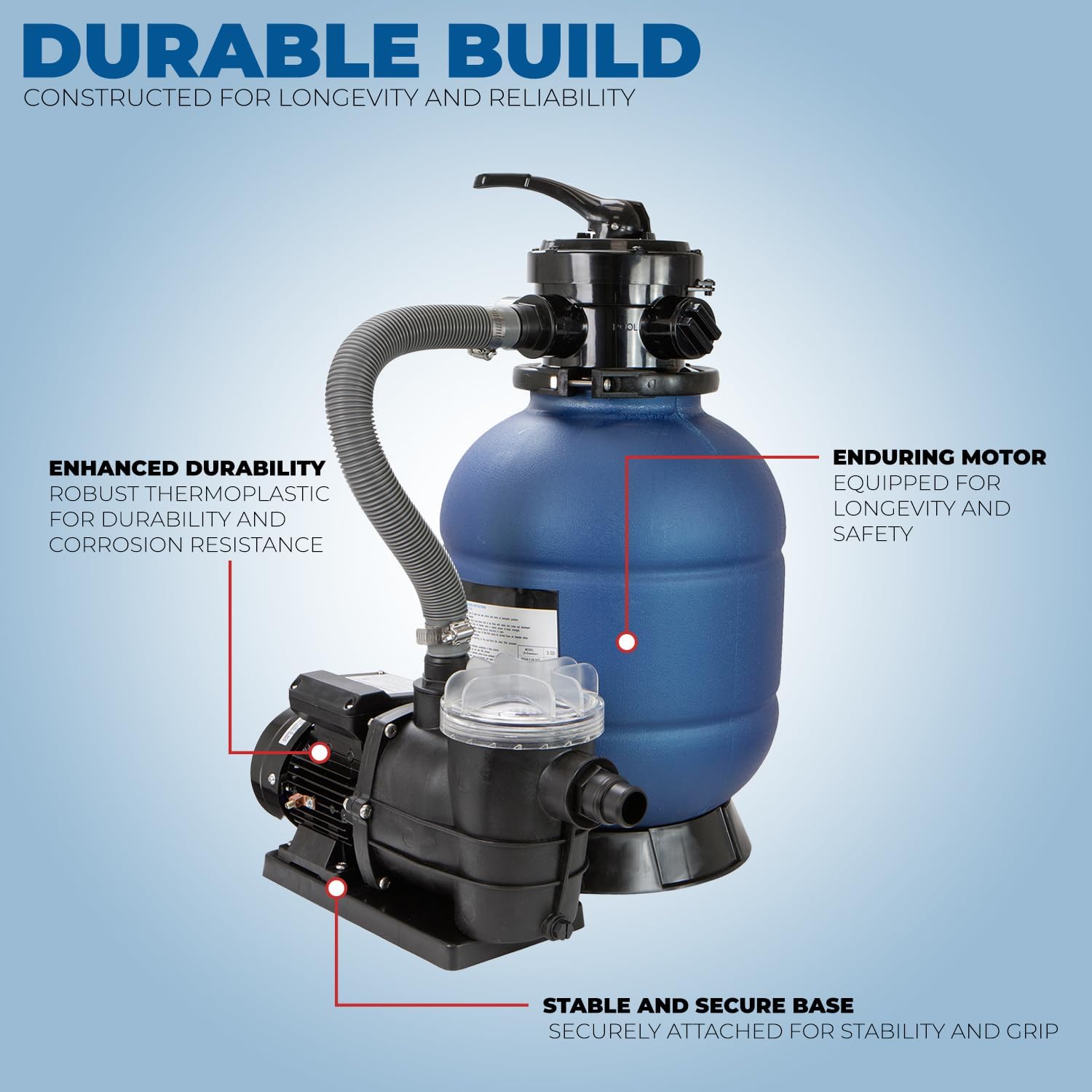
Figure 2: Key components of the sand filter and pump system, highlighting the durable build with robust thermoplastic, enduring motor, and stable base.
4. Setup and Installation
Follow these steps for proper setup and installation of your sand filter pool pump. Installation typically takes less than 5 minutes.
- Placement: Position the sand filter and pump system on a firm, level surface near your above-ground pool. Ensure there is adequate space for maintenance and ventilation.
- Fill Filter Tank with Sand:
- Remove the multi-port valve from the top of the filter tank.
- Carefully pour approximately 42 pounds of filter sand (not included) into the tank. Ensure the standpipe is centered during this process.
- Distribute the sand evenly.
- Clean any sand from the top rim of the tank.
- Attach Multi-Port Valve: Place the multi-port valve onto the top of the filter tank, ensuring it aligns correctly with the standpipe. Secure the valve with the provided clamp or fasteners.

Figure 3: Secure hose connection to the multi-port valve.
- Connect Hoses:
- Connect the hose from the pool skimmer/main drain to the "PUMP" inlet on the pump.
- Connect the hose from the pump outlet to the "INLET" port on the multi-port valve.
- Connect the hose from the "RETURN" port on the multi-port valve to the pool return fitting.
- Connect a backwash hose to the "WASTE" port on the multi-port valve, directing it to an appropriate drainage area.
- Ensure all hose connections are secured with clamps to prevent leaks. The system is compatible with 1.25 inch and 1.5 inch hoses.

Figure 4: The sand filter and pump system connected to an above-ground pool, demonstrating large pool compatibility for pools up to 10,000 gallons.
- Priming the Pump: Before starting, ensure the pump basket is filled with water. This helps to prime the pump and prevent dry running.
- Electrical Connection: Plug the 3-prong electric cable into a grounded 115 Volt outlet.
5. Operating Instructions
The 4-way multi-port valve allows for different operational modes. Always turn off the pump before changing valve settings.

Figure 5: The 4-way multi-port valve with settings for Backwash, Winter, Filter, and Rinse.
- FILTER: This is the normal operating position for filtering pool water. Water flows through the sand bed, trapping debris, and returns clean water to the pool.
- BACKWASH: Used for cleaning the sand filter. Water flows in reverse through the sand bed, dislodging trapped debris, and exits through the waste port. Perform backwash when the pressure gauge reads 8-10 PSI above its clean operating pressure.
- RINSE: Used after backwashing to flush out any remaining loose dirt from the sand bed and to re-settle the sand. Water flows through the filter and out the waste port. Run for 30-60 seconds.
- WINTER: Used for winterizing the filter. This position allows for draining the filter and prevents damage from freezing.
The pump operates with a maximum flow rate of 40 Gallons Per Minute and is designed for low noise operation, ensuring a comfortable and energy-efficient experience.

Figure 6: Demonstrates the highly effective filtration, achieving crystal-clear pool water rapidly.
6. Maintenance
Regular maintenance ensures the longevity and optimal performance of your sand filter system.
- Backwashing: As mentioned in the operating instructions, backwash the filter when the pressure gauge indicates a rise of 8-10 PSI above its clean operating pressure. This typically means the sand is saturated with debris.
- Rinsing: Always follow backwashing with a rinse cycle to ensure no dirty water returns to the pool.
- Pump Basket Cleaning: Periodically check and clean the pump's strainer basket. Turn off the pump, close any necessary valves, remove the basket lid, clear debris, and replace the lid securely.
- Winterization: Before freezing temperatures, set the multi-port valve to "WINTER" and drain all water from the pump, filter, and hoses to prevent freeze damage. Store the pump in a dry, protected area if possible.
- Sand Replacement: Filter sand typically lasts 3-5 years, depending on usage. Replace the sand when filtration efficiency noticeably decreases even after regular backwashing.
7. Troubleshooting
Refer to this section for common issues and their potential solutions.
| Problem | Possible Cause | Solution |
|---|---|---|
| Pump not starting | No power; tripped breaker; motor issue | Check power connection, reset breaker. If problem persists, contact support. |
| Low water flow / Poor filtration | Clogged strainer basket; dirty filter sand; air leak in suction line; low water level in pool | Clean strainer basket; backwash/rinse filter; check all connections for leaks; ensure adequate pool water level. |
| Water leaking from pump/filter | Loose connections; damaged O-rings/gaskets; cracked housing | Tighten all connections; inspect and replace O-rings/gaskets if damaged. For cracked housing, contact support. |
| Cloudy pool water | Insufficient filtration time; dirty filter sand; improper chemical balance | Increase filtration time; backwash/rinse filter; test and adjust pool chemistry. |
8. Specifications
Detailed specifications for the XtremepowerUS 13" Sand Filter 0.75 HP Pool Pump.
| Feature | Detail |
|---|---|
| Brand | XtremepowerUS |
| Model Number | 75138-V |
| Product Dimensions (L x W x H) | 17" x 17" x 23.5" |
| Item Weight | 25.9 Pounds |
| Power Source | Corded Electric |
| Voltage | 115 Volts |
| Maximum Flow Rate | 40 Gallons Per Minute (2400 GPH) |
| Maximum Lifting Height | 34.4 Inches |
| Sand Capacity | 42 pounds (for 13-inch tank) |
| Compatible Pool Size | Up to 10,000 Gallons |
| Hose Compatibility | 1.25 inch, 1.5 inch NPT |
| Material | Mixed (Robust Thermoplastic) |
| Color | Blue |
| UPC | 840166513354 |

Figure 7: Product dimensions of the XtremepowerUS Sand Filter Pool Pump.
9. Warranty and Support
For warranty information, technical support, or replacement parts, please contact XtremepowerUS customer service directly. Refer to the product packaging or the official XtremepowerUS website for the most current contact details.
Manufacturer: XtremepowerUS


