
mophie 401107034
mophie Powerstation Go Rugged with Air Compressor Instruction Manual
Model: 401107034
Product Overview
The mophie Powerstation Go Rugged with Air Compressor is a versatile portable device designed for various power and inflation needs. It combines a powerful battery pack for charging electronic devices and jump-starting vehicles with an integrated air compressor for inflating tires and other inflatables.

Figure 1: The mophie Powerstation Go Rugged with Air Compressor, including the main unit, detachable jumper cables, and flexible air hose.
What's in the Box
- Powerstation Go Rugged unit
- AC Wall Plug
- Charging Cable (USB-C Cable)
- Air compressor nozzle adjustments
- Jumper Cables
- Carrying Pouch
- Quick-Start Guide
Important Safety Information
Read all instructions and warnings before using this product. Improper use of this product may result in product damage, excess heat, toxic fumes, fire, or explosion, for which mophie is not responsible. Always follow the safety guidelines provided.
- Do not store the device in high-temperature environments, including heat caused by intense sunlight or other forms of heat.
- Do not place the device in fire or other excessively hot environments.
- Do not disassemble or attempt to re-purpose this device.
- Do not attempt to charge the device using any method other than the provided AC wall adapter.
- Do not operate the air compressor continuously for more than 10 minutes. Allow it to cool down between uses.
- Ensure proper connection of jumper cables to avoid sparks and ensure safety. The device includes automated safety checks.
- Keep out of reach of children.
Setup
Charging the Powerstation Go Rugged
Before first use, fully charge your Powerstation Go Rugged. Use the provided AC wall adapter and USB-C cable to charge the unit. The LCD display will show the charging progress.
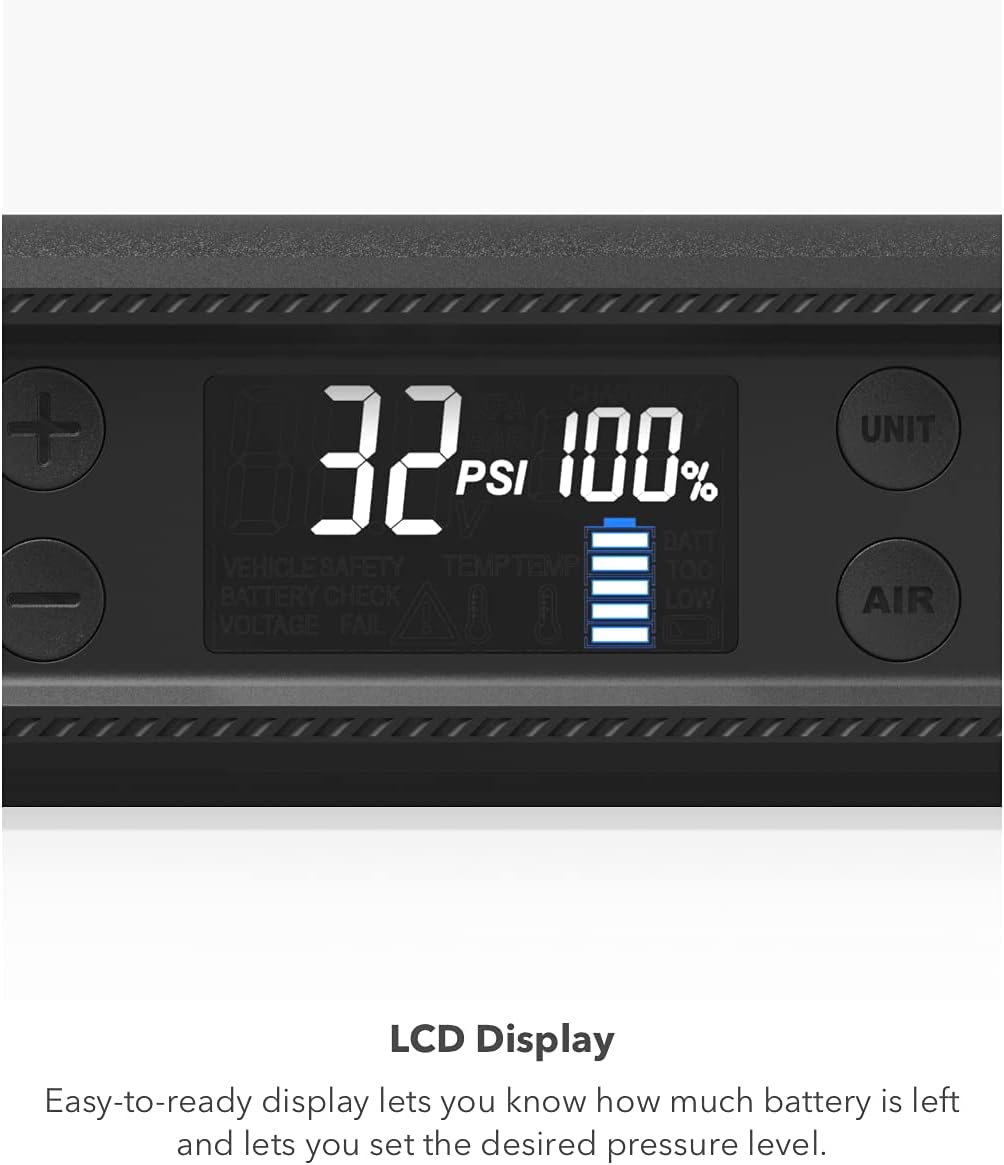
Figure 2: The easy-to-read LCD display indicates battery percentage and pressure levels.
A full charge typically takes several hours. It is recommended to fully charge the device every 3 months to maintain optimal battery health.
Operating Instructions
Using the Jump Starter
The Powerstation Go Rugged can jump-start cars, trucks, and other 12V vehicles. Ensure the Powerstation is sufficiently charged before attempting a jump-start.
- Connect the jumper cables to the Powerstation Go Rugged. The blue connector is designed to fit only one way to prevent incorrect polarity.
- Connect the red clamp to the positive (+) terminal of the vehicle's battery.
- Connect the black clamp to a metal, unpainted part of the vehicle's chassis or the negative (-) terminal of the battery.
- Once connected, the LCD screen will indicate "Ready" if the connection is correct and safe.
- Start your vehicle.
- Once the vehicle starts, immediately disconnect the jumper cables from the Powerstation and then from the vehicle battery.

Figure 3: The compact jumper cables connect securely to the Powerstation for safe vehicle jump-starting.
Using the Air Compressor
The integrated air compressor can inflate tires, air mattresses, and balls. It features an adjustable air nozzle and digital pressure control.
- Attach the appropriate air compressor nozzle to the air hose.
- Connect the air hose to the Powerstation Go Rugged.
- Connect the nozzle to the item you wish to inflate.
- Use the LCD screen to set the desired air pressure (PSI).
- Press the "AIR" button to start inflation. The compressor will automatically stop once the set pressure is reached.
- Disconnect the air hose and nozzle.

Figure 4: The air compressor hose connects to the side of the unit for convenient inflation.
Using as a Power Bank (USB-A & AC Outlet)
The Powerstation Go Rugged features two USB-A ports and a 65W AC outlet for charging various electronic devices.
- USB-A Ports: Plug your USB-compatible devices (smartphones, tablets, etc.) into the two USB-A output ports. You can charge two devices simultaneously.
- AC Outlet: For devices requiring an AC power source (e.g., laptops), plug the device's power adapter into the 65W AC outlet on the Powerstation.

Figure 5: The two USB-A ports allow for simultaneous charging of multiple devices.
Using the LED Floodlight
The built-in LED floodlight provides illumination in low-light conditions and emergency situations.
- Press the dedicated light button to cycle through different light modes: white, red, and flashing red (emergency signal).

Figure 6: The powerful LED floodlight is useful for various situations, including roadside emergencies.
Maintenance
- Keep the Powerstation Go Rugged clean and free from dust and debris. Use a soft, dry cloth for cleaning.
- Store the device in a cool, dry place when not in use. Avoid extreme temperatures.
- Recharge the unit every 3 months to prevent deep discharge and prolong battery life.
- Inspect jumper cables and air hose for any signs of wear or damage before each use.
Troubleshooting
| Problem | Possible Cause | Solution |
|---|---|---|
| Device not charging | Charging cable or adapter issue; unit not properly connected. | Ensure all connections are secure. Try a different outlet. Verify the AC adapter is functioning. |
| Vehicle not jump-starting | Low Powerstation battery; incorrect cable connection; vehicle battery completely dead. | Fully charge the Powerstation. Recheck cable connections (positive to positive, negative to chassis/negative). If battery is severely discharged, it may require professional assistance. |
| Air compressor not inflating | Hose not connected; incorrect pressure setting; compressor overheated. | Ensure air hose is securely attached. Check PSI setting on LCD. Allow compressor to cool down if it has been running continuously. |
| LCD display not working | Device is off; internal issue. | Press the power button to turn on the device. If problem persists, contact customer support. |
Specifications
- Model Number: 401107034
- Battery Capacity: 55.5 mWh (Lithium Ion)
- USB-A Output: 2 ports
- AC Outlet: 65W
- Air Compressor: Universal adjustable nozzle, LCD pressure control
- Weight: Approximately 3.78 pounds
- Dimensions: Approximately 10.28 x 5.2 x 4.02 inches
- Special Features: Air Compressor, Charge Multiple Devices, Portable Car Jump Starter with Jumper Cables, LED Floodlight
Warranty and Support
For warranty information or product support, please visit the official mophie website or contact their customer service. Keep your purchase receipt as proof of purchase.
Mophie Support: www.mophie.com/support
Related documents401107034


Ask a question about this manual
Ask about setup, troubleshooting, compatibility, parts, safety, or missing instructions. Manuals+ will review the question and use this page’s manual context to help answer it.