
Remax RB-S11
Remax RB-S11 Wireless Bluetooth Sports Earphones User Manual
Model: RB-S11 | Brand: Remax
Introduction
Thank you for choosing the Remax RB-S11 Wireless Bluetooth Sports Earphones. These earphones are designed to provide a high-fidelity audio experience with the convenience of wireless connectivity, making them ideal for sports and active lifestyles. Featuring a water and sweat-resistant design and a magnetic clasp for easy storage, the RB-S11 offers comfort and durability.
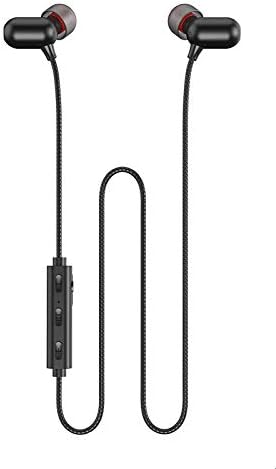
Figure 1: Remax RB-S11 Wireless Bluetooth Sports Earphones, showing the full product with earbuds and in-line controls.
Setup
Charging the Earphones
Before first use, fully charge your RB-S11 earphones. A full charge takes approximately 2 hours.
- Locate the charging port on the in-line control unit.
- Connect the provided USB charging cable to the charging port.
- Connect the other end of the USB cable to a compatible USB power source (e.g., computer USB port, wall adapter).
- The indicator light will show charging status (refer to LED indicator section for details). Once fully charged, disconnect the cable.
Bluetooth Pairing
Pair your earphones with your Bluetooth-enabled device (smartphone, tablet, etc.) to begin listening.
- Ensure the earphones are charged and turned off.
- Press and hold the Multi-function Button (usually the center button on the in-line control) until the LED indicator flashes red and blue alternately, indicating pairing mode.
- On your device, enable Bluetooth and search for available devices.
- Select "RB-S11" from the list of found devices.
- Once paired, the LED indicator on the earphones will flash blue slowly, and you will hear a confirmation tone.
The earphones will automatically attempt to reconnect to the last paired device when turned on.
Operating Instructions
Controls Overview

Figure 2: Close-up of the in-line control unit on the Remax RB-S11 earphones, showing the volume up, volume down, and multi-function buttons.
| Button/Action | Function |
|---|---|
| Multi-function Button (Center) |
|
| Volume Up Button (+) |
|
| Volume Down Button (-) |
|
Wearing the Earphones
Insert the earbuds gently into your ears. The RB-S11 features a magnetic design, allowing the earbuds to clasp together when not in use, preventing tangles and making them easy to carry around your neck.
Maintenance
Proper care will extend the life of your Remax RB-S11 earphones.
- Cleaning: Use a soft, dry cloth to wipe the earphones. Do not use harsh chemicals or abrasive materials.
- Water Resistance: The earphones are water and sweat resistant, suitable for workouts. However, they are not designed for submersion. Avoid exposing them to excessive water or high humidity.
- Storage: When not in use, store the earphones in a cool, dry place, away from direct sunlight and extreme temperatures. The magnetic earbuds help keep them tangle-free.
- Charging: Only use the provided charging cable or a certified equivalent. Do not overcharge the battery.
Troubleshooting
| Problem | Possible Cause | Solution |
|---|---|---|
| Earphones won't turn on. | Low battery. | Charge the earphones for at least 2 hours. |
| Cannot pair with device. | Earphones not in pairing mode; Bluetooth off on device; too far from device. | Ensure earphones are in pairing mode (flashing red/blue). Turn on Bluetooth on your device. Move earphones closer to the device (within 10 meters). Try unpairing and re-pairing. |
| No sound or poor sound quality. | Volume too low; earphones not properly connected; interference. | Increase volume on both earphones and device. Reconnect earphones. Move away from other wireless devices. |
| Intermittent connection. | Out of range; interference; low battery. | Stay within 10 meters of your device. Avoid strong electromagnetic fields. Charge the earphones. |
Specifications

Figure 3: Visual representation of Remax RB-S11 key specifications and features, including Bluetooth version, sound quality, ergonomic design, and battery life.
| Feature | Detail |
|---|---|
| Brand | Remax |
| Model | RB-S11 |
| Bluetooth Version | 5.0 |
| Wireless Distance | 10 meters |
| Impedance | 16 Ohm |
| Charging Time | 2 hours |
| Playback Time | 4 - 6 hours |
| Standby Time | 200 hours |
| Water Resistance | Water and Sweat Resistant |
| Design Feature | Magnetic Earbuds |
| Form Factor | In Ear |
| Connectivity Technology | Wireless |
| Included Components | Ear Cushions |
| Material | Plastic |
| Color | Black |
Warranty and Support
Specific warranty information for the Remax RB-S11 earphones is not detailed in this manual. Please refer to the product packaging or the official Remax website for warranty terms and conditions.
For technical support or further assistance, please contact Remax customer service through their official channels.
Ask a question about this manual
Ask about setup, troubleshooting, compatibility, parts, safety, or missing instructions. Manuals+ will review the question and use this page’s manual context to help answer it.