
1. Introduction
Thank you for choosing the iMaihom 100W LED Security Light. This manual provides essential information for the safe installation, operation, and maintenance of your new floodlight. Please read these instructions thoroughly before installation and retain them for future reference.
2. Safety Information
- Electrical Hazard: Installation requires working with electrical wiring. If you are not qualified, consult a licensed electrician.
- Power Disconnection: Always disconnect power at the circuit breaker before installing, servicing, or removing the fixture.
- Grounding: Ensure the fixture is properly grounded to avoid electrical shock.
- Voltage: This fixture is designed for 120V AC power supply. Do not connect to any other voltage.
- Mounting: Mount the fixture securely to a sturdy surface.
- Heat: The LED light heads can become warm during operation. Avoid touching them directly.
- Eye Protection: Do not stare directly into the LED light source when illuminated.
3. Product Features
- 100W 9000LM Super Bright: Emits a powerful cold white light (6000K) to illuminate large outdoor areas.
- Dusk to Dawn Photocell: Built-in sensitive photocell automatically turns the light on at nightfall and off at daybreak.
- 3 Adjustable Heads: Three independently adjustable light heads provide a wide lighting angle of up to 270°, allowing for customized coverage.
- Full Metal Design & IP65 Waterproof: Constructed from durable aluminum with a fin-shaped design for efficient heat dissipation. IP65 rating ensures resistance to dust and water, suitable for various weather conditions.

Image: The iMaihom 100W LED Security Light provides superior brightness compared to lower wattage alternatives, effectively illuminating a wide outdoor area.

Image: The light's photocell sensor enables automatic operation, turning off during the day and on at night.
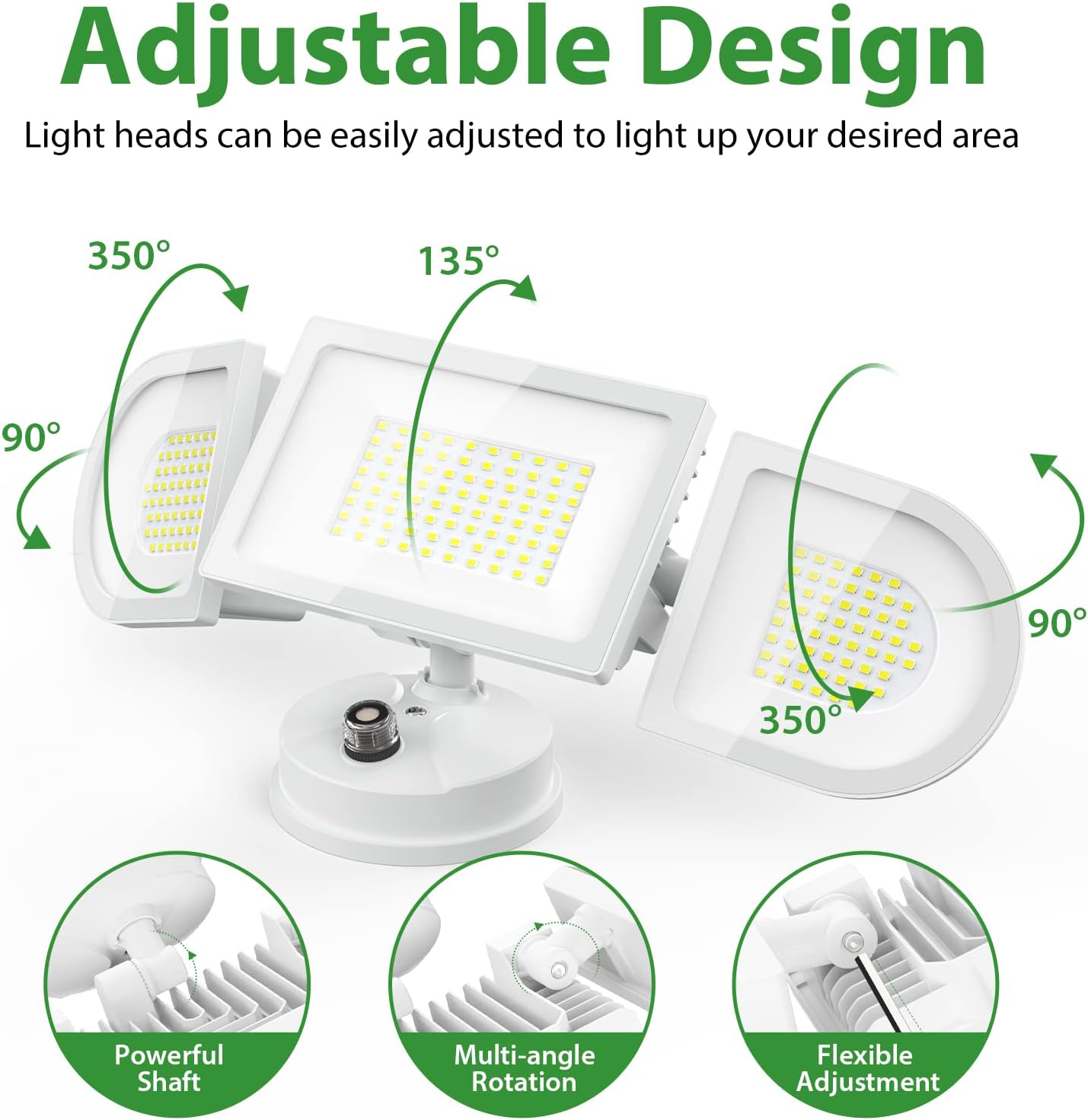
Image: The adjustable heads allow for precise light direction, covering a wide area with flexible rotation and tilt.

Image: The IP65 waterproof rating ensures the light's durability and performance in various outdoor weather conditions.
Product Overview Video
Video: This video provides an overview of the iMaihom 100W Dusk to Dawn Security Light, highlighting its key features and benefits for outdoor lighting.
4. Package Contents
Verify that all components are present before beginning installation:
- 1 x iMaihom 100W LED Security Light
- 1 x Mounting Plate
- 1 x Gasket
- 1 x Black Photocell Cap
- 1 x EVA Washer (for photocell)
- 1 x Mounting Hardware Kit (screws, wire nuts)
- 1 x User Manual
5. Setup and Installation
Important: Ensure power is turned OFF at the circuit breaker before starting installation.
5.1 Mounting Options
The fixture can be mounted on a wall or under an eave.
5.2 Installation Steps
- Prepare Wiring: Pull the electrical wires from the junction box through the center hole of the mounting plate.
- Secure Mounting Plate: Attach the mounting plate to the junction box using the provided screws. Ensure it is firmly secured.
- Connect Wires: Connect the fixture's wires to your household wiring using the wire nuts:
- Black (Live Wire) to Black (Live Wire)
- White (Neutral Wire) to White (Neutral Wire)
- Green/Yellow (Ground Wire) to Green/Bare Copper (Ground Wire)
- Attach Fixture: Align the fixture with the mounting plate and secure it with the central screw. Ensure the gasket is properly seated to maintain weather resistance.
- Adjust Light Heads: Loosen the screws on the light heads to adjust their angle and direction as desired. Tighten the screws once adjusted.
- Restore Power: Turn on the power at the circuit breaker.

Image: Simplified diagram illustrating the wiring and mounting process for easy installation.

Image: Product dimensions for planning installation space.
6. Operating Instructions
Your iMaihom LED Security Light offers two operating modes controlled by the photocell sensor:
6.1 Dusk to Dawn Mode (Default)
In this mode, the light automatically turns on when ambient light levels drop (at dusk/night) and turns off when ambient light levels increase (at dawn/day). No manual intervention is required.
- Ensure the transparent cap is installed on the photocell.
6.2 Switch Control Mode
To operate the light manually using a wall switch, you need to cover the photocell sensor.
- Replace the transparent cap on the photocell with the provided black cap. This blocks external light from reaching the sensor, allowing the light to be controlled by an external wall switch.

Image: Illustration of the photocell and how to switch between Dusk to Dawn and Switch Control modes using the transparent or black cap.
7. Maintenance
- Cleaning: Periodically clean the light fixture with a soft, damp cloth. Do not use abrasive cleaners or solvents.
- Inspection: Regularly inspect the fixture for any damage to the wiring, housing, or light heads. If damage is found, disconnect power and have it repaired by a qualified professional.
- LEDs: The LED light source is integrated and not user-replaceable.
8. Troubleshooting
| Problem | Possible Cause | Solution |
|---|---|---|
| Light does not turn on at night. | 1. Power is off. 2. Photocell is covered or obstructed. 3. Photocell is faulty. | 1. Check circuit breaker and wall switch. 2. Ensure photocell has clear access to ambient light. Remove any obstructions. 3. Contact customer support if photocell is suspected to be faulty. |
| Light stays on during the day. | 1. Photocell is not receiving enough light. 2. Photocell is faulty. | 1. Ensure photocell is not in a shaded area or covered by debris. Relocate if necessary. 2. Contact customer support if photocell is suspected to be faulty. |
| Light flickers on and off. | 1. Photocell is receiving reflected light or insufficient light. 2. Loose wiring connection. | 1. Ensure no reflective surfaces are near the photocell. Replace the transparent cap with the higher black cap to reduce excess external light. If flickering persists, add the EVA washer to further filter light. 2. Disconnect power and check all wiring connections. |
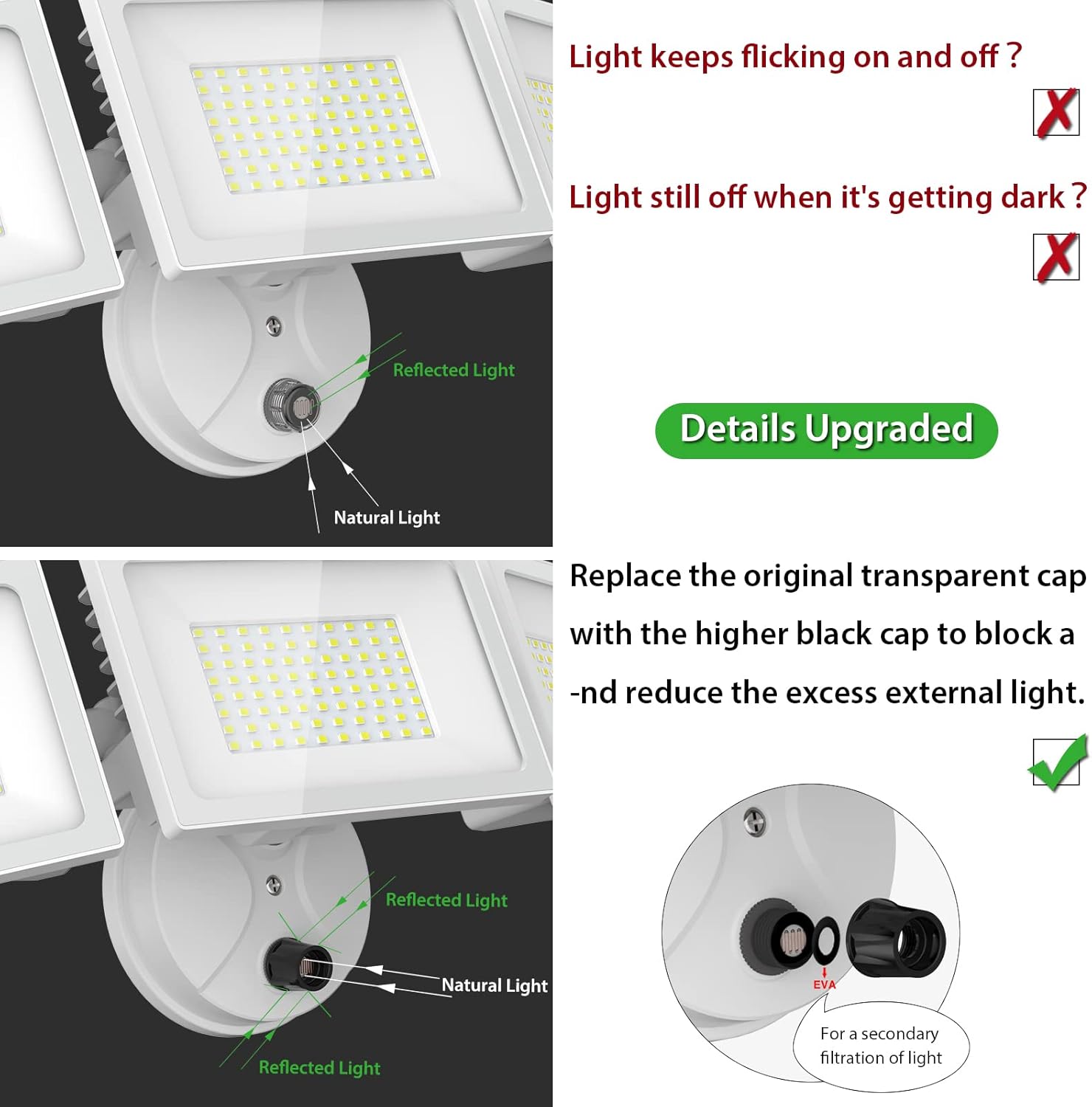
Image: Visual guide for troubleshooting photocell sensitivity issues by adjusting the cap and adding an EVA washer.
9. Specifications
| Specification | Detail |
|---|---|
| Brand | iMaihom |
| Model Number | BDD100D-3 |
| Wattage | 100 Watts |
| Brightness | 9000 Lumens |
| Color Temperature | 6000 Kelvin (Daylight White) |
| Material | Aluminum, Metal |
| Water Resistance Level | IP65 Waterproof |
| Power Source | Corded Electric |
| Voltage | 120 Volts (AC) |
| Installation Type | Wall Mount |
| Product Dimensions | 18"L x 7"W x 4"H |
| Item Weight | 4.07 pounds |
| Special Feature | Dusk till Dawn, Photocell |
10. Warranty and Support
iMaihom products are designed for quality and reliability. For warranty information or technical support, please refer to the product packaging or contact iMaihom customer service directly through their official website or the retailer where the product was purchased. Please have your model number (BDD100D-3) and purchase date available when contacting support.
