
1. Introduction
The DANOPLUS KIB-006 is a 4-channel K-type thermocouple thermometer data logger designed for precise temperature measurement and recording. This device allows for simultaneous monitoring of up to four temperature points, storing data directly onto an SD card for easy retrieval and analysis without requiring specialized software. It features a large LCD with backlight for clear readings, programmable high/low limit alarms, and various measurement functions suitable for a wide range of industrial, laboratory, and environmental applications.

Image: The DANOPLUS KIB-006 thermometer with four K-type thermocouple probes connected, showing its digital display and an 8GB SD card.
2. Package Contents
Please check the package contents upon receipt to ensure all items are present and undamaged:
- 1 x DANOPLUS KIB-006 4-Channel K-Type Thermometer SD Logger
- 2 x K-Type Thermocouple Probes
- 1 x 8GB SD Card
- 4 x AA Batteries
- 1 x English Operation Manual (this document)
- Standard Factory Packaging

Image: The DANOPLUS KIB-006 thermometer, two K-type thermocouples, an 8GB SD card, and batteries, representing the included items.
3. Key Features
- 4-Channel Measurement: Simultaneously displays temperature readings from up to four K-type thermocouple probes.
- SD Card Data Logging: Records unlimited temperature data directly to an included 8GB SD card in TXT format, eliminating the need for software.
- Programmable High/Low Limit Alarm: Features an audible buzzer and LED indicator that activate when temperature thresholds are exceeded.
- Wide Measurement Range: Capable of measuring temperatures from -200 to 1370°C (-328 to 2498°F) for the main unit.
- Large LCD with Backlight: Provides clear temperature readings and operational status, with an adjustable backlight for low-light conditions.
- MAX/MIN/HOLD Function: Allows users to view maximum, minimum, and hold current measured values on the screen.
- Switchable Units: Easily switch between Celsius (°C) and Fahrenheit (°F).
- Differential Temperature (T1-T2): Calculates and displays the temperature difference between two selected channels.
- Auto Power Off: Conserves battery life by automatically shutting down after 20 minutes of inactivity.

Image: Visual representation of the thermometer's features, including its 4-channel capability, SD card data logging, wide measurement range, alarm, unit switching, and data hold.
4. Setup Guide
4.1. Battery Installation
- Locate the battery compartment cover on the back of the device.
- Slide the cover open.
- Insert 4 AA batteries, ensuring correct polarity (+/-).
- Close the battery compartment cover securely.
4.2. SD Card Insertion
- Locate the SD card slot on the side of the device.
- Gently insert the provided 8GB SD card into the slot until it clicks into place. Ensure the card is oriented correctly.
- To remove, press the SD card inward until it springs out.

Image: Demonstrates the insertion of an SD card into the data logger for data storage.
4.3. Thermocouple Connection
- Identify the four K-type thermocouple input ports on the top of the device, labeled CH1, CH2, CH3, and CH4.
- Connect the K-type thermocouple probes to the desired channels. Ensure the positive (+) and negative (-) terminals of the probe match the corresponding markings on the device's input ports.
- Gently push the probe connectors firmly into the ports until they are secure.
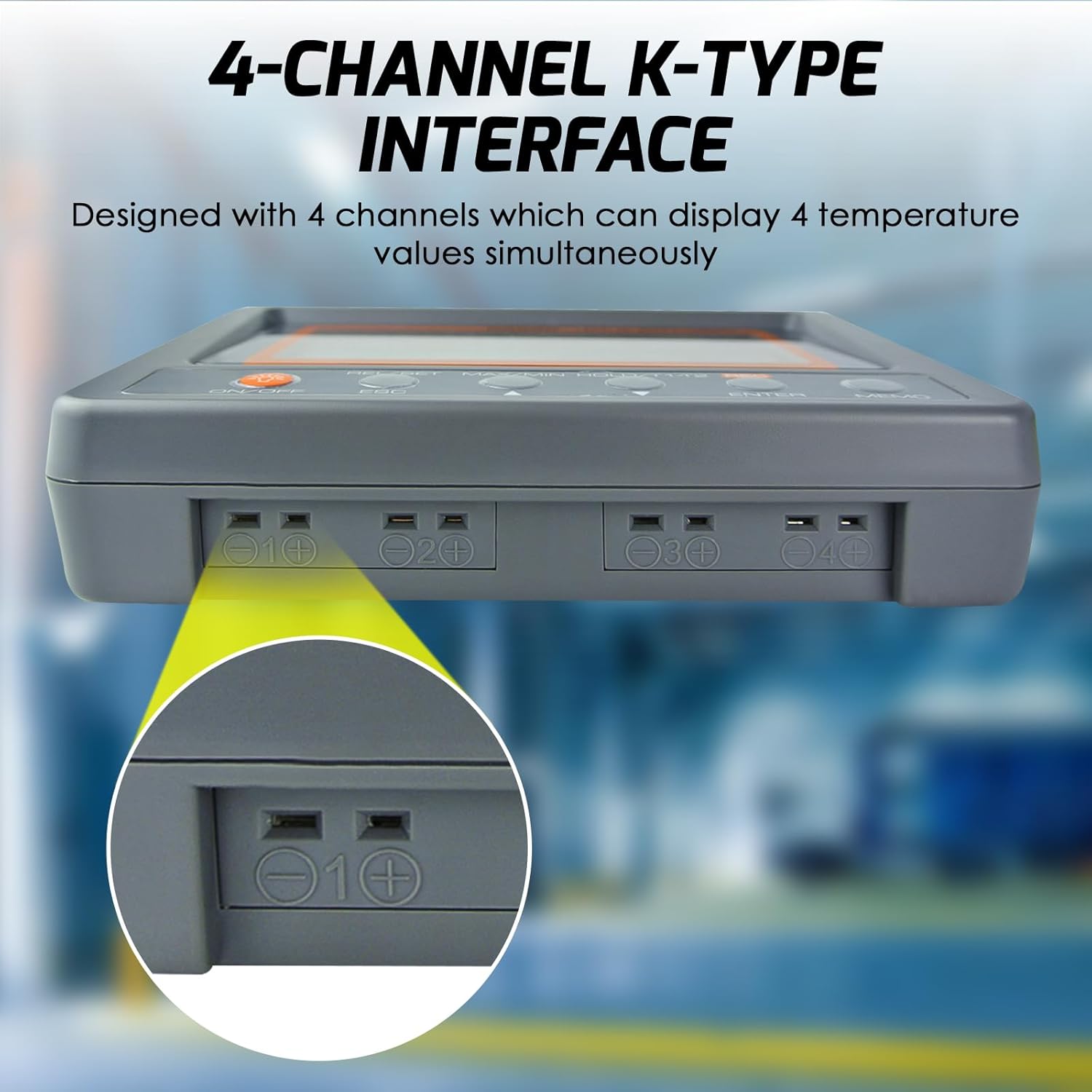
Image: Illustrates the connection of a K-type thermocouple probe into one of the four input channels on the device.
5. Operation
5.1. Power On/Off
- Press the ON/OFF button to power on the device.
- To power off, press and hold the ON/OFF button for approximately 3 seconds.
5.2. Backlight Control
- Press the ON/OFF button briefly to toggle the LCD backlight on or off.
5.3. Measuring Temperature
- Once powered on and thermocouples are connected, the device will immediately begin displaying real-time temperature readings for each active channel.
5.4. MAX/MIN/HOLD Function
This function allows you to view the maximum, minimum, and current held values during a measurement session.
- Press the MAX/MIN/HOLD button once to display the maximum (MAX) temperature recorded.
- Press the MAX/MIN/HOLD button again to display the minimum (MIN) temperature recorded.
- Press the MAX/MIN/HOLD button a third time to hold the current readings (HOLD).
- Press the MAX/MIN/HOLD button a fourth time to return to real-time measurement mode.

Video: Demonstration of the MAX/MIN/HOLD function on the DANOPLUS KIB-006 thermometer.
5.5. Data Logging to SD Card
The device records temperature data to the SD card in a simple TXT file format, which can be opened with any text editor or spreadsheet software.
- To start recording, press the REC button. The 'REC' indicator will appear on the screen.
- To stop recording, press the REC button again. The 'REC' indicator will disappear.
- The sampling rate for data logging can be programmed (refer to advanced settings in the full manual for details).
5.6. Alarm Function (High/Low Limit)
The thermometer features programmable high and low temperature alarms.
- When a measured temperature exceeds the set high limit or falls below the set low limit, the device will activate an audible buzzer and an LED indicator.
- Refer to the full manual for instructions on how to set specific high and low alarm thresholds.

Image: The thermometer indicating an active alarm with visual and auditory cues.
5.7. Unit Switching (°C/°F)
- Press the °C/°F button (often combined with another function button, refer to button labels) to toggle between Celsius and Fahrenheit temperature units.
5.8. Differential Temperature (T1-T2)
- Press the T1-T2 button to display the temperature difference between channel 1 and channel 2.
6. Applications
The DANOPLUS KIB-006 is suitable for a variety of temperature monitoring tasks, including but not limited to:
- HVAC Systems: Monitoring air conditioning and heating system performance.
- Industrial Processes: Temperature control in manufacturing, machinery, and equipment.
- Laboratory Use: Research, experiments, and quality control requiring precise temperature data.
- Food Service: Monitoring temperatures in ovens, refrigerators, and freezers.
- Aquariums: Maintaining stable water temperatures for aquatic life.
- Refrigeration Equipment: Performance testing and maintenance of cooling units.

Image: Examples of diverse environments where the thermometer can be effectively utilized.
7. Specifications
| Parameter | Value |
|---|---|
| Thermometer Main Unit Temp. Range | -200 to 1370°C (-328 to 2498°F) |
| Resolution | 0.1°C, 0.1°F |
| Accuracy (under 18-28°C ambient temp.) | ±(0.3%rdg + 1°C) |
| K Bead Type Thermocouple Temp. Range | -50 to 200°C (-58 to 392°F) |
| Sampling Rate | Programmable from 1 second up |
| LCD Size (HxW) | 47 x 104 mm (1.85 x 4.1 inches) |
| Operating Temperature | 0 to 50°C |
| Operating RH% | Humidity <80% |
| Storage Temperature | -20 to 50°C |
| Storage RH% | Humidity <90% |
| Dimension (L x W x T) | 152 x 100 x 39 mm |
| Weight | 300g (0.66 pounds) |
| Power Supply | 4 x AA Batteries (included) or 9V adaptor (not included) |
| Connectivity Technology | SD Card |
| Display Type | LCD |
| Outer Material | Plastic |
| Model Number | KIB-006 |
| UPC | 619317589858 |

Image: Detailed specifications and physical dimensions of the thermometer.
8. Maintenance
- Cleaning: Wipe the device clean with a soft, dry cloth. Do not use abrasive cleaners or solvents.
- Battery Replacement: Replace all 4 AA batteries when the low battery indicator appears on the display to ensure accurate readings and proper operation.
- Storage: When not in use for extended periods, remove the batteries and store the device in a cool, dry place away from direct sunlight and extreme temperatures.
- Thermocouple Care: Handle thermocouple probes carefully. Avoid bending or kinking the wires excessively, as this can affect accuracy. Replace damaged probes.
9. Troubleshooting
| Problem | Possible Cause | Solution |
|---|---|---|
| Device does not power on | Dead or incorrectly installed batteries | Check battery polarity; replace with new AA batteries. |
| No temperature reading / "----" on display | Thermocouple not connected or faulty | Ensure thermocouple is securely connected to the correct channel. Test with another probe if available. |
| Inaccurate readings | Damaged thermocouple; incorrect probe type; environmental interference | Inspect probes for damage. Ensure K-type probes are used. Avoid strong electromagnetic fields. |
| Data not saving to SD card | SD card full or faulty; card not inserted correctly; recording not initiated | Check SD card capacity. Reinsert SD card. Ensure 'REC' indicator is active. Try a different SD card. |
| Alarm not functioning | Alarm limits not set; alarm function disabled | Verify alarm settings and ensure they are enabled. |
10. Warranty & Support
The DANOPLUS KIB-006 comes with a standard manufacturer's warranty. For specific warranty details, please refer to the documentation included with your purchase or contact DANOPLUS customer support.
For technical assistance, troubleshooting beyond this manual, or to inquire about replacement parts, please contact your retailer or the manufacturer directly. Contact information can typically be found on the product packaging or the official DANOPLUS website.
