1. Introduction
This manual provides essential information for the installation, operation, and maintenance of your Sigineer Power 3000W 24V DC to 120V AC Pure Sine Wave Inverter with 80A MPPT Solar Charge Controller. This device is designed for off-grid solar systems and supports parallel operation, offering a reliable power solution for various applications. Please read this manual thoroughly before installation and operation to ensure safe and efficient use.
2. Safety Information
Always adhere to the following safety precautions to prevent injury or damage to the inverter and connected equipment:
- Ensure all wiring is performed by qualified personnel and complies with local electrical codes.
- Do not expose the inverter to rain, snow, spray, or any liquids.
- Do not disassemble the inverter. There are no user-serviceable parts inside.
- Ensure proper ventilation around the inverter to prevent overheating.
- Disconnect all power sources (solar, battery, AC input) before performing any maintenance or wiring.
- Wear appropriate personal protective equipment, including insulated gloves and eye protection.
- Verify correct polarity when connecting batteries and solar panels.
3. Product Overview
3.1 Key Features
- 3000W Pure Sine Wave Inverter: Provides clean and stable AC power suitable for sensitive electronics.
- 24V DC Input to 120V AC Output: Designed for 24-volt battery banks.
- 80A MPPT Solar Charge Controller: Maximizes power harvest from solar panels.
- Integrated AC Battery Charger: Allows charging from a utility grid or generator.
- Parallel Operation Capability: Expandable up to 6 units for increased power output (up to 18,000W).
- Programmable LCD Display: User-friendly interface for monitoring and setting parameters.
3.2 Components

Figure 3.1: Front view of the Sigineer Power Inverter, showing the LCD display and control buttons.
The inverter features a robust blue casing with a clear LCD display on the front panel. This display provides real-time operational data and allows access to various settings. Control buttons are located next to the display for navigation.

Figure 3.2: Rear view of the Sigineer Power Inverter, highlighting the various connection ports for AC input/output, DC input, and communication.
The rear panel houses all necessary connection terminals, including AC input, AC output, DC battery input, and PV (solar panel) input. Communication ports for parallel operation and remote monitoring are also present.
4. Setup and Installation
Proper installation is crucial for the safe and efficient operation of your inverter. Follow these general guidelines:
- Mounting: Choose a dry, well-ventilated area, away from direct sunlight and heat sources. Ensure sufficient clearance for airflow.
- Battery Connection: Connect the 24V battery bank to the DC input terminals, observing correct polarity. Use appropriately sized cables.
- Solar Panel Connection: Connect your solar array to the PV input terminals. Ensure the open-circuit voltage and current of your solar panels are within the inverter's specifications.
- AC Input Connection: If using a utility grid or generator as an AC input source, connect it to the designated AC input terminal.
- AC Output Connection: Connect your AC loads to the AC output terminals.
4.1 System Diagram
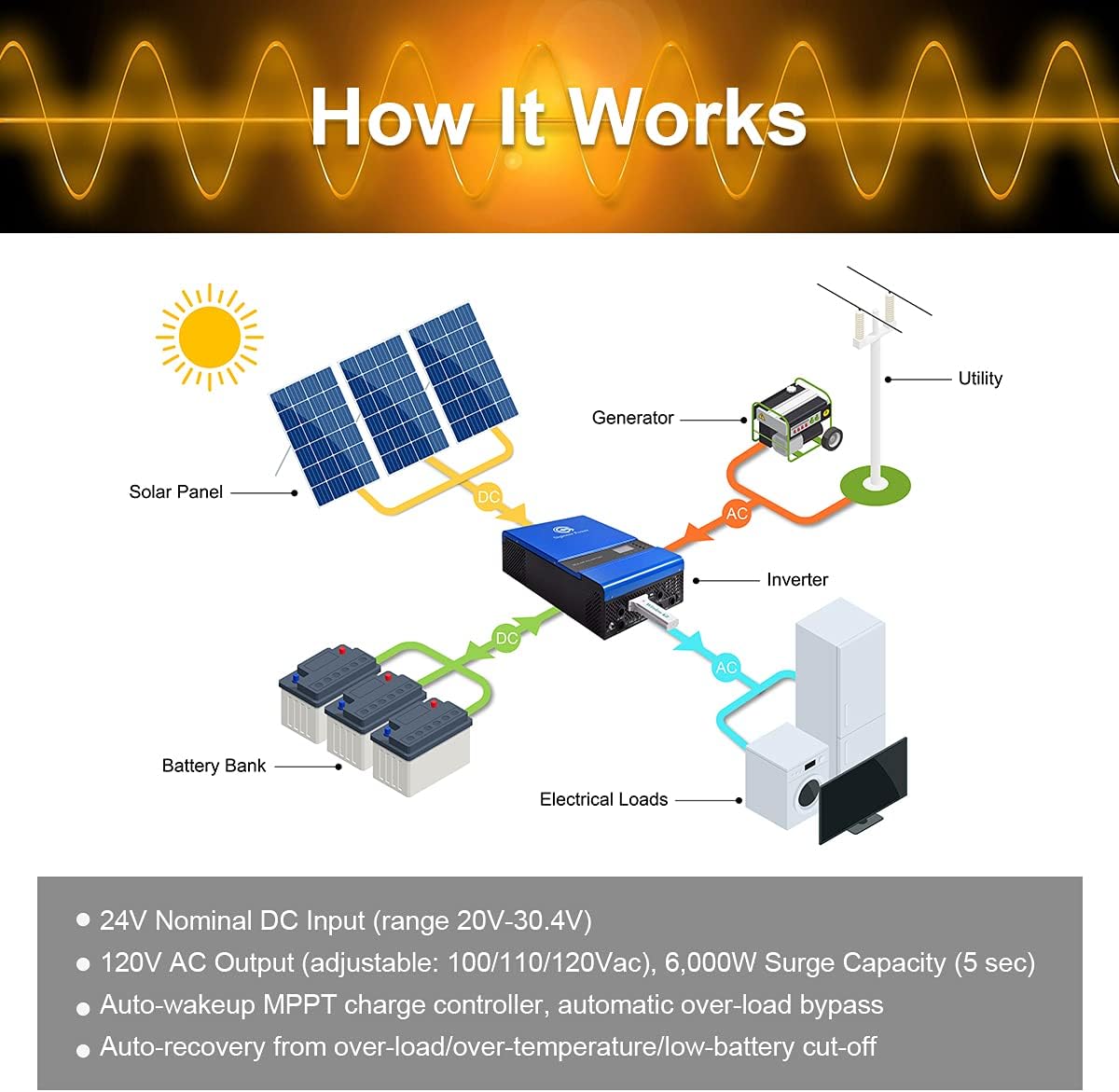
Figure 4.1: A typical system diagram illustrating the connections between solar panels, battery bank, inverter, utility/generator, and electrical loads.
This diagram illustrates the flow of power within a typical off-grid solar system utilizing the Sigineer Power inverter. DC power from solar panels charges the battery bank via the MPPT controller, and the inverter converts DC power from the batteries to AC power for your loads. An optional utility or generator input can also charge batteries and power loads.
4.2 Parallel Operation
The Sigineer Power inverter supports parallel operation, allowing multiple units to work together to increase total power output or create split-phase/three-phase systems. Up to 6 inverters can be connected in parallel for single-phase 120Vac, or for split-phase 120/240Vac and three-phase 120/208Vac configurations.

Figure 4.2: Example wiring diagram for two inverters configured for split-phase 120/240Vac parallel operation.

Figure 4.3: Example wiring diagram for three inverters configured for three-phase 120/208Vac parallel operation.
Detailed instructions for parallel wiring and communication connections are provided in the comprehensive user manual. Always ensure proper communication cable connections and power wiring to avoid damage to the units.
5. Operating Instructions
5.1 LCD Display and Control Buttons

Figure 5.1: The LCD display provides real-time data and allows for customization of settings, user-friendly interface, and convenient operation.
The LCD display provides critical information such as input/output voltage, battery status, load percentage, and operational mode. Use the navigation buttons (ESC, UP, DOWN, ENTER) to browse menus and adjust settings. Refer to the full user manual for a complete list of display codes and programmable parameters.
5.2 Work Modes
The inverter offers multiple work modes to optimize power usage based on your preferences and available power sources:

Figure 5.2: Overview of the inverter's multiple charge and power priority modes.
- Solar Priority: Solar power is the primary source for charging batteries and powering loads. Utility/generator is used only when solar is insufficient.
- Utility Priority: Utility/generator power is the primary source. Solar power is used to charge batteries when utility is available, or to power loads when utility is absent.
- Solar and Utility: Both solar and utility/generator power are used to charge batteries and power loads simultaneously.
- Solar Only: Only solar power is used for charging and powering loads.
5.3 Power Priority for Loads
- Solar Priority (SBU): Solar power is prioritized for loads, then battery power, then utility.
- Utility Priority (UTI): Utility power is prioritized for loads, then solar, then battery.
- Battery Priority (SBO): Battery power is prioritized for loads, then solar, then utility.
These modes allow users to customize the inverter's behavior to best suit their energy needs and available resources.
6. Maintenance
Regular maintenance ensures the longevity and optimal performance of your inverter:
- Cleaning: Periodically clean the exterior of the inverter with a dry cloth. Ensure ventilation openings are free from dust and debris.
- Connection Checks: Annually inspect all electrical connections (battery, solar, AC) for tightness and signs of corrosion. Tighten any loose connections.
- Battery Health: Monitor battery voltage and health regularly, especially in off-grid systems. Follow battery manufacturer's maintenance guidelines.
- Environmental Check: Ensure the installation environment remains dry, cool, and well-ventilated.
7. Troubleshooting
This section provides basic troubleshooting steps for common issues. For detailed error codes and advanced troubleshooting, refer to the complete user manual.
| Problem | Possible Cause | Solution |
|---|---|---|
| No AC Output | Low battery voltage, Overload, Inverter fault, AC breaker tripped. | Check battery voltage and charge level. Reduce load. Check for error codes on LCD. Reset AC breaker. |
| No Solar Charging | Solar panels not connected, Insufficient sunlight, PV input voltage too low/high, MPPT fault. | Verify PV connections. Ensure adequate sunlight. Check PV voltage. Consult manual for MPPT error codes. |
| Inverter Overheating | Poor ventilation, Excessive load, High ambient temperature. | Ensure clear airflow around the unit. Reduce load. Relocate inverter to a cooler environment if possible. |
If issues persist after attempting these solutions, please contact customer support or refer to the detailed troubleshooting section in the full user manual.
8. Specifications
| Attribute | Value |
|---|---|
| Model Name | M3024NC |
| Wattage | 3000 watts |
| Power Source | 24V DC |
| AC Output Voltage | 120V AC (adjustable: 100/110/120Vac) |
| Surge Capacity | 6000W (5 seconds) |
| MPPT Solar Charge Controller | 80A |
| AC Battery Charger | 60A |
| Auto-Transfer Switch | 10-20 ms |
| Product Dimensions | 17.9"L x 11.6"W x 5.1"H |
| Item Weight | 27.6 pounds |
| Manufacturer | Sigineer Power |
| Date First Available | September 24, 2021 |
9. Warranty and Support
For warranty information, technical support, or service inquiries, please refer to the official Sigineer Power website or contact their customer service directly. It is recommended to have your product model number (M3024NC) and purchase date available when contacting support.
Additional resources:


