
WYYHAA 414-840-815
WYYHAA Bluetooth Car Adapter User Manual
Model: 414-840-815

This image displays the WYYHAA Bluetooth Car Adapter, showcasing its main unit with a digital display, a detachable microphone, and the accompanying car charger with USB-A (QC3.0) and USB-C (PD 18W) ports.
Product Overview
The WYYHAA Bluetooth Car Adapter is designed to enhance your in-car audio and communication experience. It features a double microphone system for clear calls, Hi-Fi sound with deep bass, voice assistant support, and dual fast-charging ports. This device allows you to stream music, make hands-free calls, and charge your mobile devices conveniently while driving.
- Double Microphone Design: Built-in microphone plus a 3.5mm plug-in directional microphone for superior sound pickup and noise reduction, ensuring crystal clear calls.
- Lossless Hi-Fi Sound & Deep Bass Booster: Equipped with Bluetooth 5.0 and DSP technology for stable, distortion-free music streaming. Features a dedicated button for enhanced deep bass.
- Voice Service Integration: Supports Siri and Google Assistant for hands-free phone calls, text messages, and navigation, allowing you to stay focused on the road.
- Dual 18W Fast Charge: Includes one Quick Charge 3.0 port and one PD Type-C port, providing up to 4X faster charging for compatible devices.
- Multiple Safety Protections: Incorporates safeguards against battery shortage, over-current, overcharging, overheating, and high temperature to protect your devices and vehicle.
Initial Setup
Follow these steps to set up your WYYHAA Bluetooth Car Adapter for the first time:
- Install the FM Transmitter: Insert the main unit into the car cigarette lighter socket. It will automatically power on.
- Connect the External Microphone: Plug the 3.5mm directional microphone into the designated port on the main unit. This enhances call clarity.
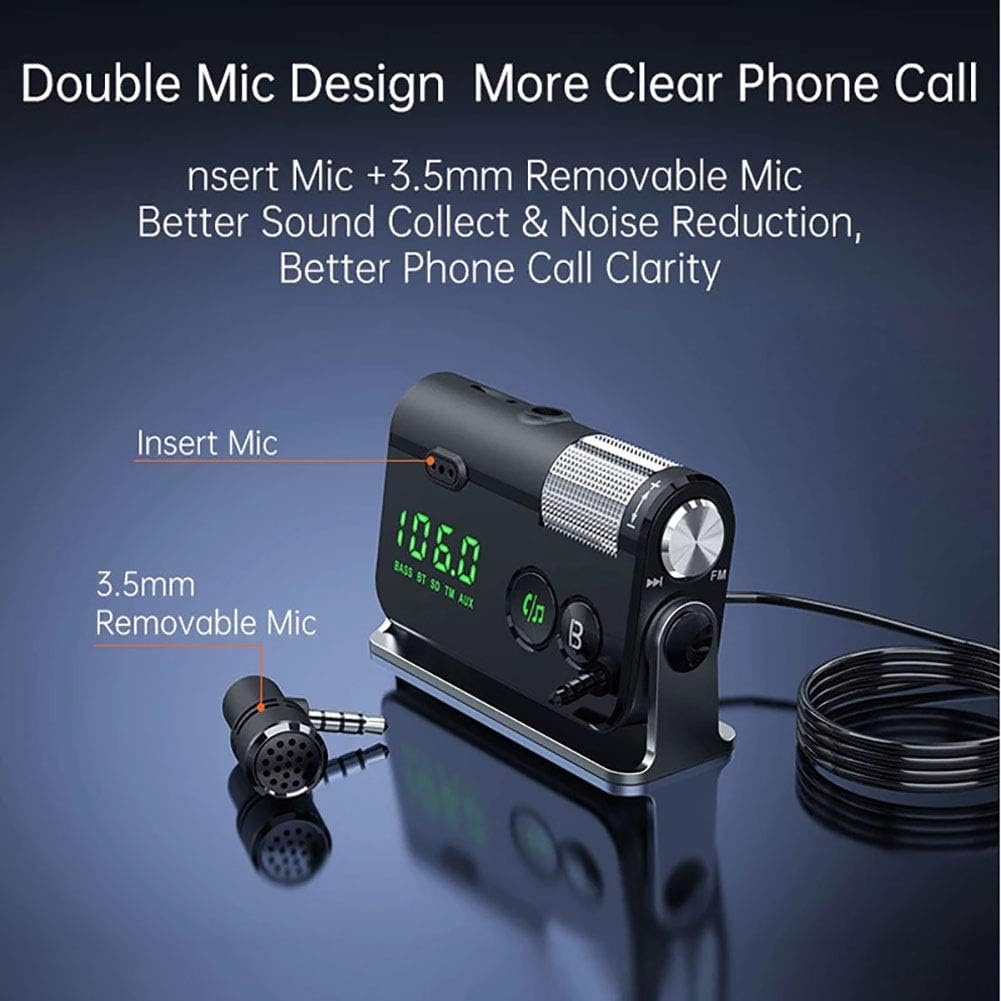
Illustration of the dual microphone setup, highlighting the external 3.5mm removable microphone for improved sound collection and noise reduction during calls.
- Tune Your Car FM Radio: Adjust your car's FM radio to an unused frequency band, ideally one without any active radio stations, for example, 89.0 MHz.
- Synchronize FM Frequencies: On the WYYHAA Bluetooth Car Adapter, adjust its FM band to match the frequency you selected on your car radio (e.g., 89.0 MHz). This ensures a clear audio connection.

Visual guide demonstrating how to set the FM frequency on the car adapter to match the car's radio for optimal connection.
- Pair via Bluetooth: On your mobile phone, enable Bluetooth and search for the device named "BC73" (or similar, refer to device display). Select it to pair. Once connected, the time on the adapter's display will synchronize with your phone.
This video demonstrates the installation process of the WYYHAA Bluetooth FM Transmitter, including connecting the microphone, setting the FM frequency, and pairing with a mobile phone via Bluetooth.
Operating Instructions
Music Streaming
After successful Bluetooth pairing, you can stream music from your mobile device to your car's audio system. The adapter supports various playback sources including Bluetooth, TF card (up to 64GB), and AUX output.
- Bluetooth Streaming: Play music directly from your phone via the Bluetooth connection.
- TF Card Playback: Insert a TF card loaded with music files into the designated slot.
- AUX Output: Connect an external audio device using a 3.5mm AUX cable.
- Deep Bass Boost: Press the 'B' button on the adapter to activate the deep bass mode for an enhanced audio experience.

The adapter facilitates high-fidelity music streaming from your phone to your car's speakers, providing a rich audio experience.

Demonstration of the deep bass effect, activated by a single button press, enhancing the low-frequency audio output.

This image illustrates the versatility of the adapter, supporting music playback via TF card (1-64GB) and a 3.5mm AUX input.
Hands-Free Calling
The dual microphone system and CVC noise suppression technology ensure clear hands-free calls. Simply click a button to answer, redial, dismiss, or end calls.

The image highlights the hands-free calling feature and the dedicated button for activating heavy bass, emphasizing ease of use.

This visual explains the 360-degree adjustable microphone, designed to capture your voice clearly for high-quality hands-free calls.
Voice Assistant Support
Utilize Siri or Google Assistant through the adapter to make calls, send texts, or get driving directions, keeping your hands on the wheel and eyes on the road.

The adapter's integration with Siri and Google Assistant is shown, allowing users to control their phone via voice commands for safer driving.

This image reinforces the voice assistant compatibility, illustrating how the device helps users stay focused on the road by using Siri or Google.
Charging Functionality
The car charger component provides fast charging for your devices with both Quick Charge 3.0 (USB-A) and Power Delivery (USB-C) ports.
- QC3.0 Port: Delivers up to 18W for compatible Android devices.
- PD Type-C Port: Delivers up to 18W for compatible iOS and Android devices.

A visual representation of the dual fast-charging capabilities, showing both PD (Power Delivery) and QC3.0 (Quick Charge) ports in action.

This image emphasizes the fast charging feature, highlighting the QC3.0 and Type-C PD 18W ports for rapid device charging.
Care and Maintenance
To ensure the longevity and optimal performance of your WYYHAA Bluetooth Car Adapter, please observe the following guidelines:
- Cleaning: Use a soft, dry cloth to clean the device. Avoid using abrasive cleaners or solvents.
- Temperature: Do not expose the device to extreme temperatures, either very high or very low.
- Moisture: Keep the device dry. Avoid contact with water or other liquids.
- Storage: When not in use for extended periods, store the device in a cool, dry place away from direct sunlight.
- Safety Information: Ensure proper handling of the device to prevent overheating and overcharging.
Troubleshooting Guide
If you encounter issues with your WYYHAA Bluetooth Car Adapter, refer to the common problems and solutions below:
Low Volume or Unclear Call Voice
If the volume is too low or others cannot hear your voice clearly during calls:
- Adjust the volume of both your mobile phone and the FM transmitter to their maximum settings.
- Then, adjust the volume of your car's speakers to the desired level.
Bluetooth Connection Instability or Failure to Pair
If you experience issues with Bluetooth pairing or an unstable connection:
- Ensure no other Bluetooth devices (e.g., Bluetooth headsets, speakers) are interfering with your phone's Bluetooth signal. Temporarily disable other Bluetooth devices and try again.
Noise or Static in Music
FM signals can be susceptible to environmental interference, which may cause noise or static:
- Reduce the volume of your car speaker to approximately 1/3 of its maximum. Prioritize increasing the volume on the FM transmitter or your smart device.
- Signal interference: Change your car radio to an unused, blank FM frequency. Then, adjust the FM transmitter to the exact same frequency.
- If noise persists, consider using the AUX jack input for a direct wired connection, which is less prone to interference.
Technical Specifications
| Feature | Detail |
|---|---|
| Model Number | 414-840-815 |
| Connectivity Technology | Bluetooth 5.0, Auxiliary, TF Card |
| Charging Ports | 1x Quick Charge 3.0 (18W), 1x PD Type-C (18W) |
| Microphone | Dual Microphone (Built-in + 3.5mm plug-in directional) with CVC Noise Suppression |
| Audio Features | Hi-Fi Stereo Music, Deep Bass Booster (DSP Technology) |
| Voice Assistant Support | Siri, Google Assistant |
| Power Source | Battery Powered (via car cigarette lighter) |
| Item Weight | 4.6 ounces (0.13 Kilograms) |
| Package Dimensions | 5.04 x 4.13 x 1.65 inches |
Warranty and Support
WYYHAA products are designed for reliability and performance. For any questions, technical assistance, or warranty inquiries, please contact WYYHAA customer support.
You can find more information and support resources by visiting the official WYYHAA Store on Amazon: WYYHAA Store.
Ask a question about this manual
Ask about setup, troubleshooting, compatibility, parts, safety, or missing instructions. Manuals+ will review the question and use this page’s manual context to help answer it.