
Introduction
This manual provides essential information for the safe and efficient operation of your Sovelor DR48E Professional Mobile Dehumidifier. Please read it thoroughly before use and retain it for future reference.
The DR48E is an automatic dehumidifier designed to quickly dry or maintain a constant humidity level in various environments. It features a robust metallic body, easy maneuverability, and simple operation, making it suitable for construction sites, workshops, cellars, stores, offices, libraries, and archive rooms.
Safety Instructions
To ensure safe operation, always adhere to the following precautions:
- Read all instructions before operating the appliance.
- Ensure the power supply matches the specifications on the rating label.
- Do not operate the unit with a damaged power cord or plug.
- Keep the unit upright during transport and operation.
- Do not block air inlets or outlets.
- This appliance contains R290 refrigerant. Handle with care and ensure proper ventilation.
- Do not attempt to repair or modify the unit yourself. Contact qualified service personnel.
- Keep children and pets away from the unit during operation.
- Disconnect from power before cleaning or maintenance.
Product Overview
The Sovelor DR48E is an automatic dehumidifier designed for professional use. It operates by drawing in ambient air, filtering it, condensing the moisture, and then releasing dry air back into the treated area.
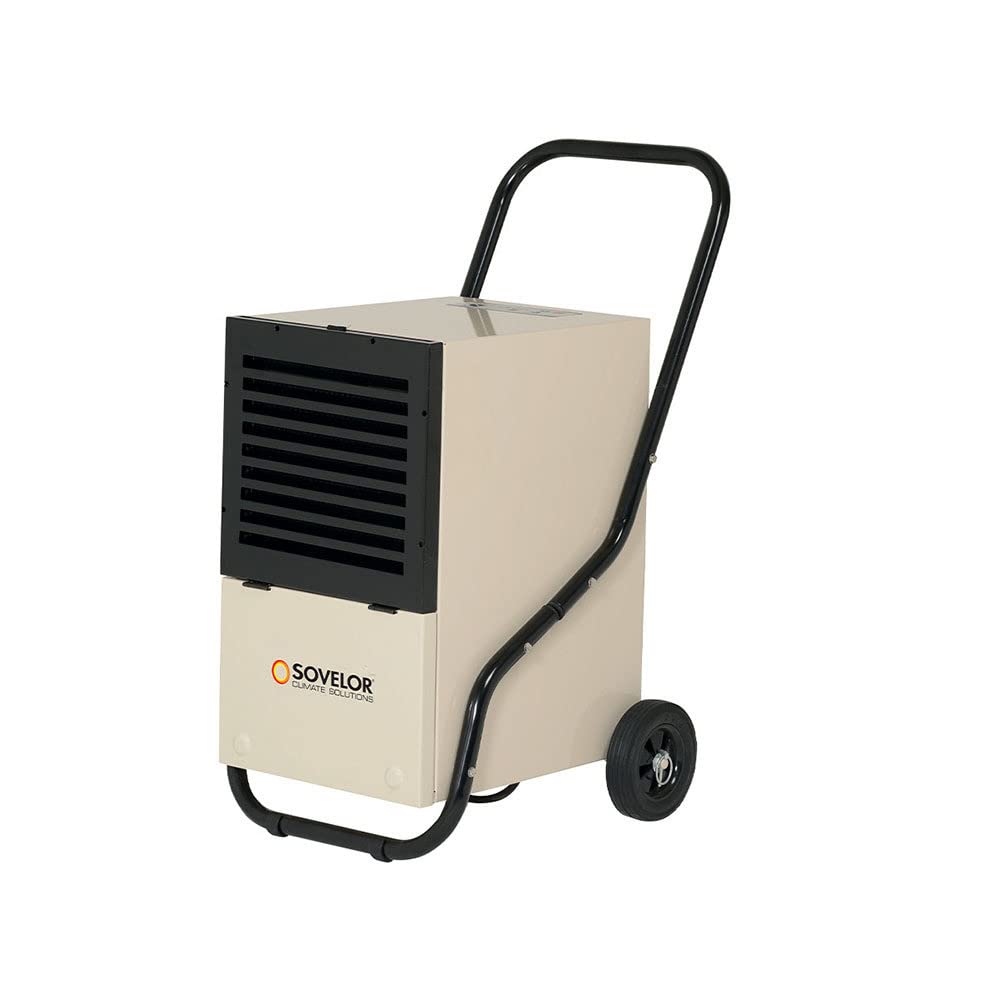
Image: Sovelor DR48E Professional Mobile Dehumidifier, front view.
Setup
Unpacking
Carefully remove the dehumidifier from its packaging. Inspect the unit for any signs of damage. Retain packaging for future storage or transport.
Placement
Place the dehumidifier on a stable, level surface. Ensure there is adequate space (at least 20 cm) around the air inlet and outlet for proper airflow. Avoid placing near heat sources or in direct sunlight.
Power Connection
Connect the power cord to a grounded electrical outlet (230 V, 50 Hz).
Drainage Setup
The DR48E offers two drainage options:
Water Tank Drainage
The unit is equipped with a 5.7-liter water tank. When the tank is full, the unit will automatically shut off, and an indicator light will illuminate. Carefully remove the tank, empty the water, and reinsert it securely.
Continuous Drainage
For continuous operation without manual emptying, attach a drainage hose (provided) to the continuous drainage outlet. Ensure the hose is sloped downwards to allow gravity drainage into a suitable receptacle or drain.

Image: Rear view of the dehumidifier showing the water collection tank and the continuous drainage hose connection.
Operating Instructions
Control Panel
The control panel features an integrated hygrostat that manages the unit's operation.
- Power Button: Turns the unit ON or OFF.
- Humidity Setting Dial/Buttons: Adjusts the desired humidity level. The unit will operate until this level is reached, then cycle ON/OFF to maintain it.
- Full Tank Indicator: Illuminates when the water tank is full.
- Defrost Indicator: Illuminates when the unit is in defrost mode.
Starting Operation
- Ensure the unit is properly set up and connected to power.
- Press the Power Button to turn on the dehumidifier.
- Set the desired humidity level using the control panel. A lower percentage indicates drier air.
- The unit will begin to operate, drawing in air and collecting moisture.
Stopping Operation
Press the Power Button to turn off the dehumidifier.
Maintenance
Regular maintenance ensures optimal performance and extends the lifespan of your dehumidifier. Always disconnect the unit from the power supply before performing any maintenance.
Cleaning the Air Filter
The air filter should be cleaned regularly (e.g., every two weeks, depending on usage and air quality).
- Turn off the unit and unplug it.
- Locate and remove the air filter (refer to the diagram in the full manual if available).
- Clean the filter with a vacuum cleaner or wash it gently with warm, soapy water.
- Rinse thoroughly and allow the filter to dry completely before reinserting it.
Emptying the Water Tank
When the full tank indicator illuminates, the tank needs to be emptied.
- Turn off the unit and unplug it.
- Carefully pull out the water tank.
- Empty the collected water.
- Reinsert the empty tank firmly into its position. Ensure it is correctly seated to allow the unit to resume operation.
Cleaning the Exterior
Wipe the exterior of the unit with a soft, damp cloth. Do not use harsh chemicals or abrasive cleaners.
Storage
If storing the unit for an extended period, ensure the water tank is empty and the unit is clean and dry. Store in an upright position in a cool, dry place.
Troubleshooting
Before contacting customer support, please refer to the following troubleshooting guide:
| Problem | Possible Cause | Solution |
|---|---|---|
| Unit does not turn on. | No power supply. Power cord not properly connected. Water tank is full or not correctly inserted. | Check power outlet. Ensure power cord is securely plugged in. Empty water tank and reinsert it correctly. |
| No dehumidification. | Air filter is clogged. Room temperature is too low (below 5°C). Humidity setting is too high. | Clean the air filter. Operate the unit within the recommended temperature range (5°C - 35°C). Lower the desired humidity setting. |
| Unit is noisy. | Unit is not on a level surface. Air filter is clogged. | Place the unit on a flat, stable surface. Clean the air filter. |
| Water leaks from the unit. | Water tank not properly inserted. Continuous drainage hose is blocked or improperly connected. | Ensure water tank is securely in place. Check the drainage hose for kinks or blockages and ensure a proper downward slope. |
Technical Specifications
The following table details the technical specifications of the Sovelor DR48E dehumidifier.

Image: Table of technical specifications for the Sovelor DR48E dehumidifier.
| Characteristic | Value |
|---|---|
| Electrical Power | 810 W |
| Dehumidification Capacity (at 30°C/80% RH) | 45.6 L/day |
| Airflow | 350 m³/h |
| Power Supply | 230 V / 50 Hz |
| Operating Temperature Range | 5°C - 35°C |
| Operating Humidity Range | 20% - 90% RH |
| Refrigerant | R290 |
| Tank Capacity | 5.7 Liters |
| Dimensions (L x W x H) | 580 x 422 x 820 mm |
| Empty Weight | 30.5 kg |
| Indicative Treated Volume (Drying at 15°C/20°C/25°C) | 70 m³/95 m³/160 m³ |
| Indicative Treated Volume (Maintenance at 15°C/20°C/25°C) | 150 m³/220 m³/340 m³ |
Warranty and Support
This product comes with a 1-year warranty from the date of purchase. Please retain your proof of purchase for warranty claims.
For technical assistance, spare parts, or warranty service, please contact your authorized Sovelor dealer or visit the official Sovelor website for contact information. Do not attempt to repair the unit yourself.
Note: Information on spare parts availability is not provided.